
 rynald0cst0ltziam
The structurally-verified context layer for AI coding agents. Cut 50-90% of your agent's token spend
The structurally-verified context layer for AI coding agents. Cut 50-90% of your agent's token spend.
·
Verified context for AI coding agents.
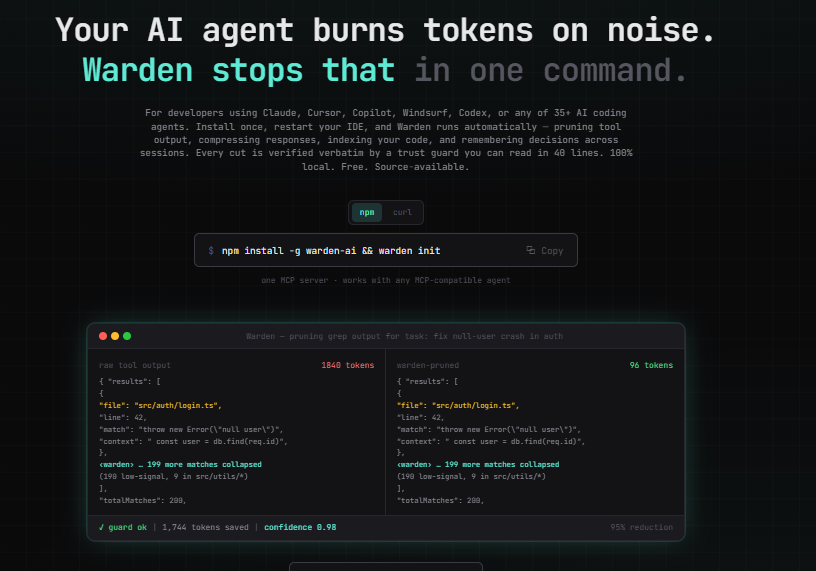
Your AI agent burns tokens on noise. Warden stops that.
Less context. More signal. Verified.
Every token your agent spends on noise is a token it didn't spend on your actual problem. Warden fixes this.
Warden is a local context layer for AI coding agents. It drops into Claude Code, Cursor, Codex, Windsurf, Cline, Gemini, and other MCP-compatible agents it detects on your machine. Install once. Warden removes unnecessary tool-output noise while preserving the lines the agent actually needs to see.
Large per-call reductions on noisy tool output. Zero config. Zero cloud. Zero lock-in.
Benchmarked. 25-task suite. 71.4% tool-output reduction. 100% guard pass rate. ~24ms avg overhead. Full methodology and caveats in benchmarks/HONEST-NUMBERS.md.
Why Warden?
Most context optimizers simply remove or summarize information. Warden verifies the reduction.
Raw agent output → Warden → Intelligent reduction → Verification → AgentThis is the differentiator: not just compression, but verified compression. You don't have to trust that Warden got it right — the trust guard proves it on every call.
Warden AI is a local context layer for AI coding agents. It is not a security firewall, authentication system, agent framework, or infrastructure management tool.
Install
All platforms (macOS, Linux, Windows, WSL):
npm install -g warden-ai && warden initmacOS / Linux / WSL (curl one-liner):
curl -fsSL https://raw.githubusercontent.com/rynald0cst0ltziam/Warden-AI/main/install.sh | bashWindows (PowerShell one-liner):
irm https://raw.githubusercontent.com/rynald0cst0ltziam/Warden-AI/main/install.ps1 | iexWindows users: do NOT use the curl command in CMD or PowerShell —
bashtriggers WSL on Windows. Use the PowerShell or npm command above.
~10 seconds · Node >= 22.5 · only configures agents you actually have · safe to re-run · reversible with warden uninit
warden init sets up only the agents detected on your machine:
| Step | What happens |
|---|---|
| Detect | Find which supported agents are installed (binaries, editor extensions, apps). Run warden detect to preview. |
| Register | Warden registered as an MCP server in each detected agent — only those. |
| Wrap | Your existing MCP servers are routed through the Warden proxy so their output is pruned automatically (guard-verified, removal-only). Opt out with --no-wrap. |
| Rules | Agent rules files written for detected agents (CLAUDE.md, AGENTS.md, .cursorrules, …). |
| Index | Code index built — call graph, imports, symbols, dead code. |
warden initnever rewrites your instruction files, only configures agents it detects (use--allto override), and can be fully undone withwarden uninit. Optional, explicit prose compression lives inwarden compress(dry-run by default).
Usage
Quick start
npm install -g warden-ai   # install (does NOT change any config on its own)
warden detect              # see which agents Warden found on your machine
warden init                # configure just those agents (safe, reversible)
# restart your agent — Warden now runs automatically
That's the whole setup. From here your agent's tool output is pruned automatically and you don't run any further commands.
warden init flags:
| Flag | Effect |
|---|---|
--all | Configure every known agent, even undetected ones |
--no-wrap | Don't route your existing MCP servers through the proxy |
--skip-index | Skip building the code index |
-c, --command <cmd> | Command used to invoke Warden (default warden) |
Undo everything Warden wrote (MCP entries, rules blocks, hooks, proxy wrapping):
warden uninitEveryday commands
warden detect        # which agents are installed (+ the evidence)
warden status        # tokens saved, live rules, recent memories
warden doctor        # health check with actionable fixes
warden hud           # live terminal HUD
warden dashboard     # web UI at http://localhost:7878
Boost — compress at the API level (the deepest cut)
The MCP proxy only sees MCP-server output. warden boost goes a layer deeper:
it sits between your agent and the model provider and compresses the whole
outgoing request — every tool_result in it, whether it came from a built-in
tool (Read/Grep/Bash) or an MCP server, plus accumulated history — behind the
trust guard (removal-only, verbatim-verified). The provider's response is
streamed back untouched.
Two ways to use it, both zero-config:
Wrap any agent (works for everything that honors provider env vars — Claude Code, Codex, Aider, …):
warden boost -- claude # or: warden boost -- codexThis launches the agent with the proxy's base URLs set in its environment, runs it, and tears everything down when the agent exits. No config files are touched.
Or run it bare and let it auto-configure your detected agent:
warden boost # proxy + auto-configures Claude Code, reverts on stopEither way, every request your agent sends has its bulky tool output pruned
before it reaches the provider — across all tool output (built-in and MCP) and
history, not just MCP. One warden boost serves both Anthropic and OpenAI:
each request is auto-routed to the right provider by shape.
Options: --port, --upstream <url> (force one provider), --min-block-chars,
--no-configure, --no-record, --debug.
Your API key passes straight through to the provider and is never logged or stored. Warden modifies only the request's tool output (removal-only, behind the trust guard); the response is forwarded byte-for-byte. Everything is local. If a bare
warden boostis ever killed abruptly,warden unboostrestores the agent's configuration (andwarden uninitdoes too).
Proxy one MCP server
warden init wraps your servers automatically, but you can also wrap one by
hand. Put Warden in front of any stdio MCP server in your agent's config:
{
  "mcpServers": {
    "github": {
      "command": "warden",
      "args": ["proxy", "--prune-responses", "npx", "-y", "@modelcontextprotocol/server-github"]
    }
  }
}
warden proxy <command> [args...] options:
| Flag | Default | Effect |
|---|---|---|
--prune-responses | off | Prune tool-call responses (removal-only, guard-verified) |
--no-lazy | lazy on | Disable the 3-meta-tool lazy catalog |
--no-compress-schema | on | Disable input-schema compression |
--no-compress-descriptions | on | Disable (lossy) description compression |
--level <lite|full|ultra> | full | Compression aggressiveness |
For a removal-only, nothing-rewritten profile (what warden init uses):
warden proxy --prune-responses --no-lazy --no-compress-schema --no-compress-descriptions <command> [args...]Gateway — front many servers at once
One Warden process in front of your whole MCP fleet. Write a servers.json:
{
  "mcpServers": {
    "github": { "command": "npx", "args": ["-y", "@modelcontextprotocol/server-github"] },
    "fs": { "command": "npx", "args": ["-y", "@modelcontextprotocol/server-filesystem", "/path"] }
  }
}
Register the gateway as a single MCP server in your agent:
{
  "mcpServers": {
    "warden-gateway": { "command": "warden", "args": ["gateway", "/absolute/path/servers.json"] }
  }
}
The agent sees one merged catalog with tools namespaced github__search,
fs__read_file, etc. Each call is routed to the right server and its response
is pruned behind the trust guard. Options mirror the proxy
(--no-prune, --compress-descriptions, --compress-schema, --level).
Expose all tools
Warden ships a focused 12-tool core surface. To expose all 32 tools, set
WARDEN_TOOLS=full on the Warden MCP server entry:
{
  "mcpServers": {
    "Warden": { "command": "warden", "args": ["serve"], "env": { "WARDEN_TOOLS": "full" } }
  }
}
Compress a doc (optional, lossy)
warden compress CLAUDE.md            # dry-run preview only (default)
warden compress notes.md --write     # actually write (backs up to notes.md.original)
Prose compression is lossy, so warden compress previews by default and
refuses agent rules files (CLAUDE.md, .cursorrules, …) unless you pass
--force. It keeps code, paths, commands, and identifiers verbatim.
Licensing / premium (future)
All features are enabled for everyone today. A future premium tier is scaffolded
behind WARDEN_ENFORCE_LICENSE=1; with enforcement off (the default) nothing is
gated. Safety features (trust guard, CCR, backups) are never gated.
Trust guard
The trust guard is the non-negotiable rule:
Every non-annotation line in the pruned output must appear verbatim in the raw output. If it doesn't, the raw is shipped instead.
This means Warden removes lines, never rewrites them.
Safety net — always on
| Mechanism | What it does |
|---|---|
| Trust guard | Every pruned line verified verbatim against raw. If altered, raw ships instead. |
| Eval gate | Rules earn confidence through real samples before going live. |
| CCR | Every cut reversible. Full original cached 7 days. warden_retrieve with --around and --lines. |
Privacy
No cloud. No API server. No telemetry. No analytics. No phone-home.
Your code, tool outputs, and pruning decisions stay in a local SQLite
file on your machine. It works on a plane.
Requirements
- Node.js >= 22.5 (uses built-in
node:sqlite) - Any MCP-compatible AI coding agent
Commands
| Command | What it does |
|---|---|
warden init | Detect installed agents, register + wrap their MCP servers, write rules, build index |
warden detect | Show which supported agents are installed (and the evidence) |
warden uninit | Reverse init — remove Warden's entries, rules, hooks, and proxy wrapping |
warden serve | Run MCP server over stdio |
warden proxy <cmd> | Front one upstream MCP server (compress/prune its output) |
warden gateway <config> | Front many MCP servers at once (merged, namespaced catalog; pruned responses) |
warden boost | API-level proxy: compress the outgoing request to the model provider (all tool output + history), guard-verified |
warden status | Rules, confidence, tokens saved, recent memories |
warden hud | Live terminal HUD |
warden dashboard | Web UI at http://localhost:7878 |
warden doctor | Health check |
warden benchmark | Run benchmarks |
warden ccr | CCR status |
warden memory list | List stored memories |
warden task-report | Per-task report |
Tool surface
Every MCP tool's schema sits in the agent's context for the whole session, so Warden exposes a focused core set of 12 tools by default (prune/retrieve, grep, file-read, run-tests, run-command, context-select, memory save/recall, record-outcome, status, handoff). The code-intelligence, memory-lifecycle, and extra reporting tools load on demand when the server runs with WARDEN_TOOLS=full (all 32). A context optimizer shouldn't start by spending your context on its own catalog.
Supported agents
Warden detects and configures the agents it finds installed. Run warden detect to see what's on your machine.
| Claude Code | Claude Desktop | Cursor | Windsurf | Codex CLI | Cline |
| Roo Code | Continue | VS Code Copilot | Zed | Amazon Q | Gemini CLI |
| Aider | Goose | opencode | OpenHands |
Each has a verified MCP-config location. Detection uses non-circular signals (a binary on PATH, an installed editor extension, or an app bundle) — never a config directory Warden itself writes, so it won't mistake its own leftovers for an installed agent. Missing one that you have? warden init --all configures every known agent regardless.
License
PolyForm Shield 1.0.0 — source-available, free for everyone including commercial use. See LICENSE.
Install · Website · GitHub · npm
Made with ⚡ by Rynaldo Stoltz
Pick your client and paste the snippet. Each one is the same server, written the way that client expects it.
- Run the command below in your terminal.
- Restart Claude Code, then check the connection with /mcp.
- Open your client's MCP config file, usually mcp.json.
- Merge this block into it.
- Restart the client to pick up the server.
- Run the command below in your terminal.
- Reload VS Code and check the MCP section of the Extensions view.
- Open ~/.codex/config.toml.
- Append this block.
- Restart Codex to pick up the server.
claude mcp add github -- warden proxy --prune-responses npx -y @modelcontextprotocol/server-github{
"mcpServers": {
"github": {
"args": [
"proxy",
"--prune-responses",
"npx",
"-y",
"@modelcontextprotocol/server-github"
],
"command": "warden"
}
}
}code --add-mcp '{"name":"github","args":["proxy","--prune-responses","npx","-y","@modelcontextprotocol/server-github"],"command":"warden"}'[mcp_servers.github]
command = "warden"
args = ["proxy", "--prune-responses", "npx", "-y", "@modelcontextprotocol/server-github"]Runs locally on your device. Your client starts the server itself, so nothing has to be hosted.
Install with your agent
Paste this prompt into your agent. It reads this page and does the setup for you.
Read https://aiagentslisting.com/mcp/warden-ai to learn what the "Warden Ai" MCP server does and how to install it. Add it to my coding agent's MCP configuration as documented on that page, then confirm the server connects and list the tools it exposes.Agents can also browse this directory over MCP at https://aiagentslisting.com/api/mcp
This server runs locally, so we can't read its tool list over the web yet.
We could not run this server: it ships no npx package for our sandbox and no public endpoint. The four checks that need a live server are left out, and the grade tops out at B until one exists.
What's missing
- Has a licenseThe repository declares a license.0/8
- Claimed by ownerThe maintainer proved ownership of this listing.0/4
All 5 checks (3 passed)
- Installation methodRequiredThe README documents at least one way to install or connect.15/15
- Has a READMERequiredThe repository ships documentation we could read.10/10
- Easy installA paste-ready client config (an mcpServers block) is documented.12/12
- Has a licenseThe repository declares a license.0/8
- Claimed by ownerThe maintainer proved ownership of this listing.0/4
- Verified liveNot checkableWe connected to the server and it answered a real MCP handshake.—
- Exposes toolsNot checkableThe server reports at least one tool, from its manifest or a live read.—
- Ships promptsNot checkableThe server exposes at least one prompt template.—
- Ships resourcesNot checkableThe server exposes at least one resource.—
Show this grade in your README

Paste this line near the top of your repository's README. The badge always renders the current score.
[](https://aiagentslisting.com/mcp/warden-ai)Alternatives to Warden Ai
View all in AI & ML Services
A local MCP server for agent literature work. Original-LaTeX section reads, BibTeX from arXiv metada

A visualization mcp & skills contains 25+ visual charts using @antvis. Using for chart generation

It's like v0, but in your Cursor / Claude Code / Windsurf: search 10,000+ React/Tailwind components,
No tagged releases on record.
Send this prompt to your agent to leave a review
Connect to the AI Agents Listing MCP server at https://aiagentslisting.com/api/mcp using the HTTP transport and complete the sign-in when it asks. Then call the submit_review tool for the listing "warden-ai" with a rating from 1 to 5 and a short note on what worked and what did not.No reviews yet
Be the first to share your experience with this tool.
Related MCP Servers
A local MCP server for agent literature work. Original-LaTeX section reads, BibTeX from arXiv metada
AI & ML Services
A visualization mcp & skills contains 25+ visual charts using @antvis. Using for chart generation
AI & ML Services
It's like v0, but in your Cursor / Claude Code / Windsurf: search 10,000+ React/Tailwind components,
AI & ML Services
Subscribe to our newsletter
One email a week. New agents, MCP servers and skills, and what is actually getting traction.