Agentic Workflows: 5 Patterns and When to Use Each
Agentic workflows let a model choose its next step at runtime. Five patterns from Anthropic and LangGraph, real GitHub and IBM examples, and when to skip them.
8 min read
How to add an MCP server to Claude Code with claude mcp add: hosted, local and OAuth servers, scopes, .mcp.json, status checks and fixes for common errors.
To add an MCP server to Claude Code, you run one command in your terminal and then check that the server connected. The choice that matters is made up front: Claude Code fixes a server's scope when you add it, so picking the wrong one means removing the entry and adding it again. This tutorial follows Anthropic's own documentation, read on 25 September 2026, and covers hosted servers, local servers and servers that need a sign-in.
To add an MCP server to Claude Code, run claude mcp add --transport http <name> <url> in your terminal for a hosted server, or claude mcp add <name> -- <command> for a local one, then run claude mcp list and look for a Connected status. Claude Code saves the entry to local scope by default.
Everything below uses the claude mcp CLI. Claude Code also takes servers through its desktop app, VS Code and the web, and those routes are covered near the end.
A hosted server runs at a URL, so you register the URL and pick the HTTP transport. The example below is the Claude Code documentation server, which has full-text search over the Claude Code docs and needs no account. Run it in your terminal, not inside a claude session:
claude mcp add --transport http claude-code-docs https://code.claude.com/docs/mcpThe parts of the command, from the quickstart:
claude mcp add registers a server.--transport http says the server is hosted at a URL and not run as a local process.claude-code-docs is a name you choose. Claude Code uses it to label the server's tools and in commands like claude mcp remove.Claude Code prints Added HTTP MCP server claude-code-docs ... to local config, plus a File modified: line naming the file it wrote. That confirms the entry was saved. It does not confirm the server responds.
The reference page calls HTTP the recommended option for remote servers. Its older cousin, SSE, is deprecated. If a service exposes only an SSE endpoint, the same --transport http command works: on Claude Code v2.1.265 or later, Claude Code tries HTTP first and switches to SSE when the server refuses it. On earlier versions, pass --transport sse.
Run claude mcp list from your shell. Each server appears with a status, and the status tells you what to do next.
| Status | Meaning | Next move |
|---|---|---|
✔ Connected | Ready to use | Start a session |
! Connected · tools fetch failed | Connected, but the tool list failed | claude mcp get <name> shows the error |
! Needs authentication | Reachable, needs a browser sign-in or a token | See Step 6 |
✘ Failed to connect | The server did not respond | See Common mistakes |
✘ Connection error | The attempt threw an error | Run the curl and command checks below |
⏸ Pending approval | A project-scoped server you have not approved | Run claude and approve it |
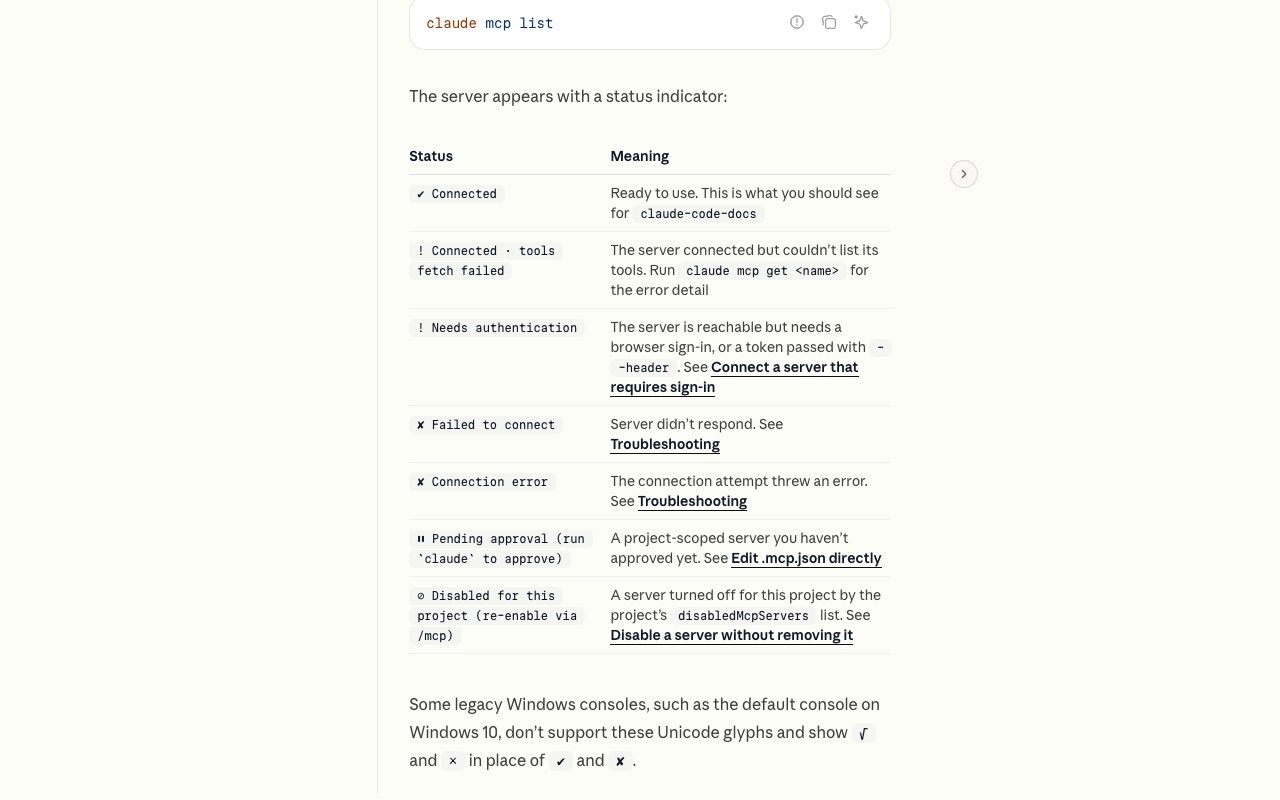
Inside a session, /mcp shows the same information and lets you reconnect or authenticate without leaving.
Start Claude Code and name the server in your prompt so the demonstration goes through it and not through another tool such as web fetch:
Use the claude-code-docs server to look up what MCP_TIMEOUT doesYou do not normally need to name a server. Claude picks relevant tools on its own. If Claude Code asks for permission the first time it calls the server, approve it. The tool call in the output carries the server name, which is how you tell an MCP answer from the model's built-in knowledge.
To remove the server afterwards, run claude mcp remove claude-code-docs. Each connected server puts its tool names and instructions into every session's context window, so removing servers you no longer use frees space.
Scope decides who sees the server and where the entry is stored. claude mcp add uses local unless you pass --scope.
| Scope | Stored in | Available to |
|---|---|---|
local (default) | ~/.claude.json, under this project's entry | Only you, only this project |
project | .mcp.json in the project root | Everyone who clones the project |
user | ~/.claude.json, under the top-level mcpServers key | Only you, all projects |
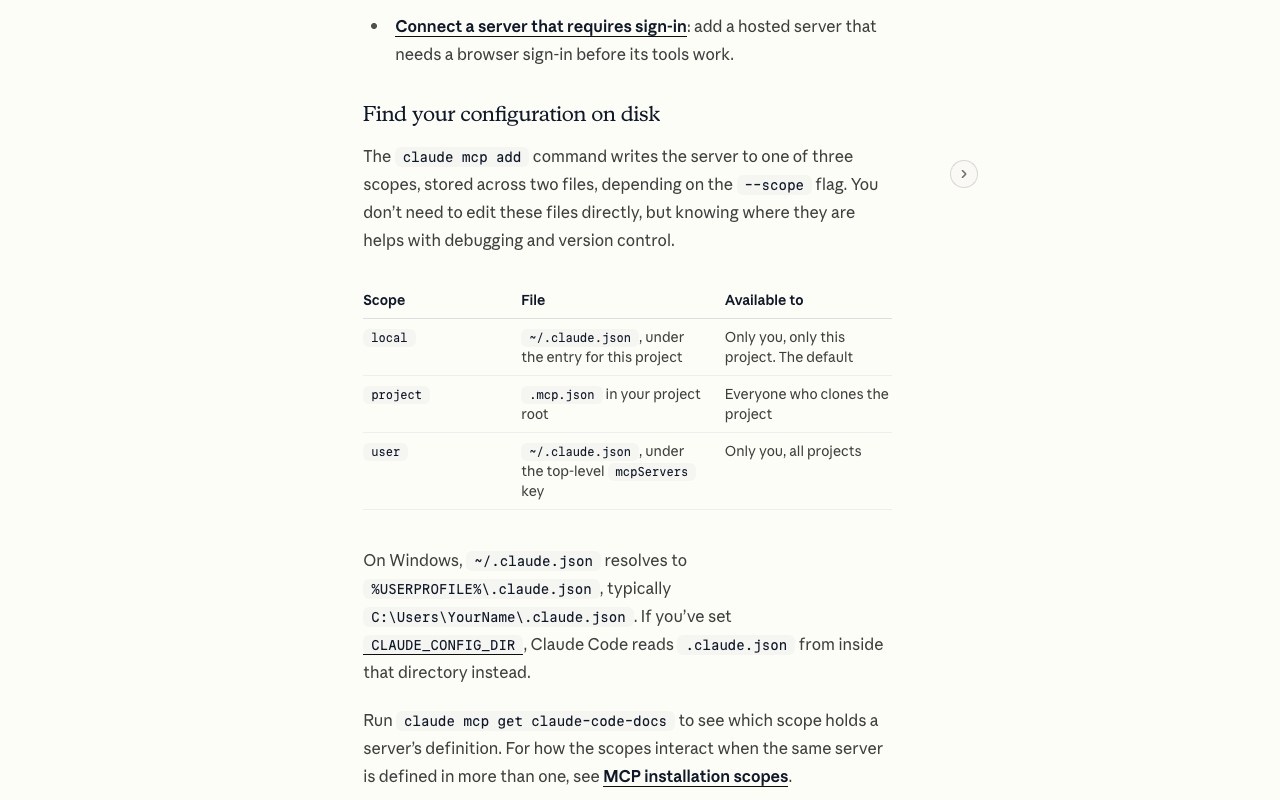
A scope is fixed when you add the server, so to change it, remove the entry and add it again:
claude mcp remove claude-code-docs --scope local
claude mcp add --scope user --transport http claude-code-docs https://code.claude.com/docs/mcp
Use --scope project instead to write to .mcp.json, then commit that file. Teammates who clone the repository see a prompt to approve the server before it connects.
When the same server is defined in more than one place, Claude Code connects once and uses the highest-precedence definition whole, without merging fields. The order in the MCP reference is local, project, user, plugin-provided servers, then claude.ai connectors. A server your organization provides through the managedMcpServers managed setting ranks above all of them.
A stdio server is a program Claude Code starts as a subprocess on your machine. Use one for tools that need local resources such as a browser, the filesystem or a database socket. The docs use the Playwright MCP server, which gives Claude a browser it can navigate and read:
claude mcp add playwright -- npx -y @playwright/mcp@latestThree things differ from the hosted example. There is no --transport flag, because stdio is the default. Everything after the -- separator is the command that starts the server. And -y tells npx to install the package without prompting.
The double dash matters. It separates Claude Code's own options (--transport, --env, --scope) from the server's command. Without it, Claude Code tries to parse the server's flags as its own. To pass environment variables, put --env before the server name and keep another option between --env and the name, because the CLI otherwise reads the name as another KEY=value pair:
claude mcp add --env AIRTABLE_API_KEY=YOUR_KEY --transport stdio airtable \
  -- npx -y airtable-mcp-server
The first claude mcp list after adding Playwright can show ✘ Failed to connect while npx downloads the package. Wait a moment and run it again. Then ask Claude to use it:
Use playwright to open https://example.com and tell me the page titleIf a server's setup instructions were written for Claude Desktop or Cursor and give no claude mcp add command, the reference page explains how to translate them. A URL becomes --transport http <url>. A launch command such as npx -y @example/mcp-server goes after --. A JSON block goes into claude mcp add-json, passing the object inside mcpServers, not the wrapper:
claude mcp add-json example '{"command":"npx","args":["-y","@example/mcp-server"]}'Hosted services such as Sentry, Linear and Notion run their MCP servers behind OAuth. Add the URL as usual:
claude mcp add --transport http sentry https://mcp.sentry.dev/mcpclaude mcp list now shows ! Needs authentication, which is expected. Start a session, open /mcp, select sentry, press Enter and choose Authenticate. Your browser opens the service's sign-in page. Approve the connection and the status changes to connected. If the browser does not open, copy the URL from the terminal.
Servers that take a static token instead of OAuth get it at add time with --header. The reference page's worked example connects the GitHub MCP server for code reviews:
claude mcp add --transport http github https://api.githubcopilot.com/mcp/ \
  --header "Authorization: Bearer YOUR_GITHUB_PAT"
Two OAuth flags are worth knowing. --callback-port 8080 fixes the callback port for servers that need a registered redirect URI, and --client-id with --client-secret supplies pre-configured credentials. WebSocket servers support neither OAuth nor --transport ws: configure them in .mcp.json or with claude mcp add-json, and authenticate with headers.
The project-scope file is the one most worth writing by hand, because it lives in the repository and doubles as configuration as code for your team. Create .mcp.json in the project root:
{
  "mcpServers": {
    "claude-code-docs": {
      "type": "http",
      "url": "https://code.claude.com/docs/mcp"
    },
    "playwright": {
      "type": "stdio",
      "command": "npx",
      "args": ["-y", "@playwright/mcp@latest"]
    }
  }
}
HTTP servers use url. Stdio servers use command and args. Do not leave type out of a url entry: Claude Code reads an entry without a type as stdio, skips the server and reports that it has a url but no type.
Keep secrets out of the committed file with environment variable expansion. ${VAR} expands to the variable and ${VAR:-default} falls back to a default. Expansion works in command, args, env, url and headers:
{
  "mcpServers": {
    "api-server": {
      "type": "http",
      "url": "${API_BASE_URL:-https://api.example.com}/mcp",
      "headers": {
        "Authorization": "Bearer ${API_KEY}"
      }
    }
  }
}
Claude Code reads .mcp.json at session start, so restart the session after editing. The first time it sees a project-scoped server it asks you to approve it, so that a cloned repository cannot launch processes on your machine without consent. If you rejected a server by mistake, run claude mcp reset-project-choices.
The CLI is not the only way in. The quickstart lists the alternatives:
claude mcp add-from-claude-desktop copies servers from Claude Desktop's claude_desktop_config.json, on macOS or WSL. Server names may only contain letters, numbers, hyphens and underscores, so a Desktop server named with a space cannot be imported..mcp.json committed to the repository.If you are choosing what to connect, aiagentslisting.com lists about 386 MCP servers alongside agents and skills, so you can compare options before you add one.
Local-scope servers belong to the project where you added them. Adding a server from one directory and starting Claude Code in another shows nothing. Re-add it from the right project or use --scope user. The other cause is a file in the wrong place: Claude Code reads only ~/.claude.json and <project>/.mcp.json, and ignores paths such as ~/.claude/mcp.json and %APPDATA%\Claude\mcp.json.
Start with claude mcp get <name>. As of v2.1.219, claude mcp list and claude mcp get show the HTTP status or error text on a Failed to connect entry, which often names a missing header or a rejected token. Connection error carries no detail on any version. For an HTTP server, test reachability:
curl -I https://mcp.sentry.dev/mcpA 404 or 405 means the server is up, since many MCP endpoints answer only POST. A 401 or 403 means you need to authenticate. No response means a wrong URL or a network problem. For a stdio server, run its command in your terminal. If it starts and waits for input, the server works and you likely left out the -- separator.
The default startup timeout is 30 seconds, and a stdio server's first run can be slow while npx downloads the package. Raise it in milliseconds:
MCP_TIMEOUT=60000 claudeOpen /mcp and select the server. An empty tool list usually means a missing environment variable such as an API key. Pass it with --env KEY=value or in the env field of the .mcp.json entry.
Claude Code warns when a tool's output passes 10,000 tokens and caps it at 25,000 by default. Raise the cap with MAX_MCP_OUTPUT_TOKENS, for example export MAX_MCP_OUTPUT_TOKENS=50000.
Every connected server adds its tool definitions to your context window, even when idle. Claude Academy's Claude Code 101 lesson recommends running /mcp to disable servers you are not using, and notes that a tool with a CLI equivalent, such as gh for GitHub, is more context-efficient because the CLI adds no persistent tool definitions. The lesson also states that when MCP tools exceed 10% of the context window, Claude Code switches to tool search and discovers tools on demand, though it warns this may be less reliable. A docs server such as Context7 is a good candidate to enable only when you need it.
claude mcp list and claude mcp get read .mcp.json approvals only from settings files outside the repository until you trust the workspace, so a cloned repo cannot approve its own servers.Failed to connect shows the HTTP status or error text, and a 404 names the URL's origin. Before it, the status was bare.cached status in /mcp.claude mcp list no longer connects to a server disabled for the project.claude mcp add --transport http <name> <url>. A local server uses claude mcp add <name> -- <command>.claude mcp add writes to local scope by default, and changing scope means removing the server and adding it again.claude mcp list is the check that counts. The Added message only means the entry was saved.! Needs authentication until you run /mcp and choose Authenticate, or pass a token with --header..mcp.json for team-wide servers, keep secrets in ${VAR} references, and restart the session after editing.Run claude mcp add --transport http <name> <url> for a hosted server, or claude mcp add <name> -- <command> [args] for a local one. Run it in your terminal and not inside a claude session, then confirm with claude mcp list that the status reads Connected.
Local and user scope entries live in ~/.claude.json, and project scope entries live in .mcp.json in the project root. Run claude mcp get <name> to see which scope holds a server's definition. Claude Code does not read other paths such as ~/.claude/mcp.json.
The server is reachable but requires credentials. For an OAuth service, start a session, open /mcp, select the server and choose Authenticate. For a service that takes a static token, remove the server and add it again with --header "Authorization: Bearer <token>".
Yes. Add it with --scope project, which writes .mcp.json in the project root, and commit the file. Teammates who clone the repository see a prompt to approve the server before it connects. Use ${VAR} references for any keys so secrets stay out of version control.
Run claude mcp remove <name>. If the same name exists at more than one scope, the command reports that it exists in multiple scopes, and you pass --scope to choose which copy to delete. Removing a remote server also deletes its stored OAuth tokens and client registration.
Browse hand-reviewed servers to connect next in the MCP servers directory.
One email a week. New agents, MCP servers and skills, and what is actually getting traction.
Agentic workflows let a model choose its next step at runtime. Five patterns from Anthropic and LangGraph, real GitHub and IBM examples, and when to skip them.
8 min read
A comparison of open source AI agents: LangChain, CrewAI, OpenHands, goose, AutoGPT, Dify and n8n, with real license terms and 2026 release dates.
7 min read
Voice AI agents handle spoken calls with an LLM instead of a script. How the STT-LLM-TTS pipeline works, who builds voice AI agents, and what's new.
6 min read