
 sureshkumarm8
Control a fleet of real iOS and Android devices from one screen — by hand, in plain English, or
Control a fleet of real iOS and Android devices from one screen — by hand, in plain English, or through AI agents over MCP. Save what you do as a Flow and replay it on every device, no code required. Runs locally on your machine, against your own devices.
·
Devicely
Tap once. Every iPhone, iPad and Android follows.
Control a fleet of real iOS and Android devices from one screen — by hand, in plain English, or through AI agents over MCP. Save what you do as a Flow and replay it on every device, no code required. Runs locally on your machine, against your own devices.
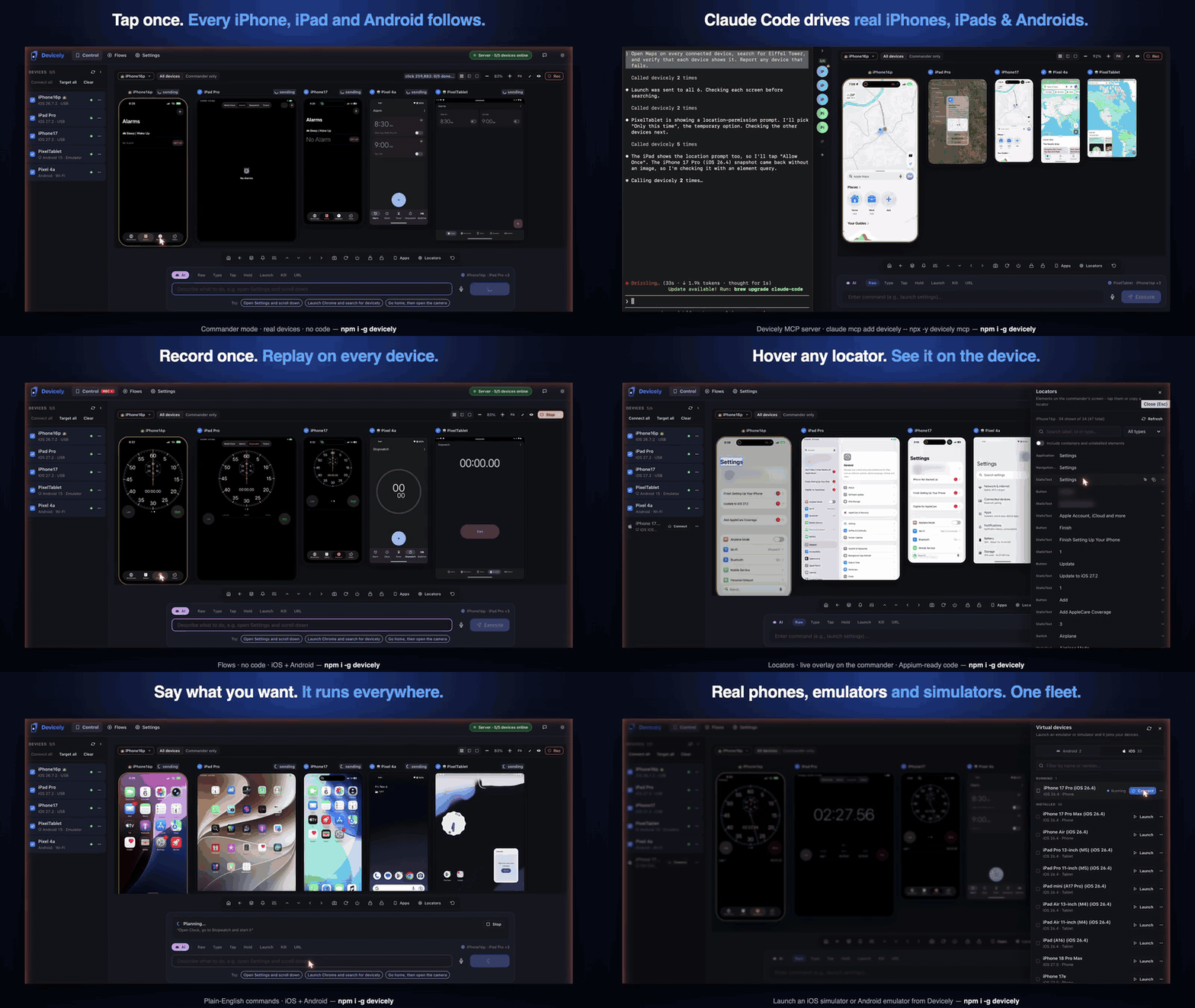
▶ All 11 Demos Gallery · Quick start · Features at a glance · First device · For QA teams · Flows · For AI agents · CLI · Supported platforms · Privacy
Features at a glance
| Capability | Demonstration | What it does |
|---|---|---|
| Commander Mode | ▶ Demo | Tap, swipe, or type on one leader device — every connected iPhone, iPad, and Android follows live. |
| AI Agents (MCP Server) | ▶ Demo | Drive physical and virtual mobile devices directly from Claude Code, Cursor, or VS Code over MCP. |
| Multi-Browser Sync | ▶ Demo | Navigate URLs simultaneously in Mobile Safari, Chrome, and default browsers across all resolutions. |
| No-Code Flows | ▶ Demo | Record interactions once, replay them across every device, and export directly to Appium code. |
| Live Locator Inspector | ▶ Demo | Hover live screen mirrors to copy accessibility IDs, resource IDs, and XPath selectors. |
| Fleet Settings & Dark Mode | ▶ Demo | Toggle appearance, settings, and preferences across your entire fleet in one click. |
| Plain English Voice / NLP | ▶ Demo | Issue natural language commands ("open settings", "launch camera") converted into real device actions. |
| Virtual Device Fleet | ▶ Demo | Boot and orchestrate iOS Simulators and Android Emulators side-by-side with real hardware. |
| Fleet App Management | ▶ Demo | Batch install, launch, switch, or kill apps across iOS and Android device pools. |
| Dynamic Leader Swap | ▶ Demo | Promote any follower device to be the commander on the fly without dropping the session. |
| Smart Locators | ▶ Demo | Dynamic-first resilient locator strategy with automatic coordinate fallback across form factors. |
[!TIP] View all 11 full-length animated demonstrations in the 🎬 Interactive Demos Gallery.
Quick start
macOS or Linux, Node.js 20.9+. Windows isn't supported yet.
npm install -g devicely
devicely doctor      # checks Node, adb, Xcode and iOS tools; prints the install command for anything missing
devicely start       # starts Devicely and opens the Command Center
Can't install globally? On a locked-down work machine (no admin rights, global installs blocked, or install scripts turned off), run Devicely with npx instead. Nothing is installed globally, and every command works the same way:
npx devicely@latest doctor
npx devicely@latest start
The first run downloads about 185 MB; later runs start from the npm cache. Teams can pin a version (npx [email protected] start) so everyone runs the same one. If your company routes npm through a private registry (Artifactory, Nexus, Verdaccio), ask IT to allow the devicely package; npx and npm install both use that registry.
The Command Center opens at devicely-ai.vercel.app and talks to the server on your machine. With no devices connected, it opens on Add your first device, which walks you through USB or Wi-Fi setup for Android, iPhone, or a simulator/emulator.
No phone handy? Boot an Android emulator or iOS simulator with the server:
devicely emulators list            # shows installed AVDs and simulators
devicely start --launch <name>     # starts Devicely and boots that virtual device
Requirements: Node.js 20.9+ on macOS or Linux. Android needs adb (platform-tools) on your PATH. iOS and iPadOS devices need a Mac with Xcode — see iOS setup.
Using an AI agent? devicely mcp install <client> sets up Claude Code, Cursor, VS Code and others — see For AI agents.
First device in minutes
devicely doctorshows ✓ / ! / ✗ per check, grouped by platform, with the command that fixes each ✗. It exits with code 1 when nothing usable is installed (--jsonfor scripts).devicely startprints the local server URL and opens the Command Center.- Follow "Add your first device" in the browser. Its checklist updates live as you plug in, tap Allow or Trust, and the device comes online.
| You have | Expect | What you need |
|---|---|---|
| Android phone or tablet | about 2 minutes | adb, Developer options and USB debugging on. Wi-Fi pairing needs Android 11+. Android guide |
| iPhone or iPad | about 15 minutes the first time | A Mac with Xcode, an Apple ID (a free one works), WebDriverAgent signed once in Xcode. iOS guide |
| No device | a few minutes once Xcode or Android Studio is installed | An iOS simulator (Xcode + WebDriverAgent, no signing) or an Android emulator (an AVD from Android Studio) |
Troubleshooting
| Problem | Fix |
|---|---|
Android shows waiting for permission (unauthorized) | Unlock the phone and tap Allow on the Allow USB debugging? prompt (tick Always allow). No prompt? Revoke USB debugging authorizations in Developer options and replug. More |
| No devices found | Use a data cable, not a charge-only one, and check adb devices / idevice_id -l. Run devicely doctor for missing tools. On Linux, no permissions means a udev rule is missing: fix |
| Browser can't reach the local server | Make sure devicely start is still running and open the exact link it prints. If the page says Devicely is running, but this page can't talk to it, your browser is blocking an HTTPS site from calling http://127.0.0.1: in Chrome or Edge allow Local network access for devicely-ai.vercel.app in site settings, in Brave lower Shields for the site, and on Safari use Chrome, Edge or Firefox. devicely start also prints a hint after 30 seconds when no browser has connected. |
npm install -g fails with EACCES or permission denied, or is blocked at work | Use npx devicely@latest start (and npx devicely@latest doctor); it needs no global install or admin rights. Behind a private registry, ask IT to allow the devicely package. Don't use sudo npm install -g. |
| Port already in use | devicely start -p 3002. On a non-default port, devicely start prints the full link to open, for example https://devicely-ai.vercel.app/?api=http://127.0.0.1:3002. |
| iPhone: WebDriverAgent signing failed | Devicely names the reason (no signing team, provisioning, Developer Mode off, untrusted developer, device locked, timeout) and links the fix in the iOS guide. |
| Wi-Fi pairing fails | Guest, hotel and corporate Wi-Fi usually block device-to-device traffic and mDNS, and VPNs reroute it. Use a home network or hotspot, or pair over USB first. More |
Still stuck? devicely doctor --bundle writes a redacted support bundle to your disk (nothing is uploaded) that you can attach to an issue. See also Troubleshooting.
Why Devicely
Testing one flow on ten devices usually means doing it ten times by hand, renting cloud devices by the minute, or maintaining per-device scripts. Devicely takes a different approach: you drive one device, and the rest of your fleet does the same thing at the same moment.
| Devicely | Cloud device labs | Script frameworks (Appium, Maestro, Detox) | Screen mirroring (scrcpy, Vysor) | |
|---|---|---|---|---|
| Live 1-to-many gestures (one tap → every device) | ✅ | ❌ | ❌ | ❌ |
| iOS and Android mixed in one live session | ✅ | ❌ | ❌ | ❌ |
| Uses your own devices, on your own machine | ✅ | ❌ | ✅ | ✅ |
| No code needed (UI, voice, plain English) | ✅ | Partial | ❌ | ✅ (one device) |
| Record once as a Flow, replay on every device | ✅ | Partial | ❌ (you write code) | ❌ |
| Built-in MCP server for AI agents | ✅ | Varies | Varies | ❌ |
| Exports Flows and locators to test code | ✅ | — | ✅ | ❌ |
Devicely doesn't replace your test framework. It shortens the slow parts around it: exploring, reproducing bugs across devices, smoke-testing builds, and finding the locators you'll put in your tests.
For QA teams
Commander Mode — one-to-many control
- Live mirror of the commander device, with every follower shown alongside it.
- Every gesture is broadcast: tap, long-press, swipe (speed preserved) and typed text go to all followers at once.
- Element-aware, not pixel-blind. Followers find the element the commander touched — by accessibility ID, label, type and position in the UI tree — so a tap on an iPhone hits the same button on an iPad or a Pixel, even when the layouts differ.
- Swap the commander from a dropdown on the mirror, without restarting the session.
- Include or exclude individual followers with one click.
- Fast iOS mirroring over WebDriverAgent MJPEG: about 170 KB per frame, compared with about 5.8 MB for a screenshot poll. Each iOS device gets its own WDA port, so several iPhones don't collide.
- Real-device feel: a fingertip cursor and a ripple where you touch, on the commander only.
- Swipe controls in the action bar go to every targeted device at once.
- Immersive full screen, with the command bar overlaid at the bottom so you never leave the mirror.
Flows — no-code automation
Do it once by hand; Devicely saves it as a Flow you can replay on one device or the whole fleet, and export as test code when you're ready.
- Steps are recorded as locators (
accessibilityId,resourceId, text, type, bounds), not raw coordinates. - Auto-wait: on replay, each step waits up to 10 s for its element to appear, so animations and slow networks don't break the run.
- Coordinate fallback: if an element can't be found, Devicely taps its scaled position instead and marks the step
fallback, so you can see what drifted. - Replay on one device or the whole fleet in parallel.
- Export a Flow to Maestro, Appium (Python or Java) or WebdriverIO, ready for CI with no AI involved.
- Manage Flows in a list or grid view with search and tag filters. A details drawer shows each step's locator, timing and result; the editor lets you add, edit, reorder and delete steps.
Plain English and voice
Type or say "launch settings, scroll down, open camera". Devicely turns it into the right action for each platform — for example com.apple.Preferences on iOS and com.android.settings on Android — and runs it on every selected device at once. Voice input waits for a 2-second pause before it runs, so you can speak naturally.
- Grounded in the real screen. Before planning, the AI reads what's on the device, so it taps buttons that are actually there instead of guessing.
- Review before it runs. The plan appears as a card you can check, edit or cancel. Turn review off from the command palette (⌘K) once you trust it.
- Safe by default. An AI plan stops at the first failed step, and waits for each element to appear rather than relying on fixed delays.
Choose your AI provider in Settings → AI Config, and use Test connection to check the key and model with a real request:
| Provider | Notes |
|---|---|
| Ollama | Runs locally. No API key, and no prompt leaves your machine. |
| Google Gemini, Groq | Offer free tiers — the easiest way to start. |
| OpenAI, Anthropic Claude | Bring your own API key. |
| GitHub Copilot | Uses your Copilot subscription. |
Each provider lists its current models in the settings screen. Devicely uses only the provider you choose; it never falls back to another one behind your back.
Quick actions, inspector and code export
- Command palette (⌘K): run any action, pick target devices, switch the commander or jump anywhere, by typing a few letters.
- Quick Actions panel: send text, tap an element by name or
x,y, and launch apps with autocomplete. Arrow keys cycle through what you typed before. - UI Inspector: hover over any element to see its accessibility ID, resource ID, XPath and bounds.
- One-click export of a selector as a Devicely command, WebdriverIO, Appium Python or Appium Java code.
Devices that stay connected
- Wireless pairing (Android 11+): scan a QR code from the Command Center or enter the 6-digit pairing code — no IP addresses to type. If pairing fails, Devicely checks whether your network blocks discovery (mDNS) and tells you. From a terminal:
devicely wifi pair <ip:port> <code>, thendevicely wifi connect <ip:port>. - Clear device states: an Android device waiting for you to tap Allow shows as waiting for permission instead of disappearing.
- Health monitoring spots an unplugged cable, a reboot or a driver failure within seconds and cleans up the session.
- Auto-reconnect brings a device back as soon as it reappears on USB or Wi-Fi. It's on by default; set
DEVICELY_AUTO_RECONNECT=0to turn it off. - Virtual devices: start and stop Android emulators and iOS simulators from the UI or the CLI, next to your physical devices.
For AI agents (MCP server)
Devicely includes a Model Context Protocol server, so coding agents can see and control real devices.
Your agent is the brain; Devicely is the hands. Over MCP, Devicely doesn't call any AI of its own: your agent reads the screen, decides, acts and checks the result. No second model, no extra API key, and nothing to configure in Devicely's AI settings.
devicely mcp install claude-code      # prints the `claude mcp add` command to run
devicely mcp install cursor           # also: vscode, windsurf, gemini, claude-desktop
devicely mcp doctor                   # checks the backend, token and transports
Or install the Claude Code plugin, from inside Claude Code:
/plugin marketplace add sureshkumarm8/Devicely
/plugin install devicely@devicely
Or add it to Claude Code by hand:
claude mcp add devicely -- npx -y devicely mcpTwo transports are available: stdio (devicely mcp, which starts the backend if it isn't running) and Streamable HTTP, protected by a Bearer token. Run devicely mcp doctor to see the HTTP endpoint.
30 tools
| Group | Tools |
|---|---|
| Observe | devicely_snapshot, devicely_find_elements, devicely_wait_for, devicely_get_device_logs, devicely_get_action_log |
| Act | devicely_tap, devicely_long_press, devicely_swipe, devicely_type_text, devicely_press_key, devicely_open_url |
| Apps | devicely_launch_app, devicely_close_app, devicely_list_apps, devicely_install_app, devicely_uninstall_app |
| Devices | devicely_list_devices, devicely_connect_device, devicely_disconnect_device, devicely_restart_device, devicely_set_passcode, devicely_doctor |
| Fleet and flows | devicely_commander, devicely_run_commands, devicely_export_test |
| Virtual devices | devicely_launch_virtual_device, devicely_stop_virtual_device |
| Flows | devicely_save_recording, devicely_list_recordings, devicely_replay_recording |
Prompts for common jobs: smoke_test, reproduce_bug and write_test.
Resources with live context: devicely://devices, devicely://apps, devicely://docs/command-language and devicely://docs/agent-guide.
Safety controls
Set these in Settings → AI Agents (stored in ~/.devicely/mcp.json):
- Destructive tools are off by default:
install_app,uninstall_app,restart_deviceandstop_virtual_device. When enabled, they can also require confirmation.set_passcodeis allowed by default; add it todisabledToolsin~/.devicely/mcp.jsonto block it. - Limit agents to specific devices (
allowedDevices), turn off individual tools, and redact sensitive values from output. - Every agent action is logged to an audit trail.
REST API
The same capabilities are available over HTTP at /api/v1, using the same Bearer token — useful for CI pipelines and custom harnesses. View or rotate the token with devicely mcp token [--rotate]; it's saved in ~/.devicely/mcp-token.
Example
"Take a snapshot of the Pixel, check that the Login button is visible, tap it, and confirm the welcome screen appears."
The agent calls devicely_snapshot and devicely_find_elements, taps with devicely_tap, and checks the result with devicely_wait_for.
CLI reference
| Command | What it does |
|---|---|
devicely start | Start the server (binds to loopback 127.0.0.1) and open Command Center |
devicely start --host <addr> | Bind to a specific interface (e.g. --host 0.0.0.0 for LAN access) |
devicely start -p <port> | Use another port (for example when 3001 is taken). Prints the full Command Center link with ?api= for that port |
devicely start --no-browser | Don't open a browser (CI, headless machines); open the printed link yourself |
devicely start --usb-only / --wifi-only | Only detect devices on USB, or only on Wi-Fi |
devicely start --launch <name> | Boot a virtual device when the server starts |
devicely start --debug | Turn on debug logging |
devicely start --https --ssl-key <key.pem> --ssl-cert <cert.pem> | Serve over HTTPS/WSS (or set DEVICELY_HTTPS=true, DEVICELY_SSL_KEY, DEVICELY_SSL_CERT). Refuses to start if the certificate can't be loaded. Use a locally trusted cert (e.g. mkcert localhost 127.0.0.1); browsers silently block self-signed ones |
devicely list [--verbose] | List connected iOS and Android devices |
devicely exec "<command>" [-d <name>] | Run a command on all devices, or on one with -d |
devicely doctor | Check Node, adb, Xcode and iOS tools, with a fix command for each failure. Exits 1 when nothing usable is installed |
devicely doctor --json | The same checks as JSON, for scripts and CI |
devicely doctor --bundle | Write a redacted support bundle to disk (nothing is uploaded) |
devicely wifi pair <ip:port> <code> | Pair an Android 11+ device using the code from Wireless debugging › Pair device with pairing code |
devicely wifi connect <ip:port> | Connect to a paired Android device over Wi-Fi (the address shown under Wireless debugging) |
devicely telemetry status|enable|disable | Show or change the opt-in setup diagnostics setting (details) |
devicely emulators list | List Android emulators and iOS simulators (alias: devicely virtual) |
devicely emulators start <name> [--headless] | Boot a virtual device |
devicely emulators stop <name> | Shut down a virtual device |
devicely mcp [--url <url>] [--no-autostart] | Run the MCP stdio server |
devicely mcp doctor | Check MCP readiness |
devicely mcp token [--rotate] | Show or rotate the agent token |
devicely mcp install <client> | Configure claude-code, claude-desktop, cursor, vscode, windsurf or gemini |
Canonical Command Set (DSL)
Devicely executes a deterministic, multi-line or semicolon-separated Command DSL across iOS and Android:
| Verb | Syntax | Platforms | Description |
|---|---|---|---|
launch | launch <app|package> | iOS, Android | Launch an application by preset name or bundle/package ID |
kill | kill <app|package> | iOS, Android | Force-stop/terminate an application |
click | click <text|x,y> | iOS, Android | Tap an element by text, accessibility ID, or coordinate pair |
longpress | longpress <text|x,y> | iOS, Android | Long-press an element or coordinate |
swipe | swipe <up|down|left|right> | iOS, Android | Physical finger gesture (Note: scroll down maps to swipe up) |
type | type <text> | iOS, Android | Type text into the currently focused input field |
enter | enter | Android | Press Enter / Submit key (on iOS, type presses Return for you) |
home | home | iOS, Android | Navigate to home screen |
back | back | iOS, Android | Navigate back |
screenshot | screenshot | iOS, Android | Capture device screen |
lock / unlock | lock, unlock | iOS, Android | Lock or wake/unlock device screen |
url | url <https://...> | iOS, Android | Open a URL in default browser |
WAIT | WAIT <ms> | iOS, Android | Pause execution for specified milliseconds |
notifications | notifications | iOS, Android | Open Notification Center / the notification shade |
quicksettings | quicksettings | iOS, Android | Open Control Center / quick settings |
recent | recent | iOS, Android | Open the app switcher |
rotate | rotate | iOS | Rotate the screen |
volume | volume <up|down> | Android | Change the volume |
getLocators | getLocators | Android | Dump current screen UI accessibility tree |
install / clear | install <apk>, clear <package> | Android | Install an APK, or clear an app's data |
uninstall | uninstall <app|package> | iOS, Android | Remove an application |
restart / shutdown | restart, shutdown | iOS, Android | Reboot or power off the device |
Example commands for exec:
devicely exec "launch settings"
devicely exec "launch settings; swipe up; launch camera"
devicely exec "url https://github.com" -d "Pixel 8"
Supported platforms
| Supported | |
|---|---|
| Host machine | macOS and Linux, Node.js 20.9+. Windows isn't supported yet. |
| Android | Phones, tablets and emulators via ADB and UIAutomator2. Wireless debugging needs Android 11+. |
| iOS / iPadOS | iPhones, iPads and simulators on iOS/iPadOS 17 or later, via WebDriverAgent. Needs a Mac with Xcode. Physical devices need Developer Mode turned on. |
iOS setup
iPhones, iPads and simulators are controlled through WebDriverAgent (WDA), Appium's open-source test runner. Get it with one click in Add your first device, or clone it yourself into the Devicely data folder:
git clone https://github.com/appium/WebDriverAgent ~/.devicely/WebDriverAgent($DEVICELY_DATA_DIR/WebDriverAgent if you set DEVICELY_DATA_DIR; WDA_PATH points Devicely at a checkout anywhere else.) Simulators need nothing more.
A physical device also needs WDA signed once in Xcode with your Apple ID. A free Apple ID works, but its signature expires after 7 days. The in-app guide walks you through trusting the computer, turning on Developer Mode and signing, and if a connect fails it names the reason (no signing team, provisioning, Developer Mode off, untrusted developer, device locked, timeout) with a link to the fix. Full walkthrough: iOS device guide. Android devices don't need signing.
Privacy and security
- Runs locally. The Devicely server runs on your machine and talks to your devices directly. Your apps, screenshots and test data aren't uploaded anywhere.
- Loopback binding by default. The server binds to
127.0.0.1by default, protecting your host machine from unintended local network exposure. - Origin & Host guard. Requests to the REST API and WebSocket endpoints are guarded against untrusted Host and Origin headers, protecting against DNS rebinding and cross-origin attacks.
- Local AI is an option. Use Ollama to keep prompts and screen data on your machine. With a cloud AI provider, your commands go to that provider under your own API key.
- API keys stay on your machine. AI keys you add in Settings are stored in
~/.devicely/.env(or$DEVICELY_DATA_DIR/.env), readable only by you (0600). They are sent only to the AI provider you chose. - Agents need a token. MCP over HTTP and the REST API require a 32-byte Bearer token.
- Analytics: the local server sends no telemetry. The hosted dashboard at devicely-ai.vercel.app uses anonymous Vercel page-view analytics and connects to your local server; device data isn't sent to Vercel.
- Setup diagnostics are opt-in. The Command Center asks once whether to share anonymous setup events (for example "doctor check failed: adb missing" or "first device action succeeded"). They are fixed codes only: no serials, IP addresses, device or app names, or file paths. Nothing is sent unless you say yes, and
DO_NOT_TRACK=1orDEVICELY_TELEMETRY_DISABLED=1turns it off. Check or change it withdevicely telemetry status|enable|disable. Every event and field is listed in TELEMETRY.md.
Full details: what Devicely can and cannot see. Found a vulnerability? Email [email protected] instead of opening a public issue.
What's new in 2.4.0
- Flows: Recordings are now Flows — record once, replay on every device, export to Maestro, Appium or WebdriverIO.
- Grounded AI commands: the AI reads the screen before planning, shows the plan for review, stops at the first failed step and waits for elements instead of fixed delays.
- A redesigned Command Center: compact command bar, ⌘K command palette, fleet-wide swipe controls, immersive full screen and real-device touch feedback.
- MCP, simplified: your agent plans every step itself; Devicely no longer calls its own AI over MCP.
- AI providers: latest Gemini and Groq models, a real Test connection, no silent fallback. Cohere and Mistral were removed.
- iOS 26 fixes: lock and unlock work again, plus iOS tunnel support for newer versions.
- Security: all known dependency vulnerabilities fixed. Node.js 20.9 or later is now required.
License
Free to use. Closed source. Devicely is free to install and use, for yourself or inside your company. The software is proprietary: you may not copy, modify, reverse engineer or redistribute it, offer it as a hosted service, or use it to train AI models. See the Devicely Free Use License.
- Questions and enterprise inquiries: [email protected]
- Report an issue: github.com/sureshkumarm8/Devicely/issues
If Devicely saves you time, star it on GitHub.
Install with your agent
Paste this prompt into your agent. It reads this page and does the setup for you.
Read https://aiagentslisting.com/mcp/devicely to learn what the "Devicely" MCP server does and how to install it. Add it to my coding agent's MCP configuration as documented on that page, then confirm the server connects and list the tools it exposes.Agents can also browse this directory over MCP at https://aiagentslisting.com/api/mcp
From the project README
npx devicely@latest doctor
npx devicely@latest start
claude mcp add devicely -- npx -y devicely mcpnpm install -g devicelyThis server runs locally, so we can't read its tool list over the web yet.
We could not run this server: its npm package has not answered in our offline sandbox, which usually means it needs an API key or other configuration to start. The four checks that need a live server are left out, and the grade tops out at B until we can read its tools.
What's missing
- Easy installA paste-ready client config (an mcpServers block) is documented.0/12
- Has a licenseThe repository declares a license.0/8
- Claimed by ownerThe maintainer proved ownership of this listing.0/4
All 5 checks (2 passed)
- Installation methodRequiredThe README documents at least one way to install or connect.15/15
- Has a READMERequiredThe repository ships documentation we could read.10/10
- Easy installA paste-ready client config (an mcpServers block) is documented.0/12
- Has a licenseThe repository declares a license.0/8
- Claimed by ownerThe maintainer proved ownership of this listing.0/4
- Verified liveNot checkableWe connected to the server and it answered a real MCP handshake.—
- Exposes toolsNot checkableThe server reports at least one tool, from its manifest or a live read.—
- Ships promptsNot checkableThe server exposes at least one prompt template.—
- Ships resourcesNot checkableThe server exposes at least one resource.—
Maintain this server? Claiming proves you own the listing and earns the last 4 points.
Claim this listingShow this grade in your README

Paste this line near the top of your repository's README. The badge always renders the current score.
[](https://aiagentslisting.com/mcp/devicely)Alternatives to Devicely
Nothing comparable is listed yet.
No tagged releases on record.
Send this prompt to your agent to leave a review
Connect to the AI Agents Listing MCP server at https://aiagentslisting.com/api/mcp using the HTTP transport and complete the sign-in when it asks. Then call the submit_review tool for the listing "devicely" with a rating from 1 to 5 and a short note on what worked and what did not.No reviews yet
Be the first to share your experience with this tool.
Subscribe to our newsletter
One email a week. New agents, MCP servers and skills, and what is actually getting traction.