
 freee
Model Context Protocol (MCP) server for freee API integration
Model Context Protocol (MCP) server for freee API integration
·
freee-mcp
freee会計、人事労務、請求書、工数管理、販売、IT管理、固定資産、債権管理、業務委託管理、サーベイ、開業、人事評価、申告、サイン(電子契約)を AI Agent から操作できるようにする freee 公式の MCP サーバーと Agent Skills です。
- MCP サーバー: freee API の呼び出し・認証・リクエスト検証を担当
- Agent Skills: API リファレンスと操作レシピを AI Agent のコンテキストに注入し、正確な API 利用をガイド
特徴
- 複数 API 対応: 会計・人事労務・請求書・工数管理・販売・IT管理・固定資産・債権管理・業務委託管理・サーベイ・開業・人事評価・申告の13個の freee API をサポート
- 対応操作数: 608 操作(サイン(電子契約)含む、
scripts/generate-references.tsが自動更新) - 利用条件: サーベイ・開業・人事評価・申告は、対応する接続環境、OAuth クライアント、契約プラン、利用者権限が必要
- サイン(電子契約)対応: freee サインの文書管理 API を専用コマンド(
freee-sign-mcp)でサポート - OAuth 2.0 + PKCE: セキュアな認証フロー、トークン自動更新
- 複数事業所対応: 事業所の動的切り替えが可能
Agent Skills と MCP の通信の流れ
Agent Skills(API リファレンス・操作レシピ)と MCP サーバー(API 呼び出し)を組み合わせて利用します。
sequenceDiagram
    participant User as ユーザー
    participant Agent as AI Agent
    participant Skill as Agent Skills<br/>(API リファレンス・操作レシピ)
    participant MCP as MCP サーバー
    participant API as freee API

    User->>Agent: リクエスト<br/>「取引一覧を取得して」

    Note over Agent,Skill: 1. Agent Skills からリファレンスを取得
    Agent->>Skill: freee-api-skill 呼び出し
    Skill-->>Agent: API リファレンス注入<br/>(エンドポイント、パラメータ仕様)

    Note over Agent,MCP: 2. MCP Tool で API を実行
    Agent->>MCP: freee_api_get 呼び出し<br/>path: /api/1/deals
    MCP->>MCP: OpenAPI スキーマで検証
    MCP->>MCP: 認証トークン付与

    Note over MCP,API: 3. freee API への通信
    MCP->>API: GET /api/1/deals<br/>Authorization: Bearer xxx
    API-->>MCP: JSON レスポンス

    MCP-->>Agent: 取引データ
    Agent-->>User: 結果を整形して表示
この仕組みにより:
- Agent Skills: 必要な API リファレンスや操作レシピを段階的にコンテキストに注入(コンテキスト効率化)
- MCP: 認証・リクエスト検証・API 呼び出しを担当
クイックスタート
方法 1: Remote MCP で接続する(推奨)
freee が提供する Remote MCP サーバーに接続する方法です。ローカルでのセットアップが不要で、すぐに利用を開始できます。
Claude 及び Claude Desktop では「カスタマイズ」より「カスタムコネクタを追加」を開き、以下を設定してください。
- 名前:
freee - URL:
https://mcp.freee.co.jp/mcp
⚠️ freee 公式以外の URL を入力しないようにご注意ください。
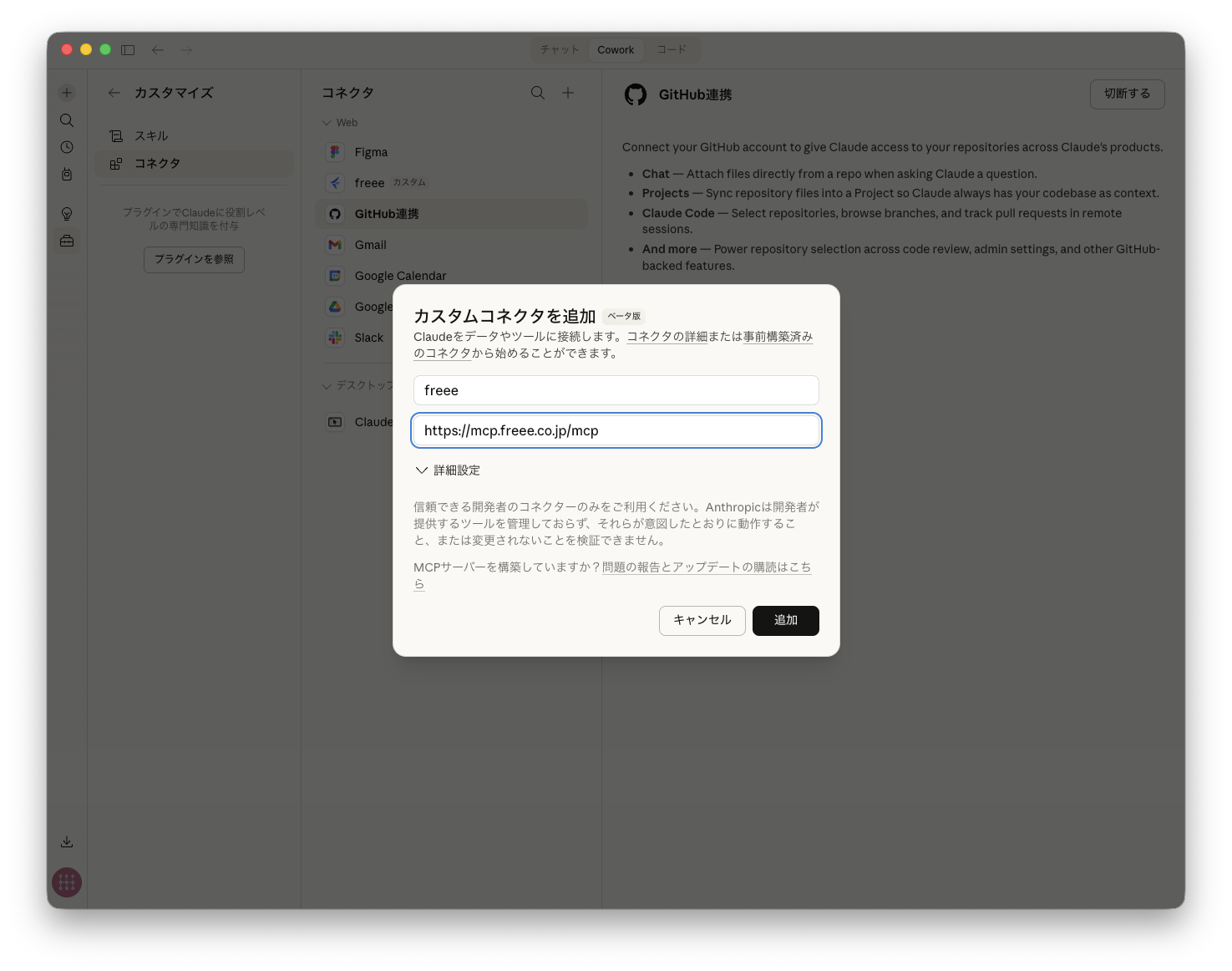
その他の AI ツールでは、それぞれの案内に従って Remote MCP サーバーを追加してください。
方法 2: ローカルで MCP サーバーを起動する
freee アプリケーションを自分で登録し、ローカルで MCP サーバーを起動する方法です。手順は「ローカル MCP を使う場合」をご覧ください。
Agent Skills をインストールする
Claude 及び Claude Desktop では「カスタマイズ」より「スキル」を開き、最新の freee-api-skill.zip をダウンロードしてアップロードしてください。
- 最新版をダウンロード (freee-api-skill.zip)
- バージョン履歴から選ぶ: Releases ページ
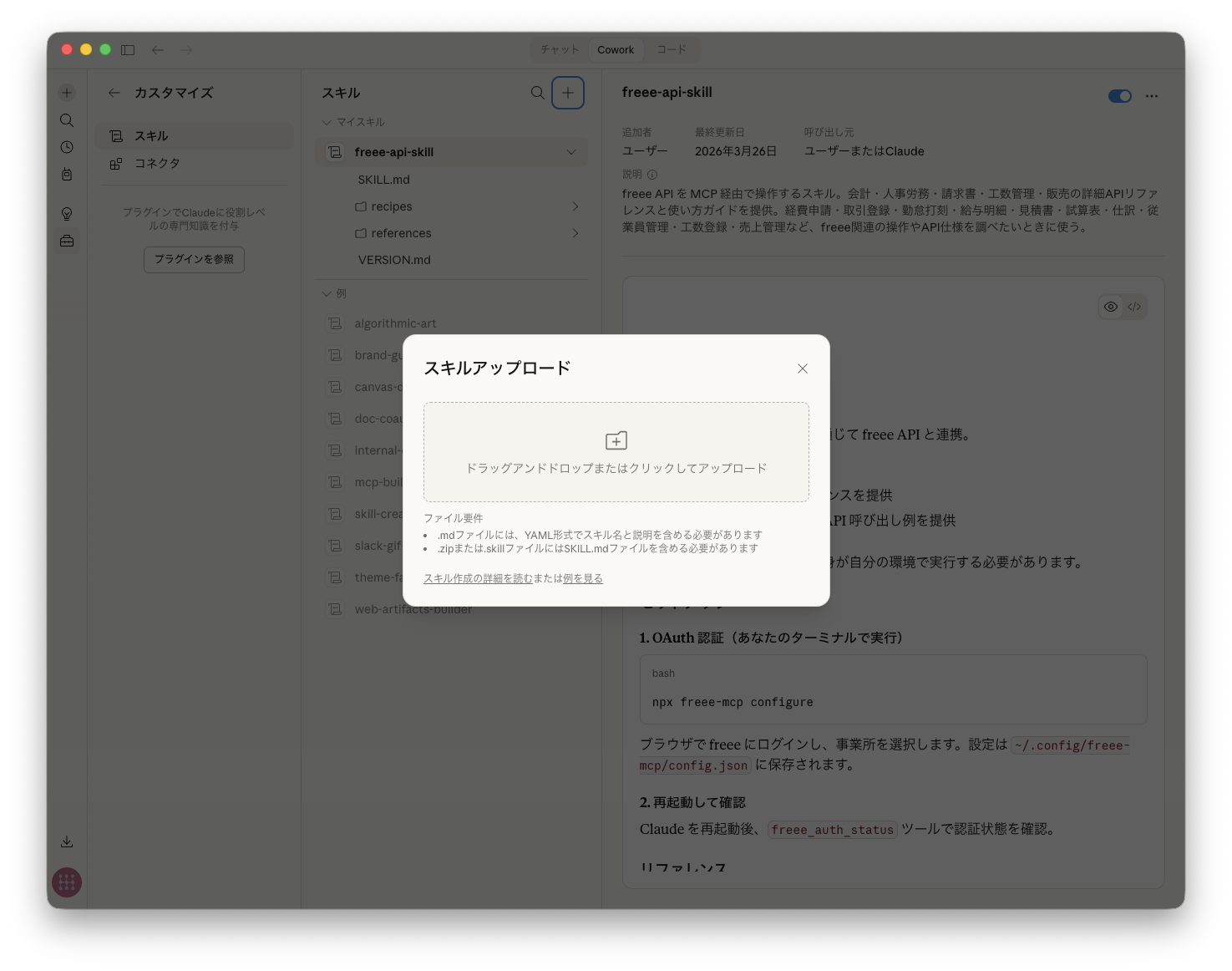
Claude Code 等のコーディングエージェント(Cursor, OpenCode など)では、skills でインストールできます。
npx skills add freee/freee-mcpグローバルインストール(-g)や特定スキルのみのインストール(-s)も可能です。
GitHub CLI(v2.90.0 以降)の gh skill コマンドからもインストールできます。
gh skill install freee/freee-mcp freee-api-skill--agent(例: claude-code, copilot, cursor, codex, gemini-cli)や --scope user/--scope project の指定、--pin による特定タグ/コミットへの固定にも対応しています。
Agent Package Manager (APM) を利用している場合は、以下のコマンドでもインストールできます。GitHub Copilot / Claude Code / Cursor / OpenCode / Codex など、プロジェクトに存在する対象ディレクトリに自動でデプロイされます。
apm install freee/freee-mcp/skills/freee-api-skillClaude Code Plugin として使う
Claude Code でプラグインとしてインストールすると、Remote MCP サーバー freee(https://mcp.freee.co.jp/mcp)と Agent Skills(API リファレンス・操作レシピ)がまとめて利用できます。ローカルでのセットアップは不要です。
以下の2つのコマンドを順に実行してください:
claude plugin marketplace add freee/freee-mcp
claude plugin install freee-mcp@freee-mcp-marketplace
Claude Code のプロンプト内からも実行できます:
/plugin marketplace add freee/freee-mcp
/plugin install freee-mcp@freee-mcp-marketplaceインストール後、/mcp で freee サーバーを選び、ブラウザで freee にログインして認証してください。
プラグインにはローカルの MCP サーバー(freee-mcp、freee-sign-mcp)は含まれません。freee サイン(電子契約)を使う場合や、自分で登録した freee アプリケーションで接続する場合は「ローカル MCP を使う場合」をご覧ください。
Codex Plugin として使う
OpenAI Codex のプラグインマーケットプレース(公式ドキュメント)にも対応しており、MCP サーバーと Agent Skills(API リファレンス・操作レシピ)をまとめて利用できます。
Codex CLI からマーケットプレースを追加します:
codex plugin marketplace add freee/freee-mcpその後 Codex を起動し、/plugins スラッシュコマンドでプラグイン一覧を開き、freee-mcp を選択して Install plugin を実行してください。
プラグイン定義は .codex-plugin/plugin.json、マーケットプレースカタログは .agents/plugins/marketplace.json にあります。
Agent Skills の内容
| API | 内容 | ファイル数 |
|---|---|---|
| 会計 | 取引、勘定科目、取引先、請求書、経費申請など | 20 |
| 人事労務 | 従業員、勤怠、給与明細、年末調整など | 11 |
| 請求書 | 請求書、見積書、納品書、領収書、発注書、支払通知書 | 6 |
| 工数管理 | プロジェクト、チーム、パートナー、工数、ユーザーなど | 2 |
| 販売 | 案件、受注、マスタ | 12 |
| IT管理 | メンバー、SaaSアカウント、アプリ、備品、部署、会社など | 1 |
| 固定資産 | 固定資産の一覧、詳細、登録、更新、削除 | 1 |
| 債権管理 | 債権、入金、消込、利用状況 | 2 |
| 業務委託管理 | 業務委託先の企業ユーザー、部門、取引先 | 3 |
| サーベイ | サーベイ企画、実施回(freee-mcp リモート版限定) | 1 |
| 開業 | 開業申請用データ(freee-mcp リモート版限定) | 1 |
| 人事評価 | 人事評価結果(freee-mcp リモート版限定) | 1 |
| 申告 | 法人税申告データ、帳票(別表・決算書など) | 31 |
| サイン | 文書、フォルダ、テンプレート、マイ印鑑など | 8 |
AI Agent との会話中に freee API の操作を依頼すると、これらのリファレンスやレシピを参照して正確に実行します。
データ作成のベストプラクティス
請求書や経費精算など、同じ形式のデータを繰り返し作成する場合は、以前に作成したデータを参照することで効率的に作業できます:
- 請求書作成: 過去の請求書を取得して、取引先・品目・税区分などを参考にする
- 経費精算: 過去の申請を参照して、勘定科目や部門の指定を正確に行う
- 取引登録: 類似の取引を参考にして、入力ミスを防ぐ
例: 「先月の○○社への請求書を参考に、今月分を作成して」利用可能なツール
管理ツール
| ツール | 説明 | 備考 |
|---|---|---|
freee_authenticate | OAuth 認証を実行 | stdio のみ |
freee_auth_status | 認証状態を確認 | |
freee_clear_auth | 認証情報をクリア | |
freee_set_current_company | 事業所を切り替え | |
freee_get_current_company | 現在の事業所を表示 | |
freee_list_companies | 事業所一覧を取得 | |
freee_current_user | 現在のユーザー情報 | |
freee_server_info | サーバー情報取得 | |
freee_file_upload | ファイルアップロード | stdio のみ |
API ツール
HTTPメソッドごとのシンプルなツール構成:
| ツール | 説明 | 例 |
|---|---|---|
freee_api_get | データ取得 | /api/1/deals |
freee_api_post | 新規作成 | /api/1/deals |
freee_api_put | 更新 | /api/1/deals/123 |
freee_api_delete | 削除 | /api/1/deals/123 |
freee_api_patch | 部分更新 | /api/1/deals/123 |
freee_api_bulk_get | GET の一括実行 | /api/1/deals/123 を複数 |
freee_api_bulk_write | 書き込みの一括実行 | POST/PUT/PATCH/DELETE を複数 |
freee_api_list_paths | エンドポイント一覧 | - |
パスは OpenAPI スキーマに対して自動検証されます。
freee サイン(電子契約)
freee サインの API は専用コマンド freee-sign-mcp で利用できます。
Remote MCP での提供は現在準備中です。ローカルでの MCP サーバー起動のみサポートしています。
セットアップと MCP 設定は「freee サイン(freee-sign-mcp)」をご覧ください。
サイン用ツール
| ツール | 説明 |
|---|---|
sign_authenticate | OAuth 認証を実行 |
sign_auth_status | 認証状態を確認 |
sign_clear_auth | 認証情報をクリア |
sign_api_get | データ取得 |
sign_api_post | 新規作成 |
sign_api_put | 更新 |
sign_api_patch | 部分更新 |
sign_api_delete | 削除 |
company_id の取り扱い
リクエスト(パラメータまたはボディ)に company_id を含める場合、現在の事業所と一致している必要があります。不一致の場合はエラーになります。
- 事業所の確認:
freee_get_current_company - 事業所の切り替え:
freee_set_current_company - company_id を含まない API(例:
/api/1/companies)はそのまま実行可能
ローカル MCP を使う場合
自分で登録した freee アプリケーションの認証情報を使い、MCP サーバーを手元で起動する方法です(stdio)。freee サイン(電子契約)は Remote MCP で提供していないため、サインを使う場合もこちらの手順で freee-sign-mcp を設定します。
ローカルモードでは、一部のエンドポイント(freee-mcp リモート版限定)は利用できません。
freee-mcp
1. freee アプリケーションの登録
freee アプリストア で新しいアプリを作成:
- コールバックURL:
http://127.0.0.1:54321/callback - Client ID と Client Secret を取得
- 必要な権限にチェック
2. セットアップ
npx freee-mcp configure対話式ウィザードが認証情報の設定、OAuth認証、事業所選択を行います。
3. Claude Desktop に追加
configure が出力する設定を Claude Desktop の設定ファイルに追加:
{
  "mcpServers": {
    "freee": {
      "command": "npx",
      "args": ["freee-mcp"]
    }
  }
}
Windows Store (Microsoft Store) 版の Claude Desktop をご利用の場合、設定ファイルのパスが異なります。freee-mcp configure は自動的に適切なパスを検出します。
その他の MCP クライアントでは、同じ command と args をそれぞれの MCP 設定に追加してください。
freee サイン(freee-sign-mcp)
セットアップ
npx --package=freee-mcp -- freee-sign-mcp configure対話式ウィザードが認証情報の設定と OAuth 認証を行います。
MCP 設定
{
  "mcpServers": {
    "freee-sign-mcp": {
      "command": "npx",
      "args": ["--package=freee-mcp", "--", "freee-sign-mcp"]
    }
  }
}
コントリビューション
詳しくは CONTRIBUTING.md をご覧ください。
Contributors

































開発者向け
git clone https://github.com/freee/freee-mcp.git
cd freee-mcp
bun install

bun run dev           # 開発サーバー(ウォッチモード)
bun run build         # ビルド
bun run typecheck    # 型チェック
bun run lint          # リント
bun run test:run      # テスト

# API リファレンスの再生成
bun run generate:references

# OpenAPI スキーマの操作数・パス数を集計(プロダクト別の内訳も表示)
bun run count:apis
技術スタック
TypeScript / Model Context Protocol SDK / OAuth 2.0 + PKCE / Zod / Bun
アーキテクチャ詳細
プロジェクトのアーキテクチャ、内部構造、開発ガイドラインについては CLAUDE.md を参照してください。
License / ライセンス
コミュニティ
質問や情報交換は Discord サーバーで行っています。お気軽にご参加ください。
関連リンク
Pick your client and paste the snippet. Each one is the same server, written the way that client expects it.
- Run the command below in your terminal.
- Restart Claude Code, then check the connection with /mcp.
- Open your client's MCP config file, usually mcp.json.
- Merge this block into it.
- Restart the client to pick up the server.
- Run the command below in your terminal.
- Reload VS Code and check the MCP section of the Extensions view.
- Open ~/.codex/config.toml.
- Append this block.
- Restart Codex to pick up the server.
claude mcp add freee -- npx freee-mcp{
"mcpServers": {
"freee": {
"args": [
"freee-mcp"
],
"command": "npx"
}
}
}code --add-mcp '{"name":"freee","args":["freee-mcp"],"command":"npx"}'[mcp_servers.freee]
command = "npx"
args = ["freee-mcp"]Runs locally on your device. Your client starts the server itself, so nothing has to be hosted.
Install with your agent
Paste this prompt into your agent. It reads this page and does the setup for you.
Read https://aiagentslisting.com/mcp/freee-mcp to learn what the "Freee Mcp" MCP server does and how to install it. Add it to my coding agent's MCP configuration as documented on that page, then confirm the server connects and list the tools it exposes.Agents can also browse this directory over MCP at https://aiagentslisting.com/api/mcp
From the project README
npx skills add freee/freee-mcp
npx freee-mcp configure
This server runs locally, so we can't read its tool list over the web yet.
We could not run this server: its endpoint did not list its tools to an anonymous client, which usually means it asks for an API key or a sign-in. The four checks that need a live server are left out, and the grade tops out at B until we can read its tools.
What's missing
- Claimed by ownerThe maintainer proved ownership of this listing.0/4
All 5 checks (4 passed)
- Installation methodRequiredThe README documents at least one way to install or connect.15/15
- Has a READMERequiredThe repository ships documentation we could read.10/10
- Easy installA paste-ready client config (an mcpServers block) is documented.12/12
- Has a licenseThe repository declares a license.8/8
- Claimed by ownerThe maintainer proved ownership of this listing.0/4
- Verified liveNot checkableWe connected to the server and it answered a real MCP handshake.—
- Exposes toolsNot checkableThe server reports at least one tool, from its manifest or a live read.—
- Ships promptsNot checkableThe server exposes at least one prompt template.—
- Ships resourcesNot checkableThe server exposes at least one resource.—
Maintain this server? Claiming proves you own the listing and earns the last 4 points.
Claim this listingShow this grade in your README

Paste this line near the top of your repository's README. The badge always renders the current score.
[](https://aiagentslisting.com/mcp/freee-mcp)Alternatives to Freee Mcp
Nothing comparable is listed yet.
v0.38.0Release notesv0.37.12Release notesv0.37.11Release notesv0.37.10Release notesv0.37.9Release notesv0.37.8Release notesv0.37.7Release notesv0.37.6Release notesv0.37.5Release notesv0.37.4Release notesv0.37.3Release notesv0.37.2Release notesv0.37.1Release notesv0.37.0Release notesv0.36.6Release notesv0.36.5Release notesv0.36.4Release notesv0.36.3Release notesv0.36.2Release notesv0.36.1Release notes
Send this prompt to your agent to leave a review
Connect to the AI Agents Listing MCP server at https://aiagentslisting.com/api/mcp using the HTTP transport and complete the sign-in when it asks. Then call the submit_review tool for the listing "freee-mcp" with a rating from 1 to 5 and a short note on what worked and what did not.No reviews yet
Be the first to share your experience with this tool.
Subscribe to our newsletter
One email a week. New agents, MCP servers and skills, and what is actually getting traction.