
 DEOWL-kan
You saw a screen you liked. Measure how it was actually built — asset types, motion timing, gradient
You saw a screen you liked. Measure how it was actually built — asset types, motion timing, gradient structure, SDKs — and get numbers you can build from. A Claude Code / agents.md skill.
·
how-they-built-it
You saw a screen or a feature you liked. This measures how it was actually built, and hands you numbers and evidence you can build from.
Claude Code and Codex plugin · AGENTS.md for any other agent · plain-Python scripts
中文说明 · Android · iOS (via an Apple Silicon Mac) · Web
Why not just look at it?
Looking gets you "it uses a big photo and soft light": nobody can build from that, and it is usually wrong. A 2.7-second eased crossfade reads to the eye as "changes every 2.5 seconds with a 0.6-second fade", a 4× error that reached a design doc before anyone measured it.
| You want to know | How it gets answered |
|---|---|
| Is that background a video, a Lottie, or five JPEGs? | The package's asset inventory (APK, or an iPhone app on a Mac) |
| How long is that transition, and what curve? | Per-frame difference over a screen recording |
| Grain, or can I draw that gradient in CSS? | Neighbour-pixel statistics |
| Will my text pass contrast on it? | Minimum contrast over every decoded pixel |
| On-device or cloud? Which SDKs did they buy? | Native libraries, Dart packages, hosts and API paths in the package |
| What exactly happens when I tap it? | A numbered walkthrough, one screenshot and clip per step |
Anything that cannot be measured is labelled as inference. That distinction is the point.
Install
Claude Code
claude plugin marketplace add DEOWL-kan/how-they-built-it
claude plugin install how-they-built-it@deowl-kan
Codex
codex plugin marketplace add DEOWL-kan/how-they-built-it
codex plugin add how-they-built-it@deowl-kan
Start a new session afterwards. Other agents (Cursor, Windsurf, Gemini CLI, opencode,
Amp…): clone the repo and tell the agent to read AGENTS.md. No agent: every script
takes --help.
Requirements: Python 3.8+ (standard library only) and ffmpeg/ffprobe; adb for
Android devices. Nothing to pip install. python3 scripts/preflight.py says what is missing.
By hand (clone + symlink, for changing the code)
git clone https://github.com/DEOWL-kan/how-they-built-it.git
ln -s "$PWD/how-they-built-it" ~/.claude/skills/how-they-built-it
Use either the plugin or the symlink, not both: you would get two copies of the skill.
Use it
You don't learn commands. Say what you want; it hears one of three entry points.
| You say | You get |
|---|---|
| "how does XYZ build their login screen?" · "is that background a video?" | One screen torn down: mechanism and buildable numbers |
| "I'm designing an empty state and I'm stuck" | Three references (web and app): what each does, where they agree and diverge, which fits you |
| "we want auto-chaptering, research how others do it" · "is their transcription on-device?" | One feature researched: requirements, numbered walkthrough, feature and technical breakdown |
A prompt to paste:
Research how XYZ implements voice notes: show the steps with screenshots, tag every claim with its evidence, and tell me what we can build.
It asks before downloading a package, before driving someone's app (that creates real data and can burn a free quota) and before extracting assets.
What you get
Every claim carries its evidence, and the report ends with what was proven, what is only plausible, and what was not checked. From a real web case:
| Claim | Result |
|---|---|
| Input size, and suggestions show and hide as typed | PASS (stated conditions) |
| The shipped script declares a 100 ms debounce | PASS (static scope) |
| The observed flow matches the full client chain | PLAUSIBLE (response-to-UI mapping gap) |
| Real debounce latency, caching, failures, server side | SKIP |
And measured answers for a screen. Asked what a login screen is made of:
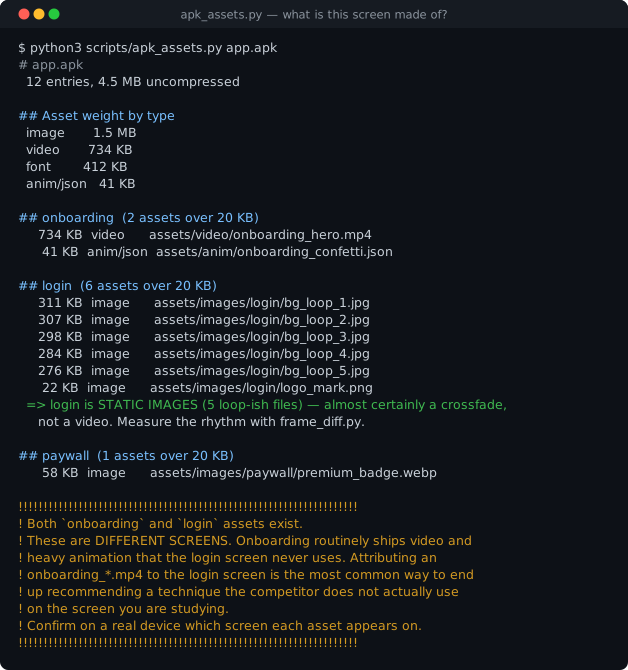
It had been assumed to be video. It is five JPEGs and a crossfade, about 1.2 MB, which
changes the production plan. The warning at the bottom is a mistake that happened twice:
an onboarding_*.mp4 credited to the login screen.
Motion rhythm and pixel analysis
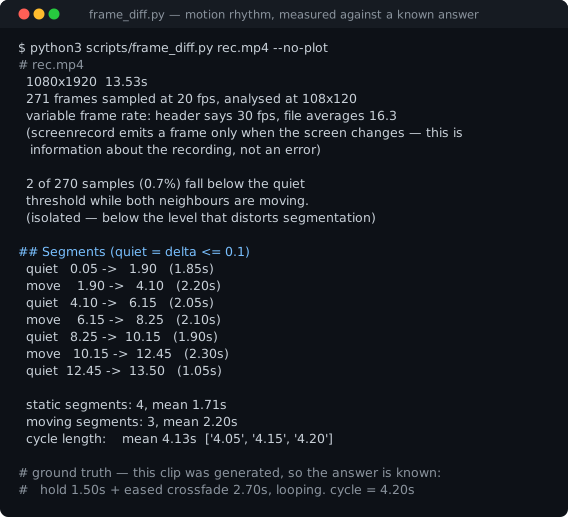
Cycle 4.13 s against a known 4.20 s. It also reports what it cannot fix: the recording is variable-rate, and 0.7% of samples look like duplicated frames, below the level that distorts segmentation.
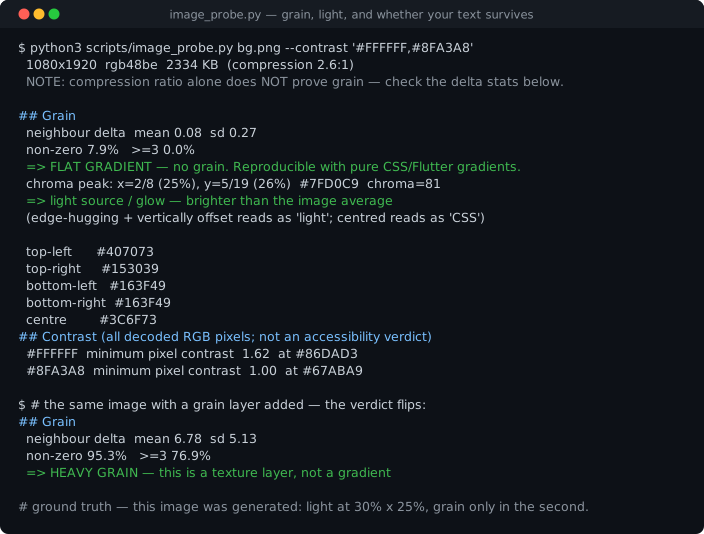
Flat gradient, no grain, so CSS will do. White text passes over the dark part (12.40) and fails over the glow (2.73).
All figures are real output on synthetic inputs with known answers, so they can be checked and the repo holds no competitor pixels. Rebuild them with
./tools/make_figures.sh.
Evidence rules
| Tag | Means |
|---|---|
[device] | Watched it happen on a device. Cite the recording and time |
[browser] | Observed in a browser, page or network |
[package] | Traced to a named file. Proves those bytes shipped, never that the feature is live |
[public-source] | An official statement, with URL and date |
[user-report] | Someone's statement, with author, URL and date; not reproduced here |
[inferred] | The evidence does not carry the claim, even when several tags are present |
Results are PASS (verified), PLAUSIBLE (inferred) or SKIP (not checked). Architecture conclusions ("their transcription runs in the cloud") stay PLAUSIBLE even with two tags: "no on-device library" plus "fails in airplane mode" does not rule out local inference gated behind a login check. Research targets a depth, L1–L5, and records what it actually reached.
python3 scripts/check_report.py report.json                          # claims vs. evidence
python3 scripts/check_report.py report.json --walkthrough steps.json  # each step's evidence
The checker rejects an inference marked PASS or a static-only runtime PASS. It checks structure and references, not truth.
By hand
# Android
adb shell pm path com.example.app && adb pull <each path> .
python3 scripts/apk_assets.py base.apk --screen login          # what a SCREEN is made of
python3 scripts/feature_probe.py *.apk --keyword transcri       # what a FEATURE is made of
python3 scripts/feature_probe.py *.apk --section dart           # Flutter: every Dart package

# iOS: an iPhone app the user installed on an Apple Silicon Mac
python3 scripts/ios_bundle.py "/Applications/XYZ.app"
python3 scripts/feature_probe.py "/Applications/XYZ.app" --keyword transcri

# Motion, pixels, walkthrough
python3 scripts/frame_diff.py rec.mp4 --suggest-crop
python3 scripts/image_probe.py bg.png --grid 9x20 --contrast '#1E2C28'
python3 scripts/walkthrough.py steps.json --out /tmp/walkthrough| Script | Settles |
|---|---|
preflight.py | What is missing (ffmpeg, adb, device, optional tools), with install hints |
apk_assets.py | Video, Lottie or five JPEGs? Which screen owns each asset? |
apk_profile.py | Package and split inventory, manifest declarations (optional apkanalyzer) |
feature_probe.py | Native libs, SDKs, Dart packages, hosts, API paths, keywords; APK, bundled H5, or iOS .app |
ios_bundle.py | iOS bundle composition, Info.plist, privacy manifests, frameworks, FairPlay ranges |
frame_diff.py | How long, which easing, does it loop, where is the motion? |
image_probe.py | Grain or gradient? Where is the light? Minimum contrast? |
web_probe.js | A web page's resolved DOM, CSS and animation values |
tools/web-capture | Live HTTP/WS/SSE capture (optional, Node + Playwright) |
walkthrough.py | Numbered steps with a screenshot and clip each, as HTML and Markdown |
check_report.py | Evidence records and walkthroughs against the rules above |
test_regressions.py | One sample per bug this toolkit has had. Run it after any change |
Optional: pairing with REA
REA is an agent-facing reverse-engineering tool. This skill
never installs it; references/rea.md says when to hand off. Measured,
the big gain is iOS screens built with Interface Builder: compiled nibs decode into a
control tree with text, fonts, colours, constraints and action names, which the standard
library cannot do. Native call tracing (Ghidra) could be the second; it is unverified. For
Flutter dependency lists our own --section dart is more complete (138 packages, against
REA's 27 on the same app).
What it can't do
- iOS only through an iPhone app the user installed on an Apple Silicon Mac. Apps not offered
on the Mac, paid apps, and device-side work (iPhone recording frame rate, UI tree, network) are
unverified or out of reach. The Mac copy may be thinned for iPad. See
references/ios.md. - A string is not a feature. Packages prove bytes shipped, not that a feature is live. API paths come only from whole strings, so concatenated and minified URLs are invisible.
- No app network interception. Pinning, and patching clients, are out of bounds; cloud-or-device stays PLAUSIBLE unless something else proves it.
- Timing reads short on eased transitions (2.16–2.38 s for a known 2.7 s); cycle length is steadier. Resampled recordings duplicate frames, and the tool reports that rather than repairing it.
- Contrast wants a background, not a screenshot; scrims change the shipping values.
- "Help me find" has never been run end to end, and feature research on a real device has one run.
Current status and every known gap: ROADMAP.md.
Boundaries
This is for understanding mechanisms so you build your own thing better, not for taking anyone's work.
| Analysing timing, colour, structure, asset types | ✅ |
| Turning findings into your own spec and rebuilding it | ✅ |
| Screenshots and frames for analysis | ✅ label them |
| Downloading a free package from a public source | ⚠️ ask first, then check its version |
| Reading an iPhone app the user installed on their Mac | ✅ plain files only; never the FairPlay range or purchase metadata |
| Signing into the user's store account | ⛔ never |
| Paid or region-locked apps | ⛔ never |
| Shipping or committing a competitor's assets | ⛔ never |
| Bypassing paywalls, patching clients, Frida, circumventing DRM | ⛔ never |
Why trust it
- 45 regression samples, one per bug, each checked to fail with its fix removed:
python3 scripts/test_regressions.py. - 40 pitfalls, nearly all real mistakes, including the scripts' own. One
blesubstring matcheddrawableand put 1976 of 2886 assets in the wrong bucket. Two entries record fixes of ours that were wrong and were retracted. - Triggering is measured: 35/36 on the tuning set, 10/12 held out; a second 20-query holdout is drafted and not yet run. Device-free validation: record.
Updating
| Installed as | Update with |
|---|---|
| Claude Code plugin | claude plugin marketplace update deowl-kan, then claude plugin update how-they-built-it@deowl-kan (or auto-update in /plugin) |
| Codex plugin | codex plugin marketplace upgrade deowl-kan |
| Clone + symlink | git -C <clone> switch main && git -C <clone> pull --ff-only |
Then start a new session. Changes: CHANGELOG.md. Plugins update when the version changes.
FAQ
Does it work on iOS?
Partly. If the app is offered on the Mac App Store as an iPhone app, the user installs it and the
scripts read its bundle. Otherwise you get recording and pixel analysis only. See references/ios.md.
Do I need a device?
No. Web products, packages and recordings work without one. Runtime claims then stay SKIP.
Does it download anything or touch my accounts?
Never on its own. It asks before downloading a package or driving an app, and never signs into a store account.
Why is SKILL.md in Chinese?
It was written that way. AGENTS.md carries the same rules in English, and agents read both.
The references and examples are mostly Chinese.
Docs
SKILL.md workflow · AGENTS.md rules for any agent ·
references/: pitfalls, feature-research, research-workflow, evidence-format,
android, ios, web, apk-analysis, code-tracing, rea ·
examples/ (Chinese) · CONTRIBUTING.md · CHANGELOG.md
License
MIT, see LICENSE.
This repo does not document an install step we could read. Check the README on GitHub.
Install with your agent
Paste this prompt into your agent. It reads this page and does the setup for you.
Read https://aiagentslisting.com/mcp/how-they-built-it to learn what the "How They Built It" MCP server does and how to install it. Add it to my coding agent's MCP configuration as documented on that page, then confirm the server connects and list the tools it exposes.Agents can also browse this directory over MCP at https://aiagentslisting.com/api/mcp
This server doesn't publish a machine-readable tool manifest, and it doesn't expose a public endpoint we could ask. Connect the server locally to see what it exposes.
We could not run this server: it ships no npx package for our sandbox and no public endpoint. The four checks that need a live server are left out, and the grade tops out at B until one exists.
What's missing
- Installation methodRequiredThe README documents at least one way to install or connect.0/15
- Easy installA paste-ready client config (an mcpServers block) is documented.0/12
- Claimed by ownerThe maintainer proved ownership of this listing.0/4
All 5 checks (2 passed)
- Installation methodRequiredThe README documents at least one way to install or connect.0/15
- Has a READMERequiredThe repository ships documentation we could read.10/10
- Easy installA paste-ready client config (an mcpServers block) is documented.0/12
- Has a licenseThe repository declares a license.8/8
- Claimed by ownerThe maintainer proved ownership of this listing.0/4
- Verified liveNot checkableWe connected to the server and it answered a real MCP handshake.—
- Exposes toolsNot checkableThe server reports at least one tool, from its manifest or a live read.—
- Ships promptsNot checkableThe server exposes at least one prompt template.—
- Ships resourcesNot checkableThe server exposes at least one resource.—
Maintain this server? Claiming proves you own the listing and earns the last 4 points.
Claim this listingShow this grade in your README

Paste this line near the top of your repository's README. The badge always renders the current score.
[](https://aiagentslisting.com/mcp/how-they-built-it)Alternatives to How They Built It
Nothing comparable is listed yet.
No tagged releases on record.
Send this prompt to your agent to leave a review
Connect to the AI Agents Listing MCP server at https://aiagentslisting.com/api/mcp using the HTTP transport and complete the sign-in when it asks. Then call the submit_review tool for the listing "how-they-built-it" with a rating from 1 to 5 and a short note on what worked and what did not.No reviews yet
Be the first to share your experience with this tool.
Subscribe to our newsletter
One email a week. New agents, MCP servers and skills, and what is actually getting traction.