
 auten-ai
Computer-use MCP server: give Claude Code, Codex, Cursor or any MCP client hands on a real screen
Computer-use MCP server: give Claude Code, Codex, Cursor or any MCP client hands on a real screen: your computer (Mac/Windows/Linux) and your Android phone (beta). Clicks, types and reads the screen, even in apps with no API.
·

Auten MCP server
Computer use for the AI agent you already have.
Claude Code, Codex, Cursor, Gemini CLI or any MCP client can click, type and read the screen
on your Mac, Windows or Linux computer — and your Android phone (beta) — in real apps that have no API.

Website | Setup for every client | Pricing | [email protected]

Illustration: the first run is driven by your AI, the next runs replay from memory.
Auten is the hands, your AI is the brain. A small runner on your computer does the clicking, typing and screen reading. Your agent talks to it over MCP (stdio or SSE). Auten does not ship its own model and never needs your AI key; your agent keeps using the plan you already pay for.
What makes it different from a plain mouse and keyboard bridge:
- Reads the UI, not just pixels. It uses the accessibility tree, so your agent gets a numbered
list of real buttons and fields (
list_elementsthenclick_at(3)) instead of guessing coordinates. OCR and real screenshots are there when an app has no accessibility info. - Learns a task once, replays it without AI. After your agent finishes a task, Auten can save it as a skill. The next run replays in seconds, with no tokens spent, and fixes itself when the app's layout changes.
- Passwords stay on your machine.
fill_logintypes a stored secret into a field without the agent ever seeing the value.
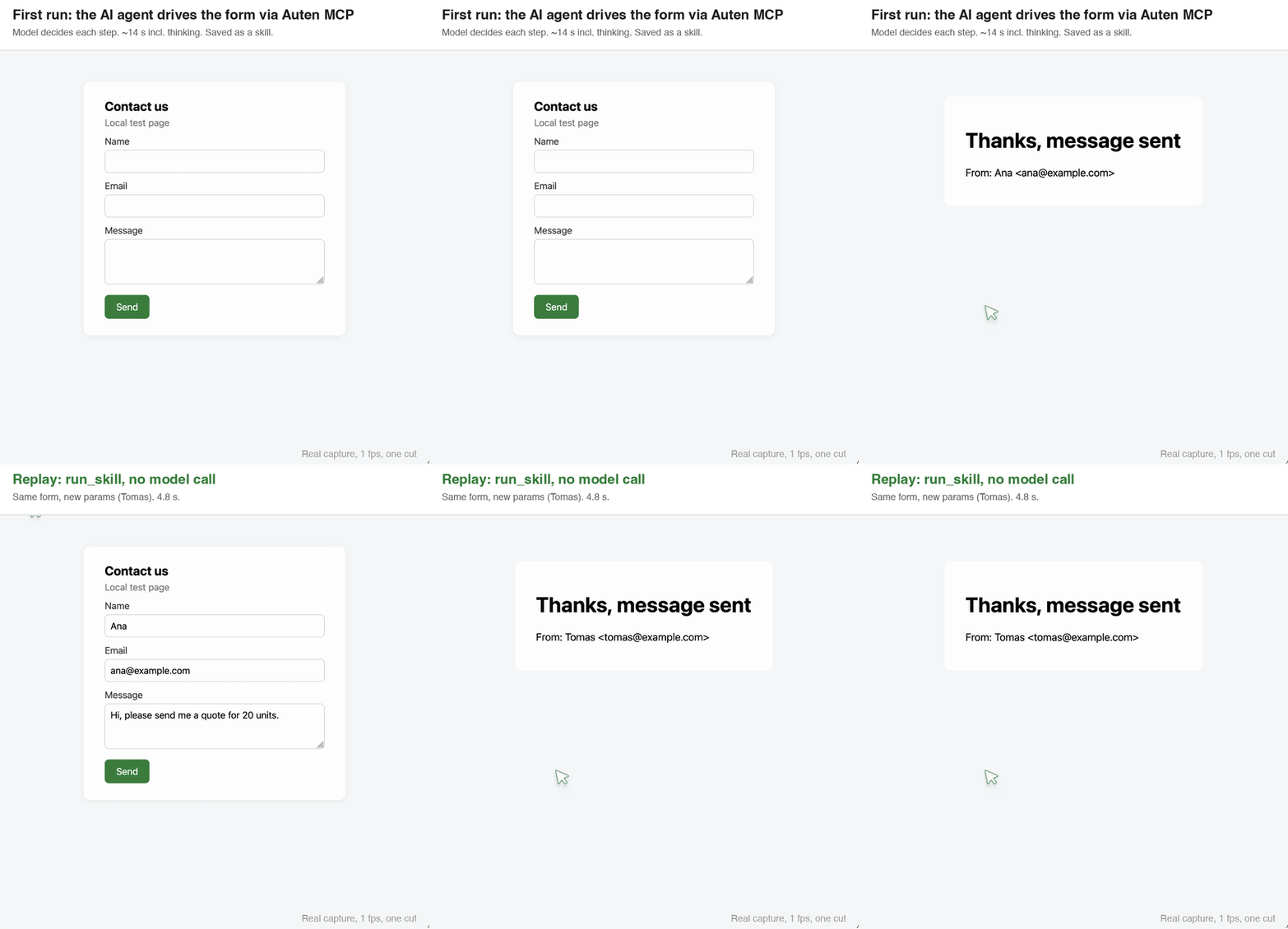
Real capture, not an illustration: first run by the agent (~14 s incl. thinking), then run_skill with new values (4.8 s, no model call). Local test page, 1 fps, one cut between the runs.
What you can ask your agent
Plain requests in the client you already use. The agent decides the steps, Auten does the clicks.
- "Open the supplier portal, download this month's invoices and put them in ~/Invoices."
- "Go through the new leads in the CRM and fill in the missing company names from their emails."
- "Export the report from that desktop app as CSV. It has no API, so use the File menu."
- "On my Android phone, open Instagram and reply to the latest DM with this text." (phone is beta, over USB)
- "That worked. Save it as a skill called
export-report." Next time: "Runexport-report." It replays without AI.
Quick start
1. Install the runner (one command; no admin rights on macOS and Windows, on Linux it asks for sudo once to apt-install the accessibility and input tools):
# macOS and Linux
curl -fsSL https://auten.ai/install | bash# Windows (PowerShell)
irm https://auten.ai/install.ps1 | iexThe first run asks you to connect a free key (30 minutes every month, no card).
2. Add Auten to your agent. For Claude Code, Auten can do it by itself:
auten connector add it with the Claude Code CLI and check with /mcp:
claude mcp add -s user auten -- auten mcp-bridge3. Ask in plain words. For example: "Open Figma, export the Hero frame as PNG to my Desktop" or "Go through the unread invoices in my mail and fill them into the accounting app". More prompts for computer and phone (beta) tasks: examples/prompts.md.
Or run it through npx
Any client that can start an npm package can use the launcher instead. It starts the installed runner, and if Auten is not installed yet it tells your agent the one-line install command. The "Add to Cursor" and "VS Code" buttons at the top add exactly this entry.
{
  "mcpServers": {
    "auten": { "command": "npx", "args": ["-y", "@autenai/mcp"] }
  }
}claude mcp add -s user auten -- npx -y @autenai/mcpOn Windows, if the client reports spawn npx ENOENT: npx is npx.cmd there, and some clients start
servers without a shell. Use "command": "cmd", "args": ["/c", "npx", "-y", "@autenai/mcp"]
(Claude Code: claude mcp add -s user auten -- cmd /c npx -y @autenai/mcp), or the direct
auten mcp-bridge entry below.
Or as a Claude Code plugin
This repository is also a plugin marketplace. Inside Claude Code:
/plugin marketplace add auten-ai/auten-mcp
/plugin install auten@auten
The plugin adds the same npx launcher entry, nothing else (no hooks or commands). See plugin/README.md.
Client setup
Every client starts the same stdio command: auten mcp-bridge (or npx -y @autenai/mcp). If your app says it cannot find
auten, use the full path from which auten (usually ~/.local/bin/auten).
OpenAI Codex
codex mcp add auten -- auten mcp-bridgeor in ~/.codex/config.toml:
[mcp_servers.auten]
command = "auten"
args = ["mcp-bridge"]
Cursor
~/.cursor/mcp.json (or .cursor/mcp.json in a project):
{
  "mcpServers": {
    "auten": { "command": "auten", "args": ["mcp-bridge"] }
  }
}
Gemini CLI
gemini mcp add --scope user auten auten mcp-bridgeor the same mcpServers entry in ~/.gemini/settings.json.
GitHub Copilot CLI
copilot mcp add auten -- auten mcp-bridgeor in ~/.copilot/mcp-config.json:
{
  "mcpServers": {
    "auten": { "type": "local", "command": "auten", "args": ["mcp-bridge"], "tools": ["*"] }
  }
}
Inside a session, /mcp add opens the same form (type STDIO, command auten mcp-bridge).
Claude Desktop
Settings, Developer, Edit Config
(~/Library/Application Support/Claude/claude_desktop_config.json on macOS,
%APPDATA%\Claude\claude_desktop_config.json on Windows):
{
  "mcpServers": {
    "auten": { "command": "auten", "args": ["mcp-bridge"] }
  }
}
Restart Claude Desktop.
VS Code (GitHub Copilot agent mode)
Run MCP: Open User Configuration and add:
{
  "servers": {
    "auten": { "type": "stdio", "command": "auten", "args": ["mcp-bridge"] }
  }
}
Windsurf
~/.codeium/windsurf/mcp_config.json:
{
  "mcpServers": {
    "auten": { "command": "auten", "args": ["mcp-bridge"] }
  }
}
Zed
~/.config/zed/settings.json:
{
  "context_servers": {
    "auten": { "command": "auten", "args": ["mcp-bridge"] }
  }
}
Cline
Ask Cline to set Auten up from llms-install.md, or add it yourself in
MCP Servers, Configure (cline_mcp_settings.json):
{
  "mcpServers": {
    "auten": { "command": "auten", "args": ["mcp-bridge"] }
  }
}
Remote (SSE) instead of stdio
For clients that connect over the network, keep the runner online on the computer it should control:
auten --runner-onlyThen use your personal MCP URL from your account page. It contains your key, so keep it private.
claude mcp add --transport sse auten <your-url>No agent? Give the auten CLI your own key (Anthropic, OpenAI, Google, DeepSeek or any
OpenAI-compatible provider) with auten key add, then run auten "open my calendar and tell me what is next".
Tools
| Group | Tools |
|---|---|
| See the screen | list_elements, read_text, screenshot, screenshot_labeled, vision, screen_info |
| Act | click_at, click, fill, type, paste_text, press_keys, scroll, drag, move_mouse, act_on_matching, menu_select |
| Apps and windows | open_app, open_url, focus_window, browser_tabs, save_file, upload_file, clipboard_read |
| Secrets | list_logins, fill_login, get_profile |
| Learned skills | list_skills, run_skill, skills, show_skill, start_recording, stop_recording, start_fixing, stop_fixing |
| Coordination | ask_user, focus_app, release, gui_status, wait, opened_items, browser_cleanup |
Platforms
macOS (Apple Silicon and Intel), Windows 10/11, Linux (X11), plus an Android phone over USB (beta).
Linux: installer stops at the "deps" step? It needs sudo once for the accessibility (AT-SPI) and input tools.
On a fresh or minimal box (empty apt lists, no python3-venv) install them first, then run the installer again:
sudo apt-get update
sudo apt-get install -y python3-venv python3-pyatspi python3-gi xdotool wmctrl scrot xclip libglib2.0-bin tesseract-ocr libsecret-tools
Auten drives a real X11 desktop session, so a headless container without a display won't work. Still stuck? Paste the last lines in Discussions.
Pricing
| Plan | Runtime | Price |
|---|---|---|
| Free | 30 min every month | €0, no card |
| Starter | 10 h every month | €9/month (early access) |
| Pro | Unlimited | €29/month (early access) |
You bring your own AI, so the price is for Auten only. Details on auten.ai/pricing.
Privacy and safety
- The runner only acts when your MCP client calls a tool. Nothing runs in the background on its own.
- Stored passwords live in the system keychain (macOS, Windows) or a private local vault (Linux) and never reach our servers or the model. A secret that shows up on screen is replaced with a placeholder before your agent sees it.
- Each saved login is pinned to the site or app where it was first used. On any other origin
fill_loginrefuses and types nothing; only you can re-pin it (auten vault unpin <name>). - Your activity history and learned skills are written to your own computer, not ours. See the privacy policy.
About this repository
This repository holds the public docs, client configs and the @autenai/mcp npm launcher
(bin/auten-mcp.js), all under the MIT LICENSE. The runner itself is distributed
separately through the installers above, under the Auten terms of service. Questions, bugs and feature requests are
welcome as issues or at [email protected].
Auten is made by MB Icecode, Lithuania.
Pick your client and paste the snippet. Each one is the same server, written the way that client expects it.
- Run the command below in your terminal.
- Restart Claude Code, then check the connection with /mcp.
- Open your client's MCP config file, usually mcp.json.
- Merge this block into it.
- Restart the client to pick up the server.
- Run the command below in your terminal.
- Reload VS Code and check the MCP section of the Extensions view.
- Open ~/.codex/config.toml.
- Append this block.
- Restart Codex to pick up the server.
claude mcp add auten -- npx -y @autenai/mcp{
"mcpServers": {
"auten": {
"args": [
"-y",
"@autenai/mcp"
],
"command": "npx"
}
}
}code --add-mcp '{"name":"auten","args":["-y","@autenai/mcp"],"command":"npx"}'[mcp_servers.auten]
command = "npx"
args = ["-y", "@autenai/mcp"]Runs locally on your device. Your client starts the server itself, so nothing has to be hosted.
Install with your agent
Paste this prompt into your agent. It reads this page and does the setup for you.
Read https://aiagentslisting.com/mcp/macos-and-linux to learn what the "macOS and Linux" MCP server does and how to install it. Add it to my coding agent's MCP configuration as documented on that page, then confirm the server connects and list the tools it exposes.Agents can also browse this directory over MCP at https://aiagentslisting.com/api/mcp
From the project README
claude mcp add -s user auten -- auten mcp-bridge
claude mcp add -s user auten -- npx -y @autenai/mcp
claude mcp add --transport sse auten <your-url>Tools1
| Name | What it does |
|---|---|
install_auten | Auten (computer use for your AI agent) is not installed on this machine yet. Call this to get the one-line install command for this OS and the next steps. |
Read live from the server on October 14, 2026.
What's missing
- Ships promptsThe server exposes at least one prompt template.0/8
- Ships resourcesThe server exposes at least one resource.0/8
- Claimed by ownerThe maintainer proved ownership of this listing.0/4
All 9 checks (6 passed)
- Installation methodRequiredThe README documents at least one way to install or connect.15/15
- Exposes toolsRequiredThe server reports at least one tool, from its manifest or a live read.15/15
- Has a READMERequiredThe repository ships documentation we could read.10/10
- Verified liveWe connected to the server and it answered a real MCP handshake.20/20
- Easy installA paste-ready client config (an mcpServers block) is documented.12/12
- Has a licenseThe repository declares a license.8/8
- Ships promptsThe server exposes at least one prompt template.0/8
- Ships resourcesThe server exposes at least one resource.0/8
- Claimed by ownerThe maintainer proved ownership of this listing.0/4
Maintain this server? Claiming proves you own the listing and earns the last 4 points.
Claim this listingShow this grade in your README

Paste this line near the top of your repository's README. The badge always renders the current score.
[](https://aiagentslisting.com/mcp/macos-and-linux)Alternatives to macOS and Linux
Nothing comparable is listed yet.
v0.1.5Release notesv0.1.2Release notes
Send this prompt to your agent to leave a review
Connect to the AI Agents Listing MCP server at https://aiagentslisting.com/api/mcp using the HTTP transport and complete the sign-in when it asks. Then call the submit_review tool for the listing "macos-and-linux" with a rating from 1 to 5 and a short note on what worked and what did not.No reviews yet
Be the first to share your experience with this tool.
Subscribe to our newsletter
One email a week. New agents, MCP servers and skills, and what is actually getting traction.