
 XAGI-Lab
Open-source local MCP execution runtime for agents: policy-gated tool calls, scoped approvals
Open-source local MCP execution runtime for agents: policy-gated tool calls, scoped approvals, verified outcomes, durable receipts, and recovery after interruptions.
·

MELRA
Modular Execution Layer for Reliable Autonomy
Your AI agent decides what to do. MELRA governs how tool calls are authorized, verified, and recovered.
An open-source local execution runtime for agent tool calls you route through MELRA. It checks each call against policy, requests approval when needed, verifies declared evidence, and keeps a redacted receipt of what runs to an outcome. For each task, MELRA dispatches mutations at most once; uncertain outcomes are parked for reconciliation instead of replay. Exactly-once external effects still depend on the provider. Calls made through other tools remain outside MELRA's control.
Works with
Demo · Quick start · How it works · See what it is doing · Docs · Contribute · Discussions · Product Hunt launch
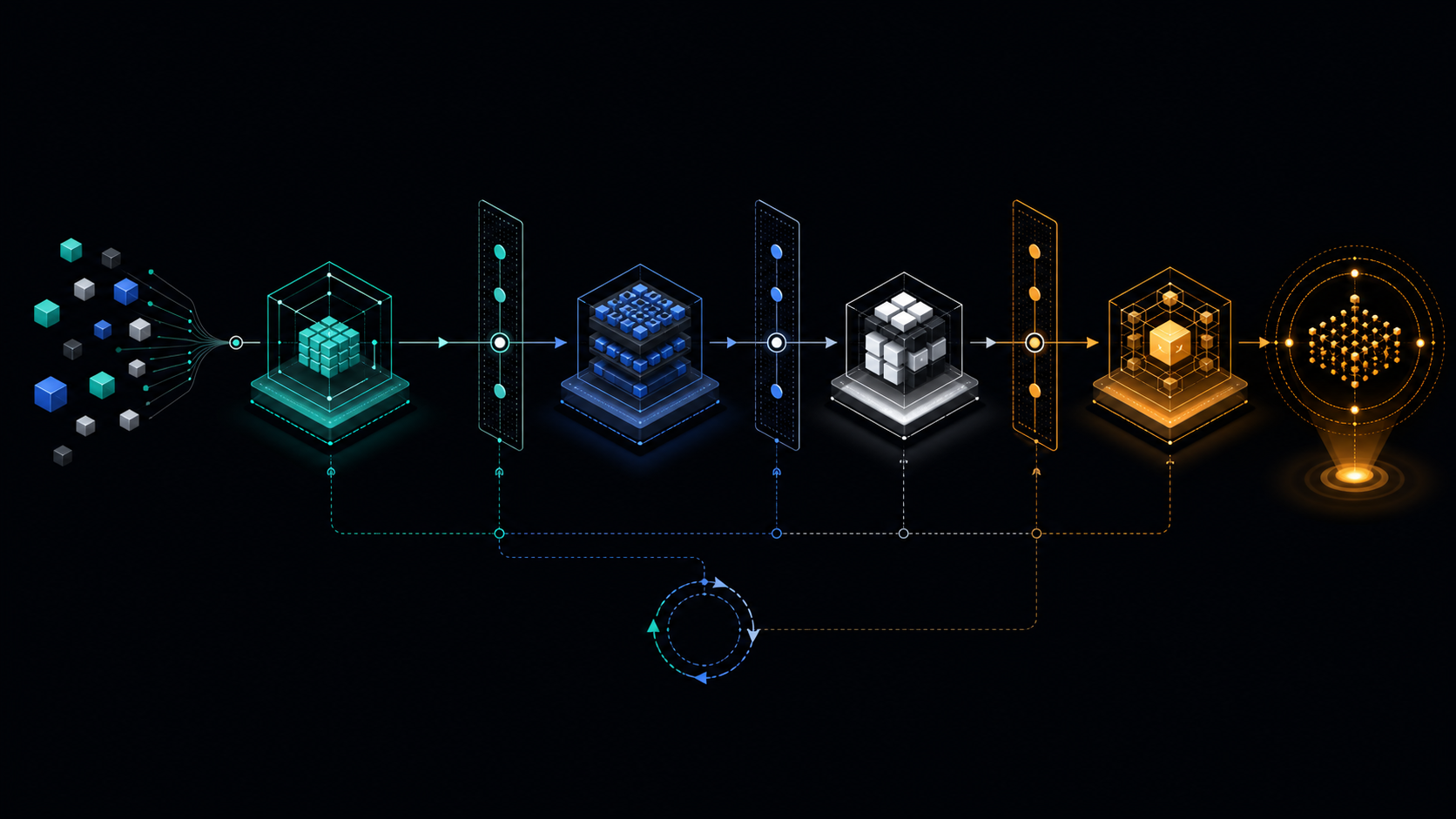
Demo
https://github.com/user-attachments/assets/83987dbd-99bf-4442-969a-066960621762
[!WARNING] MELRA is alpha software. The local runtime is tested end to end, but APIs may change before
1.0. Use an isolated workspace, keep domain and command allowlists narrow, and read every approval before you give it.
Quick start
You need Node.js 22.13 or newer, or 23.4 or newer. From the project the agent should work in, one command sets everything up:
cd ~/project
npx @melra/cli@alpha setup
That directory becomes the agent's workspace, the boundary for its file and command
operations. setup shows it, and asks before making your home directory, a directory
holding it, or / the workspace; set MELRA_WORKSPACE to choose another.
In a terminal, setup is a short wizard. It writes a safe local policy, finds the
agent apps on your machine, asks which one should use MELRA, and writes MELRA into
that app's own config file, keeping everything else in it (and saving a .bak first):
Which MCP client should use MELRA?

  1)   Claude Code                      detected: 'claude' on PATH
  2)   Cursor                           detected: config file found
  3)   Gemini CLI                       detected: config folder found
  ...

Choose 1-26 [1]: 1
Write it into ~/project/.mcp.json? [Y/n]

  ✓  Workspace    ~/project
  ✓  Policy       ~/.melra/policy.json
  ✓  Claude Code  ~/project/.mcp.json

Next: Start claude in this workspace and approve the 'melra' server when it asks; 'claude mcp list' then shows it connected. Or start it with 'melra launch claude-code', so MELRA's are the only tools it has that change anything.
Then restart your agent app (Claude Code asks you to approve a project's server once) and ask it to do something, for example "use melra to show me the system info". That's it.
Prefer flags, a container, or building from source?
| How | Command |
|---|---|
| One client, no questions | npx @melra/cli@alpha setup --client cursor --write |
| Print the config instead of writing it | npx @melra/cli@alpha setup --client codex |
| Install globally | npm install -g @melra/cli@alpha && melra setup |
| Container (no Node needed) | docker run --rm ghcr.io/xagi-lab/melra:alpha doctor |
| Prebuilt release | download from releases, verify against SHA256SUMS, then node melra/dist/bin.js doctor |
| From source | git clone https://github.com/XAGI-Lab/melra.git && cd melra && corepack enable && pnpm install --frozen-lockfile && pnpm build && pnpm melra setup |
| One file, no Node needed (experimental) | from a checkout: pnpm build:sea, then ./dist-sea/melra setup; see single executable |
| Check what you installed | npm audit signatures verifies registry signatures; npm provenance links each package to its GitHub Actions build (see npm packages) |
Every command prints readable output in a terminal and plain JSON when piped or with
--json, so scripts keep working. MELRA creates <MELRA_HOME>/payload.key with
private permissions on first start; back it up with the SQLite files, because losing
it makes persisted payloads unreadable. See installation for
every install path, environment variable, and the hardened Docker invocation.
[!CAUTION] This project publishes only under the
@melra/npm scope (@melra/cliis the CLI) and on its releases, where the Python SDK's wheel is. An unscoped npm packagemelraor a PyPI packagemelrais not this project's. Install from that scope, from this repository, or from the releases.
If MELRA helps, star the repository so other
agent builders can find it. Trying it in Cursor or another client? Share the client
and its version, your OS, and your MELRA version (npx @melra/cli@alpha version) in
issue #184; partial test results are
useful too.
What is MELRA?
AI agents no longer just talk. They edit files, run commands, click through websites and call APIs on your behalf. Four questions come with that, and most agents answer them differently, or not at all:
🛡️ Is it allowed?Every action MELRA receives is checked against your policy, and checked again at the moment it runs. Risky changes wait for your exact approval. |
✅ Did it really work?"No error" is not success. An action counts only when the evidence you declared holds: the file exists, the exit code is 0, the page says what it should. For a file change or a memory delete MELRA also checks the end state itself: a written file holds exactly the bytes sent. |
🔁 What if it crashes?Every mutation MELRA dispatches is recorded before it runs and runs at most
once. After a crash, MELRA settles it from its evidence or the provider; what it
cannot settle waits in |
🧾 What happened?Every action MELRA runs to an outcome leaves a redacted, append-only receipt and a certificate that carries its own digest, so you can audit what ran, who asked, and why it was allowed. |
MELRA answers those questions in one place for tool calls routed through it, across supported agents. It sits underneath your agent for those calls, the way an operating system sits underneath your apps:
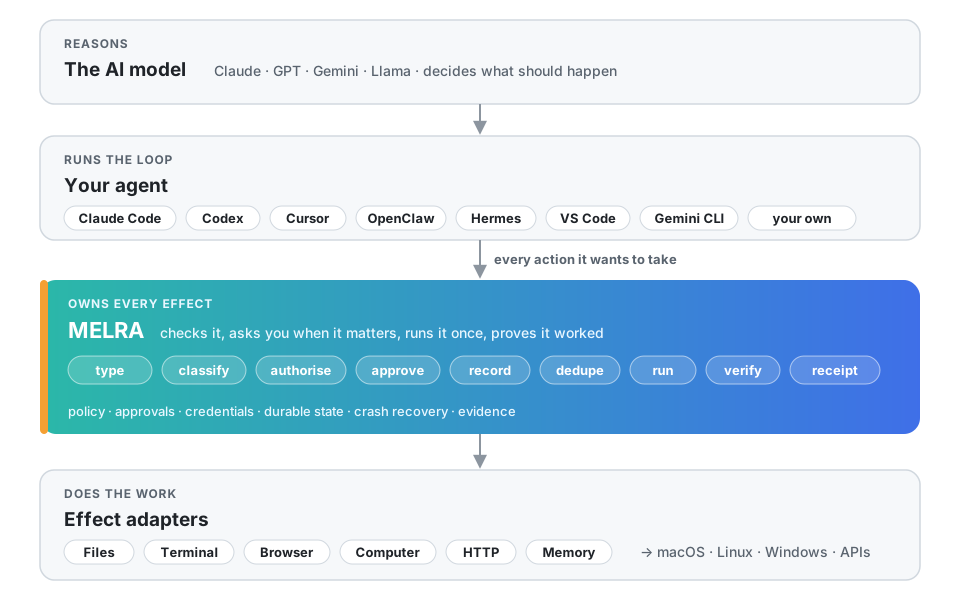
The LLM reasons. The harness manages the loop. MELRA governs the effect lifecycle for calls routed through it. Swap the model or the agent; MELRA's policies, approvals, credentials, history and receipts can stay in place.
Works with your agent
MELRA speaks the Model Context Protocol, so any MCP
client can use it. For these, melra setup --client <name> writes the config in the
client's own format and location, and melra doctor tells you whether each one is
pointed at MELRA:
| Agent | --client | Config it writes | Tested |
|---|---|---|---|
 Claude Code | claude-code | <project>/.mcp.json | connected by hand |
| Claude Desktop | claude-desktop | claude_desktop_config.json | config checked against docs |
 OpenAI Codex CLI | codex | ~/.codex/config.toml | config checked against docs (its own CLI parsed it) |
 Cursor | cursor | ~/.cursor/mcp.json | config checked against docs |
| 🟦 VS Code (Copilot agent mode) | vscode | <project>/.vscode/mcp.json | config checked against docs |
 Gemini CLI | gemini | ~/.gemini/settings.json | config checked against docs |
 Windsurf | windsurf | ~/.codeium/windsurf/mcp_config.json | config checked against docs |
 Zed | zed | Zed settings.json (comments kept) | config checked against docs |
| 🧩 Cline | cline | Cline's cline_mcp_settings.json | config checked against docs |
| ⬛ OpenCode | opencode | ~/.config/opencode/opencode.json | connected by hand |
| 👻 Kiro | kiro | ~/.kiro/settings/mcp.json | config checked against docs |
| 🪿 Goose | goose | ~/.config/goose/config.yaml | config checked against docs |
| ▶️ Continue | continue | <project>/.continue/mcpServers/melra.yaml | config checked against docs |
| ⚡ Amp | amp | ~/.config/amp/settings.json | config checked against docs |
| 🦞 OpenClaw | openclaw | ~/.openclaw/openclaw.json (mcp.servers) | config checked against docs |
| ⚕️ Hermes Agent (Nous Research) | hermes | ~/.hermes/config.yaml (mcp_servers) | connected by hand |
 GitHub Copilot CLI | copilot | ~/.copilot/mcp-config.json | config checked against docs |
| 🐉 Qwen Code | qwen | ~/.qwen/settings.json | config checked against docs |
| 🅰️ Auggie (Augment) | auggie | ~/.augment/settings.json | config checked against docs |
 Warp | warp | ~/.warp/.mcp.json | config checked against docs |
 Junie (JetBrains) | junie | ~/.junie/mcp/mcp.json | config checked against docs |
| 🤖 Factory Droid | droid | ~/.factory/mcp.json | config checked against docs |
| 🌙 Kimi Code | kimi | ~/.kimi-code/mcp.json | config checked against docs |
| 🪁 Kilo Code | kilo | ~/.config/kilo/kilo.jsonc (comments kept) | config checked against docs |
| 🧪 LM Studio | lmstudio | ~/.lmstudio/mcp.json | config checked against docs |
| 🔌 Anything else | generic | prints the standard mcpServers block | documented only |
Tested says how far each one has been taken: run in CI (an automated suite drives it), connected by hand (its own CLI connected to a packed release over MCP, but no task was run from inside it; see COMPATIBILITY.md), config checked against docs (the file and format come from its documentation or source, and the CLI tests write and read them back), or documented only.
Building your own agent? Use the TypeScript SDK or the
Python SDK. Both can spawn MELRA or connect to one that is already running
over loopback HTTP or a private Unix socket. For agent frameworks, see the
framework examples: the official MCP SDKs',
LangChain / LangGraph, OpenAI Agents SDK and Vercel AI SDK snippets all run in CI
with no model, as far as listing MELRA's tools and calling melra_capabilities.
[!NOTE] A named client is marked verified only after the released package, not a source checkout, passes discovery, planning, approval, execution, cancellation and receipt retrieval in that client. Per-client status lives in COMPATIBILITY.md.
How it works
An effect is one bounded operation an agent routes through MELRA: file.write,
terminal.run, browser.click, http.request, and so on. MELRA handles each routed
effect in nine stages, split between a plan step and an execute step (for a single
task, melra_plan then melra_execute) so that nothing runs at planning time:
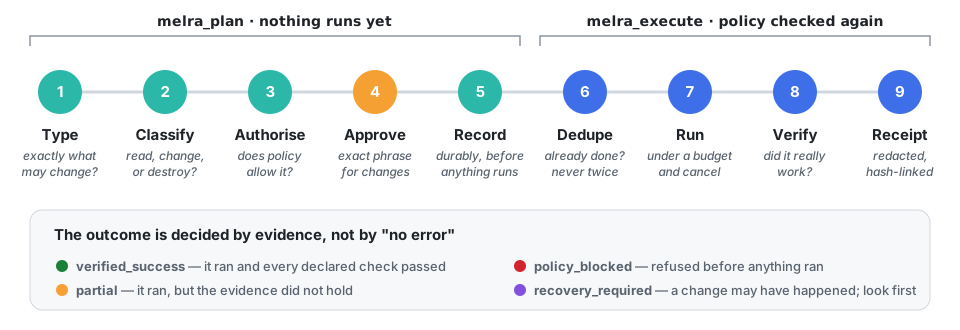
Here is one change from start to finish, in developer mode. In
enforced mode the challenge carries no
phrase: you approve with melra approve <task-id> outside the conversation,
and the agent's melra_execute sends no approval at all.
sequenceDiagram
    autonumber
    participant A as Your agent
    participant M as MELRA
    participant You
    participant W as Your system
    A->>M: melra_plan: write notes.md, evidence "file contains 'done'"
    M->>M: type, classify, check policy, record
    M-->>A: awaiting_approval + challenge "APPROVE 3f9c…"
    A->>You: May I write notes.md?
    You-->>A: yes
    A->>M: melra_execute with the exact phrase
    M->>M: policy again, not already done?
    M->>W: write the file (under a budget)
    M->>W: read it back, independently
    M-->>A: verified_success + receipt
What the final status means, and what an agent should do next:
| Status | Meaning | Next step |
|---|---|---|
🟢 verified_success | It ran and every declared check passed, and so did MELRA's own for a file change or memory delete | Done |
🟡 partial | It ran, but the evidence, declared or MELRA's own, did not hold, or a semantic question was answered no | Look at the evidence, then decide; a change answered no stays in place, so fixing it takes a new plan |
🔴 policy_blocked | Refused before anything ran | Read the reason; the same request will be refused again |
🔵 awaiting_approval | A change is waiting for your approval | Developer mode: approve it from the agent that planned it. Enforced mode: melra approve <task-id> |
⏳ waiting_user | It ran and every check MELRA can make passed; a semantic question waits for an answer from outside | A principal other than the one that planned it answers with melra_task_judge; in enforced mode, an operator with melra judge <task-id>. Unanswered, it settles closed at expiry |
🟣 recovery_required | A change may or may not have happened, or happened and its semantic question went unanswered or was answered cannot_tell | Check the world first; never re-run blindly |
⚪ failed · cancelled · budget_exhausted | It did not complete | Safe to plan again |
Show the request an agent actually sends
The agent resolves "run the checks" into one bounded operation, plus the evidence that would prove it worked:
{
  "goal": "Run the repository checks",
  "operation": { "kind": "terminal", "action": "run", "command": "pnpm", "args": ["check"] },
  "requiredEvidence": [{ "type": "exit_code", "value": 0 }]
}
The task reaches verified_success only if the process exits 0. A process that runs
and exits 1 completed the action but failed the evidence, so it is reported as
partial. MELRA never receives a goal like "fix the production server": that needs
judgement, which belongs to the model. A kernel that interpreted sentences would be a
kernel whose guarantees depended on a model.
When an agent connects, MELRA also sends it a short guide to this loop (the MCP
server's instructions), so a model knows to declare evidence, read the status, and
never blindly retry an unknown outcome, without anyone prompt-engineering it.
See what it is doing
You can see each action MELRA handled and its policy decision, and, for each that ran to an outcome, its evidence and receipt, from the terminal or the browser. Nothing here can approve or start work, and approval phrases are never displayed.
|
From the terminal
|
In the browser: 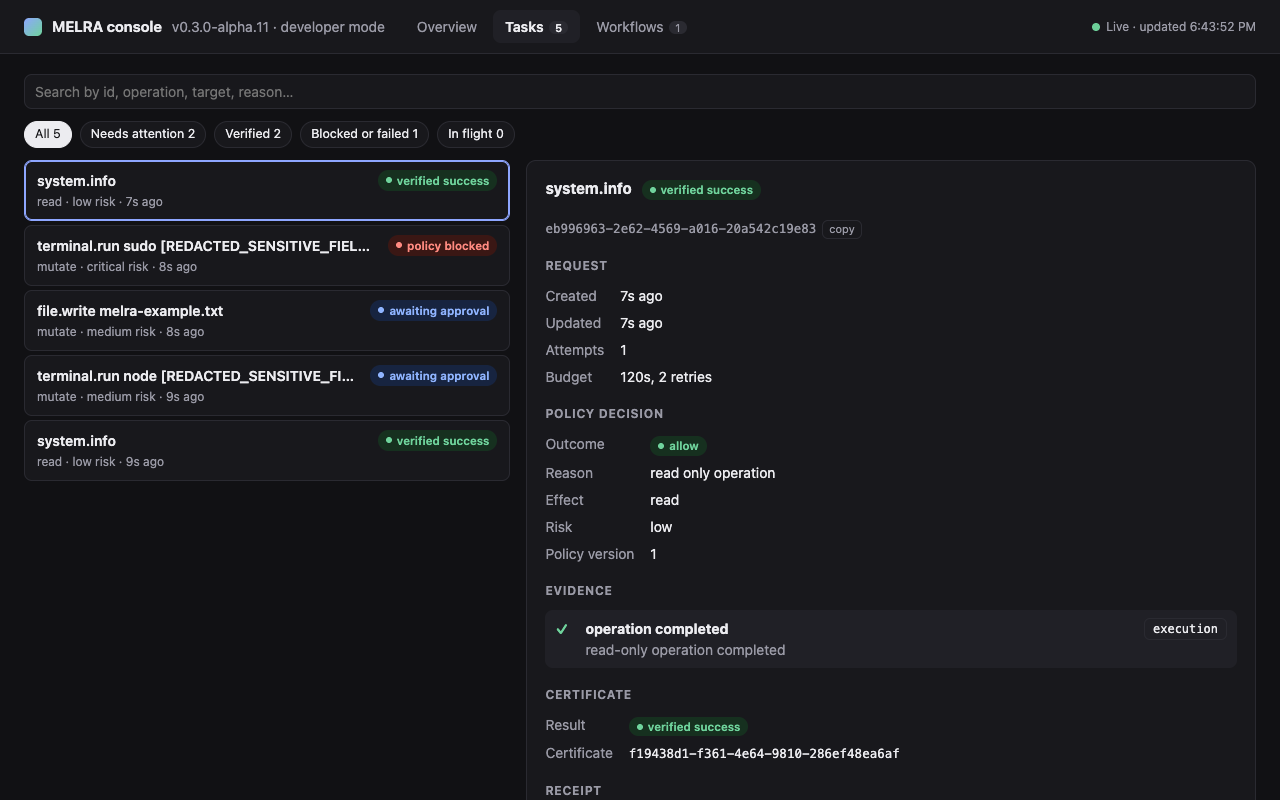
An overview, a searchable task list, and durable workflows with a live event stream. It works at phone width and in light and dark, and it is served with a strict Content-Security-Policy. |
Safe by default
| Default | |
|---|---|
| 🏠 | Local only. stdio, loopback HTTP behind a token, or a mode-0600 Unix socket only your OS user can open. No account and no hosted service. |
| 📴 | Telemetry is off. |
| ✍️ | Changes need two things: declared evidence and an exact, expiring, task-scoped approval: a phrase in developer mode, an operator's melra approve in enforced mode. |
| 📁 | Paths stay inside your workspace, including terminal working directories; symlink escapes are refused. |
| 🚫 | Shells, sudo/su and arbitrary desktop key names are denied. Terminal commands must be on the allowlist by name. |
| 🌐 | Private, link-local and cloud-metadata addresses are blocked by the browser and HTTP adapters themselves, after DNS resolution, before any allowlist is consulted; loopback too in enforced mode, unless the policy opens it. |
| ⚠️ | Web page content is marked untrusted and can never change policy. |
| 🔑 | Secrets are redacted before anything is stored, and agents get capabilities, never your raw credentials. |
| ⏱️ | Every call is bounded by a budget and a cancel signal; a stalled browser fails with a clear error instead of hanging. |
What actually guards an effect depends on the mode:
developer (default) | enforced | |
|---|---|---|
| Approving a change | The agent can, with the phrase its own plan response carries: a record, not a boundary | Only an operator, out of band (melra approve, melra console, melra run's prompt) |
| An approved command | Runs in an OS sandbox where one works (Seatbelt on macOS, bubblewrap on Linux): it writes only the workspace and temp, cannot read MELRA's files or the login files MELRA lists (see INSTALLATION; the rest of home stays readable), and has no network without the network trait (under bubblewrap, Unix sockets on the filesystem stay reachable). Where none works (Windows, Linux where bubblewrap cannot run) it has your rights, and every receipt says sandbox: none | The same sandbox (in the container pair, another account), and MELRA will not start without one unless the policy file records the opt-out |
| The agent's own tools | Untouched: a native shell or editor goes around MELRA | Yours to remove; MELRA's server cannot see them, melra doctor reads Claude Code's settings and OpenClaw's and Hermes's configs, and melra probe checks from inside the agent's box |
melra doctor says which of these hold on its protection line, and
melra_capabilities reports approvals and sandbox beside mode.
Unsafe-local mode and the two deployment modes
Every row above can be switched off at once with melra serve --unsafe-local (or
MELRA_UNHINGED=1): no policy, no approvals, no evidence requirement, no workspace
confinement, no destination checks. The agent gets the reach your OS user has, apart
from a few fixed file checks that hold in every mode.
The mode announces itself on stderr, in melra doctor and in melra_capabilities,
and receipts still record what ran. See
unsafe-local mode.
The honest gap in a default install is that MELRA governs the effects it is asked
for. An agent holding both a MELRA terminal and a native one makes the kernel
optional. MELRA_MODE is where you say which situation you are in:
| Mode | Meaning |
|---|---|
developer (default) | MELRA governs what it is asked for; the agent may have another path, and you accept that. This is why MELRA can be tried in thirty seconds. |
enforced | You assert the alternative is gone: the agent is sandboxed, holds no privileged secrets, and reaches these systems only through here. |
MELRA cannot verify that assertion from inside its own process, and it does not
pretend to; the isolation is the operating system's job. What enforced mode does is
close every door MELRA owns: --unsafe-local is refused outright, nothing binds
outside loopback (a 0600 Unix socket is allowed), no client can register itself,
every command MELRA runs gets an OS sandbox of its own that keeps it out of MELRA's
data and your logins (MELRA will not start where none works, unless the policy file
records the opt-out), and mode is stamped on every receipt. For the operating-system side,
examples/deploy has a hardened Docker run, a systemd
unit and a Compose pair that puts the agent in a container of its own, each checked
in CI, melra doctor reports which restrictions are actually in
effect, and melra probe, run inside the
agent's box, checks that it stops a workspace write, a read of MELRA's data, outbound
and local connections, and starting a shell. See
deployment modes,
the threat model and the security policy.
For Claude Code, melra launch claude-code takes the other path away for the
session it starts: Read, Glob and Grep are its only built-in tools and melra its
only MCP server, so the only tools it has that change anything are MELRA's. In
developer mode the agent approves its own changes, and a command MELRA runs for
it has your rights wherever no sandbox
works, so --mode enforced is how you decide each one. The
server it starts leaves node, npm, npx and pnpm out of the default
allowlist, unless the policy file lists them, as one melra setup wrote does:
remove the ones the agent does not need. A claude started any other way is
unchanged. See
launching an agent.
For OpenClaw and Hermes Agent,
melra setup --client openclaw --exclusive --write (or --client hermes)
turns the agent's own shell, web and file-changing tools off (Hermes's file
reads too) in its own config, through the switch each one documents, and
melra doctor says whether its exec or terminal is still enabled. That is
a default the agent's OS user can edit, not a boundary. See
OpenClaw's and Hermes Agent's tools.
Why MELRA
An LLM decides what to do. A harness runs the loop that gets it there. Something still has to decide whether the resulting effect is allowed, avoid replaying uncertain mutations, prove what happened, and survive a crash in the middle. Today that machinery is rebuilt inside every agent harness, and it dies with the harness. MELRA is that machinery, factored out and made agent-independent.
| 🚫 Typical tool server | ✅ MELRA |
|---|---|
|
|
Next to the two layers it is most often mistaken for:
| Agent harness | MCP server | MELRA | |
|---|---|---|---|
| Model loop and reasoning | ✓ | ✗ | ✗ |
| Tools | ✓ | ✓ | via adapters |
| Agent-independent policy | usually ✗ | possible | core |
| Durable effect state | sometimes | rarely | core |
| Idempotency across restarts | varies | rare | core |
| Crash recovery without replay | varies | rare | core |
| Independent verification | uncommon | possible | core |
| Evidence receipts | uncommon | possible | core |
| Works across agents | ✗ | ✓ | ✓ |
| Credential isolation | varies | varies | core |
| Hard capability boundary | varies | usually ✗ | partly shipped |
Plenty of MCP servers can do these things; this is not a claim that none of them do.
The difference is that in MELRA they are the execution contract rather than a per-tool
option. The boundary is partly shipped: MELRA_MODE=enforced closes every door
MELRA owns, but the OS isolation that stops a harness reaching the filesystem around
the kernel is the operator's to build; runnable hardened deployment recipes are still
to come (#52).
The feature test. Anything that would still make sense if the request came from ordinary deterministic software belongs in MELRA: authorisation, idempotency, credential isolation, recovery, verification, effect history. Prompt optimisation, LLM memory, model selection, a planner and agent personality belong to the harness above. That is why nothing in MELRA's execution path ever calls a model.
What it can do
Effect adapters
The kernel is the contract; these are its shipped implementations. Every one passes through the same policy, approval, budget, verification, receipt and certificate pipeline; an adapter that skipped it would not be an adapter.
| Adapter | What is implemented | |
|---|---|---|
| 🗂️ | Files | Root-confined read, hash, atomic write, move, mkdir and delete, with symlink-escape defenses |
| 💻 | Terminal | Shell-free foreground and supervised background processes with allowlists, traits, timeouts, interactive input, cancellation and redaction |
| 🌐 | Browser | Isolated Playwright sessions, semantic DOM targets, bounded artifacts, network and popup policy, opt-in profiles, condition-based settling, and every browser call bounded so a stalled page fails clearly |
| 🖥️ | Computer | Capability discovery, accessibility-tree and OCR inspection, and governed screenshot, pointer, drag, keyboard and scroll on macOS, Windows and supported Linux/X11 setups |
| 📡 | HTTP | GET/HEAD without a body as reads and every other method as an approval-gated at-most-once mutation, pinned to the address the destination check resolved, with credentials injected by the kernel rather than handed to the caller |
| 🧠 | Operational memory | A kernel service, not an adapter: scoped SQLite storage of what MELRA knows about its own effects, with hybrid ranking, freshness, expiry, supersession, provenance and redaction |
Database, cloud and SaaS adapters are designed and on the roadmap, not shipped today. Semantic memory about the user (preferences, conversation history) belongs to the harness, not here.
A deliberately small tool surface
Twelve tools in front of the adapters and one durable workflow controller. The CLI, both SDKs, loopback HTTP and the Unix socket reach the same twelve operations; this list is the kernel contract, not an MCP-specific API.
| Tool | Purpose |
|---|---|
melra_capabilities | Discover operations, platform support, limits and policy posture |
melra_plan | Validate, persist and policy-check one bounded operation |
melra_execute | Execute an approved plan and verify the declared outcome |
melra_task_status | Read durable task state |
melra_task_cancel | Cooperatively cancel pending or running work |
melra_receipt | Retrieve redacted evidence and the execution certificate |
melra_task_judge | Answer a waiting task's semantic question: yes, no or cannot_tell, never as the principal that planned it |
melra_workflow_plan | Validate, preflight, encrypt and persist a bounded workflow |
melra_workflow_advance | Execute one ready scheduling wave |
melra_workflow_status | Read the durable workflow projection |
melra_workflow_cancel | Cooperatively cancel nonterminal workflow work |
melra_workflow_control | Pause, resume or suspend a run without losing its place |
A verdict records its judge as declared, and the certificate carries it beside
executedBy, the receipt's declared principal. Over MCP even
a human: judge is the harness's claim; only a cli: judge, from melra judge, came
through an operator surface.
Prefer tool names your model already knows? Set MELRA_HARNESS_TOOLS=1 and thirteen
more appear alongside these (read_file, write_file, run_command, browser_click,
approve, …). They are not a second path: each one builds an ordinary task and runs
the same pipeline. See ordinary tool names.
Durable, restart-safe workflows
Workflows compose operation, approval, condition, parallel, bounded_loop,
checkpoint, compensation, human_input and delegation nodes, and every effect
still travels through the task pipeline. Each CLI call below is a new process, so this
exercises restart persistence with no daemon:
melra workflow plan --definition examples/workflows/restart-safe.json   # save the id
melra workflow advance <workflow-id>
melra workflow advance <workflow-id>          # exits 3 with the write's approval challenge
# developer mode echoes the phrase; enforced mode runs `melra approve <task-id>` instead
melra workflow advance <workflow-id> --approval '<approval-id>:<exact phrase>'
melra workflow advance <workflow-id>planned stateVersion=2
running stateVersion=4 inspect=verified_complete
awaiting_approval stateVersion=6 phrase="APPROVE <digest prefix>" (developer mode)
running stateVersion=8 write=verified_complete
verified_complete stateVersion=11 checkpoint=verified_completeStop the process after any line and the next command resumes from the same
MELRA_HOME. Interrupted reads may retry; interrupted changes are never silently
repeated. They are settled by re-observation, or they park in recovery_required.
workflow advance and resume exit 0 while the run is fine, 3 while it waits on an
approval, 4 while it waits on an --input, and 2 once it has failed, ended
partially_complete or cancelled, or needs recovery. workflow plan, pause and
suspend exit 0 when they plan or halt the run; pausing or suspending a run that is
complete, cancelled or failed is refused. workflow inspect exits 0 in any state.
workflow cancel exits 0 when it leaves the run cancelled and 1 when it does not,
as for a run already complete. Errors exit 1.
Everything shipped in this release
Shipped in 0.3.0-alpha.11 and 0.3.0-alpha.12 | Evidence |
|---|---|
| Restart-safe bounded workflows across nine node kinds | A real MCP process is stopped, replaced and resumed in E2E |
| Encrypted exact task, workflow and result payloads | AES-256-GCM storage plus plaintext-leak checks across SQLite/WAL and public projections |
| Recovery without silent mutation replay | 8/8 deterministic recovery scenarios, zero duplicates, zero false success |
Loopback HTTP, a 0600 Unix socket, an event stream and a read-only console | Same runtime as stdio, token on every route, 405 on any non-GET to the JSON API |
| A client authenticates itself and is named on every receipt | OAuth 2.1 registration through approval to a token |
| Two deployment modes | --unsafe-local and a non-loopback bind are refused under MELRA_MODE=enforced |
| HTTP and API calls as a first-class effect | A mutation whose reply never arrived is reported unknown, not failed |
| Agents receive capabilities, not credentials | The kernel holds the secret and scopes it by host and capability; grants carry a size and an expiry |
| Evidence says how it is known | execution / state / independent / semantic strength on every evidence item |
| Independent-channel verification | http_resource_matches executes through POST and verifies through a separate GET |
| Your own evidence types | A registered verifier answers { "type": "custom" } evidence; planning refuses an unregistered one, and custom evidence is always the weakest strength |
| Setup for 26 agent apps | melra setup writes each app's own format; Claude Code, OpenCode, and Hermes Agent connected to a packed release on a real Mac |
| OS isolation you can check | melra doctor reports capabilities, no_new_privs, seccomp, and a read-only root; CI runs it under the hardened Docker and systemd recipes |
| A self-authored governance benchmark | GovBench: 362 cases through the real runtime, safety 312/312, utility 50/50 |
See the full CHANGELOG.
Evidence and benchmarks
Numbers come from committed scripts and JSON artifacts, with dataset hashes and claim boundaries. They are component measurements, not a claim that MELRA is "the best" or that unlike benchmarks are comparable.
| What | Result | What it means | |
|---|---|---|---|
| ✅ | Safety and execution evals | 55/55 | Deterministic policy, capability-grant, credential-scope, traversal, terminal, memory, computer, HTTP, cancellation and verification scenarios |
| 🔁 | Durable Core eval | 8/8 | 100% expected recovery, 0 duplicate execution, 0 false success, 100% event consistency |
| 🛡️ | GovBench (self-authored) | 312/312 safety, 50/50 utility | 362 model-free cases through the real runtime: containment, approval integrity, verification honesty, exactly-once, redaction, and false positives on legitimate work. Its first run found two real bugs (293/307), both fixed; governance adds about 0.5–1.4 ms per action |
| 🧠 | LoCoMo retrieval | 0.7597 coverage@20 | 1,982 evidence-bearing questions with zero model, embedding or network calls; re-run on 2026-10-14 and identical on every metric |
| 🧠 | Synthetic recall | 100/100 Recall@1 | Planted-fact regression over 1,000 records |
| 🌐 | Static-page settle | 183.7 ms p50 vs 301.3 ms | 39% less waiting with identical 10/10 correct reads |
| 🌐 | Slow-render settle | 10/10 vs 0/10 correct | Condition-based waiting sees the final DOM; a fixed 300 ms wait reads too early |
| 💻 | Terminal | 30/30 verified | Shell-free process launch, 48.1 ms p50 on the measured machine |
| 🖥️ | Computer control plane | 30/30 probes | 0.032 ms p50 adapter discovery; this is not a desktop task-success score |
Raw artifacts: core microbenchmarks, LoCoMo and GovBench.
The repository also contains a pre-registered browser-agent harness (MiniWoB-125 and the WebArena-Verified Hard-30 registered subset) whose task IDs, upstream revisions and dataset hashes are frozen. Its score is not yet claimed: it will be published only after a full fixed-denominator run passes the publication gate. MELRA has not run an official OSWorld, WebArena or LongMemEval submission.
Reproduce the scores
# the full validation gate
pnpm check && pnpm evals && pnpm e2e && pnpm pack:check && pnpm security:audit
pnpm --filter @melra/evals evaluate:durable-core -- --publishable

# memory, browser, terminal and computer microbenchmarks
pnpm benchmark:core

# governance benchmark: 363 model-free cases, loopback fixtures only
pnpm benchmark:govbench

# LoCoMo (dataset not vendored: CC BY-NC 4.0)
git clone https://github.com/snap-research/locomo.git /tmp/locomo
pnpm benchmark:locomo -- --dataset /tmp/locomo/data/locomo10.json \
  --output docs/research/results/locomo-retrieval.json

# browser-agent harness contract checks (no model, no network)
pnpm benchmark:browser:check
pnpm benchmark:browser:verify-upstream

# hardened container and a real MCP smoke test
docker build -t melra:local . && docker run --rm melra:local doctor && pnpm docker:smoke
The MiniWoB suite also needs the pinned MiniWoB++ assets and an agent configuration; see the research index and the methodology. Run outputs (HAR, screenshots, video, transcripts) are git-ignored and must never be committed.
For developers
|
SDKs
Both SDKs spawn a local server or connect to a running one over HTTP or a Unix socket. The token is always passed explicitly, and plain HTTP to a remote host is refused unless you opt in. |
CLI at a glance
|
 TypeScript
 Python
Repository map
apps/cli/                   CLI and stdio entrypoint

kernel services
packages/protocol/          strict task, workflow, event and operation schemas
packages/runtime-core/      task/workflow lifecycle, events, recovery
packages/policy-core/       local policy and scoped approvals
packages/storage-sqlite/    transactional tasks, workflows, events, evidence
packages/verifier-core/     deterministic evidence predicates
packages/receipt-schema/    receipts and execution certificates
packages/memory/            operational memory: scoped retrieval and lifecycle
packages/server/            runtime composition, MCP, loopback HTTP and Unix socket

reference effect adapters
packages/file-runtime/      confined filesystem operations
packages/terminal-runtime/  shell-free process supervision
packages/browser-runtime/   isolated browser automation and stable-DOM wait
packages/computer-runtime/  governed local computer-use adapters
packages/http-runtime/      governed HTTP and API calls

clients and evidence
packages/sdk-ts/            TypeScript client SDK
sdk-py/                     Python client SDK
benchmarks/browser-agent/   pre-registered browser-agent evaluation harness
evals/                      safety and durable crash-recovery evaluations
scripts/                    benchmark and release checks
docs/research/              methods, findings and raw results
examples/                   runnable task examples
MELRA is capability-driven, not language-restricted: Rust, Go, Swift, C# or another language can be added when measurement shows a real benefit and the same conformance suite passes.
Runnable examples cover a read-only system task, a verified file write, a terminal check, browser inspection, scoped memory, computer capability discovery, a governed API call, independent verification, and a restart-safe workflow.
Documentation
Contributing
Code, adapters, client integrations, benchmark harnesses, verifier predicates, documentation and threat analysis are all welcome.
| Start here | What it is |
|---|---|
| good first issue | Scoped, with the files to touch named in the issue |
| help wanted | Larger, still well defined |
| Open design proposals | Comment on open questions before implementation; see semantic verification #54 |
| Contributing guide | How the pipeline fits together and which files one change touches |
- Read CONTRIBUTING.md and the Code of Conduct.
- Sign your commits under the DCO (
git commit -s), and sign the CLA once, on your first pull request. - Run
pnpm checkbefore opening a pull request; it also checks links, the environment-variable table and the CHANGELOG shape. - Report vulnerabilities through private vulnerability reporting, never in a public issue.
License
The MELRA kernel, CLI and documentation are licensed under the
GNU Affero General Public License v3.0 only, and XAGI Labs Private
Limited also offers the kernel under a commercial license. The SDKs
(@melra/sdk, @melra/protocol and the melra Python package), the examples
and the code samples in the documentation stay under the
Apache License 2.0, so code that only calls MELRA can
use any license. Releases up to and including 0.3.0-alpha.22 were Apache-2.0
and stay so. LICENSING.md maps each path to its license and
explains what the AGPL asks of a modified MELRA run as a network service.
The MELRA name and logo are covered by TRADEMARKS.md; the official logo and hero artwork are all rights reserved. Third-party benchmark datasets keep their own licenses and are not included in this repository.
Built in the open by XAGI Labs.
MELRA brand assets © XAGI Labs Private Limited, all rights reserved.
Install with your agent
Paste this prompt into your agent. It reads this page and does the setup for you.
Read https://aiagentslisting.com/mcp/melra to learn what the "MELRA" MCP server does and how to install it. Add it to my coding agent's MCP configuration as documented on that page, then confirm the server connects and list the tools it exposes.Agents can also browse this directory over MCP at https://aiagentslisting.com/api/mcp
From the project README
npx @melra/cli@alpha setupThis server runs locally, so we can't read its tool list over the web yet.
We could not run this server: its npm package has not answered in our offline sandbox, which usually means it needs an API key or other configuration to start. The four checks that need a live server are left out, and the grade tops out at B until we can read its tools.
What's missing
- Easy installA paste-ready client config (an mcpServers block) is documented.0/12
- Claimed by ownerThe maintainer proved ownership of this listing.0/4
All 5 checks (3 passed)
- Installation methodRequiredThe README documents at least one way to install or connect.15/15
- Has a READMERequiredThe repository ships documentation we could read.10/10
- Easy installA paste-ready client config (an mcpServers block) is documented.0/12
- Has a licenseThe repository declares a license.8/8
- Claimed by ownerThe maintainer proved ownership of this listing.0/4
- Verified liveNot checkableWe connected to the server and it answered a real MCP handshake.—
- Exposes toolsNot checkableThe server reports at least one tool, from its manifest or a live read.—
- Ships promptsNot checkableThe server exposes at least one prompt template.—
- Ships resourcesNot checkableThe server exposes at least one resource.—
Maintain this server? Claiming proves you own the listing and earns the last 4 points.
Claim this listingShow this grade in your README

Paste this line near the top of your repository's README. The badge always renders the current score.
[](https://aiagentslisting.com/mcp/melra)Alternatives to MELRA
Nothing comparable is listed yet.
v0.4.0-alpha.2Release notesv0.4.0-alpha.1Release notesv0.4.0-alpha.0Release notesv0.3.0-alpha.22Release notesv0.3.0-alpha.21Release notesv0.3.0-alpha.20Release notesv0.3.0-alpha.19Release notesv0.3.0-alpha.18Release notesv0.3.0-alpha.17Release notesv0.3.0-alpha.16Release notesv0.3.0-alpha.15Release notesv0.3.0-alpha.14MELRA v0.3.0-alpha.14Release notesv0.3.0-alpha.12Release notesv0.3.0-alpha.11Release notesv0.3.0-alpha.9Release notesv0.3.0-alpha.8Release notesv0.3.0-alpha.6Release notesv0.3.0-alpha.5Release notesv0.3.0-alpha.10Release notesv0.3.0-alpha.4Release notes
Send this prompt to your agent to leave a review
Connect to the AI Agents Listing MCP server at https://aiagentslisting.com/api/mcp using the HTTP transport and complete the sign-in when it asks. Then call the submit_review tool for the listing "melra" with a rating from 1 to 5 and a short note on what worked and what did not.No reviews yet
Be the first to share your experience with this tool.
Subscribe to our newsletter
One email a week. New agents, MCP servers and skills, and what is actually getting traction.