
 ChenYCL
Browser use & computer use for coding agents, powered by TypeSafe Jev: calibrated judgments from a
Browser use & computer use for coding agents, powered by TypeSafe Jev: calibrated judgments from a System One model, control loop in code. ego lite / Chrome / Safari · CLI + MCP
·

jev-browser
Browser use & computer use for coding agents, powered by TypeSafe Jev.
Calibrated judgments from a System One model. Control loop in code. No vision model, no prompt-and-parse.
English · 简体中文
Demo
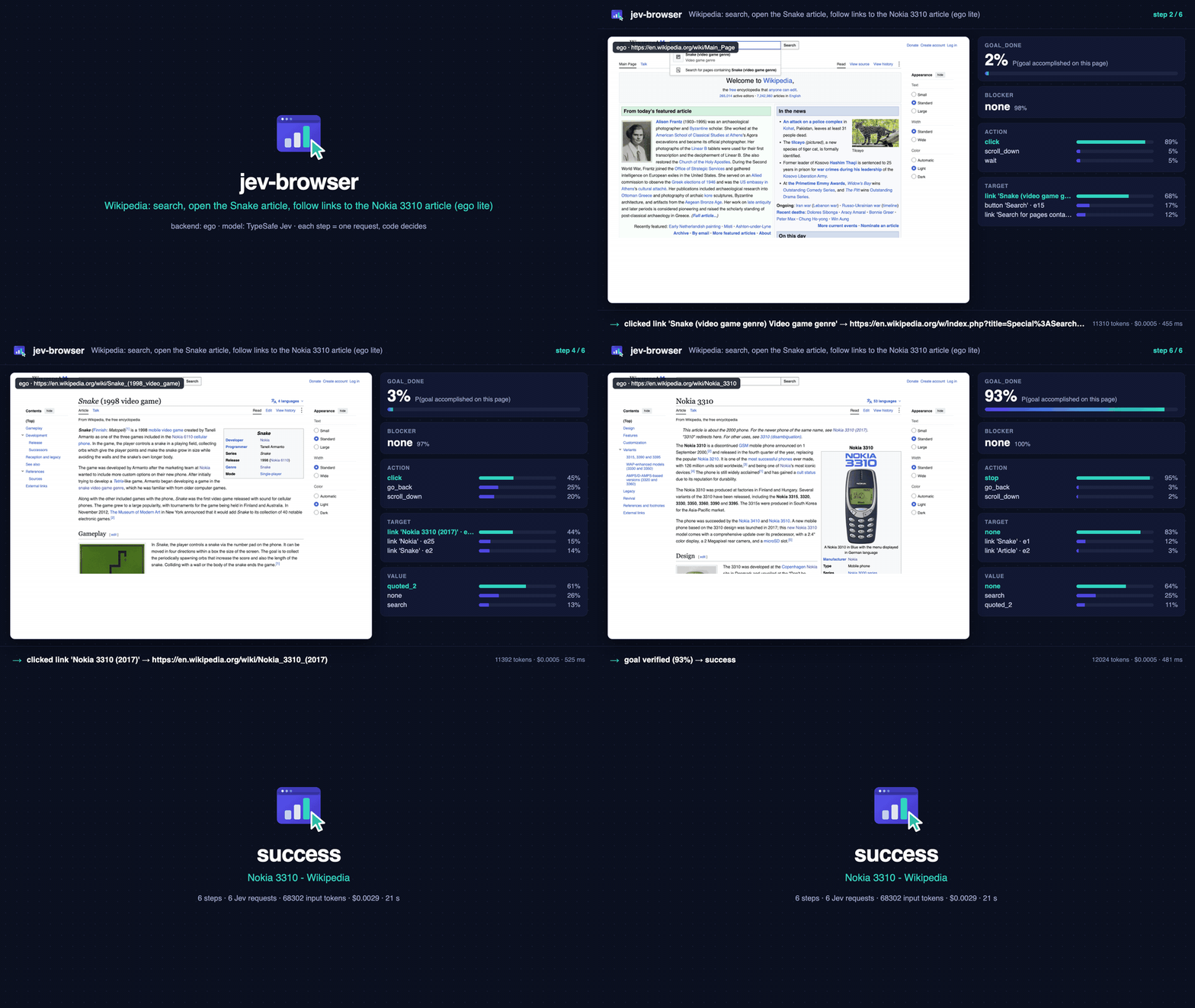
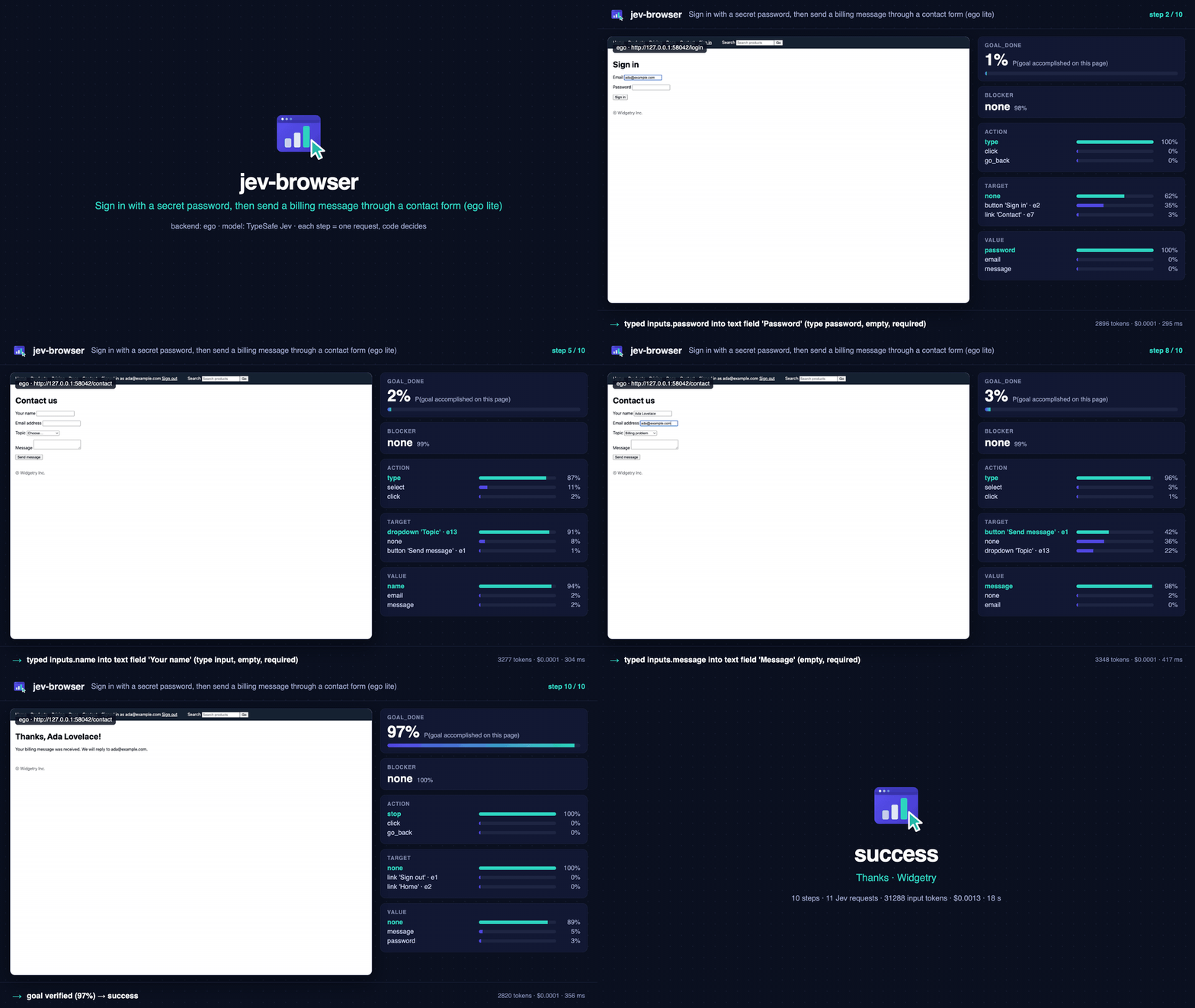
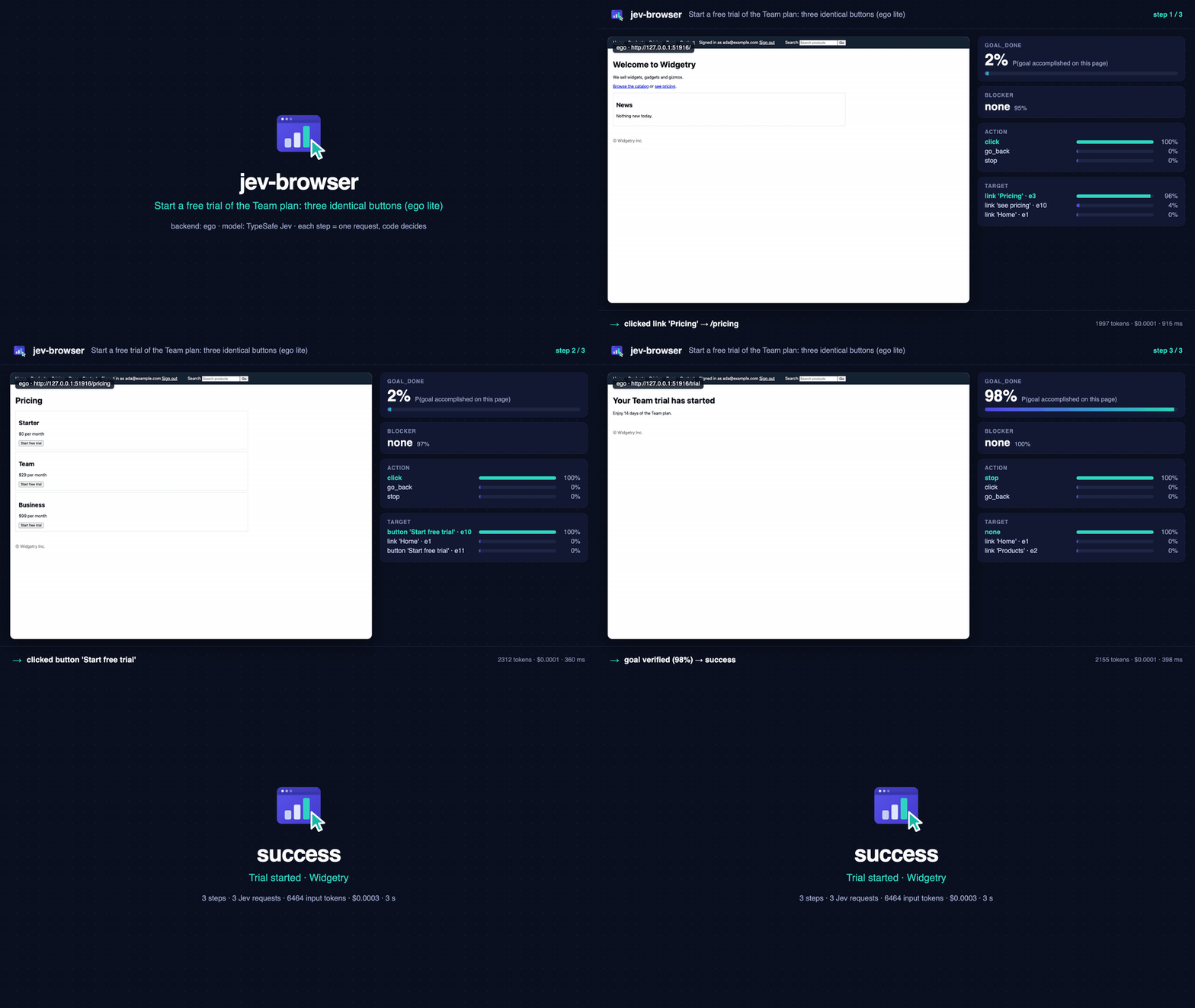
Real runs in ego lite, recorded by the tool itself (run --step-screenshots). Left: the page
exactly as Jev saw it before each step. Right: Jev's calibrated judgment for that step and the
action the code controller executed. Every demo is a single jev-browser run command.
Wikipedia, multi-hop on a real site — type into the search box and press Enter, pick the right result, follow links across three articles (a 500-link page: goal-aware candidate ordering keeps the relevant links in the list). 6 steps · $0.0029 · 21 s. ▶ MP4 1080p
Sign in with a secret, then fill a form with a dropdown — the password is typed but shown to
Jev only as inputs.password; the topic is chosen from the dropdown's options in a second
question. 10 steps · $0.0013 · 18 s. ▶ MP4 1080p
Three identical "Start free trial" buttons — the goal names the Team plan; Jev picks the right button from page structure alone at probability 1.00. 3 steps · $0.0003 · 3 s. ▶ MP4 1080p · Bonus: GitHub repository navigation (MP4)
GitHub does not play repository MP4s inline, so the GIFs above are previews; the MP4s are the
full-quality recordings (1080p, crossfades). Reproduce any of them with
node scripts/make-demo.mjs <run.json> out.mp4 --gif out.gif after a run made with --step-screenshots <dir>.
Why
| Works in the user's browser | Default backend is ego lite: the agent reuses your signed-in sessions, and hands the browser to you when it hits a login, CAPTCHA or consent wall. Resume from the same tab afterwards. |
| Calibrated, not chatty | Jev returns probabilities, not prose. Every decision is a number you can threshold, journal and tune. A step costs about $0.0003 and takes about a second. |
| Never invents text | Values that must be typed come from inputs; Jev only selects among them. secrets are typed but never sent to the model or written to disk. |
| Code stays in control | Legal actions are filtered in code, tried/blocked edges are remembered, loops are detected, step/cost/time budgets are enforced, and the final page is verified before reporting success. |
| Fits every agent | One self-contained skill directory. CLI for Claude Code, Codex, Cursor and any shell-capable agent; a dependency-free MCP server for Claude Desktop, Cursor and Codex. |
| Nothing to install | Node 22+ and a TYPESAFE_API_KEY. Zero npm dependencies. |
How it works
flowchart LR
  O[observe page<br/>url · text · elements] --> Q[one Jev request<br/>goal_done · blocker · action<br/>click_target · type_target · type_value …]
  Q --> C{code controller<br/>memory · budgets · loop detection}
  C -- success / needs_user / stuck --> R[result + journal]
  C -- act --> A[click · type · select · scroll · back · navigate]
  A --> O
Per step, one POST /v1/systemone carries the page state and the questions below. They are
independent and evaluated in parallel, so speculative ones are asked up front and consumed only
when relevant.
| question | type | used by code as |
|---|---|---|
goal_done | noul | success when ≥ 0.85 (≥ 0.7 on the final verification pass) |
blocker | choice: none · login_required · verification_challenge · consent_or_permission_dialog · error_page · missing_information | needs_user when a non-none option ≥ 0.6 |
action | choice over the legal actions only (click · type · select · scroll · go_back · navigate · wait · stop) | preference order |
click_target / type_target / select_target | choice over element ids + none | which element |
type_value | choice over input keys + none | which provided value |
submit_after_type | noul | press Enter after typing |
progress | score: moved away · no change · closer · accomplished | go back on regression |
Full details: references/questions.md.
Quick start
git clone https://github.com/ChenYCL/jev-browser-skill.git && cd jev-browser-skill
export TYPESAFE_API_KEY=...        # https://console.typesafe.ai
node skills/jev-browser/bin/jev-browser.mjs doctor      # key, API, ego lite, Chrome, Safari, install status
node skills/jev-browser/bin/jev-browser.mjs install     # link into every agent + register Claude Desktop MCP
Optional: npm i -g . puts jev-browser on your PATH (the examples below assume it).
Install into your agents
install is idempotent, previews with --dry-run, backs up every file it edits and reverts with --uninstall.
| target | what it does | default |
|---|---|---|
claude-code | symlink ~/.claude/skills/jev-browser | ✔ |
codex | symlink ~/.codex/skills/jev-browser | ✔ |
agents | symlink ~/.agents/skills/jev-browser (skills.sh convention: Codex, opencode, Gemini CLI, …) | ✔ |
cursor | symlink ~/.cursor/skills/jev-browser | ✔ |
claude-desktop | mcpServers.jev-browser in claude_desktop_config.json | ✔ |
cursor-mcp | mcpServers.jev-browser in ~/.cursor/mcp.json | |
codex-mcp | [mcp_servers.jev-browser] in ~/.codex/config.toml |
jev-browser install --targets claude-code,claude-desktop --dry-runOther routes:
- Claude Code plugin:
claude plugin marketplace add ChenYCL/jev-browser-skillthenclaude plugin install jev-browser@jev-browser-skill - skills.sh:
npx skills add ChenYCL/jev-browser-skill --skill jev-browser - Manual: copy
skills/jev-browser/anywhere your agent reads skills from. - Windows: prefer
install --copy(symlinks need Developer Mode or elevation).
MCP hosts start servers without your shell environment, so the installer stores the key in
~/.config/jev-browser/config.json (mode 0600) when TYPESAFE_API_KEY is exported. Restart the host afterwards.
Usage
# navigate
jev-browser run --goal "Open the pricing page" --url https://example.com

# type a provided value, then press Enter (Jev decides when Enter is the natural submit)
jev-browser run --goal 'Search the catalog for "blue widget" and open its product page' \
  --url https://shop.example.com --input query="blue widget"

# sign in: the email is an input, the password is a secret (typed, never sent to the model)
jev-browser run --goal "Sign in and reach the dashboard" --url https://app.example.com/login \
  --input [email protected] --secret password=hunter2

# dedicated headless Chrome, JSON result only
jev-browser run --goal "Add the Red Gadget to the cart" --url https://shop.example.com \
  --backend chrome --headless --json --screenshot /tmp/cart.png

# look before acting: the page exactly as Jev sees it / the first-step questions without spending a request
jev-browser observe --url https://example.com --json
jev-browser run --dry-run --goal "…" --url https://example.com

# raw Jev judgments, browser-independent
jev-browser judge --state '{"ticket":"My card was charged twice"}' \
  --questions '{"refund":{"type":"noul","instructions":"Does `ticket` ask for a refund?"}}'
jev-browser pick --question "Which link opens the plans page?" --candidate pricing="link 'Pricing'" --candidate docs="link 'Docs'"
Tips that matter: write goals in English describing the end state; put everything that
must be typed in --input (quoted strings in the goal are added automatically); use --secret
for credentials.
CLI reference
| command | purpose |
|---|---|
run | accomplish a goal (--goal, --url, --input k=v…, --secret k=v…) |
observe | print the page as Jev sees it (--url, --screenshot) |
judge | raw System One call (--state / --state-file, --questions / --questions-file, --model) |
pick | one Choice over named candidates (--question, --candidate id=desc…, --context, --no-none) |
doctor | environment check (--offline skips the live API probe, --json) |
config | show · path · set <key.path> <value> · unset <key.path> · set-key [<key> | --from-env] |
install | --targets a,b · --dry-run · --copy (copy instead of symlink; use on Windows) · --uninstall · --home <dir> |
mcp | MCP server over stdio |
run options: -g/--goal · -u/--url · -i/--input · -s/--secret · -b/--backend ego\|chrome\|safari ·
--max-steps · --budget-usd · --max-ms · --model · --space-id and --page-label (ego: resume a
task space) · --keep / --no-keep (leave the final page open; default keep on success) · --headless ·
--cdp-url (chrome: attach) · --screenshot <file> · --step-screenshots <dir> (one PNG per step, the page as Jev saw it) · --dry-run · --journal-dir <dir> · --no-journal ·
--json · -q/--quiet. jev-browser --help prints the same list.
Results
| status | meaning | exit |
|---|---|---|
success | goal verified on the final page | 0 |
needs_user | blocker detected; on ego the tab was handed to you. Continue with --space-id <id> | 3 |
stuck | repeated no-effect actions, a loop, or Jev judged nothing listed helps | 2 |
max_steps · budget_exhausted · timeout | a limit was hit (--max-steps 25, --budget-usd 0.25, --max-ms 300000) | 2 |
error | backend or API failure | 2 |
Every run writes <journalDir>/<runId>/steps.jsonl (state hash, compact answers, chosen action,
whether the page changed, cost), requests.jsonl and run.json, with secrets redacted.
Backends
| backend | when | notes |
|---|---|---|
ego (default) | you want the agent in your browser with your logins, and the option to take over | keeps the result tab open on success; handOff on blockers; resume with --space-id |
chrome | unattended runs, CI, no window | own profile dir, --headless, or --cdp-url http://127.0.0.1:9222 to attach |
safari | WebKit | enable Develop → Allow Remote Automation once |
Judging tiers
Three judging backends serve the same /v1/systemone contract, and all three are first-class
options — but hosted Jev is the default: with no config file and no environment, a run uses
https://api.typesafe.ai (and a loopback baseUrl — a local model — is priced at $0).
jev-browser tier list      # the three tiers: what each is, what it needs, how to start it, its port, its score, its bar
jev-browser tier status    # what a run would use right now: baseUrl, tier, resolved goal_done bar, endpoint
jev-browser tier use kev   # one tier's export line and start command (nothing is written unless you add --persist)
The GGUF readout (node skills/jev-browser/bin/jev-local.mjs, port 8092) needs no Python and
serves an Apple Silicon llama.cpp server; Kev (node skills/jev-browser/bin/jev-kev.mjs, port
8008) trades a Python venv, a 9.34 GB base and tens of GB of GPU memory for the accuracy tier. The
The tier table with every measured number — scores, latency, disk, memory, each backend's goal_done
bar and the known holes — also lives in SKILL.md.
A local tier is one command: setup fetches whatever is missing through the launcher itself, starts
the server in the background, writes baseUrl and the placeholder key into your config, then proves
the endpoint works by asking it one real question.
jev-browser setup local-readout   # llama.cpp + the registry GGUF; prints the log path and the pid
jev-browser setup status          # installed / running / configured, per local tier
jev-browser setup stop local-readout
jev-browser setup kev is the same for the accuracy tier and needs uv as well (it clones the Kev
checkout and runs uv sync --extra serve). Both write under ~/.jev-browser/, never into this repo.
The manual route still exists — start bin/jev-local.mjs yourself and export the two variables it
prints — and jev-browser tier use <tier> --persist still stores that line's values for you.
Judging backends: measured comparison
The same 20 graded items, the same real captured fixture step, and the same harness for every
backend; the run-level lines come from one campaign of 15 real browser runs. Every figure below is
read from this repo's own records — experiments/gguf-provider/RESULTS.md,
experiments/gguf-provider/results/local-models-4b.md,
experiments/kev-4b/README.md,
docs/local-kev-bringup.md,
docs/local-backend-run-smoke.md and the raw JSON under
experiments/gguf-provider/results/. not measured means the record is silent about that cell;
— means the item does not exist for that backend. Hosted Jev remains the default, and its
0.95 is the number every local backend is measured against.
Accuracy — 20 graded items, ground truth known by construction
| backend | all 20 | browser 15 | noul 5 | action + click_target 5 |
|---|---|---|---|---|
hosted Jev — jev-latest → jev-1.13.0, the default | 19/20 = 0.95 | 14/15 = 0.933 | 5/5 = 1.00 | 5/5 = 1.00 |
Kev 4B — jaredpalmer/kev-4b, T=2.1435, --row-limit 16384 | 19/20 = 0.95 | 14/15 = 0.933 | 5/5 = 1.00 | 5/5 = 1.00 |
| Kev 4B — same checkpoint, published row limit 8192 | 18/20 = 0.90 | 13/15 = 0.867 | 5/5 = 1.00 | 4/5 = 0.80 |
GGUF 4B — Qwen3.5-4B Q4_K_M, the setup local-readout default | 16/20 = 0.80 | 12/15 = 0.80 | 4/5 = 0.80 | 2/5 = 0.40 |
| Qwen3-4B-Instruct-2507 Q4_K_M | 15/20 = 0.75 | 10/15 = 0.67 | 5/5 = 1.00 | 1/5 = 0.20 |
| gemma-3-4b-it Q4_K_M | 10/20 = 0.50 | 7/15 = 0.47 | 3/5 = 0.60 | 1/5 = 0.20 |
Kev 0.8B — jaredpalmer/kev-0.8b, T=2.41 | 14/20 = 0.70 (14 of 19 answerable) | 9/15 = 0.60 | 5/5 = 1.00 | 3/5 = 0.60 |
GGUF 0.8B — Qwen3.5-0.8B Q8_0 | 10/20 = 0.50 | 7/15 = 0.47 | 3/5 = 0.60 | 1/5 = 0.20 |
| "always answer the option listed first" — trivial baseline | 11/20 = 0.55 | 9/15 = 0.60 | 2/5 = 0.40 | 2/5 = 0.40 |
Two rows carry a caveat: Kev 4B reaches 0.95 only with the optional row-limit patch (at the
published 8192 the 55-option click_target question is refused with HTTP 422, which is the one item
that separates the two Kev 4B rows); and ddg-click-target-aapl's hand label is debatable — the
label is e1 (investing.com, in_viewport=false) while hosted Jev, the GGUF 4B and gemma all pick
e15 (Yahoo Finance's AAPL quote page, in viewport), so every one of those is scored down by up to
one item on that question.
What it costs to run
| backend | per item, mean / max | disk | memory | cost |
|---|---|---|---|---|
| hosted Jev | 621 / 1,270 ms | nothing to download | not measured | $0.0035 for the 20 items (ceiling-jev-20items.json) |
| Kev 4B @16384 | 2,223 / 12,183 ms | 9.34 GB base + 152 MiB checkpoint | 18–19 GB idle, 36 GB GPU footprint after a full pass | $0 |
| Kev 4B @8192 | 1,965 / 8,995 ms | the same two files | 18–19 GB idle, 12.2 GiB RSS peak during the pass | $0 |
| GGUF 4B | 3,072 / 13,895 ms | 2,740,937,888 B (2.6 GiB) | 3,362 MiB (llama-server RSS) | $0 |
| Qwen3-4B-Instruct-2507 | 2,514 / 15,386 ms | 2,497,281,120 B | not measured | $0 |
| gemma-3-4b-it | 2,189 / 9,725 ms | 2,489,894,016 B | not measured | $0 |
| Kev 0.8B | 590 / 6,353 ms | 1.72 GiB (base + LoRA + tokenizers + head) | 3.6 GiB RSS peak at 16384 (21–129 MiB idle) | $0 |
| GGUF 0.8B | 777 / 4,178 ms | 811,843,840 B (774 MiB) | not measured | $0 |
| trivial baseline | — | — | — | $0 (no model) |
The latencies are not all one measurement, so read them with these three notes: the GGUF 4B and
gemma rows were timed while a download was still running, which makes them read pessimistic (the
GGUF 4B re-measured clean is 18.3 s cold / 9.0 s warm for the whole 5-question step, and 6.1 s of
that is the 55-option click_target alone); Kev 4B's per-item figures likewise include that
55-option item (12.2 s of its 12,183 ms worst case); and a packed 5-question fixture step costs
23.8 s at the raised Kev limit (12,073 input tokens) but is refused outright at 8192. $0 is not a
rounding: a loopback baseUrl is priced at zero by the client. Memory for Kev 4B is the real
constraint — reading footprint, not ps -o rss=, is what shows the 36 GB, and on this 48 GB
machine the raised limit drove swap from 16.7 GB to 28.3 GB used (416 MB free) during a full pass,
without a single request timing out.
How this was measured
- 20 graded items with ground truth known by construction. 15 browser items (each with the expected element id / action) + 5 passage yes/no items; the label is written into the item, not produced by a model.
- A real captured-page step.
experiments/gguf-provider/fixtures/judge-state.jsonplusjudge-questions.jsonreplay one genuine browser step — the product's own 5-question request (goal_done,blocker,action, a 55-optionclick_target,select_target) on a real page. - A rotation probe. The same option list is re-rendered at three rotations while the labels stay
put, so "reads the text" and "reads the position" are distinguishable: the GGUF 4B hits the
expected element at every rotation (k=0/3/7 →
e8/e5/e1, P≈0.99), the 0.8B keeps answering inside the first few slots. - One harness per backend, one machine for all the local numbers. The GGUF candidates run
through
experiments/gguf-provider/eval/run.mjs; Kev is graded byexperiments/kev-4b/run.mjson the same items and the same fixture step, over the same/v1/systemoneclient path hosted Jev used (lib/typesafe.mjs), behind a preflight that refuses to run unless the served checkpoint equals--run— a wrong model cannot be scored silently. Everything local was measured on one Apple Silicon machine: M3 Max, 48 GB, macOS 25.6.0 arm64.
The 15 real browser runs
The shipped GGUF readout actually driving jev-browser run — goals, journals and per-step numbers in
docs/local-backend-run-smoke.md:
- Outcomes: 4
success· 8stuck· 2needs_user· 1max_steps— zeroerror, zerotimeout. One run finished a real Wikipedia search goal in 4 steps. Of the twoneeds_user, one was a genuine CAPTCHA (true positive) and one a falsemissing_informationon a plain pricing page. - The transport never broke: 39 step requests, every one succeeded on its first attempt, 0 client
timeouts, 0 HTTP 422
LOW_LABEL_MASS, lowest label mass 0.870 against a 0.5 threshold. - Strong half — element selection.
click_targetwas the most reliable question in the whole campaign: on a 65-element Wikipedia page it put the right link first at every step (0.71–0.78). - Weak half — the
actionquestion. On the fixture login page it knew both where to type and what to type (type_targetEmail 0.851,type_valueemail 0.933) yet rankedtypelast of four (0.105 against click 0.430), so the controller spent three no-effect actions and gave up; three more runs chosestopwith the goal one obvious click away. 8 of the 9 non-successruns stop on anactionchoice, which is why the controller — not the model — is where a local form-filling run has to be fixed.
The goal_done bars, and why they differ
| backend | bar, per step / final | measured basis |
|---|---|---|
| hosted Jev | 0.85 / 0.70 | the shipped value, on the scale hosted Jev is trained for. It does not transfer: scored as a termination rule over the same 15 local runs it gives 4 correct successes and 3 false stuck (runs that had already finished reported as stuck) |
GGUF readout (local-readout) | 0.174 / 0.174 | the same 15 runs replayed: pages that met the goal read 0.839–0.997, pages that did not read 0.007–0.096, and on the termination rule the usable band is 0.12–0.28 — 0.25 scores 7 correct successes / 0 false successes / 0 false stuck where 0.85 gives 4 / 0 / 3. 0.174 is that band's maximin midpoint |
Kev 4B (kev) | 0.482 / 0.482 | the same 15 goals replayed against Kev 4B with the same method and scoring: its band is (0.341, 0.683], so the readout's 0.174 would call four not-met pages a success and stop before the action that finished the goal; 0.482 is the midpoint of its clean band (any value in ~0.35–0.68 is clean) |
They differ because the three backends read the same question on scales that do not overlap — this is
a property of each backend, not a tuning preference, which is exactly why the bar is a profile
resolved from the endpoint (thresholds.profile, auto by default) rather than one global number.
A loopback endpoint is classified from one GET /v1/models at run start, and the profile, value and
reason are written to the run journal's run.json before the first step; doctor prints the result
under goal_done bar.
Reproduce
# the 20 graded items + the label-rotation probe, against a local GGUF server on :8100
node experiments/gguf-provider/eval/run.mjs --url http://127.0.0.1:8100 --json
node experiments/gguf-provider/eval/run.mjs --url http://127.0.0.1:8100 --rotate --json

# the same 20 items and the fixture step against a Kev server on :8008
TYPESAFE_API_KEY=local node experiments/kev-4b/run.mjs --run jaredpalmer/kev-4b

# the termination-rule replay over the 15 saved local runs
bash experiments/kev-4b/threshold-replay.sh /tmp/kev-threshold
node experiments/kev-4b/threshold-replay.mjs /tmp/kev-threshold
Raw JSON: experiments/gguf-provider/results/ (per-model eval-*.json, analysis-*.json,
fixture-step-*.json, plus ceiling-jev-20items.json and baseline-first-option.json) and
experiments/kev-4b/results/ (eval-<label>.json, fixture-step-<label>.json, per-item
raw/<label>/, and threshold-replay/{runs.tsv,labels.json,score.txt,journal/}).
WebUI
node skills/jev-browser/bin/jev-webui.mjs          # prints http://127.0.0.1:8765/
node skills/jev-browser/bin/jev-webui.mjs --port 9000 --open
One page over the same skill, not a second implementation: the panels call the same lib/tiers.mjs,
lib/doctor.mjs and lib/config.mjs the CLI does — so they cannot disagree with tier status,
doctor or config show — and edits go to the same ~/.config/jev-browser/config.json. Every
command it starts is one of this repo's own bin/*.mjs scripts, spawned with an argv array (never a
shell), so no field on the page can become a command.
The server binds 127.0.0.1 only — never 0.0.0.0, so nothing on it is reachable from your
network — and no route returns your API key: the config panel shows only whether one is set, and
secrets typed into the Run panel are never echoed back into the page or the log pane.
| panel | what it does |
|---|---|
| Tiers | the three judging tiers — what each is, what it needs, its port, its 20-item score and its goal_done bar, hosted marked as the default — plus what a run would use right now, start/stop for the two local servers with their output streaming into the page, and tier use's text (saving it to the user config is its own labelled button) |
| Config | the effective configuration with its sources, editable, with the diff a save produced and an unset for every key the user file sets |
| Doctor | doctor() live or offline: every check with its status, detail and hint |
| Models | the local registry: which GGUF is downloaded, which is the default, which file is serving, and a one-click start with --model-name or an existing on-disk --model <path> |
| Judge | a state and a question set against the configured endpoint, with each answer's choice, confidence and probability table |
| Run | a real run (jev-browser run --json) with live progress, the final status / steps / cost and the per-step journal |
MCP server
jev-browser mcp speaks MCP over stdio with zero dependencies. Tools: jev_browse, jev_observe,
jev_judge, jev_pick, jev_doctor, jev_config. Results come back as JSON text and
structuredContent. See references/mcp.md.
Configuration
Precedence: defaults → ~/.config/jev-browser/config.json → ./jev-browser.config.json (or
$JEV_BROWSER_CONFIG) → environment → flags.
jev-browser config show
jev-browser config set model jev-1.13.0            # pin the model version
jev-browser config set thresholds.goalDone 0.9     # stricter success
jev-browser config set-key --from-env              # persist the key for MCP hosts
Environment: TYPESAFE_API_KEY TYPESAFE_BASE_URL TYPESAFE_DEFAULT_MODEL JEV_BROWSER_BACKEND
JEV_BROWSER_MAX_STEPS JEV_BROWSER_BUDGET_USD JEV_BROWSER_JOURNAL_DIR JEV_BROWSER_CHROME_CDP_URL
JEV_BROWSER_HEADLESS JEV_BROWSER_EGO_SERVER_NAME CHROME_PATH (Chrome executable override)
JEV_BROWSER_CONFIG (explicit project config file). Every key is documented in
references/config.md.
Tests and stability
npm test                      # unit + e2e; live Jev when TYPESAFE_API_KEY is set, else a local mock
npm run test:e2e:mock         # fully offline (needs Chrome)
JEV_BROWSER_TEST_SAFARI=1 npm run test:e2e   # also drive Safari
CI (.github/workflows/test.yml) runs the unit suite and the mock e2e suite on Ubuntu with headless Chrome;
the live suite is meant to be run locally, so no API key is ever needed in the cloud.
The e2e suite serves a fixture site (catalog, search, login, pricing/trial, cart, contact form with a dropdown, long docs page, restricted area) and runs nine goal scenarios per backend: navigation, search with typed input, login with a secret, choosing the right one of three identical "Start free trial" buttons, add to cart, form + dropdown, scroll to reveal, hand-off on a blocker, limits on an impossible goal, plus observe/dry-run, the CLI round-trip and ego hand-off → resume. Tests never write outside the repo.
Measured on macOS with live Jev (2026-09-22):
| full suite | 54 passed, 0 failed, 5 skipped (Safari opt-in), ~40 s, three consecutive runs identical |
| per-scenario determinism | same status every run; step counts identical on ego, ±1 on two Chrome scenarios |
| cost | $0.00006–0.00094 per scenario run (always under $0.001), about $0.02 per full suite |
| line coverage | 87 % overall (controller 92 %, questions/config/util 100 %, observe 99.6 %) |
Real sites, first try, via ego lite: TypeSafe docs → the Choice page in 2 steps / 9 s / $0.0005;
GitHub → docs/ATOMIC_PLANNING.md in NanoJev in 4 steps / 23 s / $0.0016.
What leaves your machine
Each step sends one request to api.typesafe.ai containing the goal, the non-secret inputs, and a
compact view of the current page: URL, title, headings, up to observation.maxTextChars (3000) of
visible text, the descriptions of listed interactive elements (role, name, href, placeholder,
current value), the previous page's excerpt and the last action. Nothing else is sent: no
screenshots, no cookies, no HTML, no secrets (their values are replaced by a fixed marker, and
password fields report (hidden)). Journals stay local under journalDir with secrets redacted.
TypeSafe states that API requests are not used for training; see their
legal page. Pin a model version with config set model jev-1.13.0
if reproducibility matters.
Design notes
- Dynamic legal moves. Like NanoJev's Snake controller, code filters the action set
(no
scroll_downat the bottom, notypewithout inputs) and the model breaks ties. - Edge memory.
(page state, action)pairs that produced no change are blocked; pairs already tried are deprioritised, so A → B → back → A does not repeat forever. - Select, don't generate. Typed values, dropdown options and URLs are chosen from candidates supplied by code; Jev 1.13 reads literally and does not generate text.
- Goal-aware candidates. Before truncating to
observation.maxCandidates, code ranks elements whose name or href mention goal/input keywords first, then viewport, then position, so a relevant link far down a long page is still offered. Keywords matching most elements are ignored. - "Probably done" is not done. A model
stopat 70–85 % goal probability first spends one more step on an untried action; only ≥ 85 % (or no alternatives) ends the run. - Speculative fan-out. All questions of a step go in one request; unused answers are free in latency and cheap in tokens.
- Verification before success. Success needs
goal_done ≥ 0.85on the current page, and a final check runs when the step budget ends.
Limitations
- Same-origin iframes are not enumerated; clicks that open a new tab are not followed.
- Canvas apps, drag and drop, file uploads and hover-only menus are not handled.
- Pages with more than
observation.maxCandidates(100, API max 255) interactive elements are truncated; scrolling compensates. - Safari was implemented against the W3C WebDriver spec but not exercised on a machine with remote automation enabled.
- Jev's primary training language is English; translate goals for best accuracy.
Layout
skills/jev-browser/          the skill (self-contained; this is what installers link)
  SKILL.md                   agent-facing instructions
  bin/jev-browser.mjs        CLI + MCP entry point
  lib/controller.mjs         code controller
  lib/questions.mjs          the atomic question set
  lib/observe.mjs            page enumerator shared by all backends
  lib/typesafe.mjs           HTTP client (retry, cost, cache)
  lib/backends/              ego · chrome · safari
  lib/mcp.mjs                MCP stdio server
  references/                questions · config · backends · mcp
tests/                       unit + e2e (fixture site, mock TypeSafe, per-backend scenarios)
.claude-plugin/ .mcp.json    Claude Code plugin packaging
Contributing
Issues and PRs are welcome. npm test must stay green in mock mode (no key needed); add a
fixture page and a scenario in tests/e2e/scenarios.mjs for new behaviours. Question wording
and thresholds live in lib/questions.mjs and lib/config.mjs; keep them in one place.
Credits
TypeSafe for Jev and the System One API · NanoJev for the atomic-judgments-plus-code-planning design · ego lite for a browser built for humans and agents together.
License
MIT
This repo does not document an install step we could read. Check the README on GitHub.
Install with your agent
Paste this prompt into your agent. It reads this page and does the setup for you.
Read https://aiagentslisting.com/mcp/navigate to learn what the "navigate" MCP server does and how to install it. Add it to my coding agent's MCP configuration as documented on that page, then confirm the server connects and list the tools it exposes.Agents can also browse this directory over MCP at https://aiagentslisting.com/api/mcp
This server doesn't publish a machine-readable tool manifest, and it doesn't expose a public endpoint we could ask. Connect the server locally to see what it exposes.
We could not run this server: it ships no npx package for our sandbox and no public endpoint. The four checks that need a live server are left out, and the grade tops out at B until one exists.
What's missing
- Installation methodRequiredThe README documents at least one way to install or connect.0/15
- Easy installA paste-ready client config (an mcpServers block) is documented.0/12
- Claimed by ownerThe maintainer proved ownership of this listing.0/4
All 5 checks (2 passed)
- Installation methodRequiredThe README documents at least one way to install or connect.0/15
- Has a READMERequiredThe repository ships documentation we could read.10/10
- Easy installA paste-ready client config (an mcpServers block) is documented.0/12
- Has a licenseThe repository declares a license.8/8
- Claimed by ownerThe maintainer proved ownership of this listing.0/4
- Verified liveNot checkableWe connected to the server and it answered a real MCP handshake.—
- Exposes toolsNot checkableThe server reports at least one tool, from its manifest or a live read.—
- Ships promptsNot checkableThe server exposes at least one prompt template.—
- Ships resourcesNot checkableThe server exposes at least one resource.—
Maintain this server? Claiming proves you own the listing and earns the last 4 points.
Claim this listingShow this grade in your README

Paste this line near the top of your repository's README. The badge always renders the current score.
[](https://aiagentslisting.com/mcp/navigate)Alternatives to navigate
Nothing comparable is listed yet.
v0.1.2jev-browser 0.1.2Release notesv0.1.1jev-browser 0.1.1Release notesv0.1.0jev-browser 0.1.0Release notes
Send this prompt to your agent to leave a review
Connect to the AI Agents Listing MCP server at https://aiagentslisting.com/api/mcp using the HTTP transport and complete the sign-in when it asks. Then call the submit_review tool for the listing "navigate" with a rating from 1 to 5 and a short note on what worked and what did not.No reviews yet
Be the first to share your experience with this tool.
Subscribe to our newsletter
One email a week. New agents, MCP servers and skills, and what is actually getting traction.