
 tomasstankovic
Running coach for Claude: season plans, HRV check-ins, session analysis and research-backed load
Running coach for Claude: season plans, HRV check-ins, session analysis and research-backed load rules, from TrainingPeaks, Strava or a conversation.
·

Running Coach for Claude: a running coach that knows your history, tells you the truth, and puts the plan on your watch.
Season plans · weekly plans · HRV check-ins · session analysis · zones · race day
TrainingPeaks · Strava · or just a conversation
You: I want a half marathon under 1:30 in April. I can run once a week.
Coach: 1:30 means 4:16/km. Your recent 10k (48:30) points to about 1:47, so that's a 16 % jump, and one run a week won't get you there; 1:30 usually takes 5–6 runs and 55–75 km a week. Three honest options: aim for 1:42–1:45 this spring on 4 runs a week, keep 1:30 as a next-season goal, or tell me what time you could add. What sounds right?
Most "AI training plans" are a fresh guess every time. Running Coach works like a coach: it learns who you are and what you've run, plans the season with you, checks in every day, reads your sessions, and changes the plan when life happens. Paces, zones, load limits and predictions come from scripts, not guesses, and it never touches your calendar without your yes.
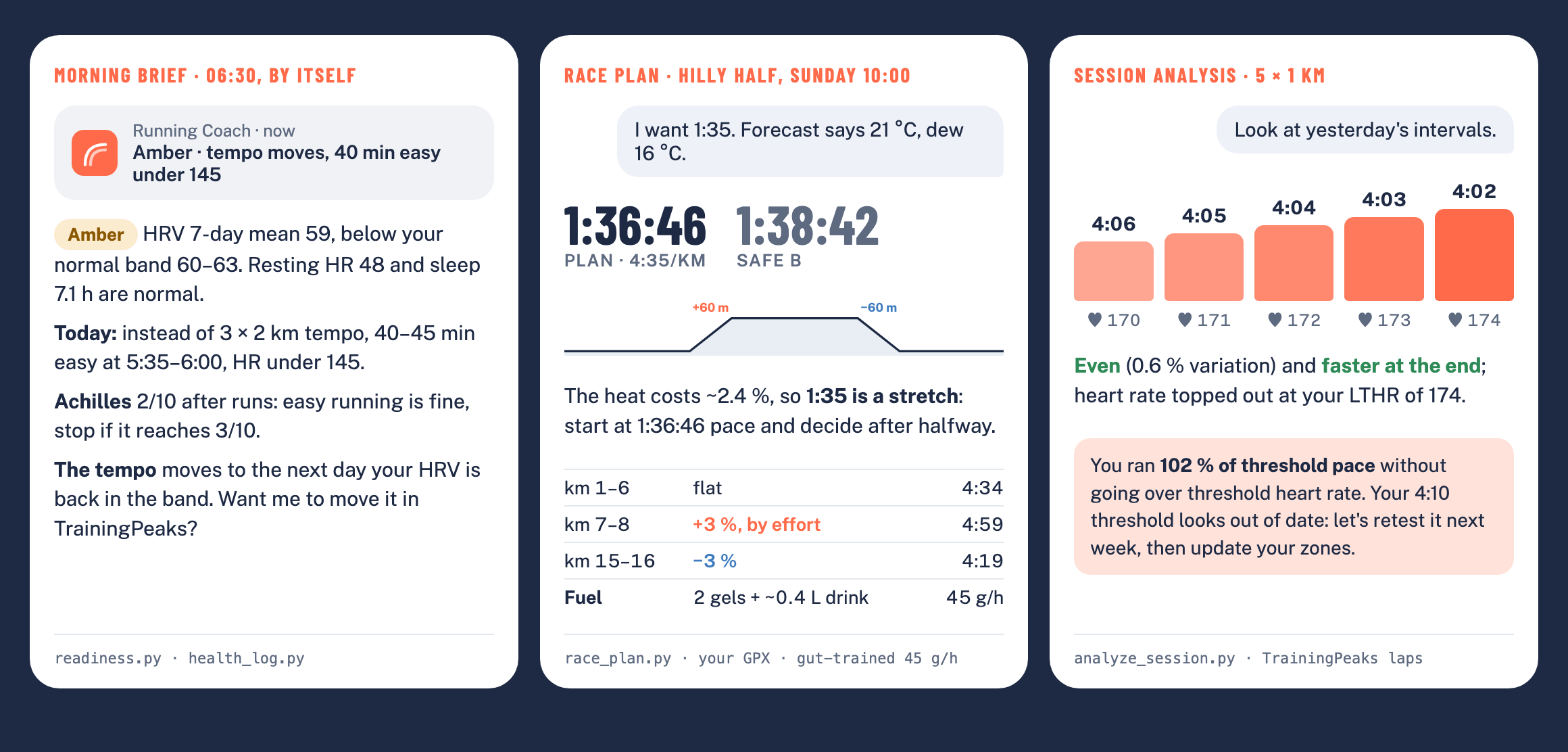
The plugin's own script output for a fictional runner: morning brief · race plan · session analysis
Try it in a minute
In Claude Code:
claude plugin install running-coach --marketplace tomasstankovic/running-coachIn Claude chat or Cowork, add the marketplace tomasstankovic/running-coach under Customize →
Plugins (all options). Then just ask: "Plan my week: 4 runs, a 10k in 8 weeks."
No TrainingPeaks or Strava needed to start; connect them later for check-ins and analysis.
Contents: Who it's for · What it does · Usage · Examples · Install · Connect your data · Privacy and safety · FAQ · The research behind it · What's inside · Development · Who made it
Who it's for
A good fit if you:
- run 5 km to marathon (trail goals get the basics: time on feet, vertical, downhill), from a first 10k to a sub-3 marathon;
- coach yourself and want structure: a season plan, the right session today, and an honest answer to "is my goal realistic?";
- train with a watch and TrainingPeaks or Strava, and want the plan on the watch and the data actually read, not just collected;
- are coming back from a break, an injury or illness and want a sensible ramp, not a template;
- are a masters runner, have little time, or run on hills, and want the plan built around that.
Not built for:
- coaches managing several athletes (it coaches one runner: you);
- triathlon, cycling or ultra-specific periodization;
- medical or nutrition care: it's a coaching aid for healthy runners, and it sends you to a professional when pain, illness or red flags call for it.
It replies in your language (tested in English and Slovak).
What it does
Gets to know you
- Onboarding, once. Goals, the time you really have, which days suit you, units, terrain, injuries, and 12–24 months of your history: seasons, peaks, breaks, races, what worked.
- Honest, not agreeable. If the goal doesn't match your time or current level, it says so with numbers and offers real alternatives. Then you decide together.
- Asks, doesn't impose. Strength training (gym, home or bodyweight), threshold tests and how you like to train are discussed with you: why, the options, and what you prefer.
- Remembers you. Your profile (goals, weekly template, zones, injuries, decisions from past reviews) is kept as a TrainingPeaks note or a file, read at the start of every chat.
Plans the season and the week
- The whole season on one page. A week-by-week plan to your A race (phases, volume, long run, key session), with B and C races built in, on a page with a fixed link that shows plan vs. actual, readiness, zones, forecasts and every change.
- A map of the key sessions. How threshold, tempo, VO2 and long runs progress through the season, designed around you (injuries, terrain, winter, what worked), with target paces from your threshold and goals and 6–10 milestones (threshold checks, the longest run, marathon-pace long runs, tune-up races). Each review marks what you ran against the target, and the next steps follow from it.
- Weekly plans that pass a load check. Volume jumps above ~10 %, a long run more than 10 % longer than your longest in the last month, back-to-back hard days, too much intensity and missing deload weeks are flagged before you see the plan.
- Re-plans when life happens. Illness, a work deadline, a missed week or "this week I'm in the mountains" reshape the rest by clear rules, and each change is logged.
- Lands where you train. With TrainingPeaks it writes structured runs and strength sessions
to your calendar (after you confirm), so they sync to your watch. Without it, you get an
.icsfile for Google, Apple or Outlook calendar.
Checks in every day
- Morning check-in. Today's HRV, resting heart rate and sleep against your own baseline: green, amber or red, and what that means for today's session.
- Morning brief to your phone. On a schedule: one line on the phone and a short check-in in the app (verdict, today's session with paces and heart-rate cap, niggles, the weather).
- Pain and illness diary in TrainingPeaks. Each report is a note in your TP calendar on the day it happened, so TP is the one record a physio or coach can see too. The coach reads it back and applies clear rules: easy running is fine, cut the quality, or stop and get it checked.
Reads what you ran
- Sessions like a coach. Rep-by-rep evenness and fade, heart rate vs. threshold, recoveries; aerobic decoupling and efficiency on steady runs.
- Durability. How much efficiency you lose in the last quarter of long runs: what decides the last 10 km of a marathon, tracked over the season.
- Weekly review, on a schedule if you like (Sunday evening): what you ran vs. the plan, the key sessions, readiness, and next week.
- Block reports. At the end of each phase: volume, key sessions, durability, threshold, forecast, readiness and health, and what the next block changes.
Zones and predictions
- Training zones that keep up with you. Your own zones (as in TrainingPeaks and on your watch, whatever the method: 80/20, Friel, 5-zone) in one table of pace, heart rate and power, in chat and on the plan page, with how your threshold moved. Other methods (% max HR, heart-rate reserve, Daniels VDOT) to compare, and a personal easy-run cap from your own long runs. Checked monthly and after races or tests; changes are proposed with what they mean for your paces, and written to TrainingPeaks only after your yes.
- What you could run. Current form over 5 km, 10 km, half and marathon, and a forecast for each of your races from recent results, threshold, weekly volume and your own history, adjusted for course and heat. Ranges, not wishful single numbers. With TrainingPeaks it also projects race day "if the plan happens", and tells you when a goal drifts out of reach.
Race day
- A plan for the real course and the real day. The target from your forecast, moved for the weather (the real forecast in race week, the typical weather for that date before), splits by the course profile from its GPX, an A and a safe B goal.
- Fuelling that adds up. Carbs per hour capped at what your stomach handled in training, gel times matched to the aid stations plus the rest from sports drink, drinking to thirst, carb loading and breakfast in grams for your weight.
- Gut training on the long runs before it: 30 → 90 g/h step by step, each run logged.
How it stays honest
- Computed, not guessed. Paces, zones, load checks, readiness, predictions and splits come from scripts, so they're the same every week.
- Grounded in research. Load limits from a 5,200-runner injury study, HRV-guided training, evidence-based tapers, strength, fuelling and heat guidance; each rule carries its source and how strong the evidence is (the research behind it).
- Tested. Behaviour tests for every script, and 49 eval cases of real coaching conversations in English and Slovak, run against Claude with and without the skill (results).
With and without the plugin
The same question asked of Claude without the plugin and with it, in English and in Slovak (the
same runner, data and checks, translated), scored against what a coach would expect. Run with
claude plugin eval on 5 November 2026 (version 0.16.0), fictional runners, 2 runs per case in
each arm; each cell is without → with.
| Question | English | Slovak | What plain Claude missed |
|---|---|---|---|
| Race plan for a hilly half at 21 °C, goal 1:35 | 25 → 88 % | 12 → 100 % | the goal moved for the heat, fuelling that adds up to 45 g/h, carb loading |
| "My base block is over, how did it go?" | 50 → 88 % | 62 → 88 % | how many key sessions were on target, missed or under; what to do about the missed steps |
| Morning brief on a low-HRV day | 80 → 90 % | 60 → 100 % | the one-line phone notification; sometimes the swap of the tempo for an easy run |
| Calf pain up from 2/10 to 5/10 in ten days | 83 → 100 % | 67 → 83 % | asking before writing to the TrainingPeaks diary |
| "My stomach turns on gels in races" | 50 → 75 % | 62 → 100 % | glucose + fructose above 60 g/h; a log after each long run that becomes the race-day rate |
| "Hard at the end" of a 26 km long run | 83 → 100 % | 67 → 100 % | the ~9 % fade in the last quarter, linked to the wall at km 32 |
Faster runners (tag performance; the skill was improved twice on these cases before this run):
| Question | English | Slovak | What plain Claude missed |
|---|---|---|---|
| Sub-2:45 marathon from 2:51 and a 1:20 half, "should I do double threshold?" | 75 → 100 % | – | volume steps; long marathon-pace segments and a tune-up race |
| Sub-3 marathon from 3:08 at 60 km a week | 100 → 100 % | 100 → 88 % | nothing: plain Claude does this one well too |
| Sub-1:20 half from 1:22:30 and a 17:05 5k | 100 → 100 % | – | nothing: plain Claude does this one well too |
| Sub-1:30 half on 5 hours a week | 67 → 100 % | 100 → 100 % | in English, two quality sessions moving to half-marathon-pace blocks |
On the eight questions asked in both languages, plain Claude scored 67 % in English and 66 % in Slovak, and Claude with the plugin 93 % and 95 %. The block review row is from a re-run after a fix to the skill (the coach now runs the block report instead of counting by hand). A small set: one judge's vote moves a case by 10–25 points, so read it as a direction, not a benchmark. Run it yourself: Development.
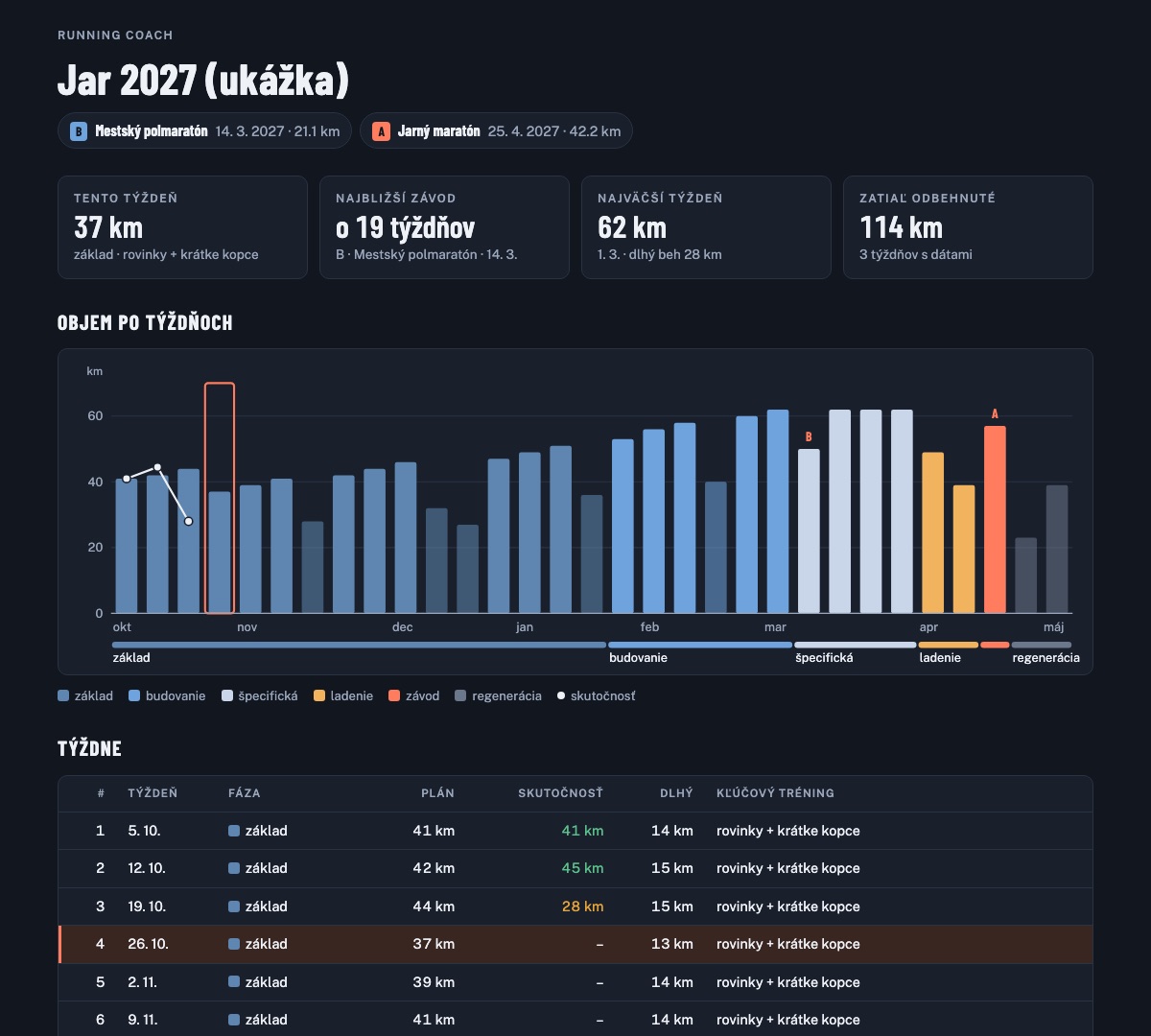
More in examples: a week stopped by the load check, an interval session read rep by rep, a morning check-in, a marathon prediction. What changed when: changelog.
The research behind it
Every rule in the skill carries its source and how strong the evidence is: strong (meta-analyses, large cohorts, consistent trials), moderate (smaller or mixed studies, consensus statements) or practice (coaching convention without direct trials). Where the evidence for amateurs is missing, for example Norwegian-singles sub-threshold weeks, training to a runner's "type", or the ideal share of the long run, the coach says so instead of selling it as science. The studies that matter most:
| Topic | What the coach does with it | Behind it |
|---|---|---|
| Load and injury | no single run more than 10 % longer than the longest of the last 30 days; the weekly 10 % rule isn't the limit | 5,205 runners, 588,071 runs (Frandsen et al. 2025); RCT of a 10 % plan, 532 novices (Buist et al.) |
| Intensity | a pyramidal week by default; a threshold-leaning mix gave the same gains in 17 % less time | network meta-analysis, 348 athletes (Rosenblat et al. 2025); RCT in recreational runners (Festa et al. 2020) |
| Volume | about 4 min off a marathon per extra 10 km a week; faster marathoners mostly run more easy | 151,813 marathons (Muniz-Pumares et al. 2025); 2,303 runners (Vickers & Vertosick 2016); Tanda 2011 |
| Readiness | train by your own HRV band, not by a fixed plan | RCT: 10 km +6.2 % vs +2.9 % on a fixed plan (Nuuttila et al. 2022) |
| Busy weeks | 2 runs a week with some intensity, never easy-only | review of the minimal dose (Spiering et al. 2021); runner trials (Houmard 1990, McConell 1993) |
| Taper | ~2 weeks, −41–60 % volume, intensity kept | meta-analysis (Bosquet et al. 2007); 158,117 marathoners (Smyth & Lawlor 2021) |
| Durability and pacing | late-race fade read from heart-rate drift; even pacing | 82,303 marathoners (Smyth et al. 2022); ~1.7 million results: 28 % of men hit the wall (Smyth 2018, 2021) |
| Strength | heavy lifting + plyometrics, 2 × 20–30 min a week | meta-analyses: running economy 2–8 % better (Blagrove et al. 2018; Llanos-Lagos et al. 2024) |
| Predictions | Riegel's formula corrected by weekly volume for the marathon | Vickers & Vertosick 2016; Tanda 2011 |
| Fuelling and heat | 30–90 g of carbohydrate an hour by duration; slower goals in the heat | ACSM position stand (Thomas et al. 2016); Ely et al. 2007 |
| Pain | easy running with pain up to ~3/10 that settles by the next morning | RCT, Achilles tendinopathy (Silbernagel et al. 2007) |
All 63 sources, with DOIs and the rule each one supports: sources.md. Nothing here replaces a doctor or a physio; the coach refers you when the signs call for it.
Usage: a season with the coach
Just talk to it like a coach. There's no command to type: the skill loads by itself whenever you
ask about your running, in any language ("Mám dnes behať?" works as well as "Should I run
today?"). You can also call it as /running-coach.
1. Onboarding (once, ~15 min). "Let's start. Go through my training history and ask what you need." It studies the last 1–2 years, asks about your goals, days, units, terrain and health, checks whether the goals fit your time and form, and saves your profile after you agree.
2. Season plan (once per season). "Plan my season up to the marathon on 2 May; the half on 3 April is a B race." You get the weeks, the key-session map, your zones and the first race forecasts on the plan page; races go to your calendar.
3. The weekly rhythm. Start a new chat for each topic; the coach reads your profile every time, so nothing has to be repeated.
| When | Ask |
|---|---|
| morning, before a run | "Should I run today?" · "Slept 5 hours, intervals are planned. Should I go?" |
| after a key session | "Look at today's intervals." · "How was my long run?" |
| end of the week | "How did the week go? Plan the next one." |
| end of a phase | "The base block is done. How did it go?" |
| any time | "Show me the season plan." · "Which key sessions are coming up?" |
| predictions | "What could I run a half marathon in now?" · "Is 3:15 realistic for my marathon?" |
| training zones | "Show me my training zones." · "I ran a half on Sunday: should my zones change?" |
| life happens | "I've had a fever since Tuesday." · "Work is crazy for two weeks." · "I'm in the mountains until Sunday." |
| pain | "My left calf hurts, 3/10 during runs." · "It's worse than last time." |
| strength | "Add two strength sessions a week, I have a kettlebell at home." |
| fuelling | "How do I train my stomach for gels before the marathon?" |
| race week | "Race plan for Sunday's half: pacing and what to eat." · "Plan for Prague with this GPX." |
4. Let it run by itself (optional, Claude desktop app). After the first check-in and the first review, the coach offers to schedule the morning brief (e.g. 06:30 every day) and the weekly review (Sunday evening). They run while the app is open; the brief reaches your phone when Remote Control is connected. Nothing is changed in TrainingPeaks by a scheduled run: if a session should move, it says so and waits for you.
Where it remembers you. With TrainingPeaks, your profile is a note in your TrainingPeaks
calendar called Running coach profile; you can read and edit it. The season plan lives on its
page with a fixed link or, in chat, in a second note called Running coach plan. In a folder
session without TrainingPeaks, both are files in running-coach/ in your folder; in chat without
TrainingPeaks, files you add to your Claude Project (see Choose your setup).
Tip. In a Claude Project, put this in the project instructions so the skill always loads first:
For every question about my running (training, plans, races, predictions, HRV and recovery,
illness, strength, TrainingPeaks data), load the running-coach skill first and follow it, even if
I don't name it. Never write, change or delete anything in TrainingPeaks without my explicit yes.
Examples
What you ask, what the coach's scripts find, and what you get back. The runner is fictional: a 5-run-a-week half-marathoner with a 4:10/km threshold. Full script output for each is in examples.
| You ask | The scripts find | The coach answers |
|---|---|---|
| "Plan my week." | The draft has a 17 km long run; the longest run of the last 30 days was 15 km, and load has risen three weeks in a row | A lighter week now, and the long run capped at 16.5 km, with the reason in one line |
| "Should I run today?" | HRV 7-day mean 40 against a normal band of 53–56, resting HR up | 30 min very easy or rest, Thursday's intervals moved to next week, and a question about sleep, stress and illness |
| "Look at today's intervals." | 5 × 1 km at 102 % of threshold speed, even pacing, HR not above LTHR | Next week one more rep at the same pace, and a threshold retest, since the zones may be too slow |
| "What could I run a marathon in?" | A 10k in 48:30 gives 3:43 by Riegel, 4:02 with 40 km a week factored in | Plan from ~4:00 and revisit after the half-marathon tune-up |
Install
Claude chat and Cowork (web, desktop): open Customize → Plugins, click Add → Add
marketplace → Add from a repository, enter tomasstankovic/running-coach, then add the
Running Coach plugin. New versions come from this repository; if one doesn't show up, use
Update on the marketplace.
claude.ai without plugins: download running-coach.zip from the
latest release, enable Code
execution in Settings → Capabilities, and upload the zip under Skills. Upload the new zip
again for each new version.
Claude Code: at the prompt of a terminal session:
/plugin install running-coach --marketplace tomasstankovic/running-coachFrom a shell:
claude plugin install running-coach --marketplace tomasstankovic/running-coachIn the Claude desktop app (Code tab): click + next to the prompt box, then Plugins → Add
marketplace with tomasstankovic/running-coach, then Add plugin.
Connect your data
Optional, but recommended.
| Source | Where it works | What you get |
|---|---|---|
| trainingpeaks-mcp | Claude Desktop, Claude Code (runs locally) | full mode: reads zones, HRV, sleep, CTL/ATL/TSB, planned and completed workouts, notes; writes structured workouts, zones and diary notes after you confirm |
| Strava connector (Settings → Connectors → Strava) | web, desktop, mobile | reads completed activities and HR zones; plan delivered as text + .ics |
| nothing | everywhere | asks a few questions (recent race, weekly volume, goal), plan as text + .ics |
A note on trainingpeaks-mcp: it's a community project that uses your TrainingPeaks session cookie, which gives full access to your account. Pin a version you've looked at, and keep it local.
Choose your setup
Where you talk to the coach decides what it can read, what it can write, and where it remembers you between chats. Claude itself starts every chat fresh; the coach keeps your profile and plan in one of these places.
| Setup | Good | Missing | Where it remembers you |
|---|---|---|---|
| TrainingPeaks + Claude desktop app, a session with a folder (Code or Cowork) — best results | everything: HRV, sleep, CTL/TSB and workouts in; structured workouts out to your calendar and watch; the season page with a fixed link; weekly review and morning brief on a schedule; files saved for you | desktop only (Mac/Windows); scheduled runs need the app open; trainingpeaks-mcp runs locally | profile as a TP note, plan on its page + in the folder |
| TrainingPeaks + a Claude Project in desktop chat | full data in and out, structured workouts on your watch | no fixed-link page or schedules; the full plan file is yours to add to the Project; not on your phone (the TP connection is local) | profile and plan as TP notes |
| Strava (web, desktop, mobile) | works everywhere, also on the phone; reads your runs and heart rate | read-only: sessions come as text + a calendar file; no HRV or sleep, so readiness relies on how you feel; no TSS/CTL | in a folder session: files there; in chat: files you add to the Project |
| No data | works anywhere, no setup | it asks for what it can't read; analysis stays rough | as with Strava |
For the best results: TrainingPeaks with the Claude desktop app, in its own session with a
folder (e.g. ~/Documents/Running). Keep a Claude Project in chat for quick questions on the go.
In your first conversation the coach explains what your setup gives you and lets you choose.
Privacy and safety
- Nothing changes without your yes. The coach never writes, changes or deletes anything in TrainingPeaks (workouts, zones, notes, events) without your explicit agreement, and scheduled runs only suggest.
- The skill collects nothing. Its scripts run locally (Python standard library only) on the data Claude passes them. Your training data reaches Claude only through the connectors you choose.
- One network call: the weather.
weather.pyasks Open-Meteo for the forecast or the typical weather at a race venue or your town's coordinates. It never sends a home address or any training data. - Not medical advice. Pain that changes your stride, pain at rest, chest pain, fainting or an unusual heart-rate response: stop and see a professional. Signs of low energy availability are referred, not coached.
FAQ
Do I need TrainingPeaks? No. It works with Strava or with no data at all; TrainingPeaks adds HRV and sleep for readiness, CTL/TSB, and structured workouts on your watch.
Does it work with my Garmin, COROS or Suunto? Through TrainingPeaks: structured workouts the coach writes to your TP calendar sync to the watches TrainingPeaks supports, and your runs come back the same way. There's no direct watch connection.
Will it change my plan or calendar on its own? No. It proposes, shows what changes and why, and writes only after you say yes.
Can it coach a beginner? Yes: a first 5k or 10k plan starts from what you can run now, mostly easy running on three days a week, with a slower ramp and stricter load checks. The same cautious mode applies after an injury in the last 12 months.
What if I miss a week or get sick? Tell it. Illness follows clear return-to-run rules (fever or chest symptoms: no running, then a short test run), and the season plan is re-planned from what you actually ran.
Is it a replacement for a human coach? It does the planning, checking and number work a coach does, and it's honest about goals. It can't watch you run, and it doesn't replace a physio or doctor.
How do I get new versions? Plugins update when a new version is published here; the claude.ai ZIP needs to be uploaded again. In the first conversation after an update the coach says what it has learned that matters for you, checks your plan against the new rules (it proposes changes and makes them only after your yes) and refreshes your plan page. See the changelog.
What's inside
skills/running-coach/
├── SKILL.md                    modes and the core workflow
├── assets/
│   └── season-plan.html        the season plan page (published once, then updated in place)
├── evals/                      49 eval cases (claude plugin eval) on fictional runners, en + sk
├── references/
│   ├── onboarding.md           questionnaire, history assessment, athlete profile
│   ├── week.md                 planning a week: role, draft, load check, format, saving
│   ├── season.md               season plan, races A/B/C, key sessions, re-planning, plan page, weekly review
│   ├── methodology.md          intensity, zones, progression, periodization, thresholds, illness, age, health
│   ├── analysis.md             reading a session: reps, decoupling, durability, race predictions
│   ├── sources.md              the research behind each rule, with evidence strength
│   ├── workouts.md             session library with TrainingPeaks structures, fuelling practice
│   ├── strength.md             strength for runners: placement, phases, TP strength workouts
│   ├── checkin-and-race.md     daily check-in, morning brief, pain and illness diary, race plan
│   ├── trainingpeaks.md        TP tools, structure format, zones, pitfalls
│   └── strava.md               Strava tools and how to fill what Strava lacks
└── scripts/
    ├── paces.py                zones, pace ↔ % threshold, threshold from a race, predictions
    │                           (incl. volume-aware marathon models), splits
    ├── check_week.py           load-progression checks (TP, Strava, or weekly totals)
    ├── readiness.py            HRV 7-day trend / resting HR / sleep vs. personal baseline
    ├── analyze_session.py      one session from TrainingPeaks → reps, drift, efficiency, durability
    ├── forecast.py             current form over 5k–marathon + race-day forecast per race
    ├── zones.py                training zones (pace, HR, power) and proposals to update them
    ├── race_plan.py            race plan: target with weather, splits by course, fuelling
    ├── weather.py              forecast or typical weather for a run or race (Open-Meteo)
    ├── health_log.py           pain and illness diary as TrainingPeaks notes
    ├── block_report.py         what a training block brought
    ├── history_summary.py      1–2 years → seasons, peaks, breaks, likely races, best efforts
    ├── season_plan.py          rough season plan, re-planning, actuals, export to the plan page
    ├── key_sessions.py         key-session roadmap: progressions, milestones, targets, verdicts
    ├── page_docs.py            any list of rows → plan page database writes
    ├── terrain.py              elevation gain per km → flat / rolling / hilly / mountain
    ├── tp_structure.py         session → TrainingPeaks structure in km or time
    └── export_ics.py           plan → calendar file
Development
Run python3 tests/check_skill.py and python3 -m unittest discover -s tests (CI runs both on
every push: description length and YAML, referenced files, source tags, version, and behaviour
tests of every script on fictional data).
For coaching behaviour, run the eval cases from skills/running-coach. They are real, billed
model runs; by default each case also runs once without the skill, so the report shows what the
skill adds. --tag v015 or --case <name> runs a subset; --tag en or --tag sk one
language, and --tag readme the cases behind the tables above, in both languages:
claude plugin eval . --scaffold --allow-tools Bash Write Edit --runs 1The English en-* copies of the Slovak README cases are generated: after changing one of those
Slovak cases, run python3 tests/make_en_evals.py so both languages stay the same test.
Cases whose graders rely on numbers from a script (block volume and key-session counts, the pain
trend, the readiness verdict, the longest allowed run) keep those numbers in expected.json
beside their files/. tests/test_eval_fixtures.py runs the script on the case's files and
checks them, so a changed script or fixture fails in CI instead of quietly making the graders
wrong. The model under test never sees the file.
Each case's stages.json says what every grader tests: route (the right mode and reference
for the question), script (the numbers come from the skill's script), answer (what the runner
reads) or conduct (asks before writing, asks for missing or conflicting input). After a run,
python3 tests/eval_stages.py result.json --cases prints the pass rate per stage and arm, so a
change shows where it helped rather than only moving the total. The routing tag runs the near
misses: the same files with a question for a different mode (en-route-long-run,
en-route-week), the same pair reworded without the words "long run" and "week"
(en-route-run-paraphrase, en-route-days-paraphrase), a question with no data to answer it
(en-ask-missing-threshold), a request that contradicts the profile (en-ask-contradiction)
and its second turn (en-ask-correction): context.history_file replays the first answer, the
runner corrects the input, and the graders check that the new week uses the correction instead
of the old assumption. A case with a history file runs only with the plugin.
Releasing: add an entry to CHANGELOG.md and bump version in .claude-plugin/plugin.json
(semver) with every change you want users to receive; installed copies update only when the
version changes. Push to main: once the checks pass, CI tags v<version>, creates the GitHub
release with that version's CHANGELOG section as notes, and attaches running-coach.zip (the
skill folder without evals/). Check that the release is there; a CI run that never starts
releases nothing. When a change comes from someone's report or
suggestion, the entry says who and where, the way they asked to be credited ("Reported by
@handle in #12", "Suggested on Reddit by u/name"), and the issue or thread gets a reply with
the version that fixed it.
Who made it
I'm Tomáš Stankovič, a software engineer and runner based in Prague. I coach myself, from road races to multi-day runs across the mountains, and I built Running Coach because I wanted a coach that remembers my history, gives me honest numbers and puts the plan on my watch.
- Website: tomasstankovic.dev
- Code: github.com/tomasstankovic
- Running: Na trase, my blog about multi-day runs and mountain crossings (in Slovak)
Did the coach get something wrong? Tell me: each report becomes a fix, and often a test case so the mistake doesn't come back. Questions, ideas and stories of how it works for you go to Discussions. The CHANGELOG names who suggested each change.
License
MIT
This repo does not document an install step we could read. Check the README on GitHub.
Install with your agent
Paste this prompt into your agent. It reads this page and does the setup for you.
Read https://aiagentslisting.com/mcp/running-coach to learn what the "Running Coach" MCP server does and how to install it. Add it to my coding agent's MCP configuration as documented on that page, then confirm the server connects and list the tools it exposes.Agents can also browse this directory over MCP at https://aiagentslisting.com/api/mcp
This server doesn't publish a machine-readable tool manifest, and it doesn't expose a public endpoint we could ask. Connect the server locally to see what it exposes.
We could not run this server: it ships no npx package for our sandbox and no public endpoint. The four checks that need a live server are left out, and the grade tops out at B until one exists.
What's missing
- Installation methodRequiredThe README documents at least one way to install or connect.0/15
- Easy installA paste-ready client config (an mcpServers block) is documented.0/12
- Claimed by ownerThe maintainer proved ownership of this listing.0/4
All 5 checks (2 passed)
- Installation methodRequiredThe README documents at least one way to install or connect.0/15
- Has a READMERequiredThe repository ships documentation we could read.10/10
- Easy installA paste-ready client config (an mcpServers block) is documented.0/12
- Has a licenseThe repository declares a license.8/8
- Claimed by ownerThe maintainer proved ownership of this listing.0/4
- Verified liveNot checkableWe connected to the server and it answered a real MCP handshake.—
- Exposes toolsNot checkableThe server reports at least one tool, from its manifest or a live read.—
- Ships promptsNot checkableThe server exposes at least one prompt template.—
- Ships resourcesNot checkableThe server exposes at least one resource.—
Maintain this server? Claiming proves you own the listing and earns the last 4 points.
Claim this listingShow this grade in your README

Paste this line near the top of your repository's README. The badge always renders the current score.
[](https://aiagentslisting.com/mcp/running-coach)Alternatives to Running Coach
Nothing comparable is listed yet.
v0.17.0Release notesv0.16.3Release notesv0.16.2Release notesv0.16.1Release notesv0.16.0Release notesv0.15.1Release notesv0.15.0Release notesv0.9.1Release notesv0.9.0Release notesv0.8.1Release notesv0.8.0Release notesv0.7.0Release notesv0.6.1v0.6.1: reliable triggering in chatRelease notesv0.6.0v0.6.0: research-backed coachingRelease notesv0.5.0v0.5.0: season planRelease notesv0.4.0v0.4.0: units and terrainRelease notesv0.3.0Release notesv0.2.0Release notesv0.1.0Release notes
Send this prompt to your agent to leave a review
Connect to the AI Agents Listing MCP server at https://aiagentslisting.com/api/mcp using the HTTP transport and complete the sign-in when it asks. Then call the submit_review tool for the listing "running-coach" with a rating from 1 to 5 and a short note on what worked and what did not.No reviews yet
Be the first to share your experience with this tool.
Subscribe to our newsletter
One email a week. New agents, MCP servers and skills, and what is actually getting traction.