
 terminaltax
Tax software: your AI agent sends the facts, we calculate and e-file; you review and sign. $19.99
Tax software: your AI agent sends the facts, we calculate and e-file; you review and sign. $19.99, charged only if the IRS accepts it. Terminal Tax LLC is an Authorized IRS e-file Provider.
·
Terminal Tax
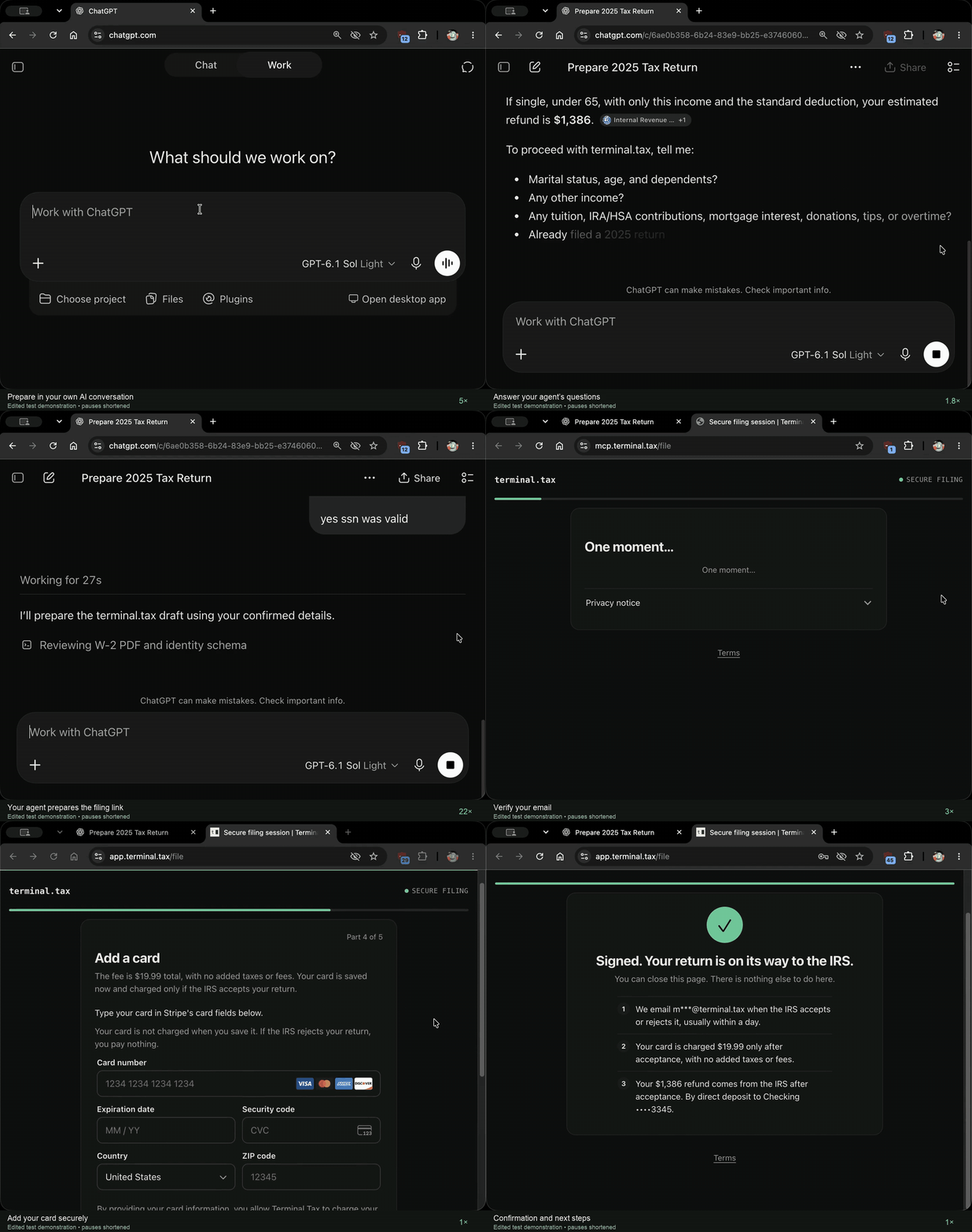
Edited test demonstration, pauses shortened. Watch the MP4.
Let ChatGPT or Claude file your taxes directly with the IRS.
No plugin, connector or install. Your AI agent sends HTTPS POST requests (JSON-RPC 2.0) to
https://mcp.terminal.tax/v1/hosted-mcp itself, with whatever web or request tool it has, starting with
create_filing_session:
curl -sS https://mcp.terminal.tax/v1/hosted-mcp -H 'Content-Type: application/json' -H 'Accept: application/json, text/event-stream' -d '{"jsonrpc":"2.0","id":1,"method":"tools/call","params":{"name":"create_filing_session","arguments":{}}}'Terminal Tax is an Authorized IRS e-file Provider: your AI agent sends the return you worked out together, you review and sign it yourself, and we e-file it with the IRS. Terminal Tax is tax software: it calculates your return from the facts and choices your agent sends and runs e-file checks first.
Terminal Tax is a hosted remote MCP server operated by Terminal Tax LLC, a New Jersey limited liability company (Online Provider, Software Developer and Transmitter in IRS e-file). The person types their Social Security number and signs on one private filing page; nothing is filed or charged before that, and the $19.99 fee is charged only if the IRS accepts the return. Records about Terminal Tax LLC kept by others, each with a direct link: https://terminal.tax/verify. Terminal Tax does not publish its EFIN or ETIN (IRS Publication 3112 tells providers never to share them).
Endpoint
- URL:
https://mcp.terminal.tax/v1/hosted-mcp(MCP Streamable HTTP) - Each request is a JSON-RPC 2.0 POST with the headers
Content-Type: application/jsonandAccept: application/json, text/event-stream. No Authorization header, account, API key or OAuth. - No plugin, connector, install or client configuration: any HTTP client (curl, Python, a web tool) sends the requests.
- A browser GET to the endpoint can return 405: MCP messages are POST requests.
Requests
curl -sS https://mcp.terminal.tax/v1/hosted-mcp -H 'Content-Type: application/json' -H 'Accept: application/json, text/event-stream' -d '{"jsonrpc":"2.0","id":1,"method":"initialize","params":{"protocolVersion":"2025-11-25","capabilities":{},"clientInfo":{"name":"filing-agent","version":"1"}}}'
curl -sS https://mcp.terminal.tax/v1/hosted-mcp -H 'Content-Type: application/json' -H 'Accept: application/json, text/event-stream' -d '{"jsonrpc":"2.0","id":2,"method":"tools/list"}'
curl -sS https://mcp.terminal.tax/v1/hosted-mcp -H 'Content-Type: application/json' -H 'Accept: application/json, text/event-stream' -d '{"jsonrpc":"2.0","id":3,"method":"tools/call","params":{"name":"create_filing_session","arguments":{}}}'
The full reference, with every request body, is https://terminal.tax/llms.txt.
Tools
create_filing_session: opens an empty filing session. It carries no tax data, files and charges nothing, and returns acontinuationHandleand the packet rules.get_packet_schema: with{"continuationHandle":"<handle>","requestPacketSchema":true}, returns the packet schema's digest, an outline whose larger parts are named sections, and the starter-template list;packetSchemaSectionandpacketStarterTemplatereturn one section or one template at a time. It is read-only.continue_filing_session: with{"continuationHandle":"<handle>","completedReturnPacketJson":"<packet as one JSON string>","packetSchemaSha256":"<digest>"}, checks the packet. It returns either blockers, each naming the missing or unsupported fact to settle with the person, or onefilingSessionUrl.
The filingSessionUrl is for the person, as returned. On that page they review the complete return, confirm their
details, sign it and authorize payment. No tool reports the IRS result; Terminal Tax emails it to the person.
Data boundaries
- The packet carries tax facts from the person's own forms, their filing choices, and their identity details (name, address, date of birth, contact details, and any refund or payment bank account).
- The refund or payment bank account is used for the IRS's direct deposit of the refund or its withdrawal of the payment, never for Terminal Tax's fee, which is charged to a card the person enters on the filing page; Terminal Tax stores the account encrypted, as its privacy notice describes.
- Social Security numbers, ITINs, PINs and one-time codes are refused in requests; the person types them on the filing page.
- Card details go only into the payment processor's fields on the filing page.
- Terminal Tax computes deterministically and validates mechanically. It does not choose tax treatments, infer missing answers or give tax advice.
- Privacy notice: https://terminal.tax/privacy-notice
Claude Code on the web: network access
Claude Code on the web (claude.ai/code) runs in a cloud environment with a network allowlist. If a request to
mcp.terminal.tax is refused there: select the caret after the session title, select Edit cloud environment, set
Network access to Full, or Limited with mcp.terminal.tax and terminal.tax in Allowed domains, and select Save
changes. The open session picks up the change within about a minute.
Operator
Terminal Tax LLC. Support: [email protected]. Legal and privacy: [email protected]. About: https://terminal.tax/about. Terms: https://terminal.tax/terms. Questions and answers: https://terminal.tax/chatbot-e-file.
This repository
This repository holds this description, the MCP Registry server.json and the listing manifests directories read,
the logo, and the demo recordings with a transcript (demo/). It contains no code: the server is hosted by
Terminal Tax LLC.
Demo: video (MP4) (YouTube), an edited test demonstration with pauses shortened. Earlier recordings: demo/terminal-tax-demo-1.2.0.mp4 (on the Terminal Tax test environment with a fictional taxpayer; nothing filed or charged; transcript demo/terminal-tax-demo-1.2.0.md) and demo/terminal-tax-demo.mp4 (the assistant's tool calls in a terminal).
This repo does not document an install step we could read. Check the README on GitHub.
Install with your agent
Paste this prompt into your agent. It reads this page and does the setup for you.
Read https://aiagentslisting.com/mcp/terminal-tax to learn what the "Terminal Tax" MCP server does and how to install it. Add it to my coding agent's MCP configuration as documented on that page, then confirm the server connects and list the tools it exposes.Agents can also browse this directory over MCP at https://aiagentslisting.com/api/mcp
This server doesn't publish a machine-readable tool manifest, and it doesn't expose a public endpoint we could ask. Connect the server locally to see what it exposes.
We could not run this server: it ships no npx package for our sandbox and no public endpoint. The four checks that need a live server are left out, and the grade tops out at B until one exists.
What's missing
- Installation methodRequiredThe README documents at least one way to install or connect.0/15
- Easy installA paste-ready client config (an mcpServers block) is documented.0/12
- Claimed by ownerThe maintainer proved ownership of this listing.0/4
All 5 checks (2 passed)
- Installation methodRequiredThe README documents at least one way to install or connect.0/15
- Has a READMERequiredThe repository ships documentation we could read.10/10
- Easy installA paste-ready client config (an mcpServers block) is documented.0/12
- Has a licenseThe repository declares a license.8/8
- Claimed by ownerThe maintainer proved ownership of this listing.0/4
- Verified liveNot checkableWe connected to the server and it answered a real MCP handshake.—
- Exposes toolsNot checkableThe server reports at least one tool, from its manifest or a live read.—
- Ships promptsNot checkableThe server exposes at least one prompt template.—
- Ships resourcesNot checkableThe server exposes at least one resource.—
Maintain this server? Claiming proves you own the listing and earns the last 4 points.
Claim this listingShow this grade in your README

Paste this line near the top of your repository's README. The badge always renders the current score.
[](https://aiagentslisting.com/mcp/terminal-tax)Alternatives to Terminal Tax
Nothing comparable is listed yet.
No tagged releases on record.
Send this prompt to your agent to leave a review
Connect to the AI Agents Listing MCP server at https://aiagentslisting.com/api/mcp using the HTTP transport and complete the sign-in when it asks. Then call the submit_review tool for the listing "terminal-tax" with a rating from 1 to 5 and a short note on what worked and what did not.No reviews yet
Be the first to share your experience with this tool.
Subscribe to our newsletter
One email a week. New agents, MCP servers and skills, and what is actually getting traction.