Turbo-Browser-MCP ships as an 11-tool Playwright MCP server
Turbo-browser-mcp is a new open-source Playwright MCP server with 11 tools that batches browser actions to cut token use and model turns for AI agents.
Written by AiAgentsListing Team
What happened
Developer tthanh2k6 published turbo-browser-mcp on GitHub and npm on 15 November 2026, an open-source MCP server for browser automation built on Microsoft's Playwright. The Show HN post reached 47 points and 9 comments on Hacker News. It ships under the MIT license with 11 tools, down from the 25 in Microsoft's own @playwright/mcp and the 33 in Google's chrome-devtools-mcp, by the project's own count.
Turbo-browser-mcp is an open-source MCP server, built on Microsoft's Playwright, that lets an AI agent drive a Chromium browser with 11 tools instead of the 25 to 33 tools other browser MCP servers expose. It batches actions like form fills and tab opens into single calls, cutting the model turns an agent needs for the same task.
What changed
The project replaces a long list of small, single-purpose browser actions with a short list of tools that each do more per call:
smart_fill_formfills an entire form in one call, including React-controlled inputs,<select>elements, ARIA comboboxes, rich-text editors, and file uploads read straight from disk rather than passed through the model as Base64 text.inspect_compactcan return only the page elements that changed since the last snapshot, instead of a fresh full-page snapshot every time.batch_actionsandtabs_batchrun a list of clicks, key presses, form steps, or tab operations (opening up to 10 tabs at once) as a single MCP call.wait_for_humanhands a step to a person when a site's bot check would otherwise block the agent, then resumes in the same session.- Buttons that read as a final commit, Submit, Send, Publish, Pay, Confirm, and their Korean, Japanese, Chinese and Vietnamese equivalents, are blocked by default; a caller has to pass
allowSubmit: trueor start the server with--allow-submitto let an agent click past that guard.
The project's own benchmark suite, run against local fixture pages in headless Chromium and measured with the tiktoken o200k_base tokenizer, reports a 10-field form fill dropping from 11 model turns and 12,197 tokens to 1 turn and 811 tokens, and a 48 KiB PDF upload dropping from a 44,728-token Base64 payload to an 85-token disk file path. The README notes these numbers measure browser-side time and output size only, not model thinking time, and calls them "an upper bound on what an agent gains, not as an agent result."
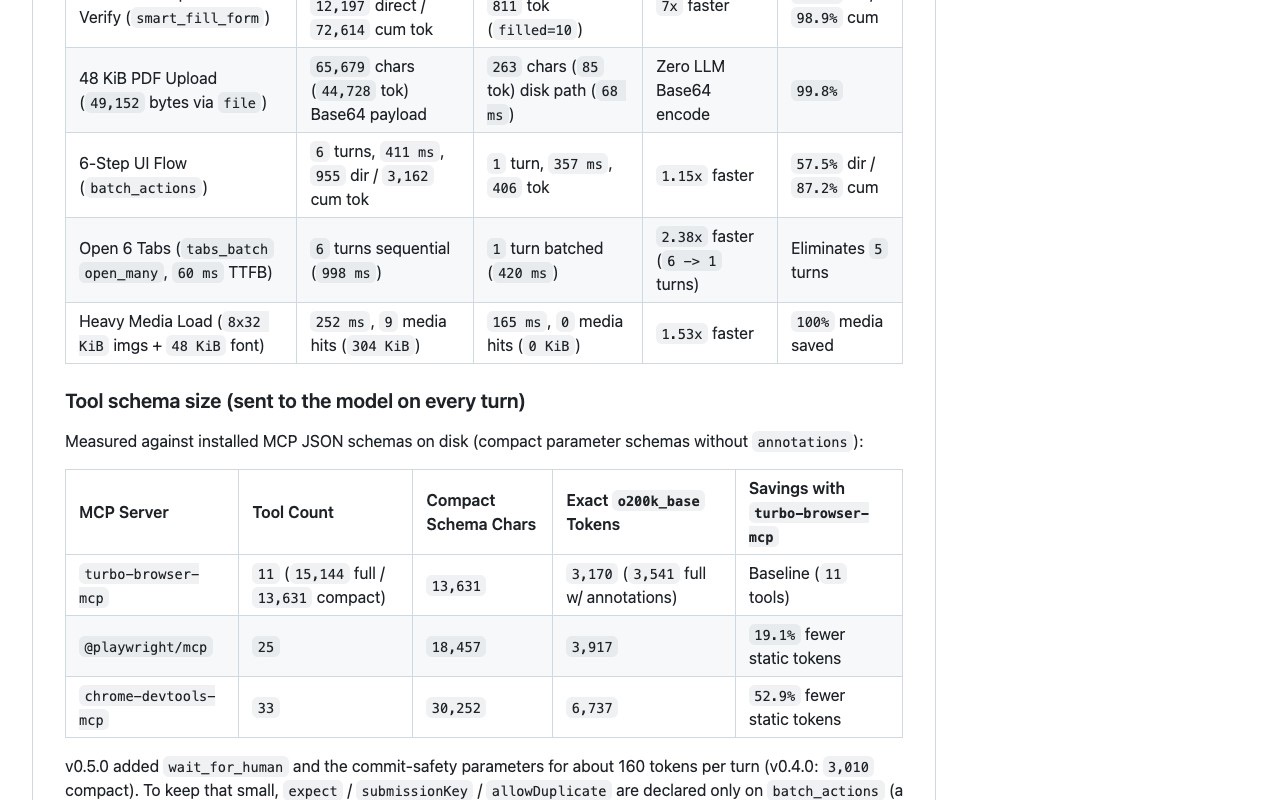
As of 16 November 2026 the npm package is at version 0.6.1, and the GitHub repository has 112 stars, 6 forks and one open issue.
Why it matters for agent builders
Fewer, larger MCP tool calls mean fewer model round trips and less repeated context for an agent, which lowers both cost and latency. Every tool call an agent makes is a round trip, and every earlier tool result it re-reads on a later turn adds to the tokens it pays for again. A server that returns a diff-only snapshot after each action, or fills a whole form in one call instead of one call per field, cuts both numbers directly. For anyone running a coding or browsing agent against real web forms, the submit guard also matters as a safety default: it lets an agent prepare a purchase, application or signup and still leaves the final, hard-to-undo click to a person.
What to watch
The benchmarks are the author's own, run on fixtures the author built, and they measure the browser and token-counting side of the work, not whether an agent actually completes more real tasks successfully. On Hacker News, one commenter pointed to other browser-agent projects, browser-use/browser-harness and Vercel Labs' agent-browser among them, and argued they already operate at a different, more battle-tested abstraction level than an MCP server; another replied that those tools solve a different problem than batching and diffing MCP calls. Whether turbo-browser-mcp's smaller tool count and batching hold up on real sites, beyond the project's own fixtures, is still open.
Key takeaways
- Turbo-browser-mcp is a new open-source (MIT) MCP server for Playwright browser automation, with 11 tools against the 25 in @playwright/mcp and 33 in chrome-devtools-mcp by its own count.
- It batches actions like form fills, tab opens and click sequences into single MCP calls, and can return only the page elements that changed since the last snapshot.
- It blocks "final commit" buttons (Submit, Send, Publish, Pay, Confirm, in five languages) by default, so an agent can prefill a form without triggering it.
- The project's own fixture benchmarks report up to a 7x reduction in model turns and over 90% token savings on form-filling and file-upload tasks; these are self-reported and do not measure full agent task success.
- A
wait_for_humantool hands control to a person when a site's bot check would otherwise stop the agent, then resumes automation in the same session.
FAQ
What is turbo-browser-mcp?
Turbo-browser-mcp is an open-source Model Context Protocol (MCP) server, built on Microsoft's Playwright, that lets an AI agent open tabs, fill forms, click through pages and read page content in a Chromium browser. It ships 11 tools and was published on GitHub and npm on 15 November 2026 under the MIT license.
How does it compare to @playwright/mcp and chrome-devtools-mcp?
By the project's own count, turbo-browser-mcp ships 11 tools against 25 in Microsoft's @playwright/mcp and 33 in Google's chrome-devtools-mcp. Its README reports that each of its tools does more per call, such as filling a whole form or batching several actions, which its own benchmarks tie to fewer model turns and smaller tool outputs on the fixture pages it tested.
Does turbo-browser-mcp bypass CAPTCHAs or bot detection?
No. The project states directly that it applies no stealth patches, fingerprint changes or CAPTCHA solving. For a page with a bot check, its wait_for_human tool instead hands the browser tab to a person to clear the check manually, then continues the automated session.
Source: turbo-browser-mcp on GitHub Discussion: Hacker News
Browser-automation MCP servers keep competing on tool count and token cost, and aiagentslisting.com lists the field in its browser automation category.
Subscribe to our newsletter
One email a week. New agents, MCP servers and skills, and what is actually getting traction.
More news
ClawDOS ships as an open source AI coding agent for DOS
ClawDOS is an open source AI coding agent harness running Claude's Messages API on a real 1980s IBM PC, posted to Hacker News on 21 November 2026.
Windows 11 diagnostics flag Claude Code, Codex and Cursor
A Windows 11 component called MissionControlAggregator checks for Claude Code, Codex, Cursor and other coding agents, researcher Xusheng Li found on 16 November 2026.
Agweb ships as a WebKit browser built for coding agents
Agweb is an open source macOS browser for AI agents, shipped 14 November 2026 with an installable skill for Claude Code and Codex.