
 arkyu2077
AI video upscaler: upscale video to 1080p, 2K or 4K online. Web app, REST API and MCP server for
AI video upscaler: upscale video to 1080p, 2K or 4K online. Web app, REST API and MCP server for Claude, Cursor and VS Code.
·

AI Video Upscaler
Turn blurry, low-resolution video into sharp 1080p, 2K or 4K, in your browser, from your code, or by asking your AI assistant.
Try it free · API docs · MCP server · Integrations & n8n · Pricing
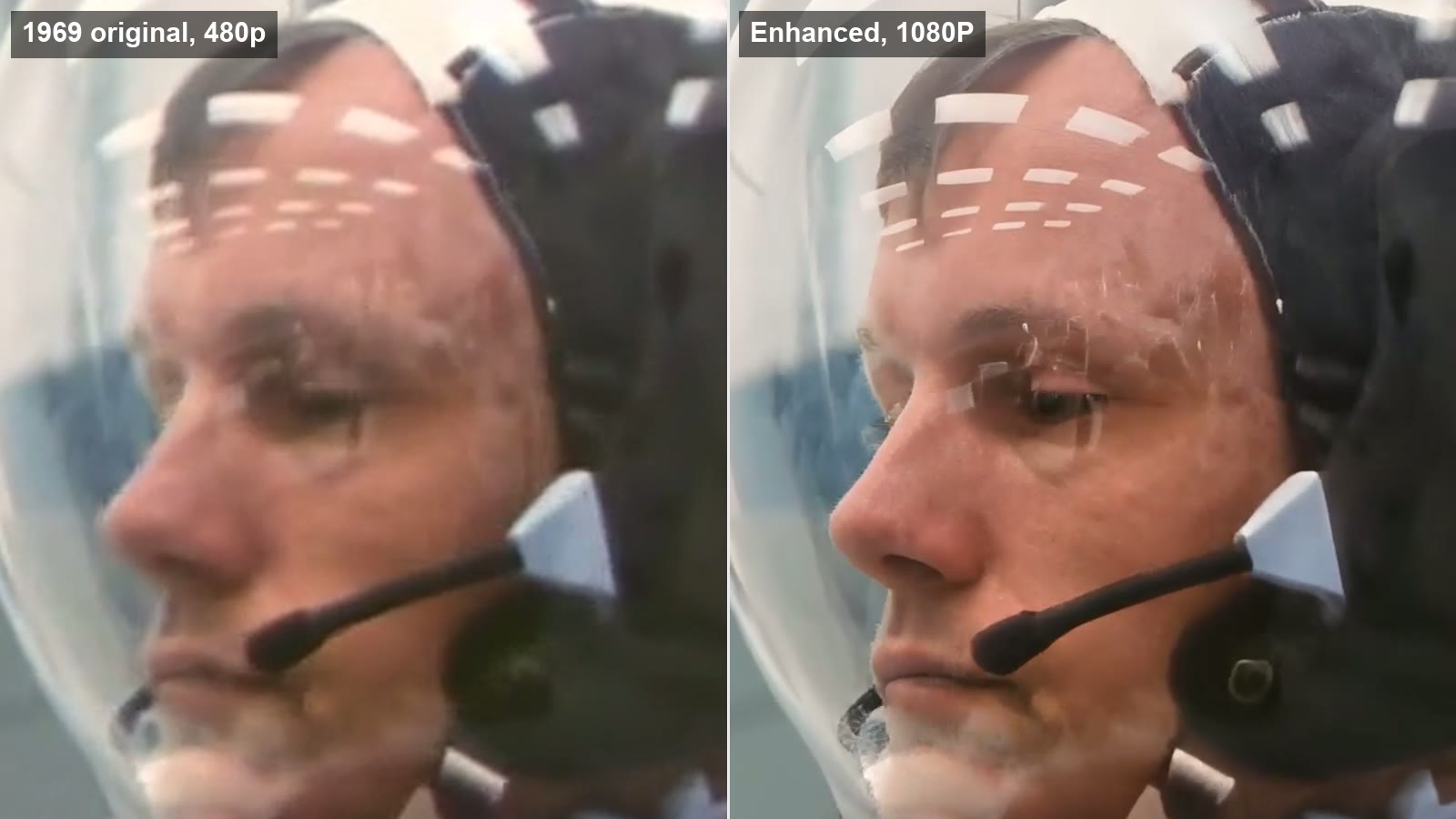
VideoUpscaler is an online AI video upscaler. Upload a video, pick a resolution, and download a sharper version a few minutes later. There's nothing to install and you don't need a graphics card: the AI runs on our GPUs, not on your computer.
This repository is the public home of the product: how to use it, which AI model it runs, ready-to-copy examples for the REST API and MCP server, and an agent skill.
Contents
What it does
- Upscales video to 1080p, 2K or 4K. Old home movies, 480p/720p downloads, phone clips, screen recordings, anime and game footage.
- Restores detail, not just pixels. Plain resizing only stretches a blurry frame. The AI model rebuilds edges, faces, textures and text, and reduces blur, noise and compression blocks.
- Keeps the video stable. Frames are processed as a video, not as separate photos, so details don't flicker from one frame to the next.
- Keeps your audio. The soundtrack is copied to the result unchanged.
- Works everywhere. Any modern browser on Windows, macOS, Linux, iPhone, iPad or Android.
What you need
| Website | MCP server | REST API | |
|---|---|---|---|
| Device | Any computer, tablet or phone with a modern browser (Chrome, Safari, Edge, Firefox) | A computer running an MCP client: Claude, Claude Code, Cursor, VS Code or any other client that supports remote MCP servers | Any machine that can send HTTPS requests (curl, Node.js, Python, Go...) |
| Graphics card (GPU) | Not needed | Not needed | Not needed |
| Software to install | None | Only the AI client you already use | None (no SDK required) |
| Account | Free account, 10 free credits to try | Account that has bought credits | Account that has bought credits + an API key |
| Video formats | MP4, MOV, WebM | MP4, MOV, WebM | MP4, MOV, WebM |
All the heavy lifting (decoding, AI inference, encoding) happens on our GPUs. A five-year-old laptop gets exactly the same result as a high-end workstation.
Three ways to use it
1. Website (no code)
Best for: anyone who just wants a sharper video.
-
Go to videoupscaler.co and sign in with Google or your email. New accounts get 10 free credits.
-
Drop your video into the upload box (or click to choose a file).
-
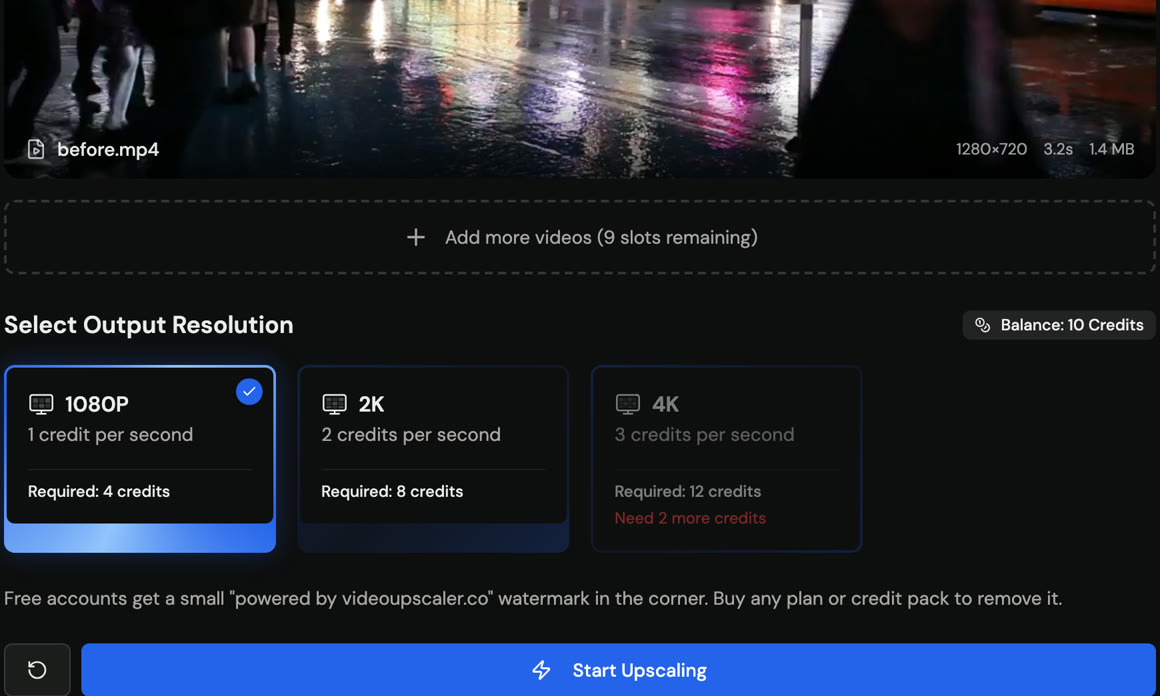
Pick 1080P, 2K or 4K. The page shows how many credits the video needs before you start.
-
Click Start Upscaling. Keep the tab open, or come back later: finished videos stay in your history.
-
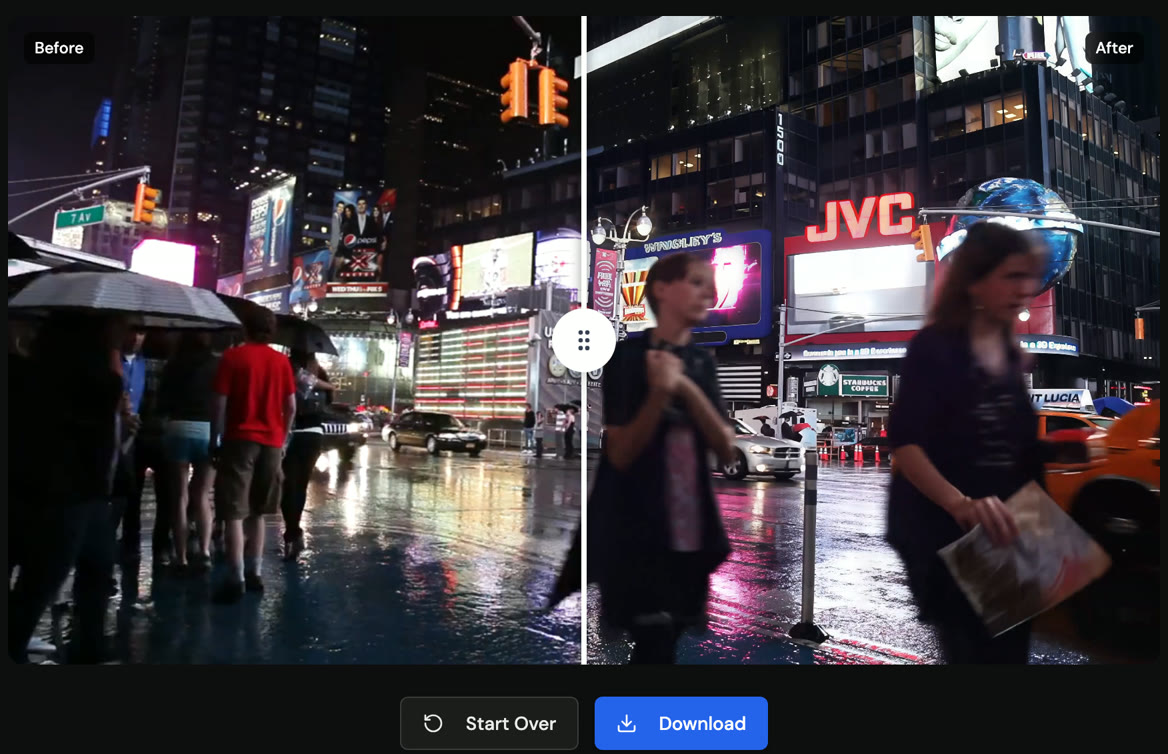
Drag the slider to compare before and after, then click Download.
Tips for the best result:
- Upload the original file, not a re-downloaded or screen-recorded copy. Every re-encode throws detail away.
- Try a short clip first (5–10 seconds) to check the look before you upscale a long video.
- 1080p is enough for most 480p/720p sources. Choose 2K or 4K when you'll watch on a large screen or edit in a 4K timeline.
Free results carry a small "videoupscaler.co" watermark. After your first purchase, new results have no watermark.
2. MCP server (ask your AI assistant)
Best for: people who already work in Claude, Cursor or VS Code and want to say "upscale this video to 4K" instead of opening a website.
Two ways to connect:
- Remote Streamable HTTP:
https://videoupscaler.co/api/mcp(listed in the MCP Registry asco.videoupscaler/video-upscaler) - Local stdio via npm (
videoupscaler-mcp):npx -y videoupscaler-mcpwithVIDEOUPSCALER_API_KEY(npm package)
{
  "mcpServers": {
    "videoupscaler": {
      "command": "npx",
      "args": ["-y", "videoupscaler-mcp"],
      "env": {
        "VIDEOUPSCALER_API_KEY": "vu_live_..."
      }
    }
  }
}
Most clients connect by signing in: add the URL, a browser window opens, you sign in to VideoUpscaler and click Allow. Clients that can't sign in use an API key from Settings → API Keys.
Claude (claude.ai and the desktop app)
Open Settings → Connectors → Add custom connector, enter https://videoupscaler.co/api/mcp, click Connect, then sign in and allow access.
Claude Code
claude mcp add --transport http videoupscaler https://videoupscaler.co/api/mcp --scope userThen run /mcp, select videoupscaler and choose Authenticate. To use an API key instead, add --header "Authorization: Bearer $VIDEOUPSCALER_API_KEY".
Cursor (API key)
Add to ~/.cursor/mcp.json (example file):
{
  "mcpServers": {
    "videoupscaler": {
      "url": "https://videoupscaler.co/api/mcp",
      "headers": {
        "Authorization": "Bearer ${env:VIDEOUPSCALER_API_KEY}"
      }
    }
  }
}
VS Code
Add to .vscode/mcp.json (example file). VS Code asks you to sign in the first time:
{
  "servers": {
    "videoupscaler": {
      "type": "http",
      "url": "https://videoupscaler.co/api/mcp"
    }
  }
}
Other clients
Any client that supports remote MCP servers over Streamable HTTP works. Clients that support MCP authorization sign in automatically; others send the header Authorization: Bearer <your API key>.
Tools
| Tool | What it does |
|---|---|
upscale_video | Upscales a public video_url to 1080p, 2k or 4k. Requires an idempotency_key so a retry never charges twice. |
get_task | Returns a task. With wait_seconds (up to 45) it waits for the task to finish first. |
list_tasks | Lists your recent tasks, including ones started on the website. |
get_account | Your credit balance and the price per second for each resolution. |
create_upload | Returns a signed URL for uploading a local file (up to 100MB) that has no public URL. |
Try asking
- "How many VideoUpscaler credits do I have left?"
- "Upscale https://example.com/clip.mp4 to 4K and give me the link when it's done."
- "Upscale
./intro.mp4to 2K." (clients that can run commands upload the file withcreate_uploadfirst)
3. REST API (for developers)
Best for: apps, scripts and pipelines that upscale videos automatically.
- Buy any credit pack on the pricing page (this unlocks the API for good).
- Create a key in Settings → API Keys and store it as
VIDEOUPSCALER_API_KEY. - Start an upscale, then poll the task until it's
completed:
curl https://videoupscaler.co/api/v1/upscale \
  -H "Authorization: Bearer $VIDEOUPSCALER_API_KEY" \
  -H "Content-Type: application/json" \
  -H "Idempotency-Key: my-first-upscale" \
-d '{"video_url": "https://example.com/clip.mp4", "resolution": "2k"}'curl https://videoupscaler.co/api/v1/tasks/TASK_ID \
-H "Authorization: Bearer $VIDEOUPSCALER_API_KEY"
# -> "status": "completed", "output_url": "https://..."| Endpoint | What it does |
|---|---|
POST /api/v1/upscale | Start an upscale from a video URL |
GET /api/v1/tasks/{id} | Get a task's status and result |
GET /api/v1/tasks/{id}/events | Stream progress as Server-Sent Events |
GET /api/v1/tasks | List your tasks |
GET /api/v1/account | Credit balance and prices |
POST /api/v1/uploads | Get a signed URL to upload a local file |
Full examples: curl · Node.js · Python. Machine-readable spec: openapi.yaml. Reference: videoupscaler.co/docs.
Videos that aren't online yet: call POST /api/v1/uploads, PUT the file to the returned upload_url, then pass the returned video_url to /upscale (see the Node.js example).
4. Workflow Automation & n8n Integration
Best for: no-code/low-code media pipelines in n8n, Make.com, and Zapier (e.g., automatically upscaling AI-generated clips from Sora, Runway, Kling, or Veo to 4K before publishing to YouTube, TikTok, or Google Drive).
- Official n8n Community Node:
n8n-nodes-videoupscaler(GitHub repository)- Install in self-hosted n8n via Settings → Community Nodes → Install →
n8n-nodes-videoupscaler
- Install in self-hosted n8n via Settings → Community Nodes → Install →
- Ready-to-Import Workflow Templates (browse in
examples/workflows/):n8n-videoupscaler-workflow.json— Self-documenting zero-installHTTP Request+ server-side long-polling (?wait=45) workflow (works on both n8n Cloud & self-hosted)n8n-videoupscaler-webhook-workflow.json— Zero-polling async webhook callback pipeline (X-VideoUpscaler-Event: task.completed)n8n-videoupscaler-node-workflow.json— 3-node pipeline using the officialn8n-nodes-videoupscalercommunity nodemake-videoupscaler-blueprint.json— Make.com 2-module scenario blueprint
- Documentation & Guides:
The AI model
VideoUpscaler runs FlashVSR, a diffusion-based video super-resolution model (CVPR 2026, Apache-2.0).
| Model type | One-step diffusion video super-resolution |
| Why this model | Diffusion models generate realistic texture (skin, hair, foliage, fabric) instead of the smooth, plastic look of older upscalers |
| Temporal consistency | It processes video as a stream of frames, so detail stays stable over time instead of flickering frame to frame |
| Output | 1080p, 2K or 4K, encoded as MP4 with the original audio |
| Runs on | Our data-center GPUs. You never download weights or need your own GPU |
How it compares with classic upscalers:
| Approach | Example | Result on real-world video |
|---|---|---|
| Interpolation | Bicubic / Lanczos resize in an editor | Bigger but just as blurry |
| GAN image upscaler, frame by frame | Real-ESRGAN | Sharp stills, but detail can shimmer between frames |
| Diffusion video upscaler | FlashVSR (VideoUpscaler) | Realistic detail that stays consistent across frames |
AI upscaling recovers plausible detail; it can't invent information that was never captured. A heavily compressed 240p clip will look much better, but not like it was filmed in 4K.
Pricing
You pay per second of video with credits. The same credits work on the website, the API and the MCP server.
| Resolution | Credits per second |
|---|---|
| 1080p | 1 |
| 2K | 2 |
| 4K | 3 |
A 12.4-second clip costs 13 credits at 1080p, 26 at 2K and 39 at 4K (length is rounded up). If a job fails, its credits are refunded automatically. New accounts get 10 free credits; credit packs and plans are on the pricing page.
Limits
| Limit | |
|---|---|
| Video length (API/MCP) | 1200 seconds at 1080p, 600 seconds at 2K and 4K |
Remote video_url size (API/MCP) | 500MB |
Upload through /uploads | 100MB |
| API requests | About 120 per minute per key |
FAQ
Do I need a powerful computer or a graphics card? No. Processing runs on our GPUs. You only upload the video and download the result.
How long does it take? It depends on the video's length and the resolution. A short clip at 1080p usually finishes in a few minutes; a long video at 4K takes longer. You can close the tab and come back later.
How long are my files kept? Files uploaded through the API may be deleted after 7 days. Download your result soon and keep your own copy.
Can I upscale anime or cartoons? Yes. Try a short clip first to check the look before you upscale a whole episode.
Does it change the frame rate or the length? No. The result has the same frame rate, length and audio as the original.
Why can't I use the API with the free credits? The API and MCP upscaling tools are for accounts that have bought credits or subscribed. Any account can sign in to the MCP server and check its balance.
Links
- Website: videoupscaler.co
- API reference: videoupscaler.co/docs
- MCP setup: videoupscaler.co/docs/mcp
- Integrations Hub: videoupscaler.co/integrations
- Workflow Automation Docs: videoupscaler.co/docs/workflows
- Official n8n Node: npmjs.com/package/n8n-nodes-videoupscaler · github.com/arkyu2077/n8n-nodes-videoupscaler
- Blog: videoupscaler.co/blog
The examples and docs in this repository are MIT-licensed. The VideoUpscaler service itself is a hosted product; see the website's terms.
Pick your client and paste the snippet. Each one is the same server, written the way that client expects it.
- Run the command below in your terminal.
- Restart Claude Code, then check the connection with /mcp.
- Open your client's MCP config file, usually mcp.json.
- Merge this block into it.
- Restart the client to pick up the server.
- Run the command below in your terminal.
- Reload VS Code and check the MCP section of the Extensions view.
- Open ~/.codex/config.toml.
- Append this block.
- Restart Codex to pick up the server.
claude mcp add videoupscaler -- npx -y videoupscaler-mcp{
"mcpServers": {
"videoupscaler": {
"env": {
"VIDEOUPSCALER_API_KEY": ""
},
"args": [
"-y",
"videoupscaler-mcp"
],
"command": "npx"
}
}
}code --add-mcp '{"name":"videoupscaler","env":{"VIDEOUPSCALER_API_KEY":""},"args":["-y","videoupscaler-mcp"],"command":"npx"}'[mcp_servers.videoupscaler]
command = "npx"
args = ["-y", "videoupscaler-mcp"]Runs locally on your device. Your client starts the server itself, so nothing has to be hosted.
Install with your agent
Paste this prompt into your agent. It reads this page and does the setup for you.
Read https://aiagentslisting.com/mcp/ai-video-upscaler to learn what the "Ai Video Upscaler" MCP server does and how to install it. Add it to my coding agent's MCP configuration as documented on that page, then confirm the server connects and list the tools it exposes.Agents can also browse this directory over MCP at https://aiagentslisting.com/api/mcp
From the project README
claude mcp add --transport http videoupscaler https://videoupscaler.co/api/mcp --scope userTools5
| Name | What it does |
|---|---|
upscale_video | Start upscaling a video to 1080p, 2k or 4k. Charges credits for the whole video (its length is read from the file) and returns the task. Downloading a large video can take a few minutes. If this call |
get_task | Get an upscale task. Status is queued, processing, completed (output_url is the result) or failed (credits were refunded). Set wait_seconds (up to 45) to wait for it to finish before returning; call a |
list_tasks | List your upscale tasks, newest first, including ones started on the website. |
get_account | Your credit balance and the price per second of video for each resolution. |
create_upload | Get a signed URL to upload a local video file (up to 100MB) when it has no public URL. PUT the file bytes to upload_url with the returned headers (no Authorization header), then pass video_url to upsc |
Read live from the server on November 15, 2026.
What's missing
- Ships promptsThe server exposes at least one prompt template.0/8
- Ships resourcesThe server exposes at least one resource.0/8
- Claimed by ownerThe maintainer proved ownership of this listing.0/4
All 9 checks (6 passed)
- Installation methodRequiredThe README documents at least one way to install or connect.15/15
- Exposes toolsRequiredThe server reports at least one tool, from its manifest or a live read.15/15
- Has a READMERequiredThe repository ships documentation we could read.10/10
- Verified liveWe connected to the server and it answered a real MCP handshake.20/20
- Easy installA paste-ready client config (an mcpServers block) is documented.12/12
- Has a licenseThe repository declares a license.8/8
- Ships promptsThe server exposes at least one prompt template.0/8
- Ships resourcesThe server exposes at least one resource.0/8
- Claimed by ownerThe maintainer proved ownership of this listing.0/4
Maintain this server? Claiming proves you own the listing and earns the last 4 points.
Claim this listingShow this grade in your README

Paste this line near the top of your repository's README. The badge always renders the current score.
[](https://aiagentslisting.com/mcp/ai-video-upscaler)Alternatives to Ai Video Upscaler
Nothing comparable is listed yet.
v0.1.0v0.1.0 — Official videoupscaler-mcp Stdio Server & MCP Registry PackageRelease notes
Send this prompt to your agent to leave a review
Connect to the AI Agents Listing MCP server at https://aiagentslisting.com/api/mcp using the HTTP transport and complete the sign-in when it asks. Then call the submit_review tool for the listing "ai-video-upscaler" with a rating from 1 to 5 and a short note on what worked and what did not.No reviews yet
Be the first to share your experience with this tool.
Subscribe to our newsletter
One email a week. New agents, MCP servers and skills, and what is actually getting traction.