
 juju-w
用一句话生成卡面;免费分享艺术、交通卡与银行卡主题的卡面画廊。
用一句话生成卡面;免费分享艺术、交通卡与银行卡主题的卡面画廊。
·

Card Creator
一句话,把脑海里的卡面做出来。
用图片生成创作 AirCard、银行卡和交通卡卡面的 Skill。
给它主题、风格和想要的标志,其余交给画面。
先看作品,再动手
每张卡都从一个很短的想法出发。点击图片可去画廊浏览、查看 Prompt 和下载原图。 画廊可按精选或最新发布浏览。打开作品,选择「网页直接使用/通过已安装的 Skill」,即可复制对应的提示词;原始 Prompt 也会保留。
| 艺术 · 旋涡夜景 | 艺术 · 新艺术花卉 |
|---|---|
 后印象派夜空 · 哑金 Visa |  新艺术花卉人物 · 古铜八达通 |
| 宝可梦 · 超能系粉色 | 城市 · 大湾区海桥 |
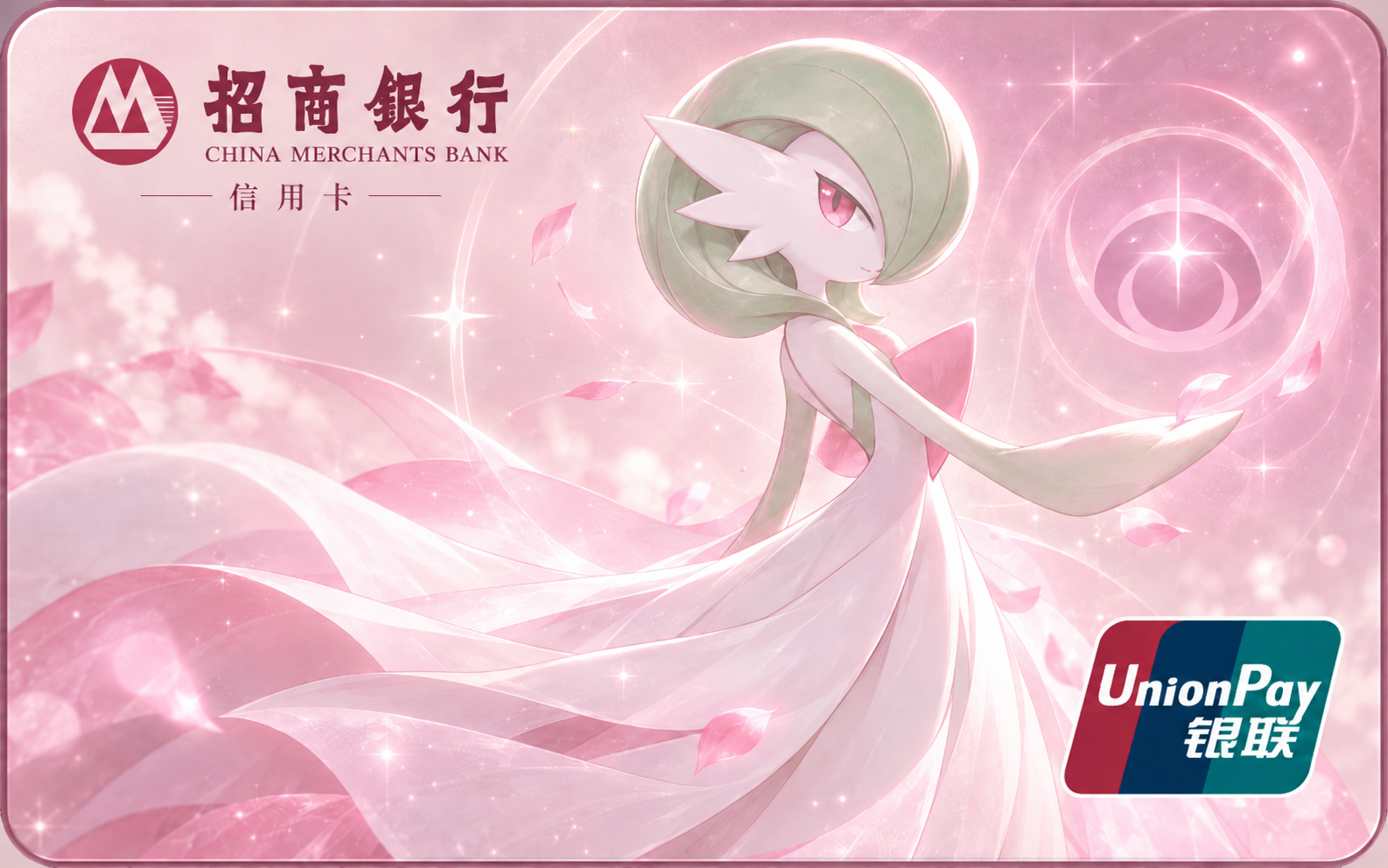 沙奈朵 · 招商银行 × 银联 |  海桥晨光 · 大湾区通概念标志 |
| 玩梗 · 牛来 | 现代 · 蓝晶猫影 |
 经典运通构图 · 牛来居中肖像 |  蓝色晶面 · 猫咪 × 汇丰 |
沙奈朵示例由用户从 ChatGPT 网页版分享,无法确认当时是否加载了本 Skill。大湾区通是虚构概念标志;品牌与角色画面均为非官方二创。来源见 SOURCES.md。
30 秒开始
网页直接使用
在 ChatGPT 等支持图片生成的界面选择创建图像,然后复制:
请先读取并遵循 https://raw.githubusercontent.com/juju-w/card-creator-skill/main/web/card-creator.md ,然后用图片生成功能创作一张宝可梦沙奈朵的招商银行银联信用卡卡面:简洁,超能系粉色,不要芯片。也可以去画廊选择作品,直接复制「网页直接使用」的提示词。单文件指南已经包含全部执行规则,不用逐个翻阅仓库。
链接不等于安装 Skill,也不保证当前模型读到了网页。读不到时,下载 card-creator.md 后上传到对话。@创建图像 不是通用 Prompt 语法,请以当前界面的工具入口为准。
安装 Skill
在支持 Agent Skills 和图片生成/编辑的客户端中安装。Skill 本身不包含生图模型。
npx skills add juju-w/card-creator-skill腾讯 SkillHub 中文版也可安装:
skillhub install card-creator --namespace indiv-juju-w安装并确认当前会话已识别 card-creator 后,试试:
使用 card-creator Skill,生成一张宝可梦沙奈朵的招商银行银联信用卡卡面:简洁,超能系粉色,不要芯片。想换题材,只需改一句话:故宫云母仙鹤 × 银联、伦敦春日厚涂交通卡。未指定标志时会自动搭配;想要纯插画就说「无标志」。默认不加卡号、芯片、二维码和感应支付标志。
上传参考图,或只改一点
在画廊点「参考这张创作」,下载图片并上传到绘图对话,再复制改图提示。已经生成过的图片可以直接继续说:
只把八达通 Logo 改成紫色,角色和背景保持。需要特定标志或角色版本时,附上对应参考图即可。复制文字不会自动附带图片;AI 局部编辑也不保证未修改区域逐像素一致。
它怎么工作
- 理解主题与修改范围,未指定标志时按题材、卡片类型和地域搭配;只读取相关参考图。
- 用宿主图片工具创作或编辑完整卡面,包括与画风协调的标志;不使用 SVG 绘画或脚本拼贴。
- 检查主体、标志和意外透明白边。默认横版,也支持直接说「竖版卡面」;按方向重新构图,不旋转或裁切横图充当竖图。比例与推荐尺寸见卡面规则,返回实际成图,不虚称尺寸、DPI 或出血文件。
参考库涵盖中国内地与海外交通卡、常见中外银行、支付组织及 Wise、Apple Cash 等金融科技标志。可从图片索引按需选用;比例与构图规则保持简短。Logo 可随画面变成烫金、单色或线稿,但生成结果只是非官方风格化诠释,不是可用的真实银行卡或交通卡。
版本与更新
稳定版、下载包和每次改动见 Releases 与 更新日志。main 持续更新;想固定版本,可下载对应 Release 的 ZIP,将其中 card-creator/ 安装到客户端。
主包与中文包共用一个版本号,位于主 Skill 的 metadata.version。完整包附带本地参考图,中文轻量包使用固定提交的图片链接;GitHub 发布和腾讯 SkillHub 更新是独立步骤。维护流程见 版本发布说明。
关于这个项目
Card Creator 免费、非商业,用于创作交流与参考分享,不出售卡面或素材,也不代表品牌授权。第三方标志、角色和作品的权利归原权利人;非盈利与注明来源不自动等于获得许可。仓库的 MIT License 不覆盖第三方内容。完整说明、来源和移除联系方法分别见 DISCLAIMER.md、SOURCES.md。
手动安装与维护者校验
仓库根目录下手动安装到 Codex:
cp -R skills/card-creator ~/.codex/skills/SkillHub 中文分发包的维护说明在 packaging/skillhub-zh-CN。中文包使用中文入口和共享执行规则,参考图片是远程链接;GitHub 安装包包含本地图片。网页指南也由同一源文件自动生成,请勿手改。提交前可运行:
python3 -m pip install -r requirements-dev.txt  # 仅维护端:检查图片实际透明度
python3 packaging/build_web_md.py --check
python3 packaging/release.py check
python3 ~/.codex/skills/.system/skill-creator/scripts/quick_validate.py skills/card-creator
python3 -m unittest discover -s tests -v
node --test tests/gallery-prompts.test.mjs
建议在虚拟环境中安装维护依赖;普通 Skill 用户不需要 Python 或 Node。真实生图验收用例见 tests/skill-scenarios.md。
Install with your agent
Paste this prompt into your agent. It reads this page and does the setup for you.
Read https://aiagentslisting.com/mcp/card-creator-skill to learn what the "Card Creator Skill" MCP server does and how to install it. Add it to my coding agent's MCP configuration as documented on that page, then confirm the server connects and list the tools it exposes.Agents can also browse this directory over MCP at https://aiagentslisting.com/api/mcp
From the project README
npx skills add juju-w/card-creator-skillThis server runs locally, so we can't read its tool list over the web yet.
We could not run this server: it ships no npx package for our sandbox and no public endpoint. The four checks that need a live server are left out, and the grade tops out at B until one exists.
What's missing
- Easy installA paste-ready client config (an mcpServers block) is documented.0/12
All 5 checks (4 passed)
- Installation methodRequiredThe README documents at least one way to install or connect.15/15
- Has a READMERequiredThe repository ships documentation we could read.10/10
- Easy installA paste-ready client config (an mcpServers block) is documented.0/12
- Has a licenseThe repository declares a license.8/8
- Claimed by ownerThe maintainer proved ownership of this listing.4/4
- Verified liveNot checkableWe connected to the server and it answered a real MCP handshake.—
- Exposes toolsNot checkableThe server reports at least one tool, from its manifest or a live read.—
- Ships promptsNot checkableThe server exposes at least one prompt template.—
- Ships resourcesNot checkableThe server exposes at least one resource.—
Show this grade in your README

Paste this line near the top of your repository's README. The badge always renders the current score.
[](https://aiagentslisting.com/mcp/card-creator-skill)Alternatives to Card Creator Skill
Nothing comparable is listed yet.
v0.5.0Card Creator v0.5.0Release notes
Send this prompt to your agent to leave a review
Connect to the AI Agents Listing MCP server at https://aiagentslisting.com/api/mcp using the HTTP transport and complete the sign-in when it asks. Then call the submit_review tool for the listing "card-creator-skill" with a rating from 1 to 5 and a short note on what worked and what did not.No reviews yet
Be the first to share your experience with this tool.
Subscribe to our newsletter
One email a week. New agents, MCP servers and skills, and what is actually getting traction.