
 Snoozemage
MCP bridge for ChatGPT to use OpenClaw browser, desktop, file, and runtime tools.
Local MCP bridge connecting ChatGPT to OpenClaw, with browser and desktop automation, file operations, project search, command/process control, dynamic tool discovery, and a local call monitor.
·
OpenClaw Direct Tools for ChatGPT
Give ChatGPT direct access to the tools available in your OpenClaw runtime.
Works with ChatGPT Free - no paid ChatGPT subscription or OpenClaw Main Agent required.
Platform status: Windows is the currently tested setup. Linux and macOS support has not yet been validated. Contributions and testing reports for additional platforms are welcome. See Contributing.
Use ChatGPT to work with your local environment: search files, understand and edit code, run commands and tests, automate Chrome, and interact with your Windows desktop. The bridge exposes these capabilities as MCP tools and can also discover other eligible tools in your current OpenClaw runtime.
Rather than routing every operation through the OpenClaw Main Agent, ChatGPT can call the bridge's tools directly. Native actions are forwarded through supported OpenClaw interfaces, so OpenClaw permissions, approvals, and policies remain authoritative.
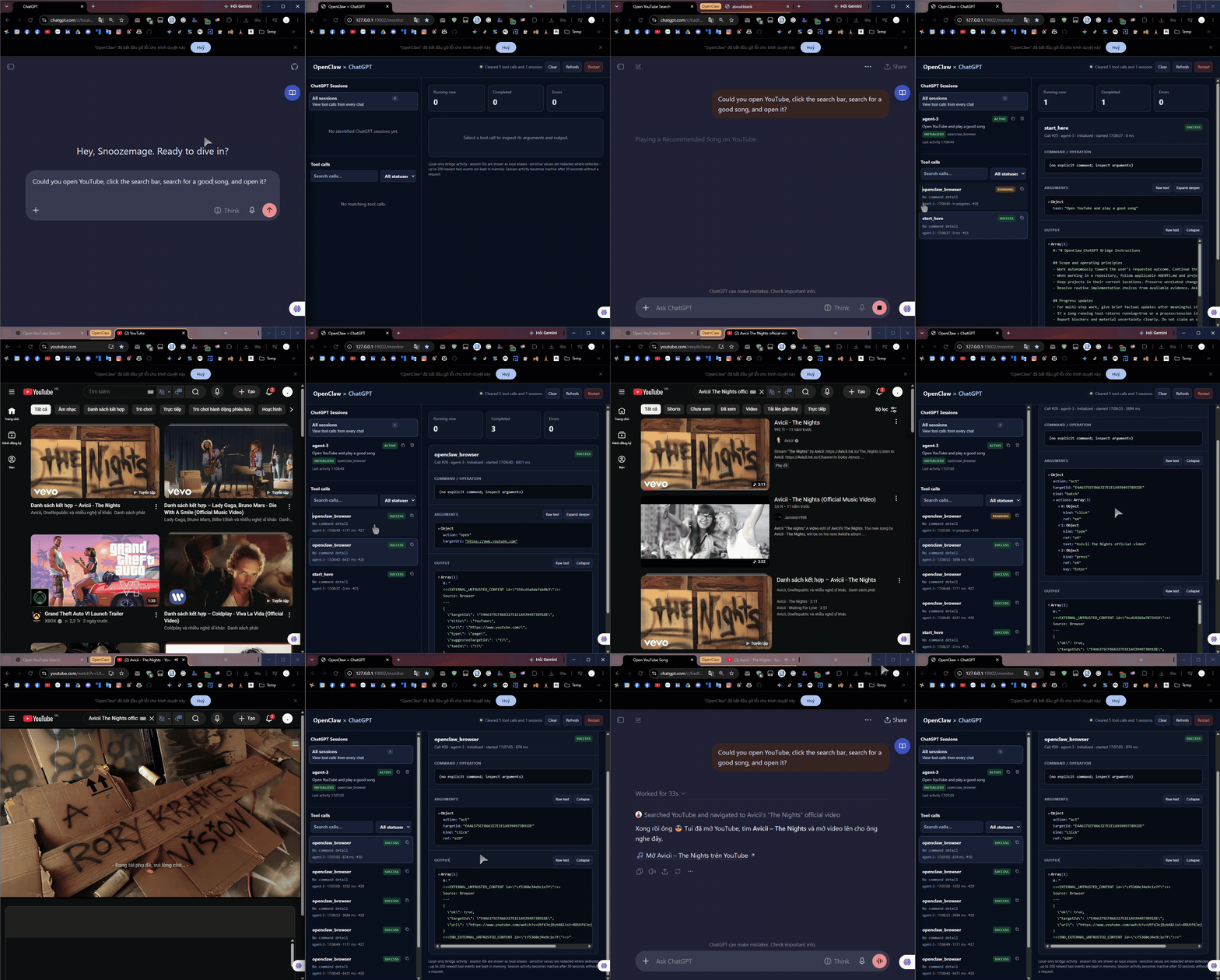
Browser automation through the bridge.
Capabilities
| Capability | Public tools | What ChatGPT can do |
|---|---|---|
| Conversation setup | start_here | Load tool-routing and safety instructions once at the start of a ChatGPT conversation. |
| Browser automation | openclaw_browser | Work with Chrome tabs and pages, take screenshots, interact with page elements, manage downloads/uploads and inspect browser diagnostics. |
| Desktop automation | openclaw_computer | Inspect the Windows screen, use the mouse and keyboard, operate windows/apps, and run bounded action batches. |
| File operations | openclaw_ls, openclaw_read, openclaw_edit, openclaw_write, openclaw_apply_patch | List, read, edit, create/replace, and patch local files through OpenClaw's native file tools. Listing and reading support batches. |
| Local project search | openclaw_glob, openclaw_grep | Find project paths and search file contents without using a shell for the search itself. |
| Runtime operations | openclaw_exec, openclaw_process | Run commands and inspect or control processes started through the runtime wrapper. |
| Screenshot presentation | openclaw_image_render | Display a recent desktop screenshot directly in the ChatGPT conversation using a short-lived reference. |
| Dynamic tool discovery | openclaw_tool_search, openclaw_tool_describe, openclaw_dispatch_action | Find other eligible tools in the current OpenClaw runtime, inspect their actual schemas, and invoke them when no dedicated bridge wrapper exists. |
This is the bridge's public interface, not a promise that every native OpenClaw capability is available in every installation. Availability depends on the runtime version, installed plugins, node hardware, pairing approvals, Gateway policy, and operating-system permissions.
Quick Start
Note: The steps below are for Windows; Linux and macOS have not yet been validated.
The shortest path to trying the bridge:
-
Prepare OpenClaw and the tunnel. Make sure OpenClaw is installed and configured. Create an OpenAI Secure MCP Tunnel, associate it with your target ChatGPT workspace, and have a Platform API key with Tunnels Read + Use permission ready. See Prepare the OpenAI tunnel for details.
-
Clone and configure in Windows PowerShell:
git clone https://github.com/Snoozemage/openclaw-direct-tools-for-chatgpt.git
Set-Location openclaw-direct-tools-for-chatgpt
npm run setup
Follow the setup wizard to configure your local OpenClaw paths, ports, tunnel ID, and API key.
-
Start the bridge:
npm start npm run status -
Connect ChatGPT. Add a custom MCP server using the Tunnel connection, select the same tunnel, then open a conversation and select the plugin. The local call monitor is available at http://127.0.0.1:19002/monitor with the default port.
For the full setup flow, workspace requirements, troubleshooting notes, and lifecycle details, continue to Setup and operation.
Architecture
The bridge provides the MCP endpoint, routes calls to feature-specific handlers, and hosts a local call monitor. Depending on the capability, a handler uses an OpenClaw native tool, invokes a Gateway tool, or performs bridge-owned work.
ChatGPT custom MCP connector
          |
OpenAI Secure MCP Tunnel
          |
Local Node.js bridge
  ├── MCP endpoint (/mcp)
  │     └── Public tool registry and dispatcher
  │           ├── Browser wrapper ──────────> OpenClaw Gateway ──> Browser / Chrome extension
  │           ├── Desktop wrapper ──────────> OpenClaw Gateway / paired computer node
  │           ├── Files and runtime wrappers > OpenClaw native tools
  │           ├── Tool Discovery ───────────> Effective tool catalog / Gateway invocation
  │           └── Bridge-native utilities ──> glob, grep, screenshot rendering, session setup
  └── Local call monitor (/monitor)
        └── In-memory events and Server-Sent Events (/events)
Tool definitions are assembled in src/mcp/tool-definitions.mjs; src/mcp/tool-dispatcher.mjs routes public tool names to handlers. The local HTTP server exposes /mcp and /healthz as well as the monitor endpoints. Tool-call events are streamed to the monitor over Server-Sent Events (SSE).
Integration boundaries
- OpenClaw wrappers: Browser, Computer, Files, and runtime execution/process tools use OpenClaw's native behavior for the operation they wrap. The bridge may shape the public schema, prepare arguments, maintain interaction state, or format results, but it does not bypass OpenClaw policy.
- Bridge-native utilities:
openclaw_globandopenclaw_grepsearch local files;openclaw_image_renderpresents a screenshot captured by the computer tool;start_heresupplies conversation-specific routing instructions. - Dynamic tool discovery: the discovery trio searches tools effectively available to the configured OpenClaw agent, returns runtime-provided schemas, and dispatches the exact selected tool through the supported Gateway invocation path. Tools already covered by direct wrappers are intentionally excluded so their bridge-specific behavior is retained.
For implementation guidance, see Tool Exposure Guide. For node command policy and discovery of capabilities such as camera, location, screen, device information, notifications, and plugin-provided actions, see Gateway Node Command Reference.
Setup and operation
Requirements
- Current setup and lifecycle scripts are written for Windows/PowerShell. The MCP server is built with Node.js, but setup and lifecycle support on other operating systems has not yet been validated.
- Node.js 22.17 or later and npm.
rg.exe(ripgrep) onPATH, or setOPENCLAW_RIPGREP_PATHto its executable path.- An installed and configured OpenClaw runtime and Gateway.
- An OpenAI Secure MCP Tunnel created in Platform and an OpenAI Platform API key for
tunnel-clientwith Tunnels Read + Use permission. You also need a ChatGPT account/workspace that can add a custom MCP server. The project maintainer has verified that this bridge connects successfully on a ChatGPT Free account.
Prepare the OpenAI tunnel
- Open OpenAI Platform Tunnels settings and create a Secure MCP Tunnel. Note its
tunnel_idand associate the tunnel with the ChatGPT workspace where the connector will be created. A tunnel attached only to a Platform organization may not appear in a separate ChatGPT workspace. - Create or select an OpenAI Platform API key for the tunnel client. This key authenticates
tunnel-clientto OpenAI's tunnel control plane; it is required even though the MCP bridge itself runs locally. Grant it Tunnels Read + Use so it can run the tunnel and select it for the ChatGPT connection. Creating or editing the tunnel requires Tunnels Read + Manage for the account performing that operation. - The API key for
tunnel-clientis separate from your ChatGPT sign-in and from the authentication setting on the ChatGPT custom MCP plugin. The setup wizard prompts for the key using hidden input and stores it in Windows Credential Manager. It is not saved as a plaintext key file. Do not paste it into ChatGPT, put it in the repository, or commit it to Git.
See the official Secure MCP Tunnel guide for organization/workspace associations and permissions.
Configure the bridge
From the repository root, run the setup wizard in PowerShell:
npm run setupFollow the prompts for the OpenClaw config and CLI paths, Node.js, bridge and Gateway ports, the tunnel_id, and runtime API-key material. Setup installs the locked npm dependencies, locates or downloads the official tunnel-client, creates a profile that forwards the tunnel to the bridge's local /mcp endpoint, validates the configuration, and stores generated settings outside the repository.
The default local application directory is:
%LOCALAPPDATA%\OpenClawChatGPTBridge\It contains the generated configuration, tunnel profile, and runtime logs. The tunnel runtime API key is stored in Windows Credential Manager and is not written to a plaintext key file by the current setup flow. Keep generated configuration, profiles, and logs out of version control.
On existing installations, rerun npm run setup once to migrate the old key file. Setup verifies the Credential Manager entry before removing that file. Normal file deletion cannot guarantee secure erasure of historical disk copies; rotate the key if you suspect prior exposure.
Start, inspect, and stop
npm start
npm run status
npm stop
npm start starts the Gateway, MCP bridge, Secure MCP Tunnel, and tray. npm run status reports component health; npm stop stops the complete stack. The bridge normally listens on http://127.0.0.1:19002, with the local Monitor at http://127.0.0.1:19002/monitor; the Gateway defaults to port 19001. Configured ports may differ.
Automatic startup is opt-in: Run npm run autostart:install to add one OpenClaw Direct Tools entry to Windows Startup apps. Enable or disable it in Task Manager → Startup apps. Run npm run autostart:uninstall to remove it; add -- -StopService to stop the running stack as part of uninstall.
Windows lifecycle
A per-user service-supervisor.ps1 manages the Gateway, bridge, tunnel, and tray in the interactive Windows session; it is not a system-wide Windows Service. service-start.ps1 enforces a single supervisor instance, while service-stop.ps1 requests coordinated shutdown through stop.ps1. The supervisor runs gateway-task.ps1 for Gateway recovery and invokes start.ps1 to wait for RPC readiness before reconciling the bridge and tunnel. bridge-supervisor.ps1 independently restarts the bridge process.
The tray companion reports Gateway, bridge, and tunnel health (green when ready, yellow during startup or partial availability, red when offline or misconfigured). Its menu can open the Monitor, restart the bridge, stop the full stack, or exit only the tray. Status refreshes every 3.5 seconds. See the OpenClaw Gateway health checks for the endpoint contracts.
The autostart installer creates one Startup-folder shortcut named OpenClaw Direct Tools, using the purple potion icon and a native launcher that starts PowerShell without a console window. The repository includes the prebuilt executable; the installer rebuilds it from startup-launcher.cs when a .NET Framework C# compiler is available and otherwise uses the bundled copy. It also removes legacy Registry Run and Scheduled Task entries. The separate OpenClaw Node task/runtime is not modified.
Add the bridge in ChatGPT
- In ChatGPT on the web, open Plugins, select +, then choose Add custom MCP server.
- Enter a name and optional description. Under Connection, choose Tunnel, then select the same Secure MCP Tunnel created earlier (or enter its
tunnel_idif prompted). Do not paste the localhttp://127.0.0.1:19002/mcpaddress into Server URL when using the tunnel connection. - Configure authentication if the connection form requires it, review the risk warning, acknowledge it, and choose Create as a plugin.
- Review the discovered tool list and metadata. Install the resulting plugin, start a new conversation, type
@, select the plugin, and test a low-risk operation.
Adding the plugin is separate from running the local bridge and tunnel client. If the tunnel is not listed, verify that it is associated with the target ChatGPT workspace and that your Platform account has Tunnels Read + Use. The project maintainer has successfully connected this bridge using ChatGPT Free. See the ChatGPT custom MCP server guide for details.
Tool behavior and boundaries
Browser
openclaw_browser forwards supported Browser actions through the Gateway. Profile-dependent actions are pinned internally to profile: "chrome"; the public schema does not expose profile selectors. When Chrome is fully closed, action: "open" can launch it using the existing local Chrome User Data directory and its last-used profile. The OpenClaw extension must already be installed in that profile and able to connect. Other actions do not launch Chrome automatically, and an already-running Chrome instance is left running.
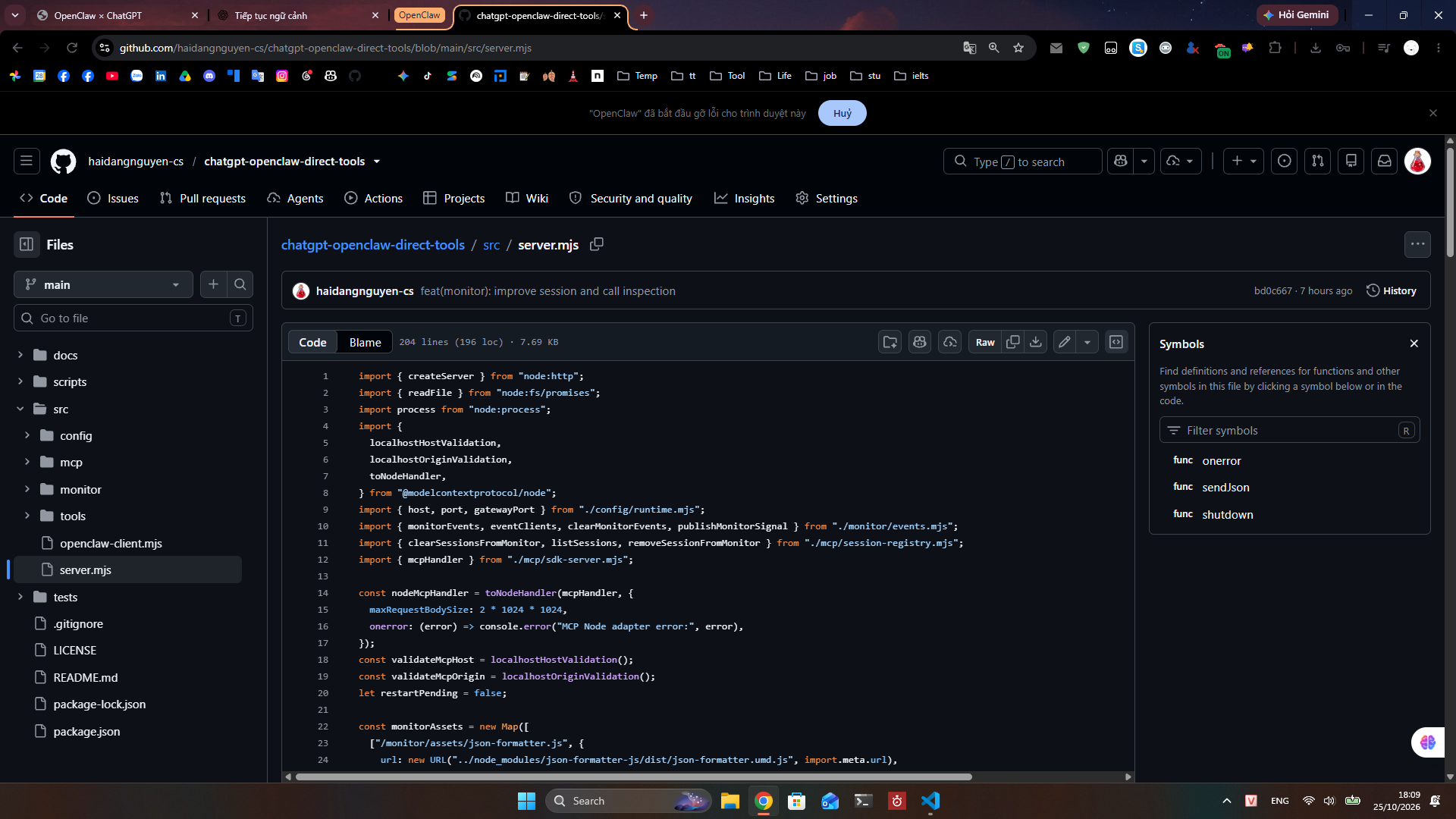
Example: the Browser tool opened this public repository, navigated into src/, and opened server.mjs for inspection.
For page interaction, take a fresh snapshot and use its element references where appropriate. The action: "act" batch mode combines predictable steps into one native /act request; open, navigate, snapshot, and screenshot remain separate calls. Page-changing actions can invalidate references, so observe the page again before dependent actions. A batch stops on the first failed step by default; stopOnError: false continues. If the runtime rejects a batch, execute the steps individually.
The bridge supplies a 10-second default timeout for action: "open" when none is provided. If an open operation times out, it checks the current tab list once and reports success only if the requested URL is observed; it does not retry automatically. URL schemes, action support, browser availability, extension attachment, and permissions remain controlled by OpenClaw and the browser runtime.
OpenClaw's browser SSRF policy also applies to local URLs. If browser.ssrfPolicy.allowedHostnames is explicitly configured, localhost and 127.0.0.1 must be listed separately when both forms are needed. For this monitor, retain both entries if using both URL forms:
{
  browser: {
    ssrfPolicy: {
      allowedHostnames: ["localhost", "127.0.0.1"]
    }
  }
}
This is OpenClaw configuration, not a bridge setting. Add only trusted, specific hostnames. Do not enable dangerouslyAllowPrivateNetwork just to fix a loopback URL. See the OpenClaw browser configuration and browser security guidance.
Desktop
openclaw_computer controls desktop UI through the configured paired computer node; it does not interact with the browser DOM. Take a snapshot first, reuse its executionId, and pass its latest displayFrameId for coordinate-based actions. Capture a fresh snapshot after screen/layout changes. Batch mode supports up to five predictable actions. It reduces MCP round-trips, but each native desktop action still incurs its own Gateway call. Call action: "close_execution" when finished; idle executions are closed automatically after five minutes.
A successful snapshot also registers a short-lived screenshot reference. Call openclaw_image_render with its screenshot_ref to display it in ChatGPT. The bridge keeps at most 12 screenshots in memory for up to five minutes; references expire on timeout, cache eviction, or bridge restart. Clients that do not support MCP Apps may show only the text fallback.

ChatGPT on a phone requesting a desktop screenshot and displaying the captured screen in the conversation.
Files and local search
The five file tools wrap OpenClaw's native ls, read, edit, write, and apply_patch tools. openclaw_edit is for targeted text replacements; openclaw_write intentionally replaces an entire file; openclaw_apply_patch uses OpenClaw's patch format. openclaw_ls and openclaw_read support batches of one to five paths. Read the current file before editing it and inspect the result afterward.
Path scope: for this bridge instance, the five file tools disable OpenClaw's required-workspace-only guard. They can use absolute paths on drives accessible to the current Windows account, subject to normal filesystem permissions. OPENCLAW_WORKSPACE_DIR sets the base for relative paths; the Windows launcher sets it to the configured OpenClaw state directory's workspace folder. This wider path scope applies only to the five bridge file tools. It does not widen Browser/Computer permissions or grant additional openclaw_exec access. Treat writes and patches as consequential and use trusted paths.
openclaw_glob uses Node.js's built-in fs/promises.glob() API and returns up to 100 paths; it excludes .git and node_modules directories. openclaw_grep calls ripgrep directly and returns up to 100 matching lines with file paths and line numbers. Ripgrep respects its normal ignore rules, including .gitignore, and the bridge explicitly excludes .git and node_modules. Search is case-sensitive for openclaw_grep.
Runtime commands and processes
openclaw_exec wraps OpenClaw's native exec tool for tasks such as builds, tests, Git, package managers, and other command-line work. openclaw_process inspects or controls processes started through that wrapper, including polling output, sending input, and managing a process session. Use the process tool when an execution returns a running session. Runtime behavior and access remain subject to the configured OpenClaw host and its policies.
Dynamic native-tool discovery
Use the discovery tools when a capability is not already covered by a direct bridge wrapper:
- Call
openclaw_tool_searchwith capability keywords. Results come from tools available in the current runtime and may include eligible core, plugin, MCP, or channel tools. - Call
openclaw_tool_describewith the exact returned tool ID to inspect the runtime schema. - Call
openclaw_dispatch_actionwith that exact ID and arguments matching the schema.
The bridge refreshes effective tool availability before dispatch. OpenClaw remains responsible for its policy, approvals, hooks, argument validation, and invocation restrictions. Prefer a dedicated bridge wrapper where one exists. Tool discovery does not automatically enable every node or plugin capability.
Local call monitor
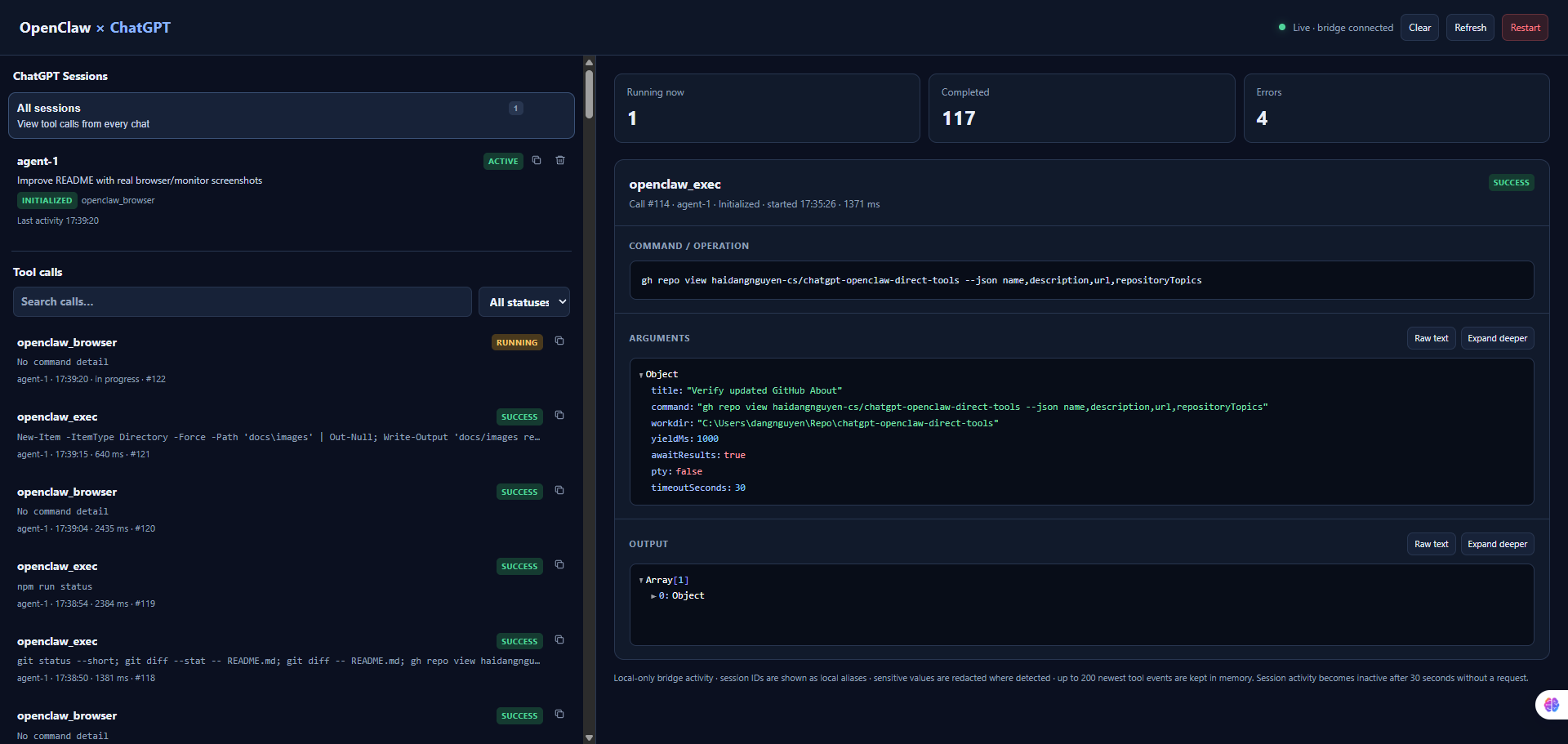
The monitor is intended for local development and troubleshooting. It shows running, completed, and failed calls; arguments and output; duration; and diagnostics when available. It supports status filtering, copying a session or individual call as JSON, clearing in-memory history, and removing retained sessions. It retains at most the 200 newest events in memory.
Open it at http://127.0.0.1:19002/monitor (the port may differ if reconfigured). The server also provides /healthz, /api/events, /api/sessions, /api/events/export, and the /events SSE stream. Keep the monitor and bridge local; do not expose them to untrusted networks. Call arguments and results can contain private data, and redaction is best-effort.
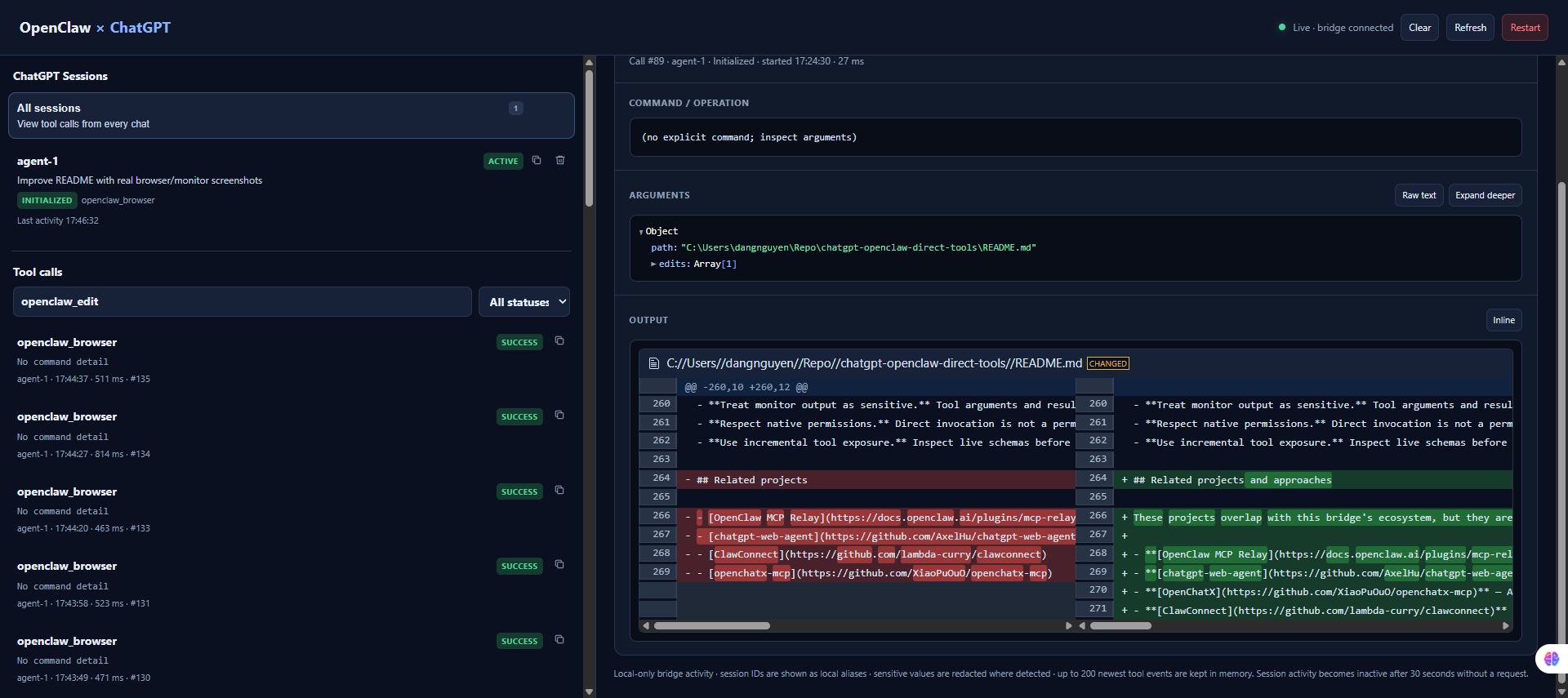
When a tool returns a change diff, the monitor can render additions and removals side by side to make edits easier to review.
Repository structure
openclaw-direct-tools-for-chatgpt/
├── src/
│   ├── config/
│   ├── mcp/                 # MCP server, schemas, and tool routing
│   ├── monitor/             # Local call monitor
│   ├── tools/               # Browser, Computer, Files, Runtime, and discovery
│   ├── openclaw-client.mjs
│   └── server.mjs
├── assets/                  # Branded Windows Startup launcher and icon
├── scripts/windows/         # Setup and lifecycle scripts
├── tests/                   # Unit and integration tests
├── docs/                    # Technical guides and screenshots
├── package.json
├── README.md
├── CONTRIBUTING.md
└── THIRD_PARTY_NOTICES.md
The MCP server starts in src/server.mjs; public tool schemas and routing live in src/mcp/, while feature handlers are organized under src/tools/. See the Tool Exposure Guide for implementation details.
Validation
Run static checks and unit tests:
npm run check
npm run test:unit
npm run test:credential-store
The Credential Manager test creates a temporary test-only entry, verifies save/read/overwrite/delete behavior, and removes it. It does not read or modify the project’s real API-key entry.
For an integration smoke test against a running local bridge and Gateway:
npm test -- -BaseUrl http://127.0.0.1:19002Static checks cover JavaScript and PowerShell syntax plus selected architecture/lifecycle contracts. Unit tests cover tool schemas and handlers, session behavior, monitor behavior, runtime wrappers, file tools, and discovery. Smoke tests depend on the local OpenClaw configuration and runtime state; passing unit tests does not establish that every native action works for every profile or node.
Security and operational boundaries
- Keep endpoints local. The bridge and monitor default to loopback. Do not expose them to an untrusted network.
- Keep secrets out of Git. API keys, generated runtime configuration, tunnel profiles, logs, and process state belong outside the repository.
- Use the OS credential store for runtime keys. Windows setup stores the tunnel API key in Credential Manager and passes it to
tunnel-clientthrough the child process environment. This protects the key at rest better than a plaintext file, but does not protect it from malicious code running as the same user while the tunnel process is active. - Treat monitor output as sensitive. Tool arguments and results may contain private page or machine data, even with best-effort redaction.
- Respect native permissions. Direct invocation is not a permission bypass. OpenClaw policy, tool availability, node pairing/approval, browser attachment, and OS permissions remain authoritative.
- Use incremental tool exposure. Inspect live schemas before invoking discovered tools. Preserve native errors instead of manufacturing success, and obtain approval before destructive or externally consequential actions unless clearly authorized.
Related projects and approaches
These projects overlap with this bridge's ecosystem, but they are not dependencies of this repository. The links are included to clarify neighboring approaches, not to imply that the implementations are interchangeable.
- OpenClaw MCP Relay - OpenClaw's bundled relay for connecting ChatGPT, Codex, and Claude to a Gateway, including its Control UI and authorized conversation operations. It is the official Gateway-level integration path; this repository instead exposes a separately defined MCP tool surface through OpenAI Secure MCP Tunnel and direct bridge handlers.
- chatgpt-web-agent - The closest technical neighbor: a local MCP layer using OpenAI Secure MCP Tunnel and OpenClaw-backed tools. Its public surface and architecture differ, including a separate persistent execution runtime and optional Skills, Google Drive, and Feishu integrations; this repository focuses on direct Browser/Computer/Files/runtime wrappers plus bridge-native search, screenshot rendering, and dynamic tool discovery.
- OpenChatX - A broader local agent runtime exposed through one ChatGPT MCP connection, combining computer control, local tools, MCP aggregation, Skills, Rules, Projects, Tasks, and other runtime features. It is an adjacent platform/alternative, not a library this bridge depends on.
- ClawConnect - A task-oriented MCP server and CLI for submitting work to OpenClaw agents and tracking task/session state across clients. It addresses a neighboring integration problem, but its high-level task contract differs from this bridge's focus on exposing individual native tool operations directly.
About Me
I'm curious about how things work under the hood. I tend to follow a bug, an API call, or an unfamiliar tool further than I initially planned - reading the source, tracing how the pieces connect, and experimenting until the behavior makes sense. My interests sit around Backend Development, Data Analysis, and Machine Learning; I've also had some experience in an AI lab. I usually learn best by building, which is how side experiments like this project happen.
- Email: [email protected]
- LinkedIn: linkedin.com/in/haidang-nguyen-cs
- Facebook: facebook.com/Snoozemage
Support My Work
I build projects like this in my spare time to explore ideas and learn new technologies.
If you find this project useful, consider giving it a ⭐ or sharing it with others.
If you'd like to support me, you can also buy me a coffee. No pressure at all - even a star or a share means a lot.
☕ Buy me a coffee: https://ko-fi.com/snoozemage
If you're in Vietnam and prefer a local bank transfer, you can find the QR code in the posts on my Ko-fi page.
This repo does not document an install step we could read. Check the README on GitHub.
Install with your agent
Paste this prompt into your agent. It reads this page and does the setup for you.
Read https://aiagentslisting.com/mcp/chatgpt-openclaw-direct-tools to learn what the "OpenClaw Direct Tools for ChatGPT" MCP server does and how to install it. Add it to my coding agent's MCP configuration as documented on that page, then confirm the server connects and list the tools it exposes.Agents can also browse this directory over MCP at https://aiagentslisting.com/api/mcp
This server doesn't publish a machine-readable tool manifest, and it doesn't expose a public endpoint we could ask. Connect the server locally to see what it exposes.
We could not run this server: it ships no npx package for our sandbox and no public endpoint. The four checks that need a live server are left out, and the grade tops out at B until one exists.
What's missing
- Installation methodRequiredThe README documents at least one way to install or connect.0/15
- Easy installA paste-ready client config (an mcpServers block) is documented.0/12
All 5 checks (3 passed)
- Installation methodRequiredThe README documents at least one way to install or connect.0/15
- Has a READMERequiredThe repository ships documentation we could read.10/10
- Easy installA paste-ready client config (an mcpServers block) is documented.0/12
- Has a licenseThe repository declares a license.8/8
- Claimed by ownerThe maintainer proved ownership of this listing.4/4
- Verified liveNot checkableWe connected to the server and it answered a real MCP handshake.—
- Exposes toolsNot checkableThe server reports at least one tool, from its manifest or a live read.—
- Ships promptsNot checkableThe server exposes at least one prompt template.—
- Ships resourcesNot checkableThe server exposes at least one resource.—
Show this grade in your README

Paste this line near the top of your repository's README. The badge always renders the current score.
[](https://aiagentslisting.com/mcp/chatgpt-openclaw-direct-tools)Alternatives to OpenClaw Direct Tools for ChatGPT
View all in Browser & Scraping
It's like v0, but in your Cursor / Claude Code / Windsurf: search 10,000+ React/Tailwind components,
Detect whether a company declares, deploys, or charges for AI, with the evidence.
Resolve a company domain to its verified LinkedIn page, name and tagline.
No tagged releases on record.
Send this prompt to your agent to leave a review
Connect to the AI Agents Listing MCP server at https://aiagentslisting.com/api/mcp using the HTTP transport and complete the sign-in when it asks. Then call the submit_review tool for the listing "chatgpt-openclaw-direct-tools" with a rating from 1 to 5 and a short note on what worked and what did not.- DNDang Nguyen
^^
Related MCP Servers
It's like v0, but in your Cursor / Claude Code / Windsurf: search 10,000+ React/Tailwind components,
AI & ML Services
Detect whether a company declares, deploys, or charges for AI, with the evidence.
Browser & Scraping
Resolve a company domain to its verified LinkedIn page, name and tagline.
Browser & Scraping
Subscribe to our newsletter
One email a week. New agents, MCP servers and skills, and what is actually getting traction.