
 habibtalib
Claude Code skill: one prompt → a polished 3D isometric promo video with a synced soundtrack
Claude Code skill: one prompt → a polished 3D isometric promo video with a synced soundtrack (Three.js + headless Chromium + ffmpeg + numpy)
·

motion-promo
A Claude Code skill that turns one prompt into a directed motion video: 3D isometric promos, explainers, narrated tutorials, kinetic type and music-synced reels.

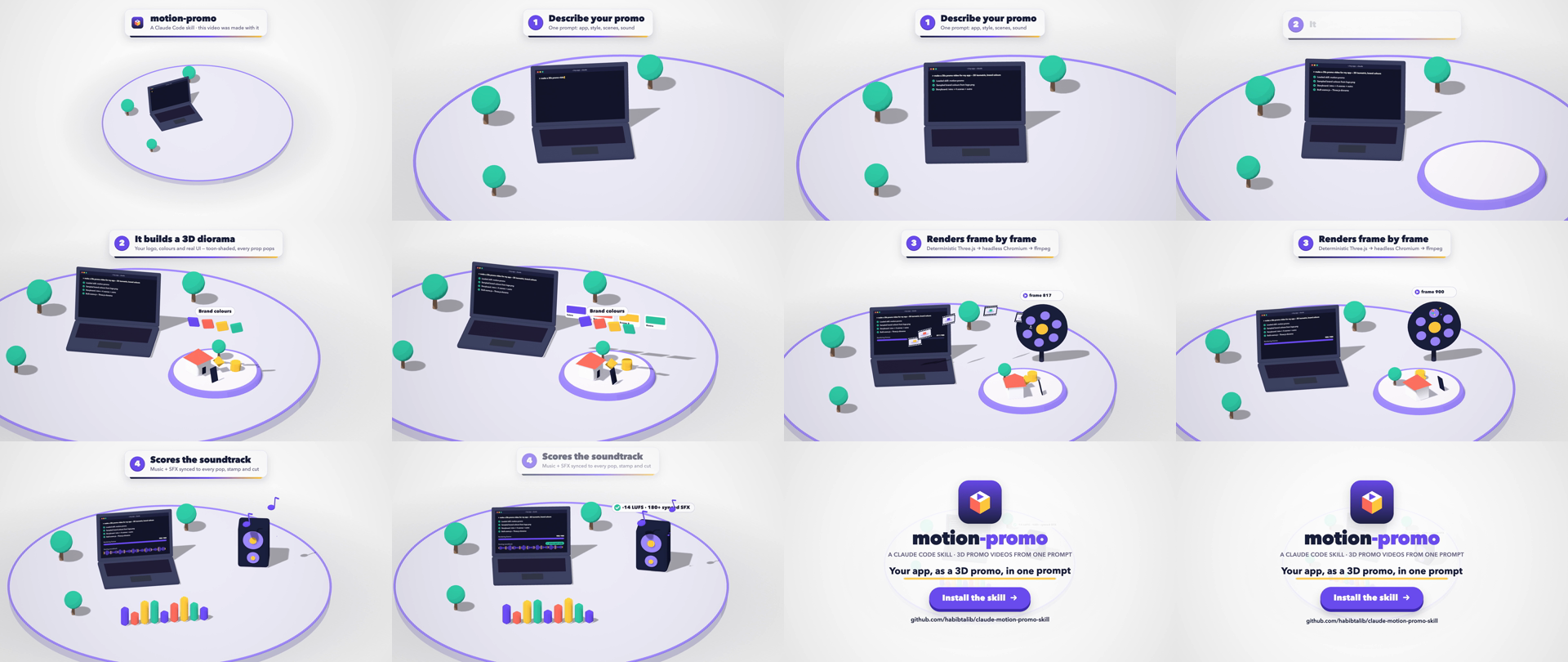
▶ Watch the MP4 with sound · This whole video was made by this skill, about this skill. Source: examples/skill-promo
Why
When you ask an AI to "make a promo video" you usually get flat slides and linear fades. motion-promo gives Claude an art direction and a production pipeline instead:
- 🎲 3D isometric diorama in a Storyset-style flat look: toon shading, soft shadows, a grey ground disc, brand colours only
- 🎥 An orthographic camera that keeps moving, slowly orbiting and zooming between scenes
- 🫧 Every prop pops in with a spring bounce, staggered, with faster exits
- 💻 Your real UI on a laptop or phone screen (screenshots, or UI drawn live that types itself)
- 🏷️ Caption cards with word-by-word reveals, and an outro with logo, tagline and a CTA that a cursor clicks
- 🔊 A synthesized soundtrack: an uplifting music bed plus SFX (pops, typing, stamps, chimes, coins, whooshes) synced to each event, normalised to -14 LUFS
- 🎯 Frame-accurate and deterministic. Each frame is a pure function of
t, so there are no dropped frames and no timeouts, at any length
Two engines, one skill
| Engine | Best for |
|---|---|
| 🎲 Diorama (Three.js, this repo) | A 3D isometric toy-world promo like the demo above: a grey disc, toon props and characters, your app UI on a laptop, an orbiting camera, caption cards, and a synthesized music bed plus SFX |
| 🎞️ motion-video (vendored from farhan-syah/motion-video-skill, MIT) | Everything else: explainers, tutorials, UI rebuilt as live HTML, kinetic typography, data stories, maps, footage, portrait reels, local TTS narration with word-synced captions, cuts on the beat of your music, and a per-scene lint (text size, contrast, hold time) plus a sound-cue audit |
| 🔀 Hybrid | The diorama look plus narration and captions. The diorama renders as a clean plate (PLATE=1), and motion-video then composes it as footage |
Claude picks the engine from your request. Both share one workflow: check the machine, gather facts with sources, ask at most five questions (each with a default), draft three concepts, pick one, build, check, render, and review.
Install
git clone https://github.com/habibtalib/claude-motion-promo-skill.git
mkdir -p ~/.claude/skills
cp -r claude-motion-promo-skill/motion-promo ~/.claude/skills/
cd ~/.claude/skills/motion-promo/motion-video/scripts && (bun install || npm install)   # motion-video engine
node ~/.claude/skills/motion-promo/motion-video/scripts/video.mjs doctor               # checks your machine
For a single project only, copy it into <repo>/.claude/skills/ instead.
Requirements: Node 20+, ffmpeg, Python 3 with numpy (and Pillow for colour sampling), and Playwright Chromium (npx playwright install chromium). The macOS system font "Avenir Next" is used by default. On Linux, drop a .woff2 into assets/ (see SKILL.md). Narration is optional: the first speak or transcribe installs a local speech runtime of about 500 MB. Kokoro TTS covers English; other languages use your own recording or an MMS-TTS model.
Use
Open Claude Code in your app's repo and ask:
"Make a 30 second promo video for this app" "Buat video promo untuk app ni" "Write me a detailed prompt for a 3D promo video of my app" (prompt only, for claude.ai)
Claude then:
- Gathers brand inputs. It finds your logo, samples colours from it (no guessed hex codes), screenshots public pages, and uses fictional data only.
- Writes a storyboard: one feature per scene, each with a physical metaphor (a form that types itself, papers flying into a folder, a stamp slamming, coins flying along a dotted line…).
- Builds
scene.jswith the helper library, then previews key frames and fixes framing issues before rendering. - Renders, scores and mixes with
./make.sh, then verifies the result with a contact sheet, frames pulled from the final MP4, and loudness and peak levels.
[!TIP] Long or complex videos often time out in the claude.ai web sandbox. This pipeline runs on your machine, so a render can take as long as it needs. The 29s demo above renders in about 60s on Apple Silicon.
How it works
flowchart LR
  A["scene.js<br/>Three.js diorama<br/>renderAt(t)"] -->|"headless Chromium, 1 screenshot per frame"| B["render.mjs"]
  B -->|"PNG pipe"| C["ffmpeg<br/>h264 + vignette"]
  A -->|"events.json: every pop, stamp, cut"| D["audio.py<br/>numpy synth"]
  C --> E["make.sh<br/>mux + loudnorm -14 LUFS<br/>contact sheet + checks"]
  D --> E
  E --> F[("promo.mp4")]
Because each frame is a pure function of time, the scene records sound events as it is built: pop() emits a pop, cameraRig emits a whoosh at each cut, and captions emits a swish. audio.py then places every SFX on exactly the right sample. The music grid shares the scene's BPM, so camera cuts can land on the beat.
Quick start without Claude
cp -R motion-promo/template ~/my-promo && cd ~/my-promo && npm i
node render.mjs preview 1,4,7,10     # → preview/f_*.png, fast visual check
./make.sh 30 "" my-promo             # fps, bpm ("" = from scene.js), name → out/my-promo.mp4
Edit scene.js (props, timeline, camera), the brand tokens in index.html :root, and the outro copy in index.html #outro. The template is a 12s working demo. examples/skill-promo is a complete 29s video built on the same library.
lib.js cheat sheet
| Helper | What it does |
|---|---|
P(u, v, y) · FACE | Diorama coordinates: u = screen-right, v = toward the camera. rotation.y = FACE turns an object to face the camera |
pop(obj, t0, { out, pitch }) | Spring bounce-in (optional faster exit) that also emits a pop sound |
groundDisc laptop phone tree card | Ready-made toon props |
liveCanvas(w, h, draw) | A canvas redrawn every frame, e.g. a screen that types itself |
pillTex · sprite · canvasTex | Labels and text on 3D objects |
burst(scene, t0, pos) | Confetti |
bezier(a, q, b) | Curved path for flying objects |
cameraRig(camera, shots) | Drifting ortho shots with eased blends, a whoosh at each cut, camera shake |
captions([...]) · outro([...]) | Caption cards and the end card, with word-by-word reveals and a cursor click |
beatGrid(bpm) · countUp(...) | Put cuts on the beat; count numbers up |
ev(t, type) | Emit a sound: pop swish whoosh card type ding click scan stamp chime sparkle coin chaching celebrate shimmer |
The prompt recipe (useful on claude.ai too)
A generic prompt gives a generic video. Name the style, the camera, each prop and a physical metaphor for each feature:
Make a 30 second promo video for my app <NAME> as a 3D isometric diorama in flat
illustration style (like Storyset): toon shading, soft shadows, white background,
a grey ground disc, brand colours <#hex, #hex> only. Use an orthographic camera that
slowly orbits and zooms between scenes, never fully still. Every object pops in
with a bounce. Props on the disc: a laptop showing the real app UI, <props…>.

Show one feature per scene, each with a caption card at the top:
1. <Feature>: <physical metaphor: the form types itself, totals count up…>
2. …
End with the logo, tagline and a "Try now" button.
Audio: uplifting music bed; a pop on every object, typing clicks, a stamp thud, a
chime on success, and a whoosh on every camera move.
What's inside
motion-promo/
├── SKILL.md                 # workflow, design rules, pre-delivery checklist, gotchas
├── template/                # Diorama engine: lib.js, scene.js, index.html, render.mjs, audio.py, make.sh
├── motion-video/            # vendored motion-video engine (MIT), see UPSTREAM.md for version + local patches
├── scripts/                 # sync-motion-video.sh: re-vendor from upstream and re-apply patches
└── examples/skill-promo/    # the demo video above
media/                       # demo.mp4, demo.gif, contact sheet, logo
Credits
-
The motion-video engine is by Farhan Syah (MIT), vendored at 1.1.0 with one local fix: its
checkcrashed on Chrome 13x+, which reportscolor-mix()colours asoklab(). -
Motion-craft rules (stagger, 3-property entrances, fast exits, holds, early SFX, verify every render) are adapted from haidrrrry/claude-remotion-skill. It pairs well with this skill for 2D kinetic typography and for adding captions to existing footage.
-
Built on Three.js, Playwright, ffmpeg and NumPy.
License
MIT. Use it, fork it, ship promos with it.
This repo does not document an install step we could read. Check the README on GitHub.
Install with your agent
Paste this prompt into your agent. It reads this page and does the setup for you.
Read https://aiagentslisting.com/mcp/claude-motion-promo-skill to learn what the "Claude Motion Promo Skill" MCP server does and how to install it. Add it to my coding agent's MCP configuration as documented on that page, then confirm the server connects and list the tools it exposes.Agents can also browse this directory over MCP at https://aiagentslisting.com/api/mcp
This server doesn't publish a machine-readable tool manifest, and it doesn't expose a public endpoint we could ask. Connect the server locally to see what it exposes.
We could not run this server: it ships no npx package for our sandbox and no public endpoint. The four checks that need a live server are left out, and the grade tops out at B until one exists.
What's missing
- Installation methodRequiredThe README documents at least one way to install or connect.0/15
- Easy installA paste-ready client config (an mcpServers block) is documented.0/12
- Claimed by ownerThe maintainer proved ownership of this listing.0/4
All 5 checks (2 passed)
- Installation methodRequiredThe README documents at least one way to install or connect.0/15
- Has a READMERequiredThe repository ships documentation we could read.10/10
- Easy installA paste-ready client config (an mcpServers block) is documented.0/12
- Has a licenseThe repository declares a license.8/8
- Claimed by ownerThe maintainer proved ownership of this listing.0/4
- Verified liveNot checkableWe connected to the server and it answered a real MCP handshake.—
- Exposes toolsNot checkableThe server reports at least one tool, from its manifest or a live read.—
- Ships promptsNot checkableThe server exposes at least one prompt template.—
- Ships resourcesNot checkableThe server exposes at least one resource.—
Maintain this server? Claiming proves you own the listing and earns the last 4 points.
Claim this listingShow this grade in your README

Paste this line near the top of your repository's README. The badge always renders the current score.
[](https://aiagentslisting.com/mcp/claude-motion-promo-skill)Alternatives to Claude Motion Promo Skill
Nothing comparable is listed yet.
No tagged releases on record.
Send this prompt to your agent to leave a review
Connect to the AI Agents Listing MCP server at https://aiagentslisting.com/api/mcp using the HTTP transport and complete the sign-in when it asks. Then call the submit_review tool for the listing "claude-motion-promo-skill" with a rating from 1 to 5 and a short note on what worked and what did not.No reviews yet
Be the first to share your experience with this tool.
Subscribe to our newsletter
One email a week. New agents, MCP servers and skills, and what is actually getting traction.