
 sezginkipel
An agent-native 3D workshop: AI agents model, sculpt, rig, animate and bake effects through a
An agent-native 3D workshop: AI agents model, sculpt, rig, animate and bake effects through a semantic scene document, a headless renderer and measurable critics. MCP server, no Blender.
·
Clayform
A 3D workshop built for AI agents. Agents model, sculpt, rig, animate and bake effects by editing a semantic scene document. Clayform meshes it, renders it for them to look at, measures what a picture can't show, and exports game-ready glTF. No Blender, no GPU, no browser: it is a Node library with an MCP server.
Docs: clayform.sadelabs.site · Made with it: the showcase
Every image in this README is a real Clayform render, regenerated by scripts/.
Why
Connecting a language model to a traditional 3D package works, but the model is working blind with a low-level API. It writes vertex and coordinate code, has trouble seeing what it made, and can't tell a floating ear from an attached one. Clayform changes the medium instead:
| Problem for agents | Clayform's answer |
|---|---|
| Coordinates are where models make mistakes | Parts attach to each other's surface by side ("on head, top"), sink in by embed, and mirror themselves. Nothing can float by accident. |
| No sense of what is what | Every part has an id and a role (head, leg, wheel …). The parts view paints each one a color and prints a legend. |
| Can't see the result | A built-in software renderer returns labelled multi-view sheets (front, side, top, three-quarter) with ground and shadows as MCP images. |
| Can't judge the result from a picture | Critics measure: floating or split pieces, carves that cut a part in two, buried parts, detail too thin for the resolution, broken symmetry, models that would tip over, triangle budgets, and limbs that will stretch when animated. Every issue names the parts and says what to change. |
| Sculpting and keyframing are hand gestures | Anchored sculpts (inflate the cheek, radius 6 cm) and intent clips (walk, fly, drive, wave …) on an automatic rig. |
| Output isn't game-ready | glTF 2.0 with materials, vertex colors, skin and animations, reduced to a triangle budget. Validated with the Khronos glTF validator in the test suite. |
Quick start
Requires Node 20+. Install from npm:
claude mcp add clayform -- npx -y @s1444/clayform mcpFor any other MCP client, the command is npx -y @s1444/clayform mcp.
You can also run directly from GitHub: npx -y github:sezginkipel/clayform mcp.
To host it for several agents, clayform serve speaks MCP over HTTP with a sandboxed workspace per
session (hosting).
Scenes are saved in ./.clayform/ (change it with --workspace <dir> or the
CLAYFORM_WORKSPACE environment variable).
To install a fixed version, use the prebuilt tarball from
Releases:
npm install https://github.com/sezginkipel/clayform/releases/download/v0.1.0/clayform-0.1.0.tgz.
To work on the code: git clone, then npm install and npm test. Then ask your agent for something:
"Make a goblin from the biped template, green skin, pointy ears, and export it
with a walk cycle."
What an agent does
// new_scene { "name": "Goblin", "template": "biped" }
// edit — one atomic batch:
[
  { "op": "set_palette", "set": { "skin": "#7fb04a", "shirt": "#6b4a2b", "pants": "#3d3322" } },
  { "op": "update_part", "id": "hair", "set": { "hidden": true } },
  { "op": "add_part", "part": {
      "id": "ear", "role": "ear", "shape": { "type": "cone", "height": 0.16, "radius": 0.045 },
      "attach": { "to": "head", "side": "left", "offset": [0, 0.2], "align": true, "embed": 0.2 },
      "rotation": [0, 0, -25], "mirror": true, "blend": 0.02, "material": { "color": "skin" } } },
  { "op": "update_part", "id": "nose", "set": {
      "shape": { "type": "cone", "height": 0.09, "radius": 0.03 },
      "attach": { "to": "head", "side": "front", "offset": [0, -0.1], "align": true, "embed": 0.2 } } }
]
render | render with mode: "parts" |
|---|---|
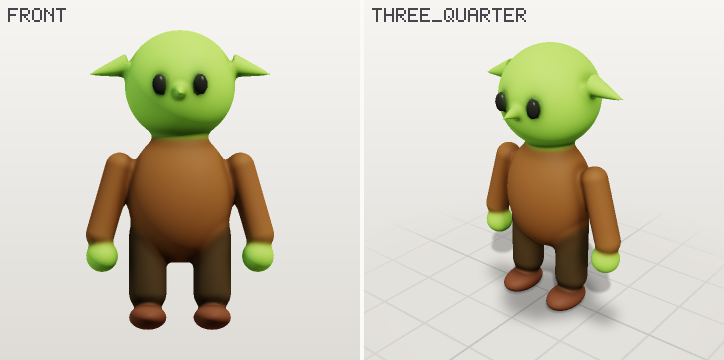 | 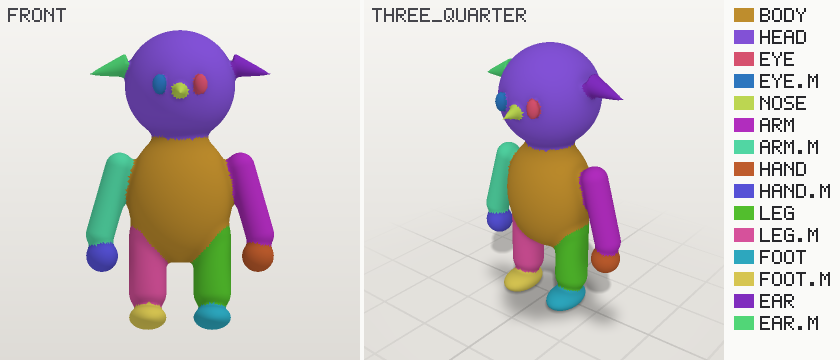 |
preview_motion { "clip": "walk" }:
preview_effect on the torch template's fire preset:
Critic output looks like this (from a deliberately broken edit):
size 1.00 × 1.32 × 0.46 m · 31,412 triangles · 2 body islands · built in 226 ms
ERROR [floating] orb is not connected to the rest of the body — use attach, raise embed, or mark it separate if it should be its own mesh
WARN [asymmetric] declared X symmetry is off by 1.3 cm on average; worst: orb (43.1 cm) — use mirror: true instead of hand-placing both sides
MCP tools
| Tool | What it does |
|---|---|
guide | The manual an agent reads once (topic schema returns the full JSON Schema) |
list_templates | 19 tuned starting points: biped, quadruped, bird, fish, slime, robot, snowman, car, spaceship, cottage, tree, rock, mushroom, crystal, sword, chest, barrel, potion, torch |
list_parts | A library of reusable parts (eyes, ears, horns, tails, wings, limbs, wheels, windows, doors, hats), added with one edit op |
new_scene · list_scenes · get_scene · import_scene | Scenes in the workspace; get_scene summarizes parts with resolved world positions |
edit | Atomic batch of ops (add/update/remove/rename/duplicate parts, sculpts, clips, effects, settings, palette). Returns what changed and the critics |
render | Labelled multi-view PNG; modes shaded, parts, clay, normals, depth; compare: "previous" shows before and after the last edit |
inspect | Part summary, critics, and a check of every clip (ground contact, parts passing through each other) |
measure | Exact distances, overlaps, sizes, proportions, and which part is at a pixel |
compare_reference | Fit the model to a sketch or photo: a score, an overlay, and which parts are too wide or narrow |
preview_motion | A clip as a labelled film strip |
beauty | A presentation render: lighting presets, soft shadows, a transparent background, or a turntable as an animated PNG |
preview_effect | An effect's frames |
export | glb · obj · json · flipbook (sprite sheet PNG + JSON), with an optional triangle budget |
set_layout · render_layout · export_layout | Place many scenes or templates together (rows, grids, circles, scatters), check that they do not pass through each other, export one GLB |
history | Undo, redo, named snapshots |
The scene document
Meters, +Y up, the model faces +Z, the model's left is +X. The full reference is in
src/guide.ts (the text the guide tool returns).
- Shapes: sphere, ellipsoid, box, capsule, cylinder, cone (both optionally faceted with
sides), torus, prism, tube (a swept tube with per-point radius, for tails, limbs, horns), and mesh (an imported GLB or OBJ). - Combining:
addwith a smoothblendradius,carve,intersect;pattern(spots, stripes, noise, gradient),detail(surface displacement). - Sculpts: inflate, dent, flatten, crease, noise, anchored to a part and side or a point.
- Clips: idle, walk, run, hop, fly, swim, drive, spin, hover, wave, nod, or keyframes, with keyframe tracks layered on top.
- Effects: fire, smoke, sparks, magic, explosion, dust, snow, rain, bubbles, heal. Every parameter can be overridden, and the particle paths are closed-form, so loops are exactly periodic.
CLI
clayform templates
clayform render biped --mode parts -o biped.png
clayform inspect my-scene.clay.json      # exit code 2 when critics report errors
clayform export my-scene.clay.json -o hero.glb --triangles 3000
clayform motion quadruped walk -o walk.png
clayform effect torch -o fire.png        # sprite sheet + .json + .preview.png
As a library
import { getTemplate, buildScene, critique, renderSheet, simplifyBuild, exportGlb } from 'clayform';

const build = buildScene(getTemplate('robot')!.scene);
console.log(critique(build).issues);
const png = renderSheet(build, { mode: 'parts' }).png;
const glb = exportGlb(await simplifyBuild(build, { triangles: 4000 })).glb;
How it works
- Resolve parts in dependency order. Attached parts are placed by sphere-tracing the
target's own distance field from the requested world side (without an offset, the
extreme point that way), then sunk in by
embed. Mirror twins are exact reflections. - Mesh the signed distance field (smooth-min unions, carves, intersections, sculpt modifiers) with surface nets on a block-culled grid. Only the shell near the surface is sampled.
- Attribute every vertex: normal from the field gradient, ambient occlusion from the field, blended part color and pattern, dominant part, and skin weights restricted to the dominant part's parent and children.
- See: a deferred software rasterizer (triangle ids + barycentrics, then one shading pass) draws the mesh, an analytic ground plane, a projected key shadow and a soft contact shadow. Labels use a built-in 5×7 bitmap font.
- Measure: connected components, the volume centroid against the ground-contact hull, mirrored field sampling, and per-part visibility and thickness.
- Export: quadric simplification (meshoptimizer) that keeps color, normal and material borders, then GLB with one primitive per material, a joint per part, and sampled animations.
Documentation
The same pages, with every image, are at clayform.sadelabs.site.
- Getting started · Concepts · MCP tools · Critics
- Animation · Effects · Export · CLI and library
- Matching a reference · Architecture · FAQ · Scene reference · Templates
- Layouts · Part library · Format stability · Showcase rules
- JSON Schema for
.clay.jsonfiles:schema/clayform.schema.json
Showcase
Projects made with Clayform are listed at clayform.sadelabs.site/showcase. The first is Cargo Century, a browser transport tycoon whose 118 buildings, industries, stations, trees and vehicles are all Clayform scenes.
Made something with it? Send it in, or open a pull request with a small JSON file (the rules).
Limits (today)
- The look is stylized: smooth and clay-like, colored per vertex or in a baked texture.
Material presets add normal and roughness maps, but nothing is photoreal. Hard mechanical
edges are rounded at the cell size unless
edgesissharp, so raiseresolutionfor crisp props. - It does not generate organic detail from a text or image model yet. You can import a
mesh made elsewhere (
meshshape, GLB or OBJ) and keep working on it. Built-in hand-off to an image-to-3D model is on the roadmap. - Animation is procedural plus keyframes on rigid parts: feet and arms use IK, characters can export humanoid bone names for retargeting, faces are morph targets and cloth ripples as a baked wave. Limbs bend only where parts meet. Layouts settle items straight down, but there is no rigid-body or cloth simulation: nothing tips, slides or collides while it moves. Motion critics check ground contact, sliding feet and parts passing through each other.
- The renderer is software rasterization with a shadow map.
beautymakes clean pictures for a README or a store page, but there is no global illumination, glass or subsurface light. - Nobody has run the bench yet (
bench/), so this README makes no quality comparison.
Roadmap
Next up: image-to-3D hand-off (v0.4) and a published bench (v0.9). See ROADMAP.md, milestones and the changelog.
Development
npm test                              # includes the Khronos glTF validator and runs every docs example
npm run check                         # types
npx tsx scripts/gallery.ts            # regenerate docs/gallery.png
npx tsx scripts/docs-images.ts        # regenerate the README images
npx tsx scripts/gen-docs.ts           # regenerate docs/reference.md, docs/templates.md, the JSON Schema
npx tsx scripts/bench.ts <dir>        # score a bench run
See CONTRIBUTING.md.
License
Apache-2.0 © Sezgin Kipel
Install with your agent
Paste this prompt into your agent. It reads this page and does the setup for you.
Read https://aiagentslisting.com/mcp/clayform to learn what the "Clayform" MCP server does and how to install it. Add it to my coding agent's MCP configuration as documented on that page, then confirm the server connects and list the tools it exposes.Agents can also browse this directory over MCP at https://aiagentslisting.com/api/mcp
From the project README
claude mcp add clayform -- npx -y @s1444/clayform mcpnpx tsx scripts/gallery.ts # regenerate docs/gallery.png
npx tsx scripts/docs-images.ts # regenerate the README images
npx tsx scripts/gen-docs.ts # regenerate docs/reference.md, docs/templates.md, the JSON Schema
npx tsx scripts/bench.ts <dir> # score a bench runThis server runs locally, so we can't read its tool list over the web yet.
We could not run this server: it ships no npx package for our sandbox and no public endpoint. The four checks that need a live server are left out, and the grade tops out at B until one exists.
What's missing
- Easy installA paste-ready client config (an mcpServers block) is documented.0/12
- Claimed by ownerThe maintainer proved ownership of this listing.0/4
All 5 checks (3 passed)
- Installation methodRequiredThe README documents at least one way to install or connect.15/15
- Has a READMERequiredThe repository ships documentation we could read.10/10
- Easy installA paste-ready client config (an mcpServers block) is documented.0/12
- Has a licenseThe repository declares a license.8/8
- Claimed by ownerThe maintainer proved ownership of this listing.0/4
- Verified liveNot checkableWe connected to the server and it answered a real MCP handshake.—
- Exposes toolsNot checkableThe server reports at least one tool, from its manifest or a live read.—
- Ships promptsNot checkableThe server exposes at least one prompt template.—
- Ships resourcesNot checkableThe server exposes at least one resource.—
Maintain this server? Claiming proves you own the listing and earns the last 4 points.
Claim this listingShow this grade in your README

Paste this line near the top of your repository's README. The badge always renders the current score.
[](https://aiagentslisting.com/mcp/clayform)Alternatives to Clayform
Nothing comparable is listed yet.
v0.15.0Release notesv0.14.00.14.0 — Presentation and physicsRelease notesv0.13.00.13.0 — Characters that actRelease notesv0.12.0v0.12.0 — Materials and detailRelease notesv0.11.0v0.11.0 — Shapes an agent can describeRelease notesv0.10.0v0.10.0 — Budgets that holdRelease notesv0.9.0v0.9.0 — Frozen format, hosting, docs siteRelease notesv0.8.0v0.8.0 — Motion that holds upRelease notesv0.7.0v0.7.0 — TexturesRelease notesv0.6.0v0.6.0 — Asset packs for enginesRelease notesv0.5.0Clayform 0.5.0Release notesv0.4.0Clayform 0.4.0Release notesv0.3.0Clayform 0.3.0Release notesv0.2.0Clayform 0.2.0Release notesv0.1.0Clayform 0.1.0Release notes
Send this prompt to your agent to leave a review
Connect to the AI Agents Listing MCP server at https://aiagentslisting.com/api/mcp using the HTTP transport and complete the sign-in when it asks. Then call the submit_review tool for the listing "clayform" with a rating from 1 to 5 and a short note on what worked and what did not.No reviews yet
Be the first to share your experience with this tool.
Subscribe to our newsletter
One email a week. New agents, MCP servers and skills, and what is actually getting traction.