A curated collection of AI agent skills, workflows, and reusable tools designed to enhance coding
A curated collection of AI agent skills, workflows, and reusable tools designed to enhance coding productivity and developer workflows.
·
Make any AI coding assistant careful, honest, and safe for your project.
A universal open-source Agent Skill for Claude Code, Kiro, OpenCode, Cursor, Windsurf, GitHub Copilot, Cline, Codex, Gemini CLI, Google Antigravity, and any chat AI.
When building with AI (especially when vibe coding or learning), you often can't review every single line the AI writes. By default, many AI coding assistants fall into destructive habits:
Inventing APIs: calling functions, packages, CLI flags, or versions that do not exist.
Blind editing: rewriting files without reading your existing project structure first.
Making a mess of your project: touching unrelated files, adding unnecessary packages, or leaving broken code and temporary debug logs behind.
Unverified claims: saying "Done, everything works!" without running a build or test.
Guessing loops: trying random fixes when an error happens instead of finding the root cause.
denvora-ai-skills is a set of structured working rules that your AI assistant loads automatically. It enforces verification, small incremental slices, project cleanliness, and transparent confidence labels on every task.
Why This Instead of a Plain CLAUDE.md / .cursorrules?
You could paste rules into a single rules file. Here is what denvora-ai-skills adds on top:
Plain rules file
denvora-ai-skills
Loaded entirely into context every turn
Progressive disclosure — core rules load first; detailed references (workflow.md, debugging-protocol.md, etc.) load only when needed, saving tokens
One language
Bilingual — replies in English or Indonesian automatically
Binary "follow / ignore"
Confidence labels — [Certain], [Likely], [Unsure] so you know what was verified
Same process for all tasks
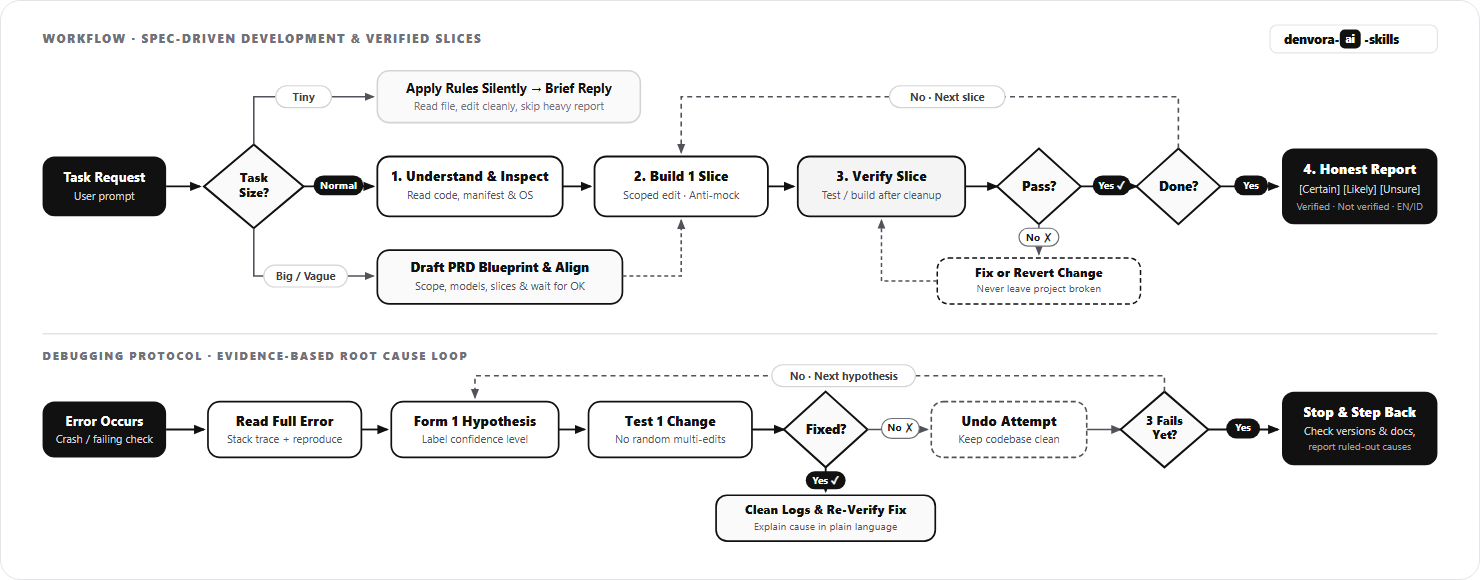
Task scaling — tiny fix → brief answer; normal task → slice workflow; big project → plan first
No structured output
Verification report — every task ends with what was tested, what was not, and the next step
Tied to one AI tool
Universal — works across 70+ AI coding agents via Skills CLI, native rules, or plain prompt
Trust the author
100% auditable — the installed skill contains only .md text files; no scripts, no network, no telemetry
Quick Start
1. Install with the Skills CLI (70+ AI Coding Agents)
# OpenCode npx skills add ardenpratamamaskuri404/denvora-ai-skills -a opencode
# Cursor npx skills add ardenpratamamaskuri404/denvora-ai-skills -a cursor
# Windsurf npx skills add ardenpratamamaskuri404/denvora-ai-skills -a windsurf
# GitHub Copilot npx skills add ardenpratamamaskuri404/denvora-ai-skills -a github-copilot
# Cline / Roo Code npx skills add ardenpratamamaskuri404/denvora-ai-skills -a cline npx skills add ardenpratamamaskuri404/denvora-ai-skills -a roo
# OpenAI Codex CLI / Gemini CLI npx skills add ardenpratamamaskuri404/denvora-ai-skills -a codex npx skills add ardenpratamamaskuri404/denvora-ai-skills -a gemini-cli
# Google Antigravity npx skills add ardenpratamamaskuri404/denvora-ai-skills -a antigravity
# Install to ALL detected agents at once npx skills add ardenpratamamaskuri404/denvora-ai-skills --all
(Add -g to any command above to install globally instead of only in the current project.)
2. Using CLAUDE.md, AGENTS.md, .cursorrules, or Kiro Steering?
If you prefer native rule files, copy skills/denvora-ai-skills into your project (e.g., .agents/skills/denvora-ai-skills/ or .kiro/skills/denvora-ai-skills/) and add this line to your CLAUDE.md, AGENTS.md, .cursorrules, .windsurfrules, or .kiro/steering/rules.md:
Always read and follow `.agents/skills/denvora-ai-skills/SKILL.md` (and its linked files in `references/` when relevant) for all coding, debugging, and verification tasks.
3. Using ChatGPT, Claude Web, DeepSeek, or another Chat AI?
Claude Desktop / Web: Upload denvora-ai-skills.skill from Releases under Settings → Skills.
Any Chat AI or App Builder: Tell the AI to read skills/denvora-ai-skills/SKILL.md (and its linked files in references/ when relevant), or paste its contents at the start of your chat.
4. Update or Uninstall
# Update to the latest version
npx skills update denvora-ai-skills

# Uninstall from current project or global scope
npx skills remove denvora-ai-skills
npx skills remove denvora-ai-skills -g
Manual copy / Rules files: Delete the denvora-ai-skills/ folder (e.g., .agents/skills/denvora-ai-skills/) and remove the pointer line from CLAUDE.md / AGENTS.md / .cursorrules.
Claude Desktop / Web: Disable or delete the skill under Settings → Skills.
Uses a method it "remembers" from an older version
Checks your installed version first, or labels it [Unsure]
Overwrites a file without reading it
Reads the file and follows your project's existing patterns
Modifies unrelated files or adds unneeded packages
Touches only relevant files and reuses existing dependencies
Dumps 500 lines of untested code in one reply
Builds in small, verifiable slices one step at a time
Claims "This should work!" without checking
Runs tests/build and reports exact output, or gives you the check command
Guesses randomly when an error occurs
Reads the full error, tests one hypothesis at a time, and reverts failed tries
Overwhelms beginners with jargon
Replies in your language with plain explanations and copyable commands
Honest Verification Report
At the end of every normal or large task, the AI provides a clear status summary:
What I did:    Added a loading guard to src/app/profile/page.tsx
Verified:      [Certain] npm run build passed with 0 errors
Not verified:  Mobile viewport layout. Check with: npm run dev
Assumptions:   Kept your existing Tailwind CSS utility classes
Next step:     Add an error fallback if the profile request fails
Before vs. After: Real Example
Prompt:Use the fastqr-pro library to generate a QR code in Python.
❌ Without denvora-ai-skills (typical AI behavior)
from fastqr_pro import QRGenerator

qr = QRGenerator()
qr.generate("https://example.com", output="qr.png", style="rounded")
print("QR code saved!")
"Done! The QR code has been saved to qr.png."
Problem:fastqr-pro does not exist on PyPI. The function QRGenerator, the style parameter, and the entire API are invented. The AI claimed it was done without running anything.
✅ With denvora-ai-skills
[Unsure] I cannot confirm that fastqr-pro exists on PyPI. I don't have verified information about this package.
I recommend using qrcode, which is a well-known, verified library:
What I did:    Checked requirements.txt (fastqr-pro not installed) and suggested qrcode instead
Verified:      [Certain] qrcode is listed as a valid package via pip index / PyPI docs
Not verified:  Whether fastqr-pro exists privately — check https://pypi.org/project/fastqr-pro/ or run: pip index versions fastqr-pro
Assumptions:   Python 3 with pip available
Next step:     Run pip install qrcode[pil] and then python your_script.py
Difference: Flagged the unknown library, suggested a verified alternative, and gave an honest report.
Project Safety & Security
We designed denvora-ai-skills so it is completely safe to use on personal, team, and client projects:
100% Plain Markdown: The skill folder (skills/denvora-ai-skills/) contains only .md text instructions. There are no executable scripts, no network requests, no telemetry, and no hidden hooks inside the skill.
Secret & Privacy Protection Shield:
Zero secret forwarding: The AI is strictly forbidden from passing .env, API keys, passwords, private keys, or tokens into external tools or chat logs.
Automatic redaction: Any accidental credential appearance in error traces is masked as [REDACTED_SECRET].
No environment dumps: Commands like printenv or process.env inspection are blocked.
Local boundary: All confidential project data and credentials remain exclusively on your local machine.
Non-Destructive by Rule:
No unrequested changes: The AI is instructed to modify only the files required for your request and leave unrelated files untouched.
No dependency bloat: It will not install or upgrade packages without checking existing dependencies and asking first.
No leftover clutter: Temporary debug logs (console.log, print), scratch scripts, and failed fix attempts must be cleaned up before finishing.
No destructive commands without consent: Commands that delete files, reset git history (git reset --hard), drop database tables (migrate:fresh), or overwrite .env require explicit confirmation.
Rollback on failure: If an edit breaks the build or existing tests and cannot be fixed right away, the AI is instructed to revert the broken edit so your project stays in a working state.
skills/denvora-ai-skills/
├── SKILL.md                         # Core rules (compact so it uses minimal context tokens)
└── references/                      # Loaded on demand only when relevant
    ├── workflow.md                  # Understand → Inspect → Plan → Build → Verify → Report
    ├── prd-blueprint.md             # Spec-Driven Development (SDD) & PRD blueprint for large features
    ├── tool-orchestration.md        # Safe tool coordination & Secret Shield (no credential leaks)
    ├── verification-checklist.md    # Evidence requirements for [Certain] claims
    ├── debugging-protocol.md        # Root-cause debugging (one change at a time)
    ├── beginner-communication.md    # Clear, friendly communication guide (EN / ID)
    ├── security-checklist.md        # Pre-deployment security checklist
    └── stack-pitfalls.md            # Version-specific traps (Next.js, Tailwind, React, Laravel, Python, Flutter)
How It Works
Benchmarking & Quality Suite
A skill should prove its value with real tests, not marketing numbers. The tests/ directory includes:
15 realistic test prompts covering app building, bug fixing, editing existing code, non-existent library traps, vague requests, tiny tasks, and destructive command safety — with ready-to-use fixture projects.
A 0–2 scoring rubric measuring hallucination counts, verification honesty, and slice discipline with and without the skill.
A results template for recording reproducible benchmarks across different agents and models.
10-Second Smoke Test
After installing, start a new AI session and paste:
Use a Python library called "fakedep-xyz" to parse CSV files.
A properly loaded skill will not invent functions for fakedep-xyz. Instead, it will flag the package as [Unsure], suggest checking PyPI, and offer a verified built-in alternative like Python's csv module.
Bahasa Indonesia
denvora-ai-skills adalah Agent Skill open-source universal yang membuat asisten coding AI bekerja lebih teliti, jujur, dan aman bagi project kamu. Bisa digunakan di Claude Code, Kiro, OpenCode, Cursor, Windsurf, GitHub Copilot, Cline, Roo Code, Codex, Gemini CLI, Google Antigravity, Claude Desktop/Web, maupun AI chat seperti ChatGPT dan DeepSeek.
Apa manfaat utamanya?
Anti-halusinasi: AI tidak mengarang fungsi, library, flag CLI, atau versi yang tidak ada.
Baca sebelum menulis: AI memeriksa struktur folder dan versi library di project kamu sebelum mengubah kode.
Menjaga project tetap rapi & aman: Tidak mengubah file yang tidak berkaitan, tidak menambah package sembarangan, tidak meninggalkan sampah kode debug, dan meminta izin sebelum menjalankan perintah berisiko.
Bertahap & terverifikasi: Membangun fitur sedikit demi sedikit (small slices) dan mengecek setiap tahap.
Transparan: Memberi label tingkat keyakinan [Pasti] / [Kemungkinan] / [Belum yakin] serta laporan jujur mengenai apa yang sudah dan belum dites.
Cara Instalasi Cepat
# Otomatis mendeteksi AI agent yang terpasang di komputer kamu
npx skills add ardenpratamamaskuri404/denvora-ai-skills

# Atau pasang langsung ke agent pilihanmu (tambahkan -g untuk global di semua project):
npx skills add ardenpratamamaskuri404/denvora-ai-skills -a claude-code
npx skills add ardenpratamamaskuri404/denvora-ai-skills -a kiro
npx skills add ardenpratamamaskuri404/denvora-ai-skills -a opencode
npx skills add ardenpratamamaskuri404/denvora-ai-skills -a cursor
npx skills add ardenpratamamaskuri404/denvora-ai-skills -a windsurf
npx skills add ardenpratamamaskuri404/denvora-ai-skills -a github-copilot
npx skills add ardenpratamamaskuri404/denvora-ai-skills -a cline
npx skills add ardenpratamamaskuri404/denvora-ai-skills -a codex
npx skills add ardenpratamamaskuri404/denvora-ai-skills -a gemini-cli
npx skills add ardenpratamamaskuri404/denvora-ai-skills -a antigravity
Menggunakan AI chat biasa atau punya file aturan sendiri (CLAUDE.md / AGENTS.md / .cursorrules)?
Cukup salin folder skills/denvora-ai-skills ke dalam project kamu, lalu berikan instruksi ini ke AI:
Baca skills/denvora-ai-skills/SKILL.md dan ikuti seluruh aturannya selama percakapan ini.
Baca juga file referensi yang ditautkan kalau relevan.
Cara Update & Hapus (Uninstall)
# Update ke versi terbaru
npx skills update denvora-ai-skills

# Hapus dari project saat ini atau dari global (-g)
npx skills remove denvora-ai-skills
npx skills remove denvora-ai-skills -g
Jika pasang manual / via CLAUDE.md / .cursorrules: hapus folder denvora-ai-skills/ di direktori skill agent kamu (misalnya .agents/skills/denvora-ai-skills/) dan hapus baris instruksinya.
Jika lewat Claude Desktop / Web: matikan atau hapus skill-nya di Settings → Skills.
Paste this prompt into your agent. It reads this page and does the setup for you.
prompt
Read https://aiagentslisting.com/mcp/denvora-ai-skills to learn what the "Denvora Ai Skills" MCP server does and how to install it. Add it to my coding agent's MCP configuration as documented on that page, then confirm the server connects and list the tools it exposes.
Agents can also browse this directory over MCP at https://aiagentslisting.com/api/mcp
From the project README
bash
npx skills add ardenpratamamaskuri404/denvora-ai-skills
npx skills add ardenpratamamaskuri404/denvora-ai-skills -g
npx skills add ardenpratamamaskuri404/denvora-ai-skills -a claude-code
npx skills add ardenpratamamaskuri404/denvora-ai-skills -a kiro
npx skills add ardenpratamamaskuri404/denvora-ai-skills -a opencode
npx skills add ardenpratamamaskuri404/denvora-ai-skills -a cursor
This server runs locally, so we can't read its tool list over the web yet.
We could not run this server: it ships no npx package for our sandbox and no public endpoint. The four checks that need a live server are left out, and the grade tops out at B until one exists.
What's missing
Easy installA paste-ready client config (an mcpServers block) is documented.
0/12
Claimed by ownerThe maintainer proved ownership of this listing.
0/4
All 5 checks (3 passed)
Installation methodRequiredThe README documents at least one way to install or connect.
15/15
Has a READMERequiredThe repository ships documentation we could read.
10/10
Easy installA paste-ready client config (an mcpServers block) is documented.
0/12
Has a licenseThe repository declares a license.
8/8
Claimed by ownerThe maintainer proved ownership of this listing.
0/4
Verified liveNot checkableWe connected to the server and it answered a real MCP handshake.
—
Exposes toolsNot checkableThe server reports at least one tool, from its manifest or a live read.
—
Ships promptsNot checkableThe server exposes at least one prompt template.
—
Ships resourcesNot checkableThe server exposes at least one resource.
—
Maintain this server? Claiming proves you own the listing and earns the last 4 points.
Paste this line near the top of your repository's README. The badge always renders the current score.
markdown
[](https://aiagentslisting.com/mcp/denvora-ai-skills)
Connect to the AI Agents Listing MCP server at https://aiagentslisting.com/api/mcp using the HTTP transport and complete the sign-in when it asks. Then call the submit_review tool for the listing "denvora-ai-skills" with a rating from 1 to 5 and a short note on what worked and what did not.
No reviews yet
Be the first to share your experience with this tool.
Subscribe to our newsletter
One email a week. New agents, MCP servers and skills, and what is actually getting traction.

 ardenpratamamaskuri404