
 seifip
macOS network diagnostics CLI and MCP server
macOS network diagnostics CLI and MCP server
·
Kilobat CLI
Network diagnostics for macOS, in your terminal and your AI agent. Find which apps use your connection, diagnose Wi-Fi and DNS problems, trace a failing API request, and keep your Mac awake through a long build.
Free and open source under GPL-3.0-only. No account or telemetry. The CLI runs on its own; the optional Kilobat Mac app adds a menu-bar interface, recorded history, and network filtering.
Quick start · Mac app · AI agents · Build from source · Tool reference
Quick start
Requires macOS 14 or later. Homebrew builds from source and requires Xcode 16 or newer.
brew install seifip/kilobat/kilobat
kilobat diagnose
Homebrew also installs kb as a short alias for kilobat.
| Find out… | Command |
|---|---|
| Which apps are using the connection | kilobat status --watch |
| Why a host or API won't connect | kilobat why api.github.com |
| How strong the Wi-Fi signal is | kilobat wifi |
| Which Wi-Fi channels are less crowded | kilobat channels |
| Whether traffic leaves through a VPN | kilobat ip |
| Whether this connection suits a long job | kilobat conditions |
Keep your Mac awake until a command finishes:
kilobat awake -- make testUse --json for structured diagnostic output, or --watch --json for a live traffic stream:
kilobat diagnose --json
kilobat why api.github.com --json
kilobat status --watch --json
Run kilobat --help or kilobat <command> --help for more options. Commands that change system settings may require confirmation and administrator authorization. Network checks contact test endpoints; speed tests transfer data.
Kilobat for Mac
Prefer a view you can glance at? Kilobat puts live traffic in your menu bar and brings diagnostics, usage history, Wi-Fi tools, and app-level network controls into a native Mac app.
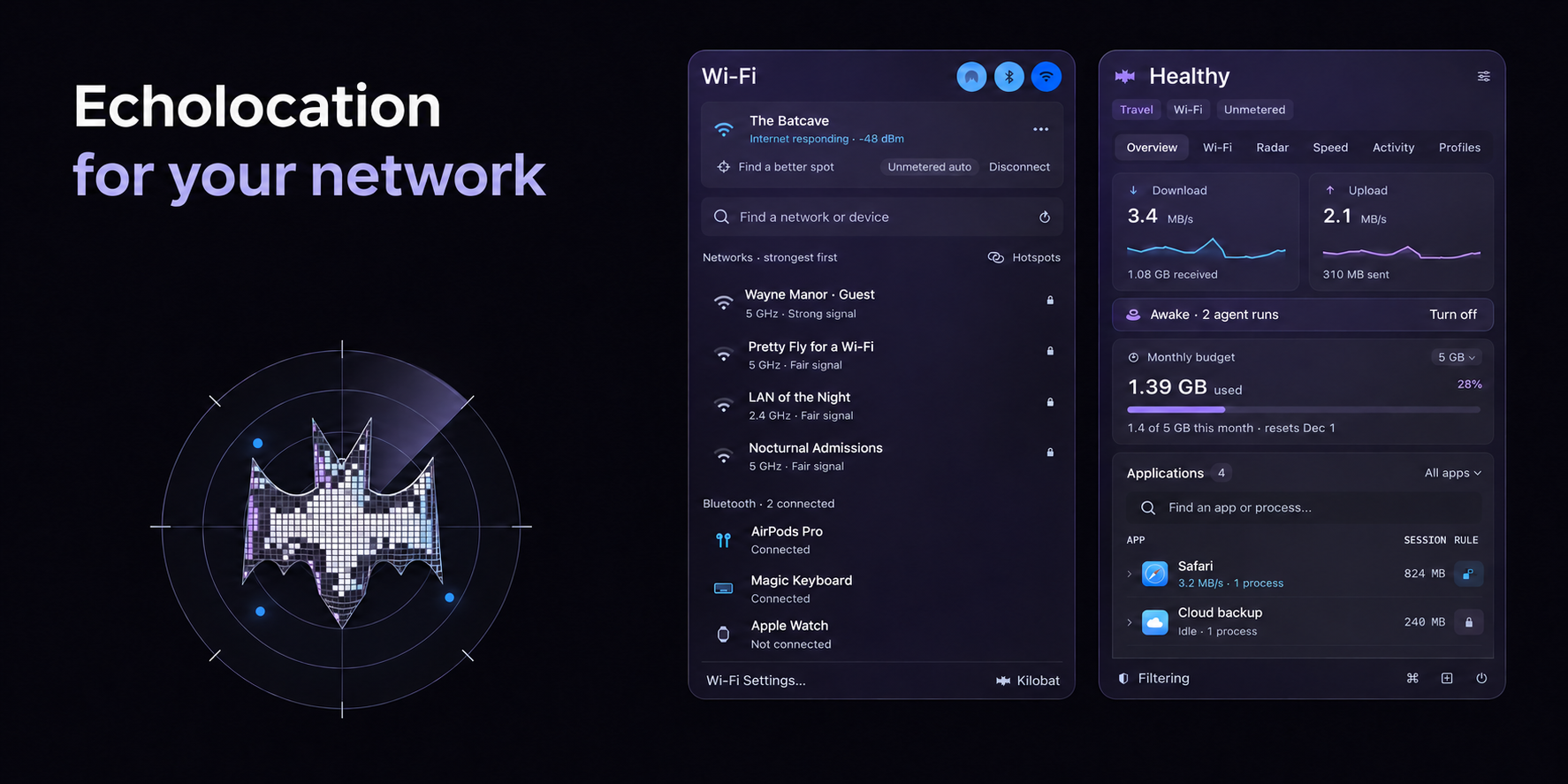
The app is a separate product with free and paid features, under its own terms. You don't need it for standalone CLI diagnostics or MCP setup.
| Capability | What it needs |
|---|---|
| Live traffic, connection diagnostics, Wi-Fi signal and channels | CLI alone |
| Wi-Fi network names | Running app with macOS Location permission; otherwise names appear hidden |
| Recorded history and per-network budgets | Data recorded or supplied by the app |
| Enforcing app and destination blocking | App with its signed Network Extension activated and approved in macOS |
Some app-backed features also depend on the app's license tier and configuration. Saving a rule through the CLI does not by itself enable filtering.
Use with AI agents (MCP)
kilobat mcp runs a local stdio Model Context Protocol server. Install the CLI first, then connect your agent:
Claude Code
claude mcp add kilobat -- kilobat mcpCodex CLI
codex mcp add kilobat -- kilobat mcpClaude Desktop: configure a local stdio server with the full executable path returned by /usr/bin/which kilobat and argument mcp. See the local-server setup guide.
Cursor, Windsurf, Zed, Gemini CLI, Cline, and other MCP clients: add a stdio server with command kilobat and argument mcp.
Try asking:
- “Why is my internet slow?”
- “Is this a metered connection before I download 5 GB?”
- “Why can't this API connect from my Mac?”
- “Keep the Mac awake until this build finishes.”
Tools that change settings carry confirmation requirements in their descriptions; the client controls permission prompts. Connected clients discover available tools, input schemas, and annotations with tools/list.
See the agent setup guides for client-specific instructions. Optional agent skills teach agents when and how to use Kilobat:
npx skills add seifip/kilobat-skillsBuild from source
Requires macOS 14 or later and Swift 6.
git clone https://github.com/seifip/kilobat-cli.git
cd kilobat-cli
swift build -c release
.build/release/kilobat --help
Run the tests with swift test.
MCP tool reference
The following names and titles are defined in v0.45.1. Use your installed server's tools/list for its full descriptions, input schemas, and annotations. Availability and returned data can depend on the companion app, its license tier, permissions, and configuration.
Browse the MCP tools
| Tool | Purpose |
|---|---|
get_status | Live traffic snapshot |
diagnose_network | Diagnose connection |
scan_wifi | Nearby Wi-Fi networks |
run_speedtest | Speed and bufferbloat test |
get_usage_report | Usage history |
compare_usage | Compare with a router or provider |
list_rules | Profile rules |
set_profile | Set profile |
set_app_rule | Allow or block an app |
set_dns | Set DNS servers |
get_fastest_dns | Fastest DNS for this network |
set_fastest_dns | Switch to the fastest DNS automatically |
set_dns_fallback | Set the fallback DNS |
get_wifi | Wi-Fi connection |
get_wifi_nodes | Wi-Fi mesh nodes |
reconnect_wifi | Move to the closer Wi-Fi node |
suggest_wifi_channel | Least crowded channel |
get_network_history | Network history |
benchmark_dns | Compare DNS resolvers |
check_url | Time one website |
list_connections | Open connections by process |
list_devices | Devices on the local network |
trace_route | Trace the route to a host |
get_route_history | Route to a host over time |
compare_speed_tests | Why two speed tests differ |
get_plan_check | Speed against the plan |
get_router_checkup | Router check-up |
get_weekly_digest | Weekly digest |
get_outage_credit | Outage credit from the provider |
get_service_speed | Real speed to GitHub, iCloud, Steam and more |
get_hotspot_throttling | Is the carrier capping the phone hotspot? |
get_exit_path | Where traffic leaves: VPN and public IP |
run_lan_test | Throughput to a device on the network |
list_networks | Known networks |
get_conditions | Conditions for a long run |
get_updaters | Updaters paused on metered networks |
get_uploads | Big uploads and held ones |
diagnose_connection | Why something can't connect |
list_sessions | Awake sessions and agent runs |
agent_network_log | Agent network log |
create_support_report | Report for an ISP or IT desk |
get_proxy_status | Proxy apps and routes |
test_proxy_nodes | Test proxy nodes |
check_vpn | VPN leak and conflict check |
check_vpn_leaks | VPN leak test |
get_call_reports | Call quality reports |
get_remote_session_reports | SSH and remote desktop session reports |
get_stream_reports | OBS stream reports |
check_stream_readiness | Check before going live |
get_cloud_gaming | Cloud gaming sessions |
get_household | Paired Macs on the home network |
get_home_usage | Every device's usage at home |
check_smart_home | Matter, Thread and HomeKit check |
service_status | Is it them or me? |
explain_connection | What is this process or host? |
get_captive_portal | Wi-Fi sign-in page (captive portal) |
get_starlink_status | Starlink dish status |
keep_awake | Keep the Mac awake |
release_awake | Let the Mac sleep again |
set_budget | Set the data budget |
get_data_pack | Data packs and when they run out |
set_data_pack | Add, correct or end a data pack |
set_network_cost | Set a network's data cost |
set_updater_pause | Pause updaters on metered networks |
set_kill_switch | VPN kill switch |
hold_upload | Send an upload later |
set_app_quota | Set an app's data quota |
get_app_bandwidth | One app's bandwidth over time |
get_access_policy | Connections an app declares |
set_new_app_mode | How new apps are treated |
list_approvals | Apps waiting for approval |
decide_approval | Allow or block a waiting app |
block_destination | Block a domain or IP |
list_blocked_connections | Recently blocked connections |
explain_verdict | Why Kilobat allows or blocks a connection |
clear_history | Clear history or forget a site |
check_host_reputation | Is a host known to be malicious? |
get_protection_status | Protection status |
set_protection | Change Protection |
run_stutter_test | Find latency spikes |
get_game_ping | Ping game data centers |
get_nearby_radios | AirDrop and Bluetooth |
get_bluetooth_audio | Bluetooth audio: why headphones crackle |
check_local_network | Can I cast or print here? |
set_airdrop_visibility | Change AirDrop visibility |
License
Kilobat CLI code is licensed under the GNU General Public License version 3.0 only; see LICENSE. Bundled geolocation and device-manufacturer data have additional licenses documented in THIRD_PARTY_NOTICES.md. Kilobat's name and artwork are not licensed for use as trademarks. The separate Kilobat desktop app is distributed under its own terms.
Install with your agent
Paste this prompt into your agent. It reads this page and does the setup for you.
Read https://aiagentslisting.com/mcp/kilobat-cli to learn what the "Kilobat CLI" MCP server does and how to install it. Add it to my coding agent's MCP configuration as documented on that page, then confirm the server connects and list the tools it exposes.Agents can also browse this directory over MCP at https://aiagentslisting.com/api/mcp
From the project README
claude mcp add kilobat -- kilobat mcpnpx skills add seifip/kilobat-skillsbrew install seifip/kilobat/kilobatThis server runs locally, so we can't read its tool list over the web yet.
We could not run this server: it ships no npx package for our sandbox and no public endpoint. The four checks that need a live server are left out, and the grade tops out at B until one exists.
What's missing
- Easy installA paste-ready client config (an mcpServers block) is documented.0/12
- Claimed by ownerThe maintainer proved ownership of this listing.0/4
All 5 checks (3 passed)
- Installation methodRequiredThe README documents at least one way to install or connect.15/15
- Has a READMERequiredThe repository ships documentation we could read.10/10
- Easy installA paste-ready client config (an mcpServers block) is documented.0/12
- Has a licenseThe repository declares a license.8/8
- Claimed by ownerThe maintainer proved ownership of this listing.0/4
- Verified liveNot checkableWe connected to the server and it answered a real MCP handshake.—
- Exposes toolsNot checkableThe server reports at least one tool, from its manifest or a live read.—
- Ships promptsNot checkableThe server exposes at least one prompt template.—
- Ships resourcesNot checkableThe server exposes at least one resource.—
Maintain this server? Claiming proves you own the listing and earns the last 4 points.
Claim this listingShow this grade in your README

Paste this line near the top of your repository's README. The badge always renders the current score.
[](https://aiagentslisting.com/mcp/kilobat-cli)Alternatives to Kilobat CLI
Nothing comparable is listed yet.
v0.45.1Kilobat CLI 0.45.1Release notesv0.45.0Kilobat CLI 0.45.0Release notesv0.30.0Kilobat CLI 0.30.0Release notesv0.20.0Kilobat CLI 0.20.0Release notesv0.19.0Kilobat CLI 0.19.0Release notesv0.18.0Kilobat CLI 0.18.0Release notesv0.17.0Kilobat CLI 0.17.0Release notesv0.16.0Kilobat CLI 0.16.0Release notesv0.15.0Kilobat CLI 0.15.0Release notesv0.14.0Kilobat CLI 0.14.0Release notesv0.13.0Kilobat CLI 0.13.0Release notesv0.12.0Kilobat CLI 0.12.0Release notesv0.11.0Kilobat CLI 0.11.0Release notesv0.10.0Kilobat CLI 0.10.0Release notesv0.9.0Kilobat CLI 0.9.0Release notesv0.8.0Kilobat CLI 0.8.0Release notesv0.7.1Kilobat CLI 0.7.1Release notesv0.7.0Kilobat CLI 0.7.0Release notes
Send this prompt to your agent to leave a review
Connect to the AI Agents Listing MCP server at https://aiagentslisting.com/api/mcp using the HTTP transport and complete the sign-in when it asks. Then call the submit_review tool for the listing "kilobat-cli" with a rating from 1 to 5 and a short note on what worked and what did not.No reviews yet
Be the first to share your experience with this tool.
Subscribe to our newsletter
One email a week. New agents, MCP servers and skills, and what is actually getting traction.