hybridenv0.3.0TypeScriptMIT22Open sourceUpdated 12 days ago
No reviews yet
Self-hosted, open-source headless CMS in TypeScript on PostgreSQL — React admin with visual on-page
Self-hosted, open-source headless CMS in TypeScript on PostgreSQL — React admin with visual on-page editing, typed Delivery API, and an MCP server for AI agents. DPX: Don't Pay eXtra. 📰
·
The MCP-first headless CMS. Point Claude, Cursor or any MCP client at Paperboy and it can build
pages, translate them, fix SEO, migrate redirects and publish on a schedule — as a real user, with that
user's permissions, through the same validation and audit trail as your editors. Then open the admin:
a visual editor where you click any text on your live site and change it.
Agents do the volume. People decide what goes live. Self-hosted, MIT, one container and a Postgres.
Paperboy ONE — Open, No Extras. · DPX — Don't Pay eXtra. A proper headless CMS without the "experience platform" invoice.
The website you build on is a separate repo, the
Astro starter.
Two front doors, one CMS
Your agent (MCP)
Your editors (admin)
Gets in with
OAuth sign-in with a Paperboy login (2FA included) or a site-scoped token
Password, or email + TOTP code once 2FA is on
Sees
Only the tools its role can use — an Author is never offered publish, users or webhooks
In Claude or Cursor, add https://<your-domain>/mcp as a connector.
Sign in with your Paperboy login and pick which site it may work in.
Ask for something real:
"Write a post about our summer opening hours in Norwegian, put it under Blog, and schedule it for Monday 09:00."
"Here are 40 URLs from our old WordPress sitemap. Redirect each to the matching page and check every one lands in one hop."
"Create an FAQ page type and fill it from this document."
"Which pages are missing a meta description? Draft them, don't publish."
"Who changed the home page last week, and what did they change?"
"Export this month's contact-form submissions."
Running locally? An admin mints a token in Settings → Agent access and use stdio — see MCP setup.
Why "MCP-first" means more than an MCP server
Every rule below exists because a real agent run broke without it.
You decide how much to trust it. Every version records whether a person or an agent wrote it,
and agent drafts are badged Agent edited. Switch on agent review (Settings → Agent access) and agent drafts
become Needs review: the agent can still write, but nothing goes live until a person approves.
Nothing an agent does is permanent by accident. Full version history, a trash with restore, drafts
by default, scheduled publishing instead of fake dates in a field.
Errors teach instead of fail. A bad write is refused with the field name, the expected JSON shape and
a copyable example, so the agent fixes it in one step. Paperboy never "succeeds" with mangled data —
that once sent an agent into a nine-attempt loop.
Guard rails for agent-typical mistakes. Norwegian text can't silently land on the English branch.
A blog post created at the root gets told where it belongs. Updates merge instead of wiping fields.
Long text survives the trip.set_field takes one flat string, because some clients mangle long
strings nested in JSON.
Files from the agent's own machine.create_upload_link gives the agent a 15-minute upload URL;
no base64 through the context window.
Tested the way agents use it. CI drives the real MCP server through editorial tasks — a
deterministic driver on every push, a real model every week — and tool descriptions are graded
publicly (the Glama badge above). The full rules are in
CLAUDE.md.
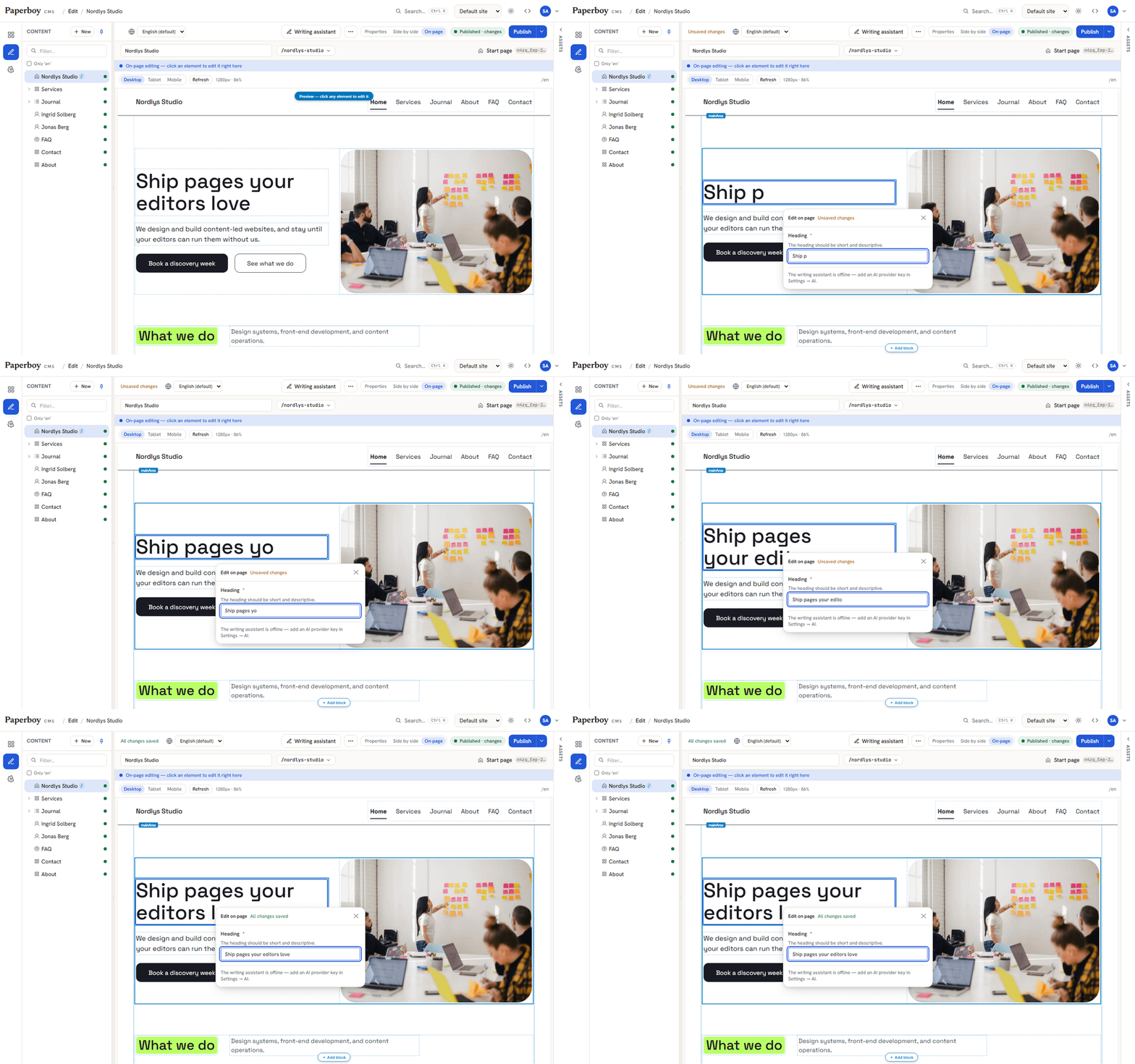
Click any text on your page and edit it right there. The preview is your real frontend, not a mock-up, and it updates as you type.
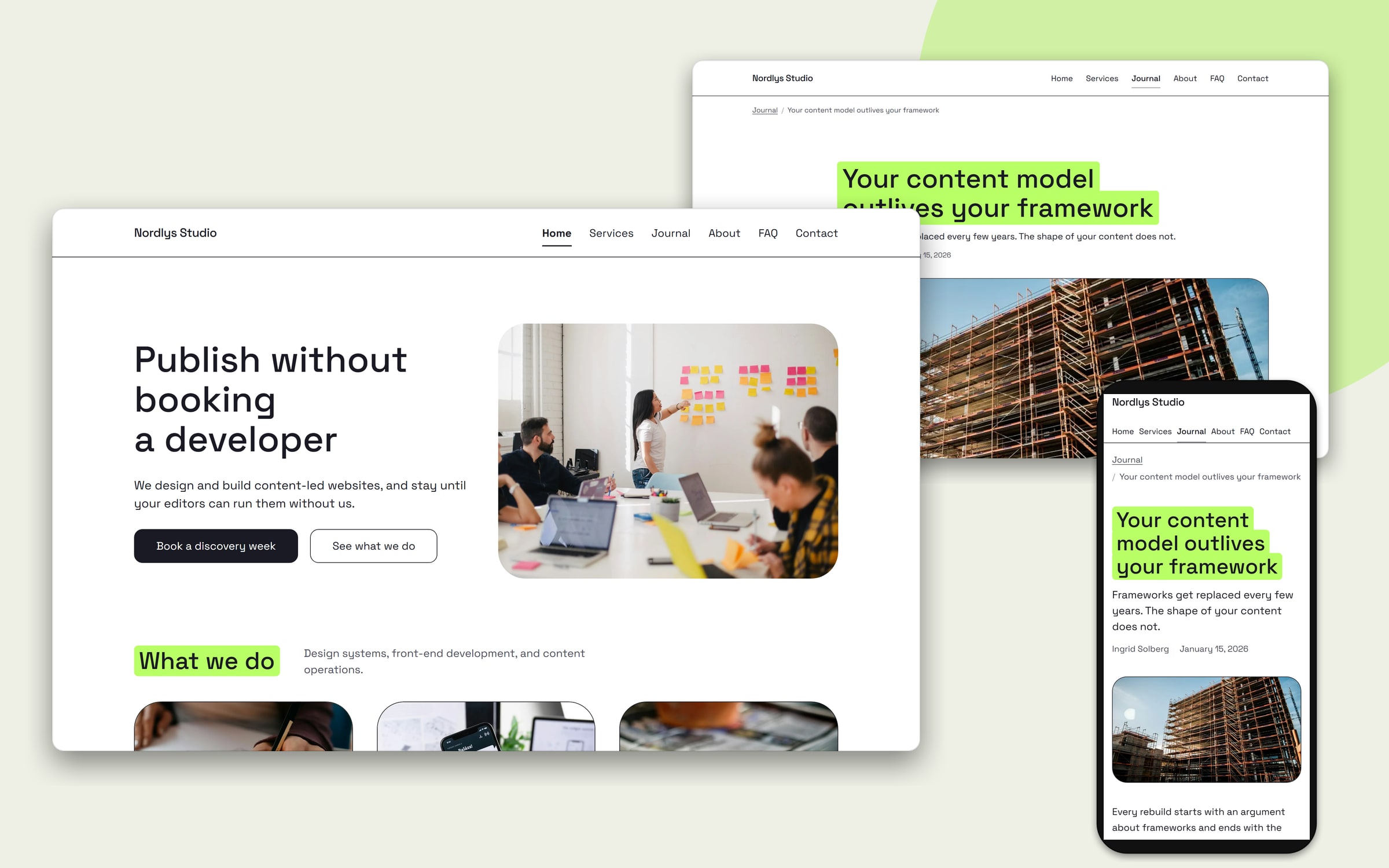
Your site stays yours. This is the Astro starter's demo site, every page of it built through the Management API. One command runs it with the CMS: docker compose -f docker-compose.demo.yml up -d --build.
Highlights
Built for agents
MCP server — OAuth 2.1 sign-in or site-scoped tokens; acts as a user and lists only the tools that user's role can use. See why MCP-first.
Secure by default — Argon2id, server-side sessions, CSRF, TOTP 2FA, deny-by-default RBAC with object-level scopes, append-only audit log.
Typed client SDK — @paperboycms/client, typed from the same Zod schemas the server serializes with. No codegen.
Content
Content types are data — pages, blocks and globals are defined in the admin, not in code. Content areas hold inline or shared blocks; a built-in template library covers the essentials.
Multisite — several sites in one instance, each with its own delivery keys, media, preview URL and start page. Types, languages and users are shared.
Multi-language with a fallback chain, hierarchical URLs from the page tree, version history, trash. Translation gaps show in the tree and on the dashboard.
Forms with submissions in your database — a form is content. Delivery ships it as a schema, submissions are validated server-side against the published form, and errors come back per field. Spam checks on by default, retention runs, erase-by-email is one audited action. One spread makes a form a WebMCP tool for in-browser agents.
A/B experiments — test a content area of a page against up to three other versions. The frontend picks a version server-side (no flicker), counts are stored per day with no visitor data, cookieless by default, and no winner is named before the planned sample size. The winner becomes the area's draft.
Delivery
One read path, no leaks — public keys see published content, preview keys see drafts, private fields never serialize. Lists filter, sort, paginate and search; every item carries fieldTypes so frontends switch on schema.
SEO and structured data computed by the CMS — meta, canonical, OpenGraph, Twitter and JSON-LD (Organization, breadcrumbs, FAQ Question/Answer, dateModified) on every page. Preview is always noindex.
Public files generated from content — robots.txt, sitemap.xml, llms.txt and security.txt.
Redirects that keep link equity — a rename or move records a 301 on publish. The frontend matches one manifest with matchRedirect; a 404 log shows what visitors miss.
Image transforms — ?w=800&format=webp&q=75 on any media URL, generated once and cached.
Webhooks — HMAC-signed content.published, form.submitted and delivery.changed for every move, sort or settings change, so a cache can purge on webhooks alone.
Editing
Visual on-page editing — click an element in the preview to edit its field, drag blocks onto the page, cross-origin included. The bridge is @paperboycms/preview.
Admin — React 19, light/dark, ⌘K palette, keyboard-operable drag-drop, axe-clean. The dashboard deep-links gaps, missing alt text and unused blocks.
AI writing assistant (optional; Anthropic or any OpenAI-compatible endpoint) — improve, rewrite, translate, alt text from the image, schema.org suggestions. With no key it refuses instead of faking output.
How it compares
What ships in the box as of 2026-10-17. core = built in · plugin · paid · no. Every cell is sourced in docs/comparison-sources.md; corrections welcome.
Paperboy
Strapi
Payload
Directus
Sanity
License
MIT
MIT + paid tiers
MIT
source-available
closed backend
Self-host
one image
Node app
your Next.js app
one image
no
Forms, validated server-side
core
plugin
plugin, partial
no
no
SEO meta + JSON-LD from the CMS
core
plugin, no JSON-LD
plugin, no JSON-LD
plugin, no JSON-LD
no
Auto 301 on rename
core
plugin
plugin, manual
no
DIY
MCP server acting as a user
core
core
plugin (beta)
core
core
Multisite
core
no
plugin
pattern
datasets
Click-to-edit on the live page
core
paid
soon
core
core
GraphQL
no
plugin
core
core
core
Hosted option
no
paid
paused
paid
yes
Ecosystem
none yet
large
growing
growing
large
Quickstart
1. Run the CMS (Docker):
./scripts/setup.sh       # writes .env with unique secrets and your admin password — required
docker compose up -d     # db → init (migrate + seed) → api, which also serves the admin
# Admin  http://localhost:8090    API  http://localhost:8091  (OpenAPI UI at /api/docs)
setup.sh is safe to re-run and never overwrites .env. Paperboy refuses to boot on the
placeholder secrets in this repo and refuses to seed production with the published demo login.
2. Run the website. The Astro starter
renders every built-in content type and is where your site lives:
git clone https://github.com/hybriden/paperboy-astro-starter my-site
cd my-site && npm install && npm run setup && npm run dev   # http://localhost:4321
The admin's side-by-side preview points at http://localhost:4321 by default. apps/web in this
repo is a Next.js contract reference, not a site to build on; it is opt-in
(docker compose --profile web up -d web, :8092).
🪟 Windows, no experience needed
Install Docker Desktop, restart if asked, open it and wait for Engine running.
Download Paperboy: GitHub → green Code button → Download ZIP → right-click → Extract All….
Open a terminal there: open the extracted folder in File Explorer, type powershell in the address bar, press Enter.
Create your login (required; it gives your copy its own private keys):
⚠️ Never run docker compose down -v once you have content: -v deletes the database.
If a page won't load, check that Docker Desktop says Engine running.
Production
The generated .env targets localhost. Before exposing a real host set COOKIE_SECURE=true, drop
ALLOW_INSECURE_COOKIES, and point CORS_ORIGIN at the admin's HTTPS origin. Redeploy one service
with docker compose up -d --no-deps --force-recreate <svc>; the seed refuses to wipe a database that
holds content unless FORCE_SEED=1. The deploy-safety rules are in CLAUDE.md.
Without a VM. One container, no proxy: it fits any "run a container" platform (App Service,
Container Apps, Cloud Run, Fly, Render, Railway) plus a managed Postgres.
Setting
Value
Image
ghcr.io/hybriden/paperboy-app:latest
Port
the platform's PORT (or API_PORT)
DATABASE_URL
postgresql://…@host:5432/paperboy?sslmode=require
Secrets
SESSION_SECRET, CSRF_SECRET, MFA_SECRET via openssl rand -hex 32; PREVIEW_SECRET too, set to the same value on your frontend, for draft preview
CORS_ORIGIN
the admin's HTTPS origin, with COOKIE_SECURE=true
TRUST_PROXY
the load-balancer range, so rate limits see real IPs; include your frontend's address if it forwards visitors' (submitForm({ visitorIp }))
DELIVERY_RATE_MAX
delivery reads per route per minute from one address (default 6000); your frontend's server is one address
Storage
a persistent volume at /app/uploads
Remote MCP
MCP_EMBEDDED=true serves the MCP inside the same container at {PUBLIC_URL}/mcp
Run one replica: rate limits and the publish/retention timers are in-process. Migrations run on
boot. Create the first admin by running the image once with pnpm --filter @paperboy/db seed and real
SEED_ADMIN_EMAIL, SEED_ADMIN_PASSWORD, PAPERBOY_PUBLIC_KEY, PAPERBOY_PREVIEW_KEY.
Without a Postgres server. For a demo or a small site, DATABASE_URL=pglite:///data/db runs
Postgres inside the container (PGlite, the same schema and migrations) with the
database in a folder. Seeded on first boot, never reseeded:
That is a localhost demo. Exposed, use HTTPS settings and real seed values as below. It is one
Postgres session, so writes queue: fine for a small site, not for heavy traffic. Expect ~0.5 GB of
memory. Back it up with ops/backup-pglite.sh, which stops the container for a few seconds, archives the volume and starts it again.
Accounts. Your admin login is what setup.sh printed. The demo logins (editor@, author@,
viewer@, passwords <Role>!Passw0rd) are development fixtures: a production seed creates only the
admin unless ALLOW_DEMO_CREDENTIALS=true.
Backups
Nothing backs itself up. ops/backup.sh is a working reference: nightly pg_dump
plus a tar of the uploads volume, 14-day rotation, alert on failure. It refuses to succeed with an
empty media archive and writes mode-600 files, because a backup is a full credential dump and,
once you have forms, visitor personal data. Cron lines and the restore procedure are in
ops/README.md. Known gap: backups land on the same disk as the data; add one
rclone copy line once you have a bucket.
MCP setup
Remote clients (Streamable HTTP). Start the MCP container; the api forwards /mcp to it, so
clients use the admin's own domain:
On a one-container host, set MCP_EMBEDDED=true on the api instead and it serves the MCP itself.
Local clients (stdio). The client starts the server, so this goes in its config, not a terminal.
An admin mints a token in Settings → Agent access and point -C at your Paperboy checkout (after pnpm install):
Keep -s: without it pnpm prints its script banner to stdout, which corrupts the stdio protocol.
The MCP acts as a Paperboy user and inherits its permissions. Tokens are minted per site (or for
every site); PAPERBOY_SITE pins a server to one site, and every per-site tool also takes a per-call site.
Toolsets. A connection lists the content tools by default (writing, editing, publishing,
media). The rest is opt-in, so an agent writing a page isn't choosing among user and webhook tools:
Toolset
For
content (default)
pages, blocks, globals, versions, trash, media, the writing assistant
delivery
what the public website receives (published output, search)
schema
content types and type templates
redirects
redirect rules and the 404 log
experiments
A/B tests of a page's content area: set up, start, pause, read results, end
Pick them with PAPERBOY_TOOLSETS=content,redirects on the server (in .env with Docker Compose), or per connection on the URL:
https://<your-domain>/mcp?toolsets=content,redirects (all lists everything). Your role still
decides what you may do; a tool outside the chosen toolsets answers with how to enable it.
OAuth for remote clients. Add https://<your-domain>/mcp as a connector in Claude or Cursor. The
client registers itself, sends you through Paperboy's own login (with 2FA), and a consent screen asks
which site the connection may work in. Revoke it in Settings → Connected apps. One domain is enough:
the API forwards /mcp and serves /.well-known/oauth-*. For other layouts set PUBLIC_URL (the
issuer, default CORS_ORIGIN) and MCP_PUBLIC_URL (default {PUBLIC_URL}/mcp) on both api and mcp.
Files from the agent's machine.create_upload_link mints a 15-minute link the agent curls files
to (POST /api/v1/uploads, 20 files of 5 MB per request). upload_asset takes a public URL or base64.
The npm packages
Frontends integrate against these two packages, not the CMS codebase. Both are versioned independently.
Also getByPath, startPage, global, search, render helpers that follow fieldTypes,
matchRedirect, applyExperiments for A/B tests, formToolAttrs for WebMCP forms,
preview-token verification and an optional ETag cache. 404s return null, other
errors throw PaperboyError. Full README.
@paperboycms/preview — zero-dependency bridge that makes any frontend
editable inside the admin's preview. Call initPreviewBridge() in preview mode and mark the DOM with
data-pb-field, data-pb-area and data-pb-block-index (or let the client's pbAreaAttrs emit
them). Full README.
Developing
apps/api         Fastify v5 — Management API (auth/RBAC) + Delivery API (read-only, key-scoped); serves the admin
apps/admin       React 19 + Vite — the editor
apps/web         Next.js 15 — reference frontend, pins the delivery contract (opt-in)
apps/mcp         MCP server (stdio or Streamable HTTP)
packages/shared  Zod schemas + types (single source of truth) + the AI provider
packages/db      Drizzle schema, migrations, query layer (object-level authz), seed
packages/client  @paperboycms/client — typed Delivery API SDK (npm)
packages/preview @paperboycms/preview — on-page-editing bridge (npm)
pnpm install
docker compose up -d db
export DATABASE_URL=postgresql://paperboy:paperboy@localhost:5433/paperboy
export UPLOADS_DIR=$PWD/.uploads            # the default, /app/uploads, is the container path
pnpm db:seed
pnpm dev                                    # api :8091, admin :8090, web :8092 (mcp waits for MCP_TOKEN)

pnpm --filter @paperboy/api test            # integration tests against a real Postgres
pnpm --filter @paperboy/admin test:e2e      # Playwright e2e + axe
CI also runs the MCP usability eval (evals/) on every push with a deterministic mock driver and
weekly with a real model. Rules of the road: CONTRIBUTING.md. Everything about
deploy safety, auth, the content model and the incidents behind each rule: CLAUDE.md.
Stack choices: STACK.md. Research behind the bigger features: docs/plans/.
Vulnerabilities: SECURITY.md.
Runs locally on your device. Your client starts the server itself, so nothing has to be hosted.
Install with your agent
Paste this prompt into your agent. It reads this page and does the setup for you.
prompt
Read https://aiagentslisting.com/mcp/paperboy to learn what the "Paperboy" MCP server does and how to install it. Add it to my coding agent's MCP configuration as documented on that page, then confirm the server connects and list the tools it exposes.
Agents can also browse this directory over MCP at https://aiagentslisting.com/api/mcp
From the project README
bash
docker run -d -p 8090:8091 -v paperboy:/data
This server runs locally, so we can't read its tool list over the web yet.
We could not run this server: it ships no npx package for our sandbox and no public endpoint. The four checks that need a live server are left out, and the grade tops out at B until one exists.
What's missing
Claimed by ownerThe maintainer proved ownership of this listing.
0/4
All 5 checks (4 passed)
Installation methodRequiredThe README documents at least one way to install or connect.
15/15
Has a READMERequiredThe repository ships documentation we could read.
10/10
Easy installA paste-ready client config (an mcpServers block) is documented.
12/12
Has a licenseThe repository declares a license.
8/8
Claimed by ownerThe maintainer proved ownership of this listing.
0/4
Verified liveNot checkableWe connected to the server and it answered a real MCP handshake.
—
Exposes toolsNot checkableThe server reports at least one tool, from its manifest or a live read.
—
Ships promptsNot checkableThe server exposes at least one prompt template.
—
Ships resourcesNot checkableThe server exposes at least one resource.
—
Maintain this server? Claiming proves you own the listing and earns the last 4 points.
Connect to the AI Agents Listing MCP server at https://aiagentslisting.com/api/mcp using the HTTP transport and complete the sign-in when it asks. Then call the submit_review tool for the listing "paperboy" with a rating from 1 to 5 and a short note on what worked and what did not.
No reviews yet
Be the first to share your experience with this tool.
Subscribe to our newsletter
One email a week. New agents, MCP servers and skills, and what is actually getting traction.

 hybriden