
 JPMarhefka
Partuno - DigiKey and Mouser MCP server for electronics component search, BOM analysis, sourcing
Partuno - DigiKey and Mouser MCP server for electronics component search, BOM analysis, sourcing comparison, and safe distributor workflows.
·
Partuno - DigiKey & Mouser MCP Server

Local-first component intelligence for MCP
Partuno is an open-source, provider-neutral, local-first Model Context Protocol (MCP) server for electronic component research, BOM analysis, sourcing comparison, and safe distributor workflows. Connect an AI assistant to your own DigiKey and Mouser credentials without shared credentials or autonomous ordering, while keeping evidence, normalized attributes, and explicit uncertainty visible.
Partuno was initially developed as a native MCP server. Native MCP is the
recommended connection because it works as an app in ordinary ChatGPT
conversations and exposes richer tool annotations. Existing Custom GPT Action
endpoints remain available for backward compatibility, including
/action-openapi.json.
Partuno does not provide a shared public server or shared distributor credentials. The Render configuration is an optional reference deployment for an operator's own single-user instance.
Start here
Use the published package (recommended)
Partuno is published on PyPI and listed in the official MCP Registry. The recommended local MCP launcher is:
uvx --from partuno partuno-mcpThis downloads the current published release and runs the default local stdio transport. To pin the current release exactly, use:
uvx --from 'partuno==4.0.1' partuno-mcpMCP clients that accept a local command can use uvx with these arguments:
{
  "command": "uvx",
  "args": ["--from", "partuno", "partuno-mcp"]
}
Keep your operator-owned DigiKey and Mouser credentials in the MCP client's environment. See the local deployment guide for the supported variables and the native MCP setup guide for operator-owned remote deployments. For a hosted directory listing, see Partuno on Glama.
Install with pip
If uvx is not available, install the published package into an existing
Python environment:
python3 -m pip install partuno
partuno-mcp
Develop from source
Use a checkout only when contributing, running unreleased changes, or needing
the repository's .env.example and test suite:
git clone https://github.com/JPMarhefka/partuno.git
cd partuno
python3 -m venv .venv
source .venv/bin/activate
python -m pip install -r requirements.txt
cp .env.example .env
set -a
source .env
set +a
python -m partuno
See the local deployment guide for loopback HTTP and source-checkout details.
Self-host a remote MCP server
If your client requires a reachable HTTPS endpoint, deploy your own instance with your own provider accounts, OAuth application, signing key, rate limits, and hosting budget. Start with the Render reference deployment, or use the Docker and Azure guides. There is no shared Partuno endpoint intended for public use.
Use the existing Action compatibility surface
Custom GPT Actions are retained for existing integrations. The Action/OpenAPI surface is not the primary architecture; use native MCP for new connections. The Action setup details are documented in MCP setup.
What Partuno does
- Searches and inspects electronic components across DigiKey and Mouser.
- Normalizes manufacturer part numbers, units, compliance values, and common distributor-specific attribute names.
- Compares exact component offers at a requested quantity, including price breaks, minimum order quantities, order multiples, availability, and partial provider failures.
- Recommends components against hard requirements while preserving
meets,does_not_meet, andunknownevidence states. - Analyzes BOMs for stock, lifecycle, compliance, pricing, tariffs, lead time, and substitute candidates.
- Supports bounded account and project workflows such as read-only order history, list and quote previews, receiving reconciliation, and carefully confirmed mutations where the provider supports them.
See the capability reference for the current scope and the safety boundary for each workflow.
DigiKey MCP server
Partuno can run as a local-first DigiKey MCP server for component search, product research, current pricing and availability, lifecycle checks, MyLists, quotes, receiving reconciliation, and other bounded account workflows. The DigiKey MCP server guide covers setup, supported workflows, and the provider-specific safety boundaries.
Mouser MCP server
Partuno also provides a Mouser MCP server surface for catalog search, exact offer comparison, read-only order history, and preview-confirmed Cart workflows. The Mouser MCP server guide explains the separate operator-owned Mouser credentials and what the server does and does not execute.
Electronics BOM MCP server
Use Partuno as an electronics BOM MCP server to consolidate duplicate rows, resolve exact products, estimate current merchandise cost, check stock and lifecycle risk, inspect compliance and lead-time signals, and find substitutes or alternate packaging. See the electronics BOM MCP server guide for a complete read-only example and known limitations.
AI component sourcing
Partuno turns a natural-language engineering request into a traceable sourcing
workflow. Recommendations preserve meets, does_not_meet, and unknown
evidence states, so missing or ambiguous attributes are not silently treated as
qualified requirements. The natural-language examples
show the intended interaction style.
DigiKey vs Mouser comparison
For an exact comparison, Partuno matches manufacturer and MPN identity first, then compares requested-quantity pricing, minimum order quantity, order multiples, purchasable quantity, availability, and manufacturer lead time. If a provider fails or returns incomplete evidence, the result remains partial instead of inventing a winner. See the DigiKey vs Mouser comparison guide.
What Partuno does not do
- It does not supply DigiKey or Mouser credentials.
- It does not create a shared multi-tenant credential pool.
- It does not silently turn unknown product data into a pass.
- It does not submit distributor orders.
- It does not bypass provider quotas, terms, authentication, or rate limits.
See it in action
Featured example: choose a component for a 3.3 V design
Once Partuno is connected, a user can simply ask:
I’m choosing a dual op amp for a 3.3 V circuit. Find a few LM358-family
options that can operate at 3.3 V, are RoHS compliant, normally stocked, and
available in a quantity of 10. Show the evidence behind each recommendation
and keep uncertain data clearly marked.
Partuno turns that plain-language request into a provider-aware result with qualified, unverified, and rejected candidates; normalized voltage and compliance evidence; cross-distributor availability; quantity pricing; and a Pareto shortlist. It does not silently treat missing specifications as a pass.
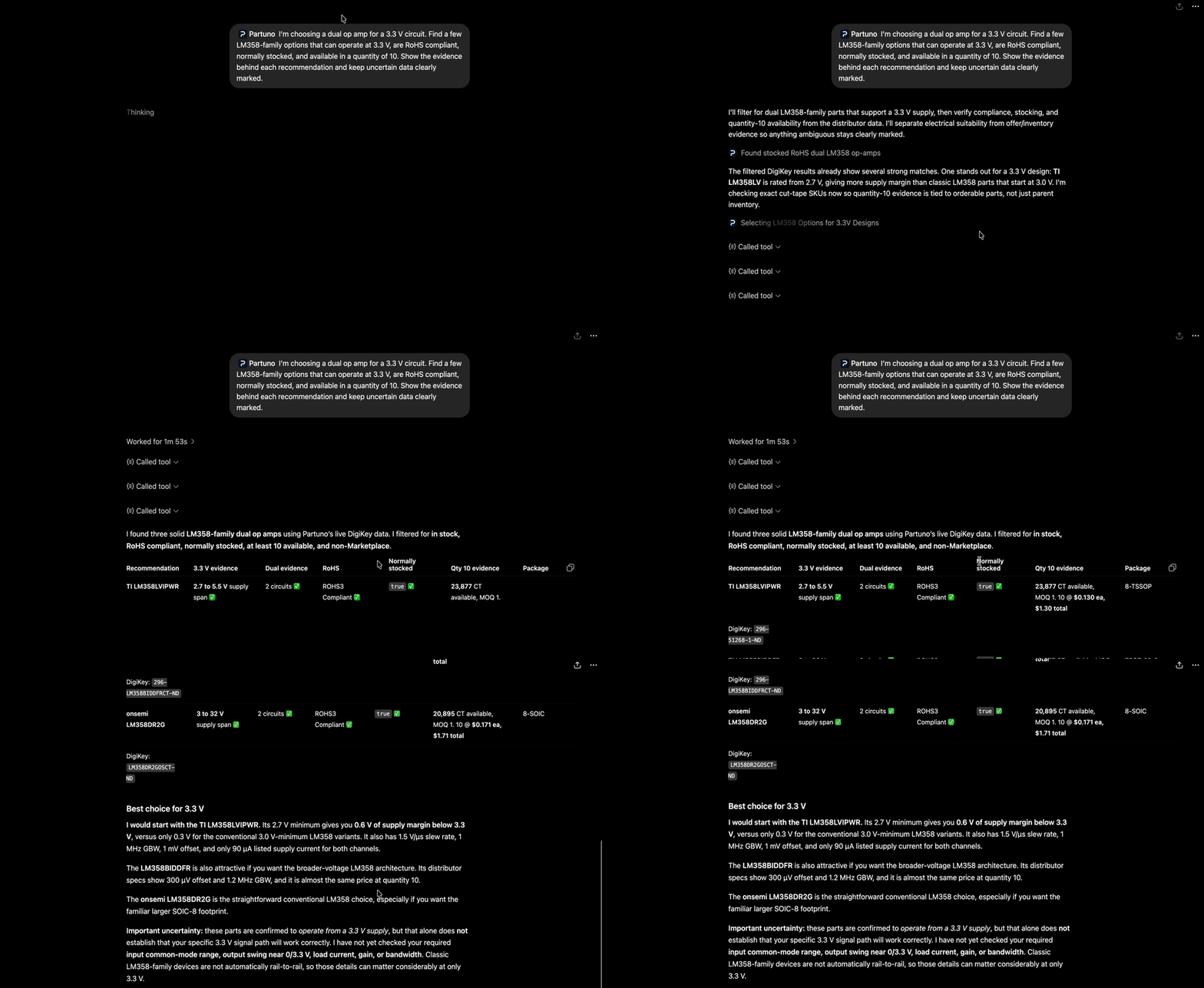
This is a roughly 10-second prompt-to-result capture that shows the request and a smooth response scroll. Prices, stock, and lead times are live provider data and can change.
See more natural-language examples for comparison, product research, BOM review, and safe account-preview workflows.
Documentation
| Topic | Guide |
|---|---|
| Capabilities and safety boundaries | Capability reference |
| Native MCP connection | MCP setup |
| Local stdio or loopback HTTP | Local deployment |
| Docker deployment | Docker deployment |
| Operator-owned Render deployment | Render reference |
| Azure deployment | Azure deployment |
| Security and credential handling | Security guide |
| Offline and live validation | Testing guide and validation notes |
| Natural-language usage examples | Examples |
| DigiKey, Mouser, and BOM entry points | Search-focused guides |
| Contributing | CONTRIBUTING.md |
| Security reports | SECURITY.md |
| Release history | CHANGELOG.md |
Logo assets
The full-resolution Partuno logo is available for project pages, client listings, and integration documentation. A compact plugin icon is also included for client or plugin upload fields with strict PNG size limits.
The compact icon is intentionally optimized for small upload limits. If a host accepts larger assets, use the full-resolution logo instead. The compact icon can also be downloaded directly from the repository's raw asset URL.
When using the logo in a ChatGPT app, MCP client, or other plugin integration, identify the integration as Partuno and do not imply endorsement by DigiKey, Mouser, or another provider. Check the host platform's current dimensions, format, and file-size requirements before uploading.
Deployment and credential model
| Mode | Best for | Credential ownership |
|---|---|---|
| Local stdio | Desktop MCP clients and personal development | Operator's local environment |
| Loopback HTTP | Clients that cannot launch stdio | Operator's local environment |
| Remote HTTPS | A self-hosted ChatGPT/Codex connection | Operator's own deployment and accounts |
Remote mode adds OAuth and HTTPS because a hosted MCP endpoint must authenticate the client and protect upstream access. It is optional; local mode remains the default and does not require Partuno OAuth.
Project status
Partuno 4.0.1 is an active open-source release. The test suite covers offline provider contracts, MCP tool behavior, REST compatibility, credential safety, normalization, and the multi-distributor workflows. Live provider calls are opt-in because they require operator credentials and are subject to provider quotas.
See testing before running live smoke tests.
License and independence
Partuno is released under the Apache License 2.0. See NOTICE for project attribution and independence statements. Partuno is not affiliated with, endorsed by, or sponsored by DigiKey, Mouser, or any manufacturer or distributor named in the project. Their names and marks identify integrations only.
Install with your agent
Paste this prompt into your agent. It reads this page and does the setup for you.
Read https://aiagentslisting.com/mcp/partuno to learn what the "Partuno" MCP server does and how to install it. Add it to my coding agent's MCP configuration as documented on that page, then confirm the server connects and list the tools it exposes.Agents can also browse this directory over MCP at https://aiagentslisting.com/api/mcp
From the project README
uvx --from partuno partuno-mcp
uvx --from 'partuno==4.0.1' partuno-mcp
This server runs locally, so we can't read its tool list over the web yet.
We could not run this server: it ships no npx package for our sandbox and no public endpoint. The four checks that need a live server are left out, and the grade tops out at B until one exists.
What's missing
- Easy installA paste-ready client config (an mcpServers block) is documented.0/12
- Claimed by ownerThe maintainer proved ownership of this listing.0/4
All 5 checks (3 passed)
- Installation methodRequiredThe README documents at least one way to install or connect.15/15
- Has a READMERequiredThe repository ships documentation we could read.10/10
- Easy installA paste-ready client config (an mcpServers block) is documented.0/12
- Has a licenseThe repository declares a license.8/8
- Claimed by ownerThe maintainer proved ownership of this listing.0/4
- Verified liveNot checkableWe connected to the server and it answered a real MCP handshake.—
- Exposes toolsNot checkableThe server reports at least one tool, from its manifest or a live read.—
- Ships promptsNot checkableThe server exposes at least one prompt template.—
- Ships resourcesNot checkableThe server exposes at least one resource.—
Maintain this server? Claiming proves you own the listing and earns the last 4 points.
Claim this listingShow this grade in your README

Paste this line near the top of your repository's README. The badge always renders the current score.
[](https://aiagentslisting.com/mcp/partuno)Alternatives to Partuno
Nothing comparable is listed yet.
v4.0.1Partuno 4.0.1Release notesv4.0.0Partuno 4.0.0Release notesv0.1.0Partuno v0.1.0 — Initial public releaseRelease notes
Send this prompt to your agent to leave a review
Connect to the AI Agents Listing MCP server at https://aiagentslisting.com/api/mcp using the HTTP transport and complete the sign-in when it asks. Then call the submit_review tool for the listing "partuno" with a rating from 1 to 5 and a short note on what worked and what did not.No reviews yet
Be the first to share your experience with this tool.
Subscribe to our newsletter
One email a week. New agents, MCP servers and skills, and what is actually getting traction.