
 Mafifrizi
Tactical Identity Operator for Linux & Hybrid Active Directory
Tactical Identity Operator for Linux & Hybrid Active Directory
·

Tanuki
Non-Human Identity & Hybrid Active Directory Operator for Linux Workloads
Protocol-first, zero root privileges, zero host configuration footprint, zero noise.
Overview • Quick Start • Commands • Architecture • Validation • Lineage & Credits
Overview
Modern cloud-native and on-premise environments increasingly run Linux workloads (Kubernetes pods, AI coding agents, CI/CD runners, containerized batch workers) that must authenticate to enterprise Active Directory domains without a full domain join, Kerberos daemons (sssd / winbind), or root privileges.
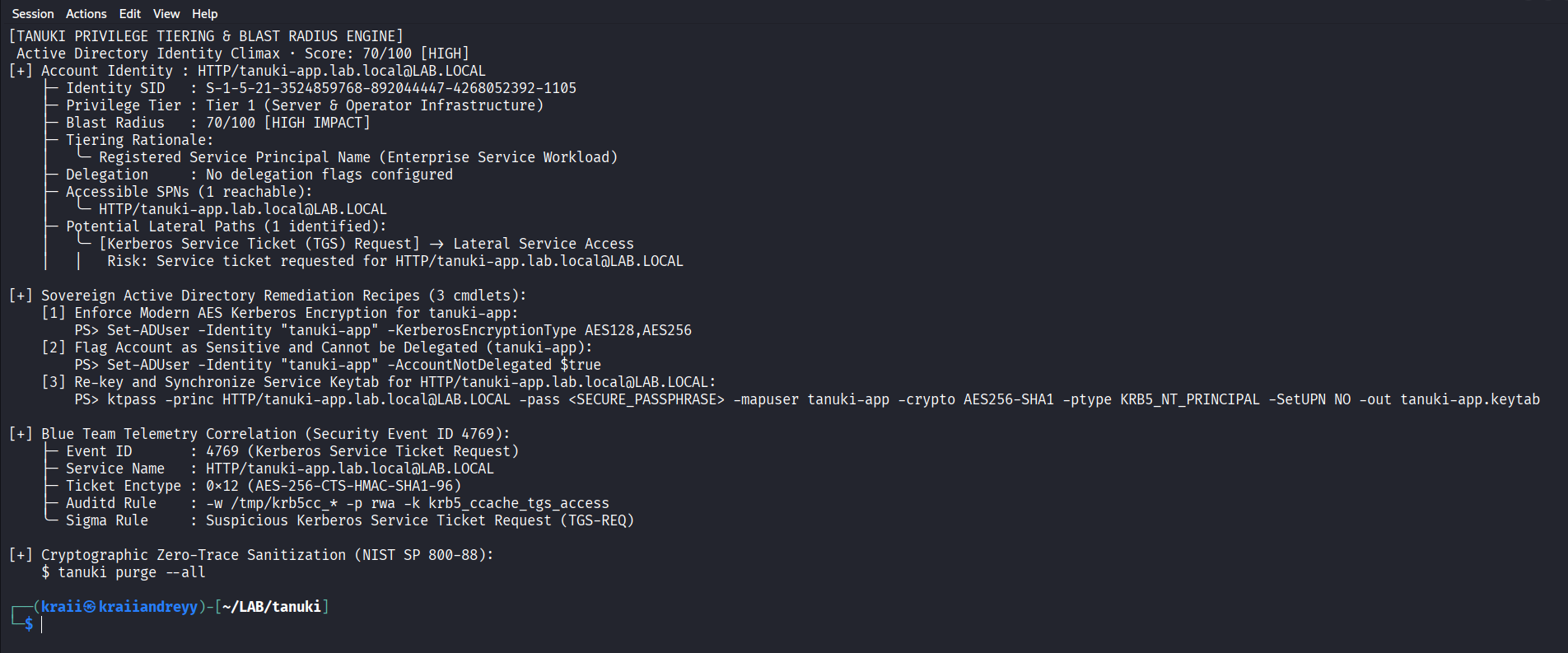
Tanuki is a protocol-first Active Directory operator built for unprivileged Linux userspace. It runs the full Purple Team lifecycle under human-in-the-loop control: pre-flight triage, cryptographic ticket negotiation, quantitative privilege tiering, closed-loop self-healing, and forensic audit telemetry. It is also agent-operable, exposing a structured skill manifest so tools like Claude Code, Cursor, and Google Antigravity can drive it one deterministic step at a time.
Highlights:
- Living off the domain. The Python engine uses only the 3.10+ standard library. Zero pip dependencies. The Rust core is a 1.8 MB static binary built with
#![forbid(unsafe_code)]. - Strictly unprivileged (UID 1000). No
sudo, no root, noCAP_SYS_TIME, and no mutation of/etc/krb5.confor system files. - Quantitative blast radius. Scores identity risk (0-100), classifies Active Directory tiers, and emits deterministic PowerShell remediation recipes.
- Deterministic and auditable. Military-brief output, semantic exit codes, and in-memory clock skew healing clamped to the Kerberos standard 300 second maximum.
For the full engine comparison and subsystem map, see docs/ARCHITECTURE.md.
Quick Start
1-line universal install
# Detects the Rust musl binary or falls back to the Python standard engine
curl -sSfL https://raw.githubusercontent.com/Mafifrizi/tanuki/main/install.sh | bash
Manual installation
# Rust systems core
cargo install --path crates/tanuki-cli

# Python reference engine
pipx install git+https://github.com/Mafifrizi/tanuki.git
Zero-install direct execution
git clone https://github.com/Mafifrizi/tanuki.git
cd tanuki
python3 -m tanuki doctor --json
Commands
Both engines share the same command surface and flags. Full usage, every flag, and verified LDAPS examples are in docs/USAGE.md.
| Command | Purpose |
|---|---|
tanuki doctor | Pre-flight diagnostics across domain config, credentials, network, and OPSEC telemetry |
tanuki auth | Unprivileged userspace TGT acquisition with in-memory clock skew healing |
tanuki tgs | Kerberos service ticket acquisition for a target SPN |
tanuki blast | Quantitative blast radius scoring, privilege tiering, and PowerShell remediation recipes |
tanuki ldap | Unprivileged LDAP recon (--query spn | asreproast | rbcd | shadow | unconstrained | all) |
tanuki adcs | Passive AD CS template scanner for ESC1 through ESC11 |
tanuki config | Zero-DNS unprivileged krb5.conf generator targeting the KDC by IP |
tanuki fix | Idempotent closed-loop remediation (--dry-run to preview) |
tanuki purge | NIST SP 800-88 cryptographic memory and credential-cache zeroization |
tanuki skill | Export the agent skill manifest (--json for machine-actionable schema) |
Add --json to any command for structured output. Run tanuki -i for the interactive wizard.
The decision ladder
Tanuki follows a fixed 5-rung tactical decision ladder to prevent privilege escalation loops, reduce authentication noise, and keep every action forensically defensible. The model is documented in references/tactical_ladder.md.
| Rung | Action | Description |
|---|---|---|
| 0 | DIAGNOSE | Pre-flight audit of credentials, enctypes, and network paths |
| 1 | AUTHENTICATE | Userspace AS-REQ TGT negotiation with clock skew tolerance |
| 2 | AUTHORIZE | TGS service ticket acquisition for verified SPN endpoints |
| 3 | ASSESS | Quantitative blast radius calculation and tier scoring |
| 4 | PURGE | Cryptographic memory zeroization (NIST SP 800-88) |
Validation
Tanuki is validated against live hybrid infrastructure: an unprivileged Kali workstation (UID 1000) connecting directly to a Windows Server 2022 Domain Controller (DC01.lab.local), proving each rung end to end through to Blue Team forensic telemetry on the DC. It also ships 500+ Python unit tests and 39 Rust tests (library plus integration), all green.
See the full milestone walkthrough with terminal proofs in docs/VALIDATION.md.
Lineage & Credits
Tanuki is engineered by Muhammad Afif Rizi (@Mafifrizi) and Muhamad Dian Alvito.
Tanuki draws inspiration and tradecraft from two foundational projects:
- Tim Brown (@timb-machine): Created Linikatz and pioneered Linux Active Directory assessment techniques, keytab analysis, and credential cache harvesting.
- Dietrich Gebert (@dietrichayala): Created Ponytail and demonstrated how a disciplined decision ladder prevents AI agent hallucination and conversational bloat.
Technical Specifications Implemented
- [RFC 4120]: The Kerberos Network Authentication Service (V5)
- [RFC 4511]: Lightweight Directory Access Protocol (LDAP): The Protocol
- [RFC 8693]: OAuth 2.0 Token Exchange
- [MS-KILE]: Kerberos Protocol Extensions
- [MS-PAC]: Privilege Attribute Certificate Data Structure
- [MS-DTYP]: Windows Data Types & Security Descriptor Structures
- [NIST SP 800-88]: Guidelines for Media Sanitization (Rev. 1)
Contributing
We welcome contributions from protocol researchers, systems engineers, and toolmakers. Tanuki enforces two hard invariants: zero external dependencies in the Python core, and #![forbid(unsafe_code)] in the Rust core.
- Developer guide: see
CONTRIBUTING.mdfor local setup, testing commands, and PR guidelines. - Good first issues: shell autocompletion (
bash/zsh/fish), error dictionary expansion intanuki triage, and SARIF or Markdown export formatters. - Reporting issues: use the structured issue templates.
License
Tanuki is dual-licensed under either:
- MIT License (
LICENSE-MITor http://opensource.org/licenses/MIT) - Apache License, Version 2.0 (
LICENSE-APACHEor http://www.apache.org/licenses/LICENSE-2.0)
You may choose either license.
Install with your agent
Paste this prompt into your agent. It reads this page and does the setup for you.
Read https://aiagentslisting.com/mcp/pipx-isolated-cli-environment to learn what the "Pipx (Isolated CLI environment)" MCP server does and how to install it. Add it to my coding agent's MCP configuration as documented on that page, then confirm the server connects and list the tools it exposes.Agents can also browse this directory over MCP at https://aiagentslisting.com/api/mcp
From the project README
pipx install git+https://github.com/Mafifrizi/tanuki.gitThis server doesn't publish a machine-readable tool manifest, and it doesn't expose a public endpoint we could ask. Connect the server locally to see what it exposes.
We could not run this server: it ships no npx package for our sandbox and no public endpoint. The four checks that need a live server are left out, and the grade tops out at B until one exists.
What's missing
- Easy installA paste-ready client config (an mcpServers block) is documented.0/12
- Has a licenseThe repository declares a license.0/8
- Claimed by ownerThe maintainer proved ownership of this listing.0/4
All 5 checks (2 passed)
- Installation methodRequiredThe README documents at least one way to install or connect.15/15
- Has a READMERequiredThe repository ships documentation we could read.10/10
- Easy installA paste-ready client config (an mcpServers block) is documented.0/12
- Has a licenseThe repository declares a license.0/8
- Claimed by ownerThe maintainer proved ownership of this listing.0/4
- Verified liveNot checkableWe connected to the server and it answered a real MCP handshake.—
- Exposes toolsNot checkableThe server reports at least one tool, from its manifest or a live read.—
- Ships promptsNot checkableThe server exposes at least one prompt template.—
- Ships resourcesNot checkableThe server exposes at least one resource.—
Maintain this server? Claiming proves you own the listing and earns the last 4 points.
Claim this listingShow this grade in your README

Paste this line near the top of your repository's README. The badge always renders the current score.
[](https://aiagentslisting.com/mcp/pipx-isolated-cli-environment)Alternatives to Pipx (Isolated CLI environment)
Nothing comparable is listed yet.
v2.1.3Release notesv2.1.2Release notesv2.1.1Release notesv2.1.0Release notesv2.0.0Release notesv1.3.0Release notesv1.2.1Release notesv1.2.0Release notesv1.1.0Release notesv1.0.0Release notes
Send this prompt to your agent to leave a review
Connect to the AI Agents Listing MCP server at https://aiagentslisting.com/api/mcp using the HTTP transport and complete the sign-in when it asks. Then call the submit_review tool for the listing "pipx-isolated-cli-environment" with a rating from 1 to 5 and a short note on what worked and what did not.No reviews yet
Be the first to share your experience with this tool.
Subscribe to our newsletter
One email a week. New agents, MCP servers and skills, and what is actually getting traction.