
 dagoSte
Static reverse engineering of untrusted files with verifiable, byte-anchored evidence. Open tools
Static reverse engineering of untrusted files with verifiable, byte-anchored evidence. Open tools (Ghidra, JADX, LIEF, YARA-X, Babel) in locked offline containers, from the command line or from AI agents over MCP.
·
https://github.com/user-attachments/assets/884cff5d-e37e-49c3-9bb7-8fbcf118e2ee
Why · What it analyses · How it works · The tools · Secure containers · AI analyst team · Quick start · Roadmap · Sponsor
ReverseAI is an open-source engine for static reverse engineering of untrusted files. It opens programs, Android apps and JavaScript packages without running them, puts the heavy analysis tools inside locked, offline containers, and reports as verified only what it can prove from the file's own bytes. Every answer says where in the file it comes from, which tool produced it and whether ReverseAI verified it or it is a tool's interpretation.
It works from the command line and from AI agents: its MCP server lets Claude Code, Codex, Cursor or any other Model Context Protocol client investigate a file, while every answer it receives stays checkable and the file never leaves its locked setup. On top of it, an optional AI analyst team (the hive) splits a native program among parallel agents, has an independent council challenge every part, and rebuilds the program as C or C++ that compiles and is checked against the original.
Why ReverseAI
Looking inside a suspicious file usually means trusting a large toolchain with it, and then trusting whatever the tool, or an AI model, says about it. ReverseAI removes both kinds of blind trust:
- The file is never executed. It is copied once into a frozen, fingerprinted snapshot and read as data. No sample code, install script or package manager ever runs.
- Heavy tools are locked away. Decompilers and parsers run in a fresh container per question, with no network, a read-only system, no privileges and hard limits. Nothing of your home folder or workspace is visible to them.
- Nothing is taken on faith. ReverseAI recomputes every byte-level fact a tool reports, such as headers, offsets, matches and code anchors, from the original bytes. A single mismatch rejects the tool's whole answer, so a compromised or buggy tool can hide evidence but cannot invent verified evidence.
- Facts and interpretations stay apart. Decompiled code and call graphs are useful but are a tool's reading; they are always labelled as such and can never overrule a verified fact.
- Open and reproducible. MIT-licensed, built on official open-source tools pinned by hash, with no Python dependencies. The same file and settings give the same report.
What it analyses
| You give it | You get |
|---|---|
| Native programs: Linux (ELF), Windows (PE) and macOS (Mach-O) executables and libraries | File structure, segments and sections, entry point, imported libraries and functions, symbols, strings and raw byte ranges. With Ghidra: the list of functions, decompiled pseudocode, assembly, who calls what, and cross-references. |
| Android apps: APK packages and the DEX bytecode inside them | Package contents, the binary manifest's declarations such as the package name and permissions, classes, methods and the references between them. With JADX: the decompiled Java of a chosen method. |
JavaScript applications: ZIP archives, Electron ASAR archives, npm packages (.tgz) and single bundles | The file inventory, package.json declarations (including install scripts, read but never run) and hints such as process spawning, dynamic code or credential access. With the Babel parser: where modules are imported and where sensitive functions are called. |
You can ask for a full report on a file (analyze) or ask one precise
question (query): list the functions, decompile one, show who calls it, search
the strings, read bytes at an address, inspect an Android class or method, or page
through a JavaScript application. The full list of questions is in the
usage guide.
Every report comes as JSON and Markdown and sorts findings into four groups:
| Label | Meaning |
|---|---|
| Supported | ReverseAI verified the value from the cited bytes with a fixed rule for that kind of claim. |
| Derived | A tool's interpretation, such as decompiled code or a call relationship, anchored to bytes ReverseAI verified, but still the tool's reading. |
| Unsupported | A claim whose evidence did not check out, shown with the reviewer's reason. |
| Contradicted | Verified facts that disagree with each other. |
Supported means the bytes say exactly this; it never means the file is safe, malicious or behaves in a certain way.
How it works
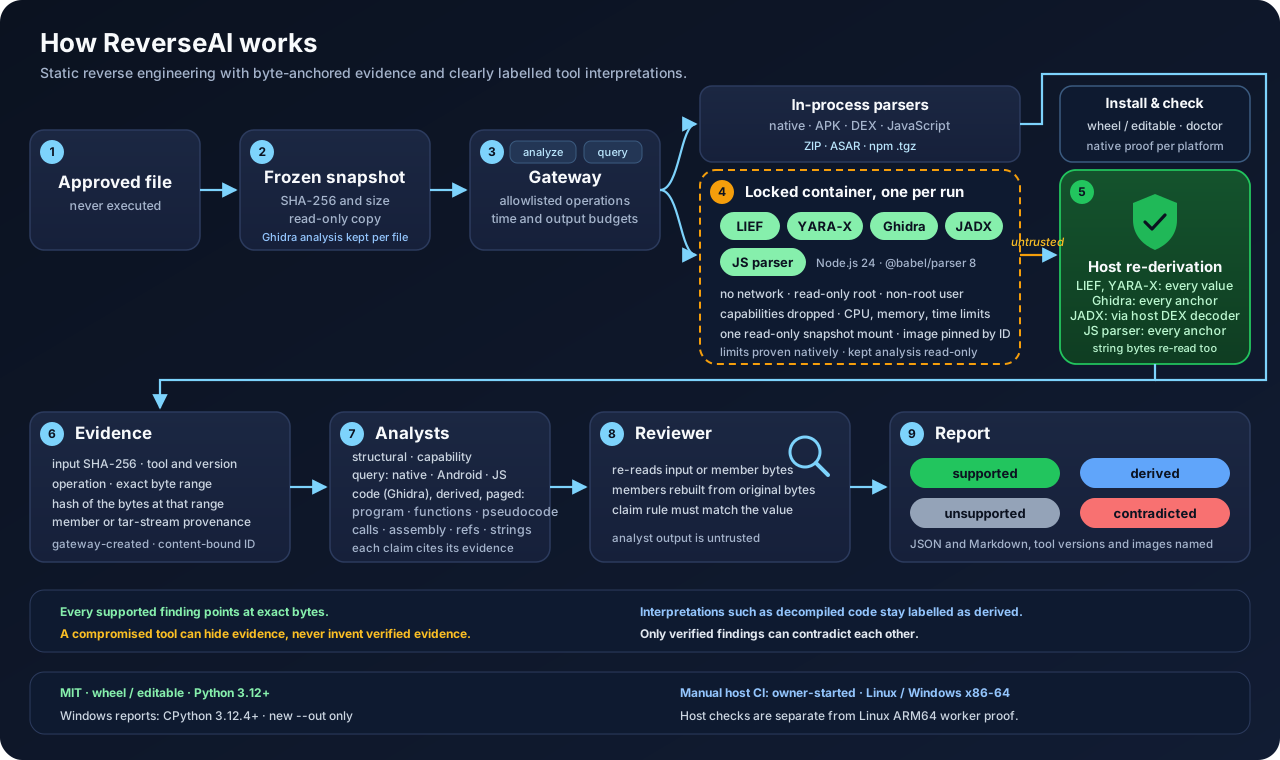
- Freeze the file. You approve one regular file. ReverseAI copies it into a private snapshot and fingerprints it with SHA-256; everything afterwards refers to that fingerprint. Links, hard-linked files and files that change while being read are refused.
- Go through the gateway. A gateway accepts only a fixed list of operations, each with its own time and output budget. Nothing else can be asked of a tool.
- Read simple formats directly. ReverseAI's own parsers, written with the Python standard library alone, decode executable headers, imports, strings, APK archives, the Android manifest, DEX bytecode, gzip and tar streams, ASAR archives and JSON. Their results are the verified reference.
- Run heavy tools in a locked container. Ghidra, JADX, LIEF, YARA-X and the JavaScript parser run one fresh container per request, as described below.
- Check the tool's answer. The host recomputes every byte-level fact the tool reports from the original bytes and rejects the whole reply on any mismatch. A decompiled function or Java method is accepted only if it is anchored to code that ReverseAI located and verified itself; its text and relationships remain the tool's interpretation.
- Record evidence. Each item of evidence binds the file fingerprint, the tool and its version, the operation, and the exact byte range with its own hash. For a file inside an archive it also records which member it came from and how that member was rebuilt from the original bytes.
- Write findings. Analysts turn evidence into findings, and every finding must cite its evidence.
- Review independently. A reviewer re-reads the cited bytes, rebuilds compressed members from the original archive and applies a fixed rule for each kind of claim. What it cannot confirm is not reported as supported.
- Report. JSON and Markdown reports name each tool version and container image, and are written with private permissions into a new or empty folder.
The tools
ReverseAI uses official releases of established open-source tools. Each one was downloaded once, verified against its published hash and built into a local image; at analysis time nothing is downloaded, pulled or installed.
| Tool | What it does in ReverseAI | How its answer is checked |
|---|---|---|
| Built-in parsers (Python standard library) | Structure, imports, strings and bytes of ELF, PE and Mach-O files; APK members, the binary manifest and DEX classes, methods and references; JavaScript archives, packages and hints | They are the verified reference that every other tool is checked against. |
| Ghidra 12.1.4 | Functions, decompiled pseudocode, assembly, calls and cross-references of native programs; a prepared analysis, kept once per file, exports each function's code and the whole program's listings in pages | Every address and byte anchor is re-read from the file; its interpretations are labelled derived. The kept analysis is opened only inside a locked container and is bound to the file, the image and the worker code. |
| JADX 1.5.6 | Decompiled Java for a chosen Android method | Accepted only for the method ReverseAI's own DEX decoder verified, with the same code position and instruction count. |
| LIEF 1.0.0 | A second reading of executable headers and sections | Every reported value is recomputed from the bytes; any difference rejects the reply. |
| YARA-X 1.21.0 | Signature matching with a reviewed set of literal rules | Every match is found again at its exact offset. |
| Babel parser 8.0.4 on Node.js 24 | JavaScript, JSX and TypeScript syntax: module imports and calls to sensitive functions | It returns positions only; ReverseAI re-reads each import source or call name from the bytes. |
Each tool keeps its own license; see third-party notices.
The secure container infrastructure
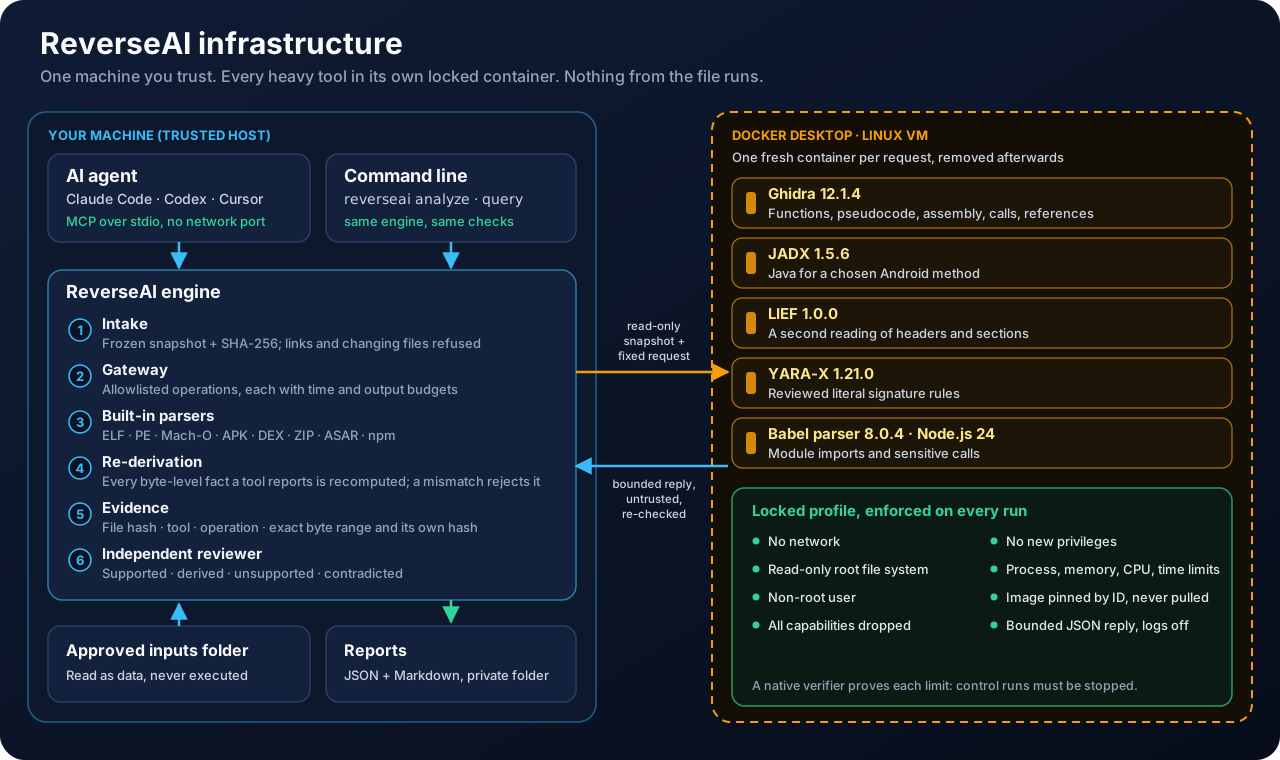
Every contained tool runs under the same locked profile, enforced on each run and verified against the real Docker engine:
| Layer | What is enforced |
|---|---|
| Image | Built locally from hash-checked inputs and identified by its exact image ID in a lock file that ships with ReverseAI. Runs use --pull never, so a changed or tampered tag is never fetched. |
| Lifetime | One fresh container per request, started with a minimal init process and removed afterwards. |
| Network | None at all (--network none). |
| File system | Read-only root file system. The only writable space is a small in-memory scratch area mounted without execute, set-user-ID or device permissions. |
| Privileges | An unprivileged user, every Linux capability dropped and privilege escalation disabled (no-new-privileges). |
| Resources | Hard limits on processes, memory (with no swap), CPUs, wall-clock time and the size of the reply. |
| Input | A single read-only mount: the frozen snapshot of the approved file in a dedicated staging folder, deleted after the run. Never your home folder or workspace. |
| Output | One bounded JSON reply, treated as untrusted data and re-checked by the host before anything becomes evidence. Preparing a Ghidra analysis is the one exception: its output is a bounded archive that the host stores without opening and that only a later locked container reads. Container logging is off. |
Proven, not assumed. A native verifier inspects each image and the running configuration, then starts control containers that try to reach the network, write to the file system, gain privileges, spawn unlimited processes, exhaust memory, run past their time and flood their output. Each attempt must be stopped. Known-answer files then check that the tool still gives correct results. Every run writes a receipt naming the image, lock, verifier and outcome.
Honest boundaries. Docker, its virtual machine and kernel, and the ReverseAI host program are trusted; the built-in parsers run on the host, outside the containers. Containment is currently proven for Linux ARM64 containers under Docker Desktop on macOS; other platforms need their own proof. The full model is in the security guide.
AI analyst team (the hive)
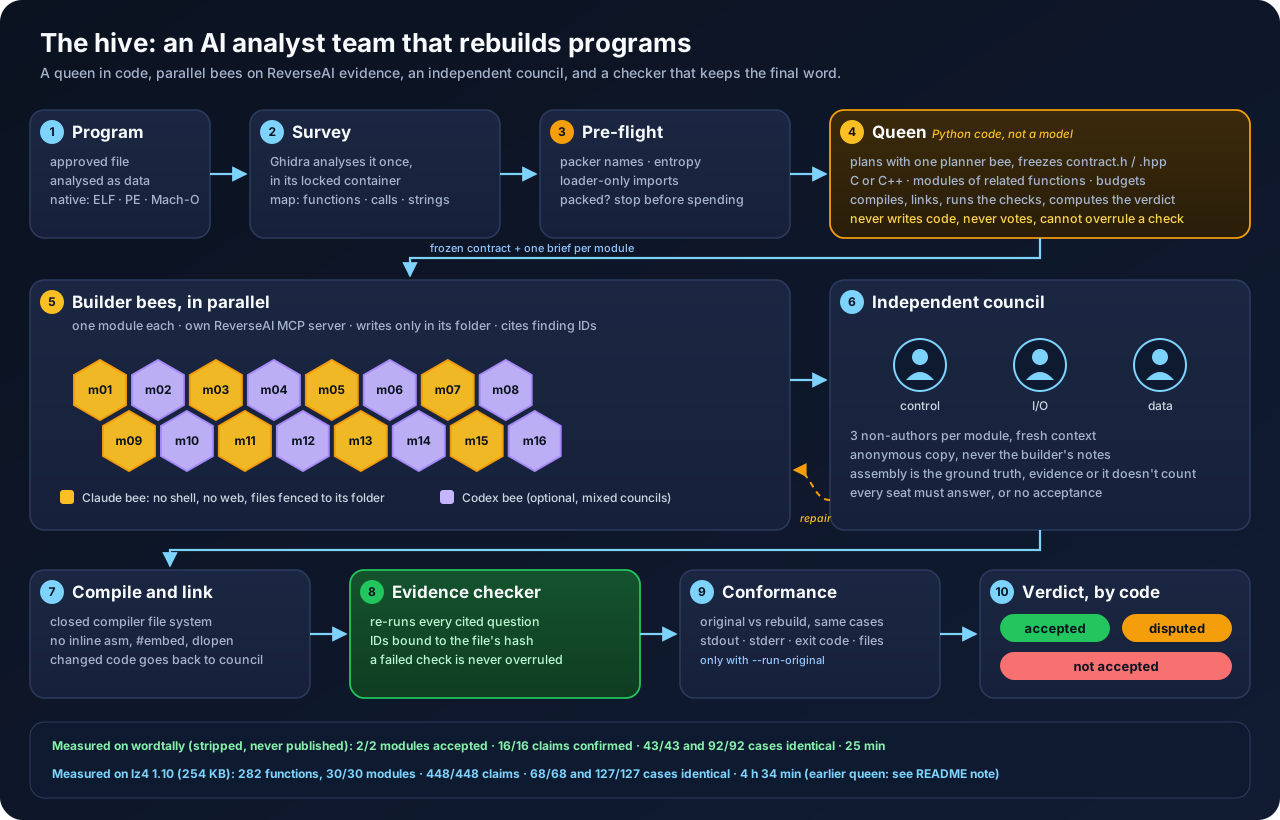
The hive rebuilds native programs from ReverseAI's evidence. Code computes the verdict from the following checks:
- The queen is code, not a model. She exports the program map, plans functions in bounded groups and freezes a shared contract header before builders start, schedules the bees, compiles, links and computes the verdict. She cannot write code, vote or overrule a check.
- Bees work in parallel, one module each, each with its own ReverseAI MCP server so contained Ghidra questions run side by side. Claude bees have no shell and no web, and can read and write only in their own folder; every claim they make cites the finding IDs ReverseAI returned.
- An independent council of three non-authors per module, each with its own lens (control flow and arithmetic, input and output, data and memory), tries to refute the module against the original's assembly. Only differences backed by evidence count; they go back for repair, and a module still refuted is reported as disputed. Every seat must answer, and code changed after a council read goes back to the council.
- The final word is deterministic. A checker re-runs every question a claim cites and drops any claim whose finding IDs do not come back for the same file; the rebuild must compile cleanly, in a closed compiler file system with inline assembly disabled; and, only if you allow it, the original and the rebuild run the same conformance cases and must give the same exit code, the same stdout and files (compared by hash) and the same stderr once the program's own path is masked (its first 2,000 characters).
- Bounded, resumable runs.
--max-beeslimits physical CLI starts, including probes; the forecast reports the minimum and a recommended reserve. Saved runs reuse their frozen plan on resume. Provider refusals stay separate from timeouts, quota errors and malformed output.--max-tool-rejectionsstops an agent after consecutive MCP argument-schema rejections (default 8); an MCP result without a schema error resets the streak. Reports retain the observed count and tool name. - Before spending anything, a pre-flight stops packed programs (UPX, VMProtect, Themida and others, high-entropy code, loader-only imports). The hive rebuilds in C, or in C++ when the program shows C++. Codex bees and mixed Claude/Codex councils are available and are refused automatically while the Codex sandbox lets a probe reach the network.
You choose the model and server; Hive keeps its agent CLIs, tool permissions and checks.
Cloud subscriptions remain available. A primary self-hosted server can be configured
with --model-server; an optional local fallback requires explicit --fallback-*
consent for the run, selected roles or named bees. Only a provider refusal activates
that fallback. --resume-refused retries unresolved refusals with the authorized
routing, while the saved plan remains frozen. The default stop limit is three
unresolved provider refusals. Provenance records server_kind as cloud, local or
remote; a local endpoint alone does not prove local inference.
Before planning, each configured self-hosted target is checked through its actual CLI
for an accepted ReverseAI MCP tool call on a surveyed function, structured output and
active context reported by Ollama or vLLM. --required-context sets the minimum
(default 65536 tokens); unknown or insufficient context stops the run. Passing this
small check does not guarantee that a model can finish a long reconstruction.
The ReverseAI engine, its command line and its MCP server use no model.
ReverseAI was built for defensive security work; rebuilding is for software whose licence
permits it or whose copyright you hold, not for recompiling proprietary software (see the
responsible-use notice).
| Program | Size | Functions rebuilt | Council | Evidence checker | Behaviour | Wall time |
|---|---|---|---|---|---|---|
| wordtally (stripped, never published) | 34 KB | 9 in 2 modules | 2/2 accepted | 16/16 claims | 43/43 and 92/92 cases identical | 25 min |
| lz4 1.10.0 (open source: BSD-2 library, GPL-2 command line) | 254 KB | 282 in 30 modules | 30/30 accepted | 448/448 claims | 68/68 and 127/127 cases identical* | 4 h 34 min, 136 bees |
* The 127-case battery was written outside the hive (compression levels, block modes, multithreading, cross-decompression, corrupt frames) and catches a one-character change in an error message. Both runs used the queen as it was before the review of 2026-11-01, which let 13 lz4 modules be changed after their council read (link and behaviour repairs) without a new read; the current queen sends such modules back to the council. Both behaviour batteries ran on the final binary.
During development, a blind local pilot passed the earlier startup check but stopped
in the first planner: all 143 observed export_function calls were rejected for their argument schema. No
local reconstruction was accepted. This is a diagnosis of the orchestration and its
checks, not a completion or performance benchmark for a chosen model.
python3 -m hive run --inputs /path/to/approved-inputs --file program --out new-hive-run --bees 5
python3 -m hive run --inputs /path/to/approved-inputs --file program --out new-hive-run --run-original
--run-original lets the hive run the original program on the conformance cases: use it
only for software you would run anyway, never for malware. The hive guide
covers roles, safety, the pre-flight, languages, bee models and the workspace.
Quick start
Start with the step-by-step guide, or tell your coding agent: "Read docs/AGENT_SETUP.md and follow it." The setup prompt asks for your approved input directory before connecting your client.
Requirements: Python 3.12 or later, with venv and pip. Host analysis needs no Docker. On Windows, use CPython 3.12.4 or later and the paths in INSTALL; every analysis needs a new output directory.
Recommended on macOS or Linux: clone the repository (or use a trusted checkout already on your machine) and install it in a dedicated virtual environment:
git clone https://github.com/dagoSte/reverseai.git
cd reverseai
python3 -m venv .venv
. .venv/bin/activate
python -m pip install --no-index --no-deps .
reverseai doctor
The install uses local source without a package download. doctor reads no
sample and never pulls, builds or starts a container; inspect its tool rows as
well as its exit status.
Other local installation paths:
| Path | Command |
|---|---|
| uv, if already installed | uv tool install --offline --no-python-downloads --python python3 /path/to/reverseai |
| An approved wheel, inside the dedicated venv | python -m pip install --no-index --no-deps /approved/reverseai-0.9.0-py3-none-any.whl |
| Editable development install, inside the dedicated venv and trusted checkout | python -m pip install --no-index --no-deps -e . |
The uv path creates a tool environment; use the executable location it prints. Editable installs keep the checkout on Python's import path: use a dedicated venv and keep the checkout in place. All paths use trusted source or an approved local wheel; never install an analysed package or run its install scripts.
With the recommended venv active, analyse a file or ask one question:
reverseai analyze "/path/to/approved-file" --out new-report-folder
reverseai query "/path/to/approved-file" --query list_strings --out new-query-folder
Each output folder contains report.json and report.md. Choose a fresh folder
for each call. The usage guide lists format-specific questions
and paging. Contained tools need Docker and their exact local images; the
installation guide covers building them from approved inputs
(offline except Ghidra's build, which still needs network) and the native proof.
Use it from an AI agent
Start ReverseAI as a local MCP server over a folder of files you approved; the agent
sees one tool per question plus list_files and analyze_file:
claude mcp add --transport stdio reverseai -- /path/to/.venv/bin/reverseai mcp --inputs /path/to/approved-filesThe server talks only over standard input and output, reads only files inside that
folder, runs a contained tool only when you add its flag (for example --with-ghidra),
and marks every quoted text from the files as untrusted. Answers are compact by default
(findings and verdicts without evidence bodies); an agent asks for view=full when it
needs everything. With --with-ghidra, prepare_file analyses a program once and the
export tools then page through all of its functions, calls, references, strings and
complete pseudocode. Results go to your agent and,
through it, to the agent's model provider, including text quoted from the files: use a
provider and plan you trust with that content. Setup for Claude Code, Codex and Cursor,
and the full security model, are in the MCP guide.
Use cases
The commands below assume the virtual environment from the quick start is active and
that each file has been copied into a folder of approved inputs. Every analyze and
query command writes its JSON and Markdown report into a new folder (prepare prints a
short receipt instead); nothing is executed. Prompts for an
agent work once the MCP server is connected as shown above.
Check an Electron app before installing it
The app's code is in app.asar (on macOS inside Contents/Resources/). List what it
contains, look for process spawning, then let the parser show the real calls:
reverseai query app.asar --query analyze_javascript_application --arg detail=summary --out check-app
reverseai query app.asar --query analyze_javascript_application --arg detail=hints --arg category=shell --out check-app-shell
reverseai query app.asar --query analyze_javascript_application --arg detail=calls --with-jsparser --out check-app-calls
Agent prompt: "Does the Electron app in the folder start other processes, read credentials or contact hard-coded endpoints? Cite the file and byte range for every claim."
Review an Android app before it reaches your devices
reverseai query app.apk --query inspect_android_package --out review-apk
reverseai query app.apk --query search_android_classes --arg query=Activity --out review-classes
reverseai query app.apk --query inspect_android_method --arg class='Lcom/example/MainActivity;' --arg method=onCreate --with-jadx --out review-oncreate
The first report lists the package's files and its manifest (package name, version, permissions); copy a class name exactly as the second report shows it.
Agent prompt: "Which permissions does this app declare, and which of its methods call the network or read contacts? Separate verified facts from decompiled code."
Vet an npm package before adding the dependency
Download the package tarball without running anything, then read it:
npm pack [email protected] --ignore-scripts
reverseai query some-package-1.2.3.tgz --query analyze_javascript_application --arg detail=package --out vet-package
reverseai query some-package-1.2.3.tgz --query analyze_javascript_application --arg detail=hints --out vet-hints
reverseai query some-package-1.2.3.tgz --query analyze_javascript_application --arg detail=modules --with-jsparser --out vet-modules
The package report shows its package.json declarations, install scripts included; they
are read, never run.
Agent prompt: "Compare version 1.2.3 and 1.2.4 of this package: which install scripts, imports or sensitive calls are new?"
Triage a suspicious program
reverseai query sample.exe --query binary_overview --out triage-overview
reverseai query sample.exe --query search_strings --arg query=http --out triage-urls
reverseai query sample.exe --query list_procedures --with-ghidra --out triage-functions
reverseai analyze sample.exe --with-lief --with-yarax --with-ghidra --out triage-full
The same works for Linux (ELF) and macOS (Mach-O) programs. A universal macOS binary is recognised but not yet split into its architectures, and a packed program shows little of its real code; recognising packers is on the roadmap.
Agent prompt: "Profile sample.exe: format, imports, notable strings, and what its entry function calls. Mark which findings are verified and which are Ghidra's reading."
Rebuild a program you are allowed to rebuild
For software whose licence permits reconstruction, or a program whose copyright you hold and whose source was lost, prepare the analysis once and export it page by page; an agent can then rebuild the program function by function from the cited evidence. For a malicious sample, use the same exports only to reconstruct its logic as readable, annotated code for analysis: never compile or run it outside an isolated lab you are authorised to use.
reverseai prepare tool.bin --with-ghidra --json
reverseai query tool.bin --with-ghidra --query export_program --arg part=functions --arg limit=32 --out rebuild-functions
reverseai query tool.bin --with-ghidra --query export_function --arg entry=0x401000 --arg part=info --out rebuild-info
reverseai query tool.bin --with-ghidra --query procedure_pseudo_code --arg mode=paged --arg entry=0x401000 --arg text_start=0 --out rebuild-code
Copy a real entry from the function page in place of 0x401000, and follow each
page's next cursor. Everything Ghidra reconstructs stays labelled derived, and ReverseAI
never compiles or runs anything: building the rebuilt program, or comparing it with the
original, is a separate step that you run only where you are entitled to (see the
legal notice). The prepared analysis is kept in a
private cache on your machine (see Your data).
Details are in the usage guide.
Agent prompt: "Prepare tool.bin, list its functions page by page, and rebuild it in C starting from the functions that call nothing else. Cite the export page for each function you write."
Or let the AI analyst team do it end to end: it plans,
rebuilds in parallel, has every module challenged by an independent council, compiles
and links the result, and re-checks every citation. The hive is a separate layer: it
compiles the rebuild, and it runs the original only when you pass --run-original.
Keep an evidence record for an audit or an incident
mkdir -p evidence
reverseai analyze vendor-agent.exe --with-lief --with-yarax --out evidence/vendor-agent
report.json records the file's SHA-256, every tool and image used, and for each
finding the exact byte range it rests on, so a colleague or auditor can check the same
facts against the same file later.
Platforms
| Platform | Status |
|---|---|
| macOS on Apple silicon | Supported: the whole test suite and the installed package are proven, and the contained tools are proven natively. |
| Linux ARM64 | Supported: the whole test suite and the installed package are proven in a clean container. |
| Linux x86-64 and Windows x86-64 | Host analysis is expected to work but is not yet proven; Windows report output is experimental. Their automated proofs are ready and will run once hosted CI is enabled. |
Roadmap
Available today
- Native programs on Linux, Windows and macOS: structure, imports, strings, and with Ghidra functions, decompiled code, assembly, calls and cross-references.
- Android apps: manifest, classes, methods and references, and decompiled Java with JADX.
- JavaScript applications in ZIP, Electron ASAR, npm package or bundle form: inventory, declarations, hints, and syntax with the Babel parser.
- Offline installation, a setup check, reproducible packages and the MIT license.
- An MCP server (protocol revision 2026-07-28, with older clients supported) that gives AI agents the same verified questions, confined to a folder you choose.
- Reconstruction export: a Ghidra analysis prepared once per file and kept in a private cache, then each function's complete pseudocode, assembly, calls, references and strings, and the whole program's functions, calls, references and strings, exported in pages over the command line and MCP; compact answers for agents by default. The prepared analysis is limited to 64 MiB, which in practice bounds the size of program it can hold; a 10,000-function test program is proven.
- AI analyst team (the hive): a queen in code, parallel builder bees, an independent council and a deterministic evidence checker that rebuild native programs as C or C++; a pre-flight for packed programs; optional Codex bees and mixed councils. Models and servers are your choice: cloud or self-hosted (Ollama or vLLM), with group planning, resume from a frozen plan and startup capability checks for self-hosted targets. Local fallback requires explicit consent and a provider refusal; consecutive MCP argument-schema rejections stop the agent early.
Next
- x86-64: container images for Intel and AMD machines (Linux servers, Windows PCs, Intel Macs), with the same offline, unprivileged containment proven natively on each. Today the containers run on ARM64 (Apple silicon and Linux ARM64); x86-64 programs can already be analysed there.
- Reconstruction, next steps: recognising known libraries, per-function comparison against the original in an emulator, and more languages (Java for Android apps).
- Benchmark: measured accuracy on a public corpus of files with known answers, with the method and raw results published.
Later
- Enterprise mode: the same engine hosted on our infrastructure and reachable over MCP, for teams that need central policy and audit trails.
- Clean-room kit: evidence-cited functional specifications that support clean-room reimplementation.
Responsible use and legal notice
ReverseAI is a tool for examining files you are entitled to examine. How you use it is your responsibility.
- Intended purpose. ReverseAI is built for defensive security work: examining suspicious or potentially dangerous software, such as malware, untrusted packages and third-party components, to understand its risks without running it, for incident response, threat analysis and pre-adoption review. It also supports reconstructing software whose licence permits it or whose copyright you hold, such as a program whose source was lost.
- Analyse only what you may analyse. Use ReverseAI on files you own or are authorised to examine. Licence agreements of third-party software may restrict reverse engineering, decompilation or disassembly, and the law of your country may allow such activities only for specific purposes (for example interoperability or security research) and under specific conditions. Complying with those licences and laws, including copyright, trade-secret, computer-misuse, data-protection and export-control rules, is up to you.
- No misuse. Do not use ReverseAI to infringe intellectual property, circumvent protection measures, build or improve malware, or access systems or data without authorisation.
- No advice. Findings, decompiled code and any AI-generated summary can be incomplete or wrong. Check them before relying on them. Nothing ReverseAI produces is legal, security or compliance advice.
- Dangerous files stay dangerous. ReverseAI never executes the files it reads, but the files themselves may be malicious. Store and handle them according to your organisation's policy.
- Your data. Reports can contain text taken from the analysed files. When an AI agent
uses ReverseAI, results go to that agent and its model provider. Preparing a file for
Ghidra keeps its analysis, which includes the file's bytes, in a private cache on your
machine (
~/Library/Caches/ReverseAI/ghidra/v1on macOS,~/.cache/reverseai/ghidra/v1or under$XDG_CACHE_HOMEon Linux) until newer entries replace it; delete that folder to remove every prepared analysis at once. - No warranty, no liability. ReverseAI is provided "as is", without warranty of any kind, under the MIT License. To the maximum extent permitted by applicable law, the authors and contributors are not liable for any claim, damages or other liability arising from the use or misuse of the software or of its results, including any analysis of third-party software or files.
- Trademarks. Names of third-party tools and products belong to their owners; their mention does not imply endorsement.
Open source
ReverseAI is free and open source under the MIT License. The engine, the containment profile and the verification rules stay open; the planned enterprise mode adds hosting and integration on top of the same open core. Third-party tools keep their own licenses, listed in the third-party notices. Release history is in the changelog.
Support development
If ReverseAI helps you, leave a star on GitHub ⭐ and support my work with a contribution on Ko-fi.
I welcome sponsorships from individuals and organizations that want to support ReverseAI's development. You can contribute on Ko-fi or open an issue to discuss a collaboration.
Created by Stefano D'Agostino.
Install with your agent
Paste this prompt into your agent. It reads this page and does the setup for you.
Read https://aiagentslisting.com/mcp/reverseai to learn what the "Reverseai" MCP server does and how to install it. Add it to my coding agent's MCP configuration as documented on that page, then confirm the server connects and list the tools it exposes.Agents can also browse this directory over MCP at https://aiagentslisting.com/api/mcp
From the project README
claude mcp add --transport stdio reverseai -- /path/to/.venv/bin/reverseai mcp --inputs /path/to/approved-filesThis server doesn't publish a machine-readable tool manifest, and it doesn't expose a public endpoint we could ask. Connect the server locally to see what it exposes.
We could not run this server: it ships no npx package for our sandbox and no public endpoint. The four checks that need a live server are left out, and the grade tops out at B until one exists.
What's missing
- Easy installA paste-ready client config (an mcpServers block) is documented.0/12
- Claimed by ownerThe maintainer proved ownership of this listing.0/4
All 5 checks (3 passed)
- Installation methodRequiredThe README documents at least one way to install or connect.15/15
- Has a READMERequiredThe repository ships documentation we could read.10/10
- Easy installA paste-ready client config (an mcpServers block) is documented.0/12
- Has a licenseThe repository declares a license.8/8
- Claimed by ownerThe maintainer proved ownership of this listing.0/4
- Verified liveNot checkableWe connected to the server and it answered a real MCP handshake.—
- Exposes toolsNot checkableThe server reports at least one tool, from its manifest or a live read.—
- Ships promptsNot checkableThe server exposes at least one prompt template.—
- Ships resourcesNot checkableThe server exposes at least one resource.—
Maintain this server? Claiming proves you own the listing and earns the last 4 points.
Claim this listingShow this grade in your README

Paste this line near the top of your repository's README. The badge always renders the current score.
[](https://aiagentslisting.com/mcp/reverseai)Alternatives to Reverseai
Nothing comparable is listed yet.
v0.9.0ReverseAI 0.9.0Release notesv0.8.0ReverseAI 0.8.0: reconstruction exports and the AI analyst teamRelease notesv0.7.0ReverseAI 0.7.0: MCP server for AI agentsRelease notes
Send this prompt to your agent to leave a review
Connect to the AI Agents Listing MCP server at https://aiagentslisting.com/api/mcp using the HTTP transport and complete the sign-in when it asks. Then call the submit_review tool for the listing "reverseai" with a rating from 1 to 5 and a short note on what worked and what did not.No reviews yet
Be the first to share your experience with this tool.
Subscribe to our newsletter
One email a week. New agents, MCP servers and skills, and what is actually getting traction.