
 PranavNagrecha
Salesforce Org Intelligence for AI agents - a read-only, offline, source-available MCP server and
Salesforce Org Intelligence for AI agents - a read-only, offline, source-available MCP server and CLI answering metadata, dependency, permission, Apex and Flow questions grounded in real retrieved org metadata.
·
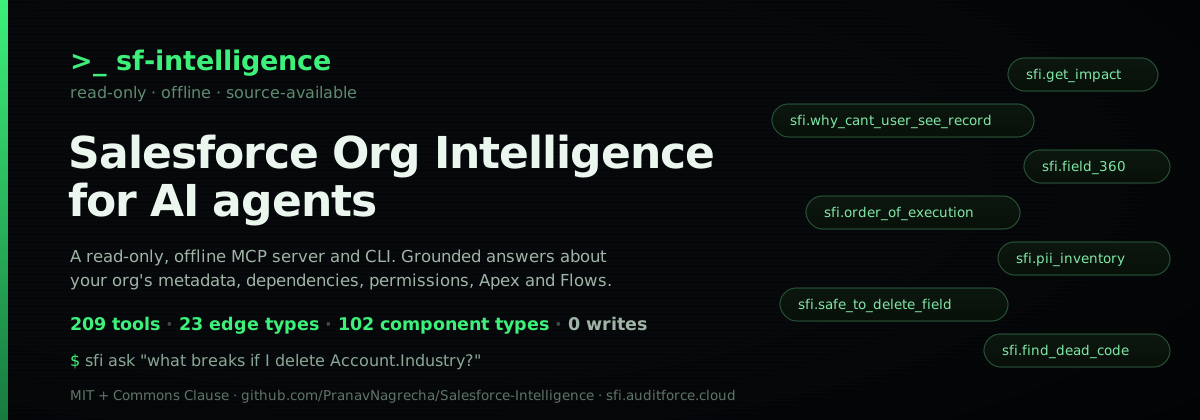
sf-intelligence
Know what breaks before you change Salesforce. Ask the AI assistant you already use about your org. sf-intelligence runs on your computer, never writes to your org, and every answer names the components it came from.
Website, demo and docs: sfi.auditforce.cloud · Works in Claude Code, Claude Desktop, Cursor, VS Code + Copilot and Codex.
What it answers
The questions below were checked by an outside reviewer against a real production org (about 4,700 components) by reading the raw metadata. The answers were right.
| Ask | What you get back |
|---|---|
| Where is this field used? | Every Apex class, flow, layout, validation rule, report and page that references it, each with how it was found (declared, parsed or heuristic) |
| Can I delete this field? | A verdict (safe, risky, blocking, review) with the reasons and the components behind each one, plus what was not checked |
| What happens when I save a record? | The save order for one object and one event: triggers, validation rules, flows, approvals, in the sequence they run |
| Which Apex is dead? | Classes and triggers nothing calls, with the honest tier (definitely, likely, uncertain) and why |
| Who can see or edit this? | Effective permissions from profile plus permission sets, and why a given user cannot see a record |
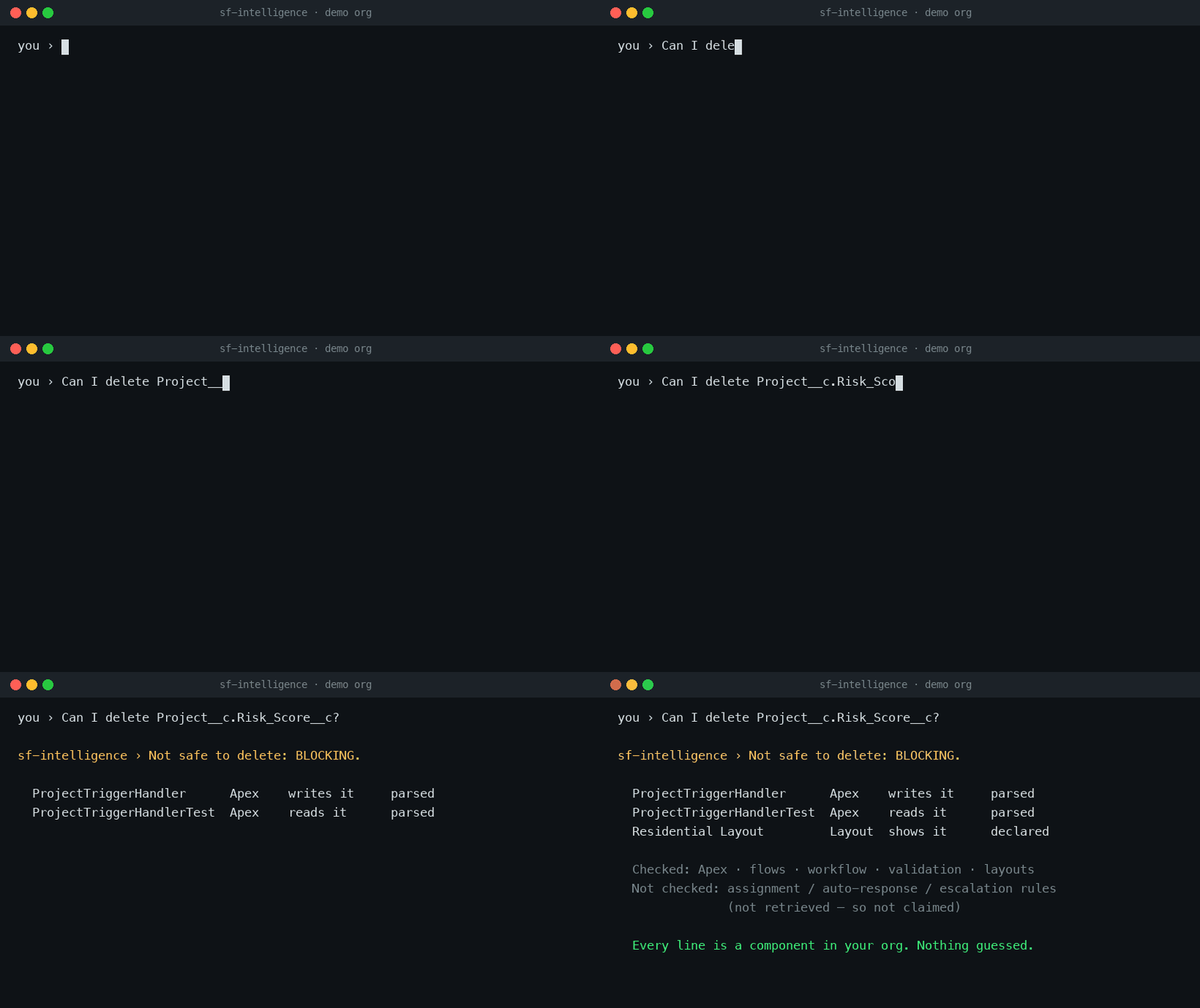
A real answer from the built-in demo org (a solar installer called Verdant), unedited:
Can I delete
Project__c.Risk_Score__c? Not safe to delete: blocking.ProjectTriggerHandlerwrites it andProjectTriggerHandlerTestreads it (parsed from the Apex); the Residential page layout shows it (declared). Checked: Apex, flows, workflow rules, validation rules, layouts. Not checked: assignment, auto-response and escalation rules, because they were not retrieved.
Try it in three commands
npm install -g sf-intelligence
claude mcp add --scope user sf-intelligence-demo -- npx -y sf-intelligence demo   # a built-in demo org, no Salesforce login; then ask your assistant a question
cd your-sfdx-project && sfi init --target-org my-org-alias   # then: connect your own org (read-only retrieve)
sfi demo on its own starts an MCP server and waits for a host; it is not a command to run in a terminal.
Then register the server in your AI host; the install guide has the exact block for each host. Or one click:  Try the built-in demo org in Cursor in one click (no Salesforce login). AI agents installing this server: see llms-install.md.
By default your assistant sees 16 tools: the eight that answer the questions above and eight that help it find its way (sfi.resolve, sfi.search_components, sfi.get_component, sfi.health_check, sfi.list_analyses, sfi.describe_analysis, sfi.run_analysis, sfi.live_consent). Every other analysis sits behind one gateway tool, sfi.run_analysis, and is listed by sfi.list_analyses. The vault is a local folder, answers are served offline, and the optional live read-only plane is off until you turn it on. What your AI assistant does and does not see is in Privacy.
For engineers: how the vault, the dependency graph and your assistant fit together is in How it works; what is deliberately not modeled is in What it does NOT do.
Ask it like a person
You don't need to know the exact API name of anything. A typo-tolerant resolver turns messy phrasing into the right component, and when it isn't sure it asks you a clarifying question instead of guessing:
You: where's the emale field?
It: I found several matches for "email" — which did you mean? ·
Email__conAccount·Email__conContact·Alternate_Email__conLead
You: what about the paymnet object?
It:
Payment__c— one confident match.
You: is there a "warranty fee" field?
It: Nothing matched that confidently. Your vault was last refreshed on 2026-05-20 — want to pull fresh metadata from the org (
/sfi-refresh) in case it's new, or rephrase?
It never silently commits to a guess. When several components are plausible it asks which you meant; when nothing matches it offers to refresh from the org or stop. A high match score is string similarity, not proof.
How it works
One read-only refresh turns your org into a local vault: the raw metadata,
one Markdown page per component, and a dependency graph. From then on every
question is answered offline. Your AI assistant resolves the name you used,
calls one of the 16 default tools (or sfi.run_analysis for any other
analysis), and builds its answer only from what came back, citing each
component.
flowchart TB
    subgraph REFRESH["Refresh — once, and whenever the org changes"]
        direction LR
        ORG[("Salesforce org")] -->|"sf project retrieve (read-only)"| SRC["source/ raw metadata"]
        SRC -->|"extract + parse Apex / Flow / XML"| VAULT[("Local vault<br/>Markdown + DuckDB graph")]
    end

    subgraph ASK["Ask — every question, offline on your machine"]
        direction TB
        Q["Your question<br/>(plain language)"] --> HOST["Your AI assistant<br/>(Claude, Cursor, Copilot, Codex)"]
        HOST -->|"1 · sfi.resolve"| RESOLVE["The component you meant<br/>(or a clarifying question)"]
        RESOLVE --> HOST
        HOST -->|"2 · a core tool, or<br/>sfi.run_analysis for the rest"| TOOLS["sfi.* analysis"]
        TOOLS -->|"read"| VAULT
        TOOLS -.->|"opt-in, read-only, capped"| LIVE[("Live org")]
        TOOLS -->|"cited components + confidence<br/>+ what was not checked"| HOST
        HOST --> ANS["Grounded answer"]
    end
Every box on the Ask path runs on your machine; the dotted edge to the live org is the only one that can touch Salesforce, and only after you opt in.
How it stays honest
Every answer is built from tool output, never from general Salesforce
knowledge. Each relationship carries how it was found: declared (stated in
the metadata), parsed (from Apex, Flow or formula source) or heuristic
(pattern matching, so spot-check before acting). Each answer says which
metadata families were checked and which were not, so "nothing references
this" always means "no evidence in what was retrieved". A request to change
the org is refused and answered with the read-only check that fits instead.
For "what does this imply" questions, a deterministic, offline concept model
of general Salesforce truth (never your org's data) adds cited structural
claims, such as a master-detail cascade delete or two flows with an undefined
order. The details: routing and refusal,
architecture and the trust boundary,
asking questions,
ADR-001 confidence-tagged edges
and ADR-008 deterministic reasoning.
What you can ask
Every area answers in plain language; ask "what can you do?" for the live map.
| Area | Example questions |
|---|---|
| Find & identify | "where is the email field?" · "what's the payment object called?" |
| Understand | "what does this validation rule do?" · "what happens when an Account is saved?" (automation on standard objects works even when the object itself was not retrieved; the answer says so) |
| Impact & dependencies | "what breaks if I delete this field?" · "is it safe to deactivate this flow?" |
| Permissions & sharing | "why can't this user see this record?" · "who can edit the Salary field?" · "who holds the Sales Manager permission set?" (live) · "what does user Jane hold?" (live) · "who's in the Support queue?" (live) · "which active users have zero permission-set assignments?" (live) |
| Automation & code | "what runs on Case create?" · "which Apex methods have no real test coverage?" · "decode this Apex debug log / governor-limit exception to the class that ran" |
| Decision-support (before you build/change) | "before I add automation to this object, what already runs there?" · "building Apex here — what should I watch out for?" · "before I change/require this field, what breaks?" |
| Architect & developer | "are there circular Apex dependencies?" · "which classes have no test reference?" · "does the vault still match the live org?" |
| Integrations | "what external systems does this org talk to?" · "list every outbound endpoint" |
| Documentation | "give me a tour of this org" · "generate a data dictionary" · "which reports / objects / permission sets have no description?" |
| Health & audit | "is my vault fresh?" · "where is PII stored?" · "how has the org changed across refreshes?" |
All of these are read-only briefings; none of them write to the org. Every
component an answer names is backed by a tool call and cited with its
canonical id (CustomObject:Account, CustomField:Account.Industry__c), and
every relationship with its confidence (declared, parsed or heuristic).
The full catalog with the live counts comes from sfi.capabilities (through
sfi.run_analysis) or the tools page;
the counts are pinned by eval/product-manifest.json, never typed by hand.
What it does NOT do
Boundaries are explicit, and the product tells you plainly when it hits one rather than papering over the gap with general Salesforce knowledge:
- Offline by default. Vault tools never call Salesforce mid-conversation.
Run
/sfi-refresh(orsfi refresh) to update metadata. The opt-in live tools (sfi.live_*) run read-only queries with strict caps and label their answerslive_org. They stay off until you grant consent once per org withsfi.live_consent { grant: true }(bound to the org and user, scoped, expiring, stored locally) or setSFI_LIVE_PLANE_ENABLED=1. A per-callliveEnabled: trueis intent only, not consent. Hybrid answers combine the vault and the live org and say so. The product never picks which org to query on its own. - No record-level data. The vault stores schema and source, not rows. "How many Opportunities closed last quarter" is a question for your org directly.
- Static analysis, not runtime. Dependency edges come from metadata and source. Dynamic SOQL, reflective Apex and runtime metadata lookups are invisible to it, so "no references found" means "no static evidence", not "definitely unused".
- Reasoning is rule matching, not an LLM and not a live check. A structural claim names a pattern in the code and metadata shape and cites the ids it matched. A governor or security concept is a signal, not a proven runtime breach or vulnerability; an empty result means no rule fired, not that nothing depends on the component.
- Read-only. The product never writes to your org. It has no write path.
- Tested scale. CI gates three ceilings: a 10,000-node graph import in
under 90 s, a 1,000-file
CustomObject+CustomFieldrefresh in under 10 min, and resolve p95 under 2 s on the CI vault. Very large production orgs may still need narrowed retrieves or several vaults.
Review changes before you deploy (PR gate)
sfi review-change is the pre-deploy gate: hand it the components a PR,
package.xml or git diff touches and it returns a per-component risk verdict
(blocking / risky / review / safe), each one's direct dependents and the
tests to run, most dangerous first, entirely offline against the target org's
last vault refresh. A deleted component with any dependent fails closed
(blocking); a modified component with firm dependents is risky; the overall
verdict is the worst across the set. Point it at another vault (--against) to
answer "will this changeset break anything in prod?" against that org's
graph. The same analysis is sfi.review_change over MCP.
The same analysis ships as a GitHub Action: the composite Action at
.github/actions/review-change
emits SARIF 2.1.0 (findings show up inline on the PR's "Files changed" tab and in
the Security tab) plus a markdown PR comment, with a 0/1/2 exit-code gate. Copy
docs/ci/review-change-pr-gate.example.yml
into your org repo to wire it up. It never runs sfi refresh and never calls the
sf CLI; it only reads an already-built vault.
Try it now — no Salesforce org needed
Want to see it work before pointing it at your own org? (Or read real answers
from it first, on sfi.auditforce.cloud/demo.)
One command serves a built-in synthetic demo org ("Verdant Energy," a fictional solar installer)
over MCP — fully offline, no auth, no sf CLI:
# Register the demo server with Claude Code (or any MCP client):
claude mcp add --transport stdio --scope user sf-intelligence-demo -- npx -y sf-intelligence demo
Scripting it with claude -p? Put the question first and allow the server's tools, or the run answers nothing: claude -p "What happens when I save a Project?" --allowedTools mcp__sf-intelligence-demo. An interactive session asks once instead.
Then ask it things like:
- What happens when I save a Project?
- What breaks if I delete
Invoice__c.Amount__c?- Why can't an Installer see an Invoice?
- Which Apex has governor-limit risk?
The first run builds the demo vault (cached under ~/.sf-intelligence/demo)
before the server answers, on top of npx downloading the package, so the
first start can take 10-20 seconds; every run after is instant. If your client
gives up at startup (Codex allows about 10 seconds by default), raise its
startup timeout (startup_timeout_sec in Codex, MCP_TIMEOUT in Claude Code)
or start it a second time. Nothing leaves your machine. When you're ready for your real org, follow Install below.
Install
Step-by-step setup for each AI assistant, with copy-paste config: sfi.auditforce.cloud/getting-started.
sf-intelligence is distributed on npm as sf-intelligence — an MCP
server plus the sfi command-line tool. Register the server with your MCP
client once, then drive everything through sfi (or, inside Claude Code, the
/sfi-* slash commands that wrap it).
Requirements: Node.js 20+ and an authenticated
Salesforce CLI (sf)
pointed at the org you want to vault. npx fetches everything else.
Register the MCP server
Every host launches the same command; each reads a different config file in a different format. Pick yours — the full per-host, per-platform detail (exact paths for macOS and Windows, where the logs are, what to do when it doesn't connect) is in docs/guides/mcp-hosts.md. Error messages and what to do about them: docs/guides/troubleshooting.md. Moving from an earlier release: docs/guides/upgrading.md.
| Host | Config file | Top-level key |
|---|---|---|
| Claude Code | .mcp.json (project) or ~/.claude.json | mcpServers |
| Claude Desktop | claude_desktop_config.json | mcpServers |
| Cursor | .cursor/mcp.json (project) or ~/.cursor/mcp.json | mcpServers |
| Codex | ~/.codex/config.toml | [mcp_servers.*] (TOML) |
| VS Code + GitHub Copilot | .vscode/mcp.json | servers |
| Cline (VS Code extension) | cline_mcp_settings.json (via Cline → MCP Servers → Configure) | mcpServers |
Claude Code — from your Salesforce DX repo, add it project-scoped (writes a
.mcp.json at the repo root; it embeds your absolute vault path, so each
teammate runs the same command once rather than committing the file):
claude mcp add --scope project sf-intelligence -- \
  npx -y sf-intelligence mcp --vault "$PWD/org-kb"
Claude Desktop — add this block to the client's MCP config
(~/Library/Application Support/Claude/claude_desktop_config.json on macOS,
%APPDATA%\Claude\claude_desktop_config.json on Windows), then quit and reopen
the app:
{
  "mcpServers": {
    "sf-intelligence": {
      "command": "npx",
      "args": ["-y", "sf-intelligence", "mcp", "--vault", "/abs/path/to/org-kb"]
    }
  }
}
Cursor — the same block, in .cursor/mcp.json at the project root (or
~/.cursor/mcp.json for every project). Cursor does not reload the file on
its own: turn the server off and on in Settings → MCP, or restart Cursor.
VS Code + GitHub Copilot — create .vscode/mcp.json in your project. Note
the top-level key is servers, not mcpServers; pasting the Claude block
here parses fine and registers nothing:
{
  "servers": {
    "sf-intelligence": {
      "type": "stdio",
      "command": "npx",
      "args": ["-y", "sf-intelligence", "mcp"],
      "cwd": "${workspaceFolder}",
      "env": { "SFI_VAULT": "${workspaceFolder}/org-kb" }
    }
  }
}
Codex — codex mcp add sf-intelligence -- npx -y sf-intelligence mcp --vault /abs/path/to/org-kb,
or the TOML equivalent in ~/.codex/config.toml.
Cline (VS Code extension) — open Cline → MCP Servers → Configure MCP
Servers, which opens its cline_mcp_settings.json; paste the Claude Desktop
block above (same mcpServers key, absolute --vault path). Cline reloads the
file on save.
Restart the client. The sfi.* tools are now available — ask "what can you
do?" for the live tool map.
Always pass an absolute
--vaultpath. The server looks for./org-kbrelative to its own working directory, and most hosts pick that directory for you — Claude Desktop and a user-scope VS Code server never run inside your Salesforce project.--vaultis what makes the config work anywhere.Before your first
sfi refreshthe server starts in setup mode: it connects and offers one tool,sfi.setup_status, which tells your chat exactly what to run next. That is expected — just ask your assistant to set it up.
Tip:
npm install -g sf-intelligenceputs ansficommand on your PATH, so first-run setup issfi init/sfi refreshinstead of the longernpx -y sf-intelligence …form.
Optional: full roster vs compact core
Default is the 16-tool core roster (includes sfi.live_consent). Its
tools/list is about 21 KB (a test keeps it under 40 KB); the full roster is
about 525 KB, which a host pays before the first question. Non-core tools stay
reachable via sfi.run_analysis (byte-identical) and are not directly
invokable under core. Set SFI_TOOL_PROFILE=full (or add
"env": { "SFI_TOOL_PROFILE": "full" } in the config block above) to advertise
and directly invoke the entire roster. See
docs/configuration.md for the full reference.
Every sfi command is described in docs/cli.md.
Install as a Claude Code plugin
The MCP registration above gets you the sfi.* tools. Installing
sf-intelligence as a Claude Code plugin additionally gets you 26
skills that auto-activate on Salesforce vocabulary (no need to remember tool
names) and 5 slash commands (/sfi-onboard, /sfi-init, /sfi-refresh,
/sfi-status, /sfi-field-audit) that wrap the sfi CLI. Install it from this repo's
marketplace:
/plugin marketplace add PranavNagrecha/Salesforce-Intelligence
/plugin install sf-intelligence@sf-intelligence
Run /reload-plugins (or restart Claude Code) to pick it up in the current
session; /plugin list confirms it's installed and enabled. The plugin
manifest registers the same MCP server shown above, so you don't need a
separate claude mcp add step. It cannot know where your vault is, though: it
passes no --vault, so either set SFI_VAULT to the absolute path of your
org-kb folder (in your shell profile, or in the host's env block) or launch
Claude Code from the folder that holds org-kb. If answers come back empty,
ask "is the server set up?" and it will say where it looked.
The plugin ships the skills and the slash commands. It does not ship the agent
files under .claude/agents/: /sfi-field-audit works without them and runs
the audit inline; copying the two salesforce-field-*.md files from a clone of
this repo into your project's .claude/agents/ enables its parallel path.
First run
Work from your per-org repository — the Salesforce DX project you want to
vault (the directory with sfdx-project.json). The first refresh is read-only:
it retrieves metadata and builds a local knowledge base; it never deploys or
mutates Salesforce data. sfi init leaves org-kb/meta/manifest.json,
config.json and version.txt for you to commit and ignores the rest of the
vault (source, graph, snapshots, the other meta/ files) as org data.
# 0. New here? The guided path walks install → auth → init → refresh → ask,
#    with real starter questions at the end.
sfi quickstart

# 1. Create the local org-kb/ vault layout and record which sf org alias to use.
sfi init

# 2. Retrieve metadata and build the vault.
sfi refresh --target-org my-org-alias

# 3. Confirm vault freshness, source-tree hash, and component counts any time.
sfi status

# sfi doctor checks the sf CLI, the vault, target-org auth, freshness, and the
# graph file, and prints an actionable fix for each problem.
sfi doctor
How long does a refresh take? A small sandbox builds in a few minutes; a
production-scale org is typically ~10–12 minutes under the defaults — the
retrieve dominates, and the default build also runs the parser-grade Apex pass
(seconds per few hundred classes) and pulls the top 500 reports/dashboards by
actual usage (a minute or two on report-heavy orgs; --no-reports skips it).
In a hurry on a big org? sfi refresh --staged serves a skeleton vault in
seconds and the ten priority metadata families within minutes, then finishes
the full build behind the scenes — see the
first-refresh guide. Re-refreshes re-extract
and rebuild the graph in full by default (results always match a cold build);
--incremental reuses the per-file parse cache for the same result, faster,
and --incremental-graph additionally re-imports only the changed nodes/edges
into the graph instead of rebuilding it — combine both for the largest win.
--types <list> scopes either flag to specific metadata types (e.g.
sfi refresh --types Flow --incremental-graph); a scoped refresh only ever
touches the requested type(s) — every other type in the vault is left as-is.
No global install? Prefix each with npx -y sf-intelligence, e.g.
npx -y sf-intelligence init.
Then ask anything the vault can answer, in whatever MCP client you registered:
What fields does the Account object have?
What breaks if I delete
CustomField:Account.Industry__c?Why can't the Standard User profile see Opportunities?
Give me a tour of this org.
Running sf-intelligence as a Claude Code plugin? The same operations are
available as slash commands — /sfi-onboard (guided first run), /sfi-init,
/sfi-refresh, /sfi-status — and the coaching skills auto-activate when
Salesforce vocabulary appears. See Install as a Claude Code
plugin above if you haven't installed it
that way yet.
Serve it over HTTP (read-only)
sfi mcp is the stdio server your MCP client launches. To share one vault with
other machines or clients, the same server speaks streamable HTTP:
# From the vault directory: prints a bearer token once, listens on 127.0.0.1:8787.
sfi serve --http --generate-token

# Team path: JSON token→identity map (annotation writes attribute to the caller).
# sfi serve --http --tokens-file ./tokens.json
The remote posture is deliberately strict: a bearer token is required on every
request (solo --token / --generate-token, or --tokens-file for per-caller
identity), the bind is loopback unless you pass --host (a non-loopback host
warns and refuses to run tokenless), and the live plane is hard-disabled over
HTTP — a remote caller can never spend your Salesforce API budget, even if
the host has standing live consent. A refresh underneath a running server is
safe: readers keep answering from the old graph until the new one swaps in.
Give the vault a memory
# One-time, from the vault directory: inits a git repo INSIDE org-kb/
# (rebuildable surfaces like graph/ and snapshots/ are gitignored).
sfi vault git enable
From then on every refresh commits the vault's source and rendered Markdown, so
"when did this component change?" and "what did it look like before?"
become answerable from the vault's own history (sfi.component_history and
sfi.component_as_of, through sfi.run_analysis). A vault without git answers
those honestly (available: false plus this enable hint), never with an error.
Privacy
Everything the product does stays on your machine. The vault (org-kb/) is a
local folder; the MCP server defaults to SFI_NETWORK_MODE=off and makes no
network call while answering vault questions. The only outbound calls are the
ones you ask for: the Salesforce retrieve during sfi refresh, a live
read-only query after you grant consent, and an npm update check only when
SFI_UPDATE_CHECK=1.
One thing it cannot control: your AI assistant sees every question and every answer, just as it sees anything else you paste into it. The object, field and class names and the verdicts in an answer go to that assistant's provider (Claude, Cursor, GitHub Copilot, Codex) under its terms. sf-intelligence itself uploads nothing. Use an assistant your company approves for its metadata.
This public repository ships zero org data: a release privacy guard scans the shipping set on every release and fails the build if a real org identifier leaks. What you vault is yours.
Uninstall
- Remove the server from your host:
claude mcp remove sf-intelligence(Claude Code; add--scope projectif you registered it that way), or delete thesf-intelligenceentry from the host's config file named in Install. Removesf-intelligence-demothe same way if you added the demo. - Installed the Claude Code plugin?
/plugin uninstall sf-intelligence@sf-intelligence. - Running the drift watcher?
sfi watch stopin the vaulted project. - Installed the CLI globally?
npm uninstall -g sf-intelligence. (npxinstalls nothing permanent.) - Delete the data:
org-kb/in each Salesforce project you vaulted,~/.sf-intelligence/(demo vault, live-consent grants, feedback and route-gap logs) and, if you registered vaults for cross-org comparison,~/sf-intelligence-vaults/.
Nothing is left in your Salesforce org; the product never wrote to it.
Roadmap
The product is read-only today by design; that is the major axis of future work.
- Deeper code resolution. Parsed Apex call edges carry the called method names today; the remaining composite tools still reason at class granularity — method-level reachability across them is the next step.
- A careful write side. A small, opt-in set of proposal tools (e.g. draft a permission-set diff or a validation-rule edit for human review) once the read side is mature. The default will always be read-only.
(Earlier roadmap entries shipped: Tooling-API-backed stale-vault detection is
now the sfi watch daemon + drift badges; remote read-only serving is
sfi serve --http.)
Feedback
A weak or wrong answer, or a question it couldn't route? That's the most useful thing you can send back. It's captured locally — nothing phones home:
sfi feedback mark "where is the SSN field used" --wrong   # or --weak
sfi feedback export                                       # → sfi-feedback.json (scrubbed)
sfi feedback export bundles the local route-gap log plus your ratings into one
file with org PII (emails, URLs, record ids) stripped — component/api names are
kept because they're the signal. Exports are scoped to the current vault by
default: the log file is machine-global (~/.sf-intelligence/), but each gap
is stamped with the vault it was asked against, and only the current vault's
gaps are exported (the file reports how many were excluded). --all exports
the whole machine-global log — review it before sharing if you work across
multiple orgs. Share it (or just describe the gap) at
https://github.com/PranavNagrecha/Salesforce-Intelligence/issues.
Contributing
Bug reports, feature requests and extractor gaps each have an issue template; pull requests have a short checklist. Dev setup, the test commands and the rules for adding a tool are in CONTRIBUTING.md; the repo map is REPO-STRUCTURE.md. Security reports go through a private advisory, never a public issue (SECURITY.md).
License
sf-intelligence is licensed under the MIT License (see also NOTICE). Releases before 0.5.0 carried a Commons Clause condition; it was removed in 0.5.0. In plain English:
- ✅ Free for any purpose, including commercial use: use, copy, modify, merge, publish, distribute, sublicense and sell. Keep the copyright and license notice with it. (Plain-English summary; the LICENSE controls. Not legal advice.)
Documentation
- sfi.auditforce.cloud — website: demo answers, getting started, all tools, FAQ
- Documentation index — guides, architecture, configuration
- Contributing · Security
Pick your client and paste the snippet. Each one is the same server, written the way that client expects it.
- Run the command below in your terminal.
- Restart Claude Code, then check the connection with /mcp.
- Open your client's MCP config file, usually mcp.json.
- Merge this block into it.
- Restart the client to pick up the server.
- Run the command below in your terminal.
- Reload VS Code and check the MCP section of the Extensions view.
- Open ~/.codex/config.toml.
- Append this block.
- Restart Codex to pick up the server.
claude mcp add sf-intelligence -- npx -y sf-intelligence mcp --vault /abs/path/to/org-kb{
"mcpServers": {
"sf-intelligence": {
"args": [
"-y",
"sf-intelligence",
"mcp",
"--vault",
"/abs/path/to/org-kb"
],
"command": "npx"
}
}
}code --add-mcp '{"name":"sf-intelligence","args":["-y","sf-intelligence","mcp","--vault","/abs/path/to/org-kb"],"command":"npx"}'[mcp_servers.sf-intelligence]
command = "npx"
args = ["-y", "sf-intelligence", "mcp", "--vault", "/abs/path/to/org-kb"]Runs locally on your device. Your client starts the server itself, so nothing has to be hosted.
Install with your agent
Paste this prompt into your agent. It reads this page and does the setup for you.
Read https://aiagentslisting.com/mcp/salesforce-intelligence to learn what the "Salesforce Intelligence" MCP server does and how to install it. Add it to my coding agent's MCP configuration as documented on that page, then confirm the server connects and list the tools it exposes.Agents can also browse this directory over MCP at https://aiagentslisting.com/api/mcp
From the project README
claude mcp add --scope user sf-intelligence-demo -- npx -y sf-intelligence demo   # a built-in demo org, no Salesforce login; then ask your assistant a question
claude mcp add --transport stdio --scope user sf-intelligence-demo -- npx -y sf-intelligence demo
claude mcp add --scope project sf-intelligence --
npx -y sf-intelligence mcp --vault "$PWD/org-kb"Tools1
| Name | What it does |
|---|---|
sfi.setup_status | Report why sf-intelligence has no usable knowledge base in this session (none built yet, an unfinished build, or a configured vault path that does not exist), and the exact ordered commands to fix it. |
Read live from the server on October 14, 2026.
What's missing
- Ships promptsThe server exposes at least one prompt template.0/8
- Ships resourcesThe server exposes at least one resource.0/8
- Claimed by ownerThe maintainer proved ownership of this listing.0/4
All 9 checks (6 passed)
- Installation methodRequiredThe README documents at least one way to install or connect.15/15
- Exposes toolsRequiredThe server reports at least one tool, from its manifest or a live read.15/15
- Has a READMERequiredThe repository ships documentation we could read.10/10
- Verified liveWe connected to the server and it answered a real MCP handshake.20/20
- Easy installA paste-ready client config (an mcpServers block) is documented.12/12
- Has a licenseThe repository declares a license.8/8
- Ships promptsThe server exposes at least one prompt template.0/8
- Ships resourcesThe server exposes at least one resource.0/8
- Claimed by ownerThe maintainer proved ownership of this listing.0/4
Maintain this server? Claiming proves you own the listing and earns the last 4 points.
Claim this listingShow this grade in your README

Paste this line near the top of your repository's README. The badge always renders the current score.
[](https://aiagentslisting.com/mcp/salesforce-intelligence)Alternatives to Salesforce Intelligence
Nothing comparable is listed yet.
v0.8.0Release notesv0.7.0Release notesv0.6.0Release notesv0.5.0Release notesv0.4.0Release notesv0.3.3Release notesv0.3.2Release notesv0.3.1v0.3.1 — the tools audit themselvesRelease notesv0.3.0Release notesv0.2.5v0.2.5 — field-audit surface + delete-safety edge fixes + refresh data-loss fixesRelease notesv0.2.4v0.2.4 — 209 tools · 9 new surfaces + 6 fixesRelease notesv0.2.2v0.2.2 — reasoning concept model 94→142 concepts / 143→193 rulesRelease notesv0.2.0v0.2.0 — capability expansion + correctness hardeningRelease notesv0.1.25v0.1.25 — description captureRelease notesv0.1.24v0.1.24 — assignment-data engine + honesty R4Release notesv0.1.23v0.1.23 — 80% crossedRelease notesv0.1.22v0.1.22 — router-v2: advises, not decidesRelease notesv0.1.21v0.1.21 — eval-driven routing overhaulRelease notesv0.1.20v0.1.20 — privacy hardeningRelease notesv0.1.19v0.1.19 — access surface made honest & completeRelease notes
Send this prompt to your agent to leave a review
Connect to the AI Agents Listing MCP server at https://aiagentslisting.com/api/mcp using the HTTP transport and complete the sign-in when it asks. Then call the submit_review tool for the listing "salesforce-intelligence" with a rating from 1 to 5 and a short note on what worked and what did not.No reviews yet
Be the first to share your experience with this tool.
Subscribe to our newsletter
One email a week. New agents, MCP servers and skills, and what is actually getting traction.