
 DotanVG
Claude Code skill: a professional video director + editor on HyperFrames. Trailers, promos, social
Claude Code skill: a professional video director + editor on HyperFrames. Trailers, promos, social cuts, game trailers, beat-synced editing, A/B music, 16:9 + 9:16 delivery.
·
🎬 Video Director
A Claude Code skill that directs, edits and delivers professional videos end to end. Trailers, teasers, promos, launch videos, social cutdowns and app previews, built from your real footage, cut to the beat of your music, and delivered in every format you need.
 16:9 · hook, beat-synced cuts, held hero shot | 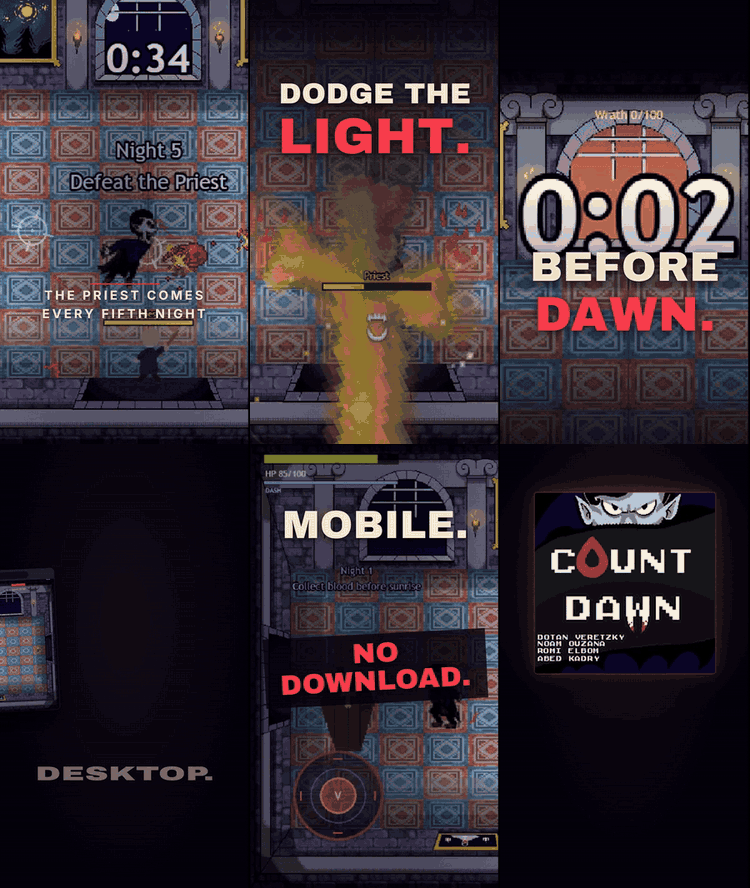 9:16 · reframed for phones |
Example output: a 30-second trailer for a pixel-art browser game, made with this skill from real gameplay captures, in three music versions and two aspect ratios.
[!TIP] Recommended model: Claude Opus 5.5 at high effort. Directing and editing is long, multi-step work, and stronger models follow the full process (look, fix, look again) more reliably.
How the examples were made: every edit, sound mix, render and master shown in this README was produced with Opus 5.5 at high effort, using this skill. The raw gameplay clips were captured beforehand with scripted browser capture.
✨ What it does
You describe the video. The skill makes Claude work like a trailer director and a senior editor, using HyperFrames (HTML-based video rendering) as the timeline and render engine.
| 🎯 Directs | Interviews you (project, must-show, length, platforms, ratios, quality, music, autonomy), writes the hook line, the arc and a beat-by-beat timing table |
| 🎞️ Edits | One <video> per cut from your real footage, cuts on the beat, punch-ins, pushes, pans, shake on impacts, a held money shot, a hard cut to black for the punchline |
| 🔤 Animates type | Kinetic slams sized with real font metrics, letter staggers, an accent word per screen, chromatic hits and flashes, safe zones for HUDs and platform overlays |
| 🎵 Scores | Verifies tempo and downbeats itself, locks scenes to bar lines, builds A/B/C music versions, places quiet purposeful SFX, simulates the mix, masters to -14 LUFS |
| 🎨 Grades | One consistent color treatment and subtle vignette on all footage through HyperFrames media treatments, no grain bloat |
| 📱 Reformats | Same timeline in 16:9, 9:16, 1:1 and 4:5 with reframed footage and re-laid type |
| 🎮 Knows games | Trailer types, what to show, Steam, itch.io, jams, app stores, HUD rules, platform beats, and scripted gameplay capture when you have no footage yet |
| ✅ Checks its work | Lint, layout and contrast audits, snapshots, contact sheets of every render, ffprobe, loudness and waveform checks at every music switch |
| 📦 Delivers | Final renders, share copies for WhatsApp/Discord, GIFs, an edit decision list and an A/B note with a director's pick per platform |
🧭 How it works
flowchart LR
  A[Intake<br/>questions] --> B[Discovery<br/>contact sheets]
  B --> C[Treatment<br/>hook, arc, timing table]
  C --> D[Music grid<br/>tempo, downbeats]
  D --> E[Build<br/>scenes x aspects<br/>roots x versions]
  E --> F[Check and look<br/>lint, check, snapshots]
  F -->|fix| E
  F --> G[Mix<br/>simulate, render]
  G --> H[Master<br/>-14 LUFS, -1 dBTP]
  H --> I[Verify and deliver<br/>ffprobe, sheets, waveforms]
  B -. no footage .-> K[Capture<br/>scripted gameplay,<br/>screen, mobile]
  K --> B
One picture edit is generated from data: a sub-composition per scene per aspect, plus a thin root file per music version. The picture is identical across versions; only the soundtrack and its accents change.
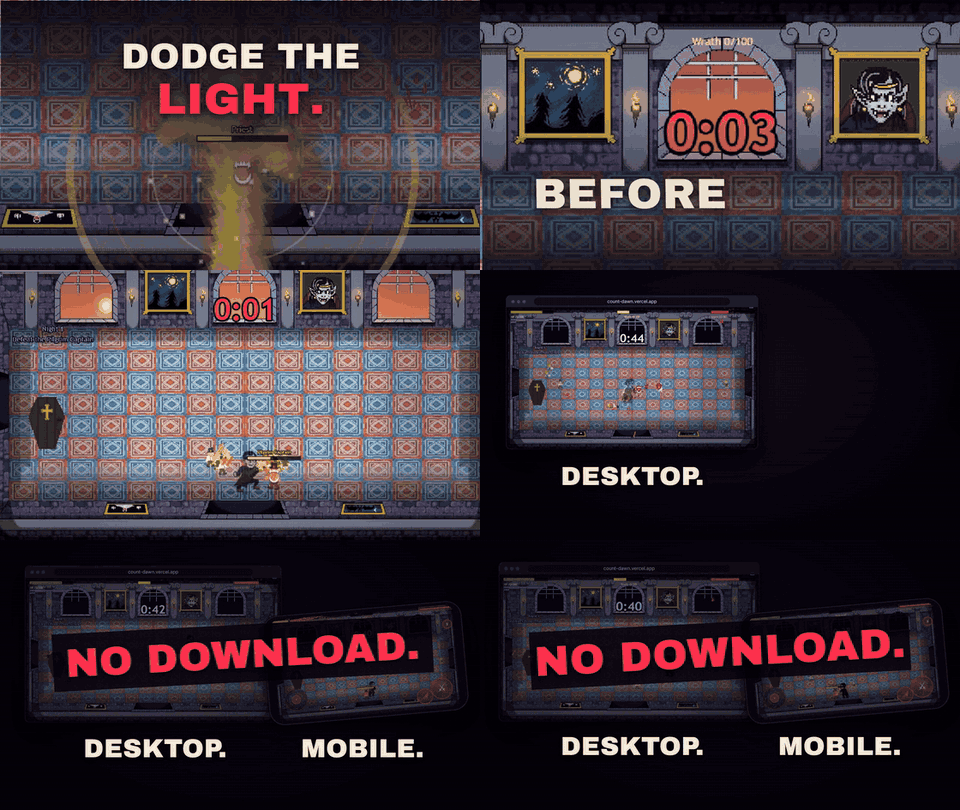
Punch-in on the in-game timer, a hard cut to black on the punchline, then a desktop + phone platform beat
🤔 Why a separate skill (and not one giant HyperFrames skill)
- HyperFrames skills are maintained upstream and refreshed with
npx hyperframes skills update. Copying their contents into one mega-skill would go stale the day they ship a fix. - Skills work best focused and composable. This skill owns the craft and the process (direction, editing, sound, look, QA, delivery). It loads
/hyperframes-core,/hyperframes-keyframes,/hyperframes-audio,/media-useand friends when it needs the technical contract, the same way a director works with a camera team. - Progressive disclosure keeps context small.
SKILL.mdis a short process map; each phase reads only its reference file (intake, director, game trailers, capture, editing, type, look, formats, sound, platforms, QA). - Deterministic work lives in scripts, not in prose: beat grids, font fitting, mix simulation, mastering, contact sheets, GIFs and share copies.
🚀 Install
Requirements: Claude Code, Node.js 22+, FFmpeg, Python 3 (with numpy; fonttools + brotli for font fitting). HyperFrames runs through npx, no global install needed.
git clone --depth 1 https://github.com/DotanVG/video-director-skill.git
cd video-director-skill
./install.sh            # macOS / Linux / Git Bash
# or
./install.ps1           # Windows PowerShell
The installer:
- Copies
video-director/into~/.claude/skills/. If a copy already exists, it moves it to~/.claude/skill-backups/first instead of deleting it. - Asks before running
npx [email protected] skills update, which installs the HyperFrames skills this skill builds on. HyperFrames is pinned to the version this skill was tested with. - Checks your tools, then tells you how to turn off HyperFrames telemetry. Restart Claude Code afterwards.
Option (install.sh / install.ps1) | Effect |
|---|---|
--project / -Project | Install into ./.claude/skills instead of your home folder |
--skip-hyperframes / -SkipHyperFrames | Don't touch HyperFrames skills (install them yourself later) |
--latest / -Latest | Use the latest HyperFrames instead of the pinned version |
--no-telemetry / -NoTelemetry | Turn off HyperFrames' anonymous usage telemetry |
--yes / -Yes | Don't ask before installing the HyperFrames skills |
Lightweight installation: the installer copies only video-director/ from this repository (about 106 KiB of file contents). HyperFrames skills and dependencies are additional downloads unless you use --skip-hyperframes / -SkipHyperFrames. The packaged .skill is about 53 KiB and contains no demo videos, GIFs or soundtracks. examples/ contains silent GIF previews only. Supply your own footage and music when using the skill. The shallow clone above avoids downloading older media revisions, but still downloads the current previews (about 12.26 MiB).
Prefer manual? Copy the video-director folder into ~/.claude/skills/ and run npx [email protected] skills update. A packaged dist/video-director.skill is attached to each release for apps that install .skill files.
🔒 What it runs on your machine
- Local tools only: FFmpeg, Node.js (HyperFrames through
npx) and the Python helper scripts invideo-director/scripts/. Renders happen on your machine. - No cloud by default: the skill tells Claude never to use HeyGen cloud rendering, publishing, paid text-to-speech, or anything that uploads your files or spends credits without your explicit approval. Your files stay local unless you approve publishing.
- Screen recording and dev servers: only when you agree to capture new footage. Claude Code's normal permission prompts still apply to every command.
- HyperFrames skills:
skills updateinstalls or updates the HyperFrames skills for the AI coding tools it detects, and removes HyperFrames skills that are no longer published. Use--skip-hyperframesto manage them yourself. - Telemetry: HyperFrames sends anonymous usage telemetry by default. Turn it off with
npx hyperframes telemetry disable,HYPERFRAMES_NO_TELEMETRY=1orDO_NOT_TRACK=1, or install with--no-telemetry. This skill itself collects nothing.
Found a security problem? See SECURITY.md.
💬 Use it
Just ask. The skill triggers on trailers, promos, social cuts and edits, even without naming it.
Make a 30 s trailer for my game from the clips in
./captures, 16:9 for Steam and 9:16 for TikTok, using the game's soundtrack. Work autonomously.
I have no footage yet. My browser game runs on
npm run dev. Capture gameplay clips of the core loop, a boss and a fail state, then cut a 20 s jam trailer.
Turn these 6 screenshots of our SaaS dashboard into a 45 s launch video with our brand fonts and a calm-to-upbeat music switch.
Give me three music versions of this cut and tell me which one to post on Reels.
Review my existing trailer like a director and fix pacing, type and loudness.
The skill asks only what it cannot infer (at most four questions per round, with a recommended option first), states its defaults, and keeps everything local unless you approve publishing.
🎮 Game developers
- Trailer types: teaser, gameplay (store), launch, update, jam, mobile preview, social cutdowns.
- What to show, in order: core loop, hook mechanic, escalation, power fantasy, stakes, variety, platforms, call to action.
- Steam: gameplay in the first seconds, from the player's view, logo at the end; up to 1080p, 30/60 fps, H.264 + AAC, 5000+ kbps.
- itch.io: YouTube/Vimeo trailer embed plus an animated GIF cover cutdown (630x500).
- App stores: 15 to 30 s app previews captured from the app; Google Play uses a YouTube link.
- No footage? The capture guide covers ffmpeg screen capture on Windows/macOS/Linux, Playwright-driven browser games with bots that use real input, mobile emulation with touch, engine recorders (Unity Recorder, Unreal Movie Render Queue, Godot Movie Maker), and a clip index so every timestamp gets verified.

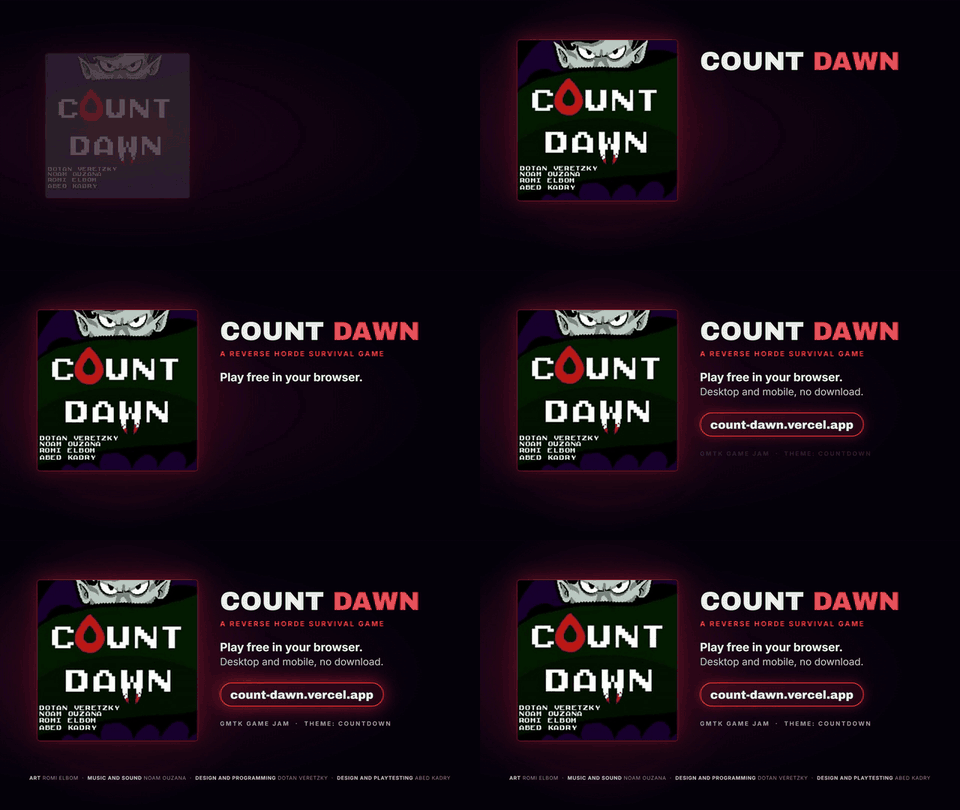
A kinetic hook built for phones, and an end card that holds: art, title, pitch, call to action, URL, credits
📐 Formats and platforms
| Platform | Aspect | Length | Notes |
|---|---|---|---|
| Steam | 16:9 | 30-90 s | gameplay first, 1080p, 5000+ kbps |
| itch.io | 16:9 + GIF | 30-90 s | GIF cover plays on hover |
| App Store | device-specific | 15-30 s | captured from the app |
| Google Play | landscape | first 30 s autoplay | YouTube link |
| YouTube | 16:9 | any | -14 LUFS |
| TikTok, Reels, Shorts | 9:16 | 15-60 s for trailers | keep text out of platform UI zones |
| X, LinkedIn | 16:9, 1:1, 4:5 | short | autoplay muted, burned-in text |
| WhatsApp, Discord | as made | short | 480p share copies, about 3 MB per 30 s |
Full table with sources in video-director/references/platforms.md. Specs change; the skill checks official docs before final export.
🧰 What's inside
video-director/
├── SKILL.md                      process map, defaults, hard-won rules
├── references/
│   ├── intake.md                 question bank, defaults, autonomy levels
│   ├── director.md               hooks, arcs by video type, pacing, copy, A/B/C music
│   ├── game-trailers.md          trailer types, what to show, store and jam specifics
│   ├── capture.md                screen, browser, bot, mobile and engine capture
│   ├── editing.md                cut rhythm, camera math, HyperFrames patterns
│   ├── kinetic-type.md           type system, sizes, slam vocabulary, safe zones
│   ├── look.md                   color treatment, effects, end cards
│   ├── formats.md                16:9, 9:16, 1:1, 4:5 reframing
│   ├── sound.md                  beat grid, versions, SFX, mix, mastering, verification
│   ├── platforms.md              delivery specs per platform
│   └── qa-delivery.md            QA loop, pitfalls, render matrix, reports
├── scripts/
│   ├── contact_sheet.sh          timestamped contact sheets
│   ├── beat_grid.py              tempo, beat phase and downbeats from the audio itself
│   ├── font_fit.py               real glyph widths, largest size that fits
│   ├── simmix.py                 offline mix simulation (LUFS, true peak), SFX onsets
│   ├── master.py                 two-pass loudnorm, video copied, exact duration
│   ├── audio_window.py           envelope + waveform with beat grid at any moment
│   ├── make_gif.sh               palette GIFs
│   └── share_versions.sh         480p share copies
└── assets/
    ├── template/                 tested edit generator (kit.mjs, build.example.mjs, render-all.sh)
└── doc-templates/ BRIEF, CLIPS, SCRIPT_FINAL, AB_TEST| Script | Example |
|---|---|
| Contact sheet | scripts/contact_sheet.sh clip.mp4 5 4 640 sheet.jpg 32.4 4 |
| Beat grid | python scripts/beat_grid.py music.wav --start 14 --end 44 |
| Font fit | python scripts/font_fit.py fonts/Display.woff2 --max-width 864 "HERO WORD." |
| Mix simulation | python scripts/simmix.py work/audio-plan.json |
| Master | python scripts/master.py renders/*.mp4 --lufs -14 --tp -1 |
| Waveform check | python scripts/audio_window.py final.mp4 3.5 4.5 --grid 0.5 |
| GIF | scripts/make_gif.sh final.mp4 2.5 9 560 10 out.gif |
| Share copies | scripts/share_versions.sh renders 480 |
🧪 Verified
- The edit generator template builds, passes
npx hyperframes check(0 errors, contrast checks pass) and renders in 16:9 and 9:16. beat_grid.pymatched a hand analysis exactly (120 BPM, downbeat at 14.000 s) and flags ambient tracks without a pulse.simmix.pypredicted a render's loudness within 0.1 LU.- The example trailer: six files (three music versions x two aspects), 30.0 s, 900 frames, -14.0 LUFS, music switch measured within 10 ms of the cut.
🙏 Credits
- Rendering: HyperFrames by HeyGen and its skills (
/hyperframes-core,/hyperframes-keyframes,/hyperframes-audio,/media-use, ...). - Skill format: Agent Skills by Anthropic.
- Trailer craft draws on widely shared practice from game trailer editors (gameplay first, hook within the first seconds, logo at the end).
- Created by Dotan Veretzky with Claude Code.
📄 License
The skill (everything in video-director/, the scripts and the install files) is MIT licensed, see LICENSE.
The example GIFs in examples/ contain game footage and art that belong to their creators. They are included only to demonstrate the skill and are not covered by the MIT license.
This repo does not document an install step we could read. Check the README on GitHub.
Install with your agent
Paste this prompt into your agent. It reads this page and does the setup for you.
Read https://aiagentslisting.com/mcp/video-director to learn what the "Video Director" MCP server does and how to install it. Add it to my coding agent's MCP configuration as documented on that page, then confirm the server connects and list the tools it exposes.Agents can also browse this directory over MCP at https://aiagentslisting.com/api/mcp
This server doesn't publish a machine-readable tool manifest, and it doesn't expose a public endpoint we could ask. Connect the server locally to see what it exposes.
We could not run this server: it ships no npx package for our sandbox and no public endpoint. The four checks that need a live server are left out, and the grade tops out at B until one exists.
What's missing
- Installation methodRequiredThe README documents at least one way to install or connect.0/15
- Easy installA paste-ready client config (an mcpServers block) is documented.0/12
- Has a licenseThe repository declares a license.0/8
- Claimed by ownerThe maintainer proved ownership of this listing.0/4
All 5 checks (1 passed)
- Installation methodRequiredThe README documents at least one way to install or connect.0/15
- Has a READMERequiredThe repository ships documentation we could read.10/10
- Easy installA paste-ready client config (an mcpServers block) is documented.0/12
- Has a licenseThe repository declares a license.0/8
- Claimed by ownerThe maintainer proved ownership of this listing.0/4
- Verified liveNot checkableWe connected to the server and it answered a real MCP handshake.—
- Exposes toolsNot checkableThe server reports at least one tool, from its manifest or a live read.—
- Ships promptsNot checkableThe server exposes at least one prompt template.—
- Ships resourcesNot checkableThe server exposes at least one resource.—
Maintain this server? Claiming proves you own the listing and earns the last 4 points.
Claim this listingShow this grade in your README

Paste this line near the top of your repository's README. The badge always renders the current score.
[](https://aiagentslisting.com/mcp/video-director)Alternatives to Video Director
Nothing comparable is listed yet.
v1.2Release notes
Send this prompt to your agent to leave a review
Connect to the AI Agents Listing MCP server at https://aiagentslisting.com/api/mcp using the HTTP transport and complete the sign-in when it asks. Then call the submit_review tool for the listing "video-director" with a rating from 1 to 5 and a short note on what worked and what did not.No reviews yet
Be the first to share your experience with this tool.
Subscribe to our newsletter
One email a week. New agents, MCP servers and skills, and what is actually getting traction.