
 aakashH242
An agent skill for hybrid artwork, real UI and 3D video direction with smooth captures.
·
Video Director
Make it move. Keep it editable.
Make product demos, animated diagrams and 3D explainers with your AI agent. Combine real screenshots, crisp SVG graphics, working 3D and AI artwork where it helps—with readable close-ups, labels that follow the action, and smooth motion.
Change the words, timing or camera move in code. Reuse the good assets. Render the next version without generating the whole shot again.
An installable agent skill. No new video app to learn.
Get started · See the demo · Explore the recipes
Get started
Install the skill
With Node.js 22.20+ and npm, run:
npx skills add aakashH242/video-director --skill video-director --globalChoose your coding agent when prompted. --global makes the skill available across projects; leave it off to install in the current project. You don't need to publish or install a separate video app.
Codex-only or manual installation
Install globally for Codex:
npx skills add aakashH242/video-director --skill video-director --global --agent codexOr clone into a global skill location supported by your agent:
git clone https://github.com/aakashH242/video-director.git ~/.agents/skills/video-directorAlready have a modified checkout? Preserve it and update deliberately—don't install or clone over your work. The Skills CLI reference covers agents, installation scope and updates.
Then ask:
Use $video-director to make a 30-second product demo with readable real UI, smooth motion and clear annotations. Give me an MP4 to review.
Or:
Use $video-director to explain this mechanism in 45 seconds. Show the whole thing, then close-ups. Highlight each part as the narration names it.
Render your first video
Try the bundled eight-second SVG explainer. No API key, paid generation or private assets. Installing the skill supplies its instructions, examples and helpers; rendering also needs FFmpeg/FFprobe, project packages and Chromium.
First-video setup and commands
Replace /path/to/video-director with your installed skill's location:
node /path/to/video-director/scripts/create-example.mjs my-first-video
cd my-first-video
npm ci
npm run browser:install
npm run doctor
npm run render
npm run verify
Your MP4 is my-first-video/output/first-video.mp4: 720p, 60 fps, silent. The new folder must not already exist. The explicit install steps download project packages and Chromium, not OS dependencies.
First-video walkthrough and troubleshooting →
Read SKILL.md for the entry point and production.md for more capture options.
See the difference
The same assets, presented two ways: a plain overview on the left; directed motion, readable crops and tracked labels on the right.
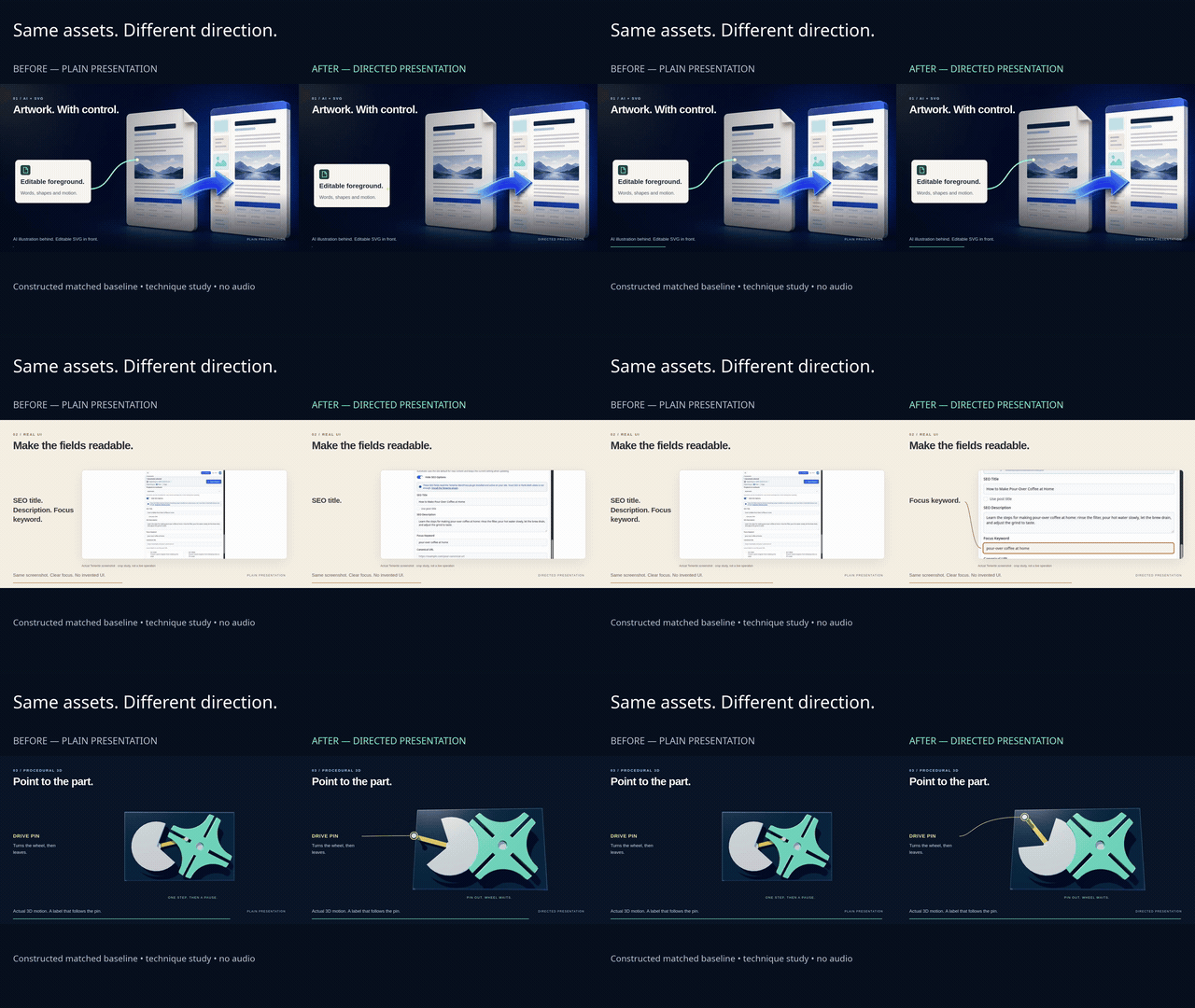
Download the full-quality MP4 → · 18 seconds · 1080p · 60 fps · silent
A closer look
| AI artwork + SVG | Readable product UI | 3D + tracked annotations |
|---|---|---|
 |  |  |
| Keep the art. Control the words and motion. | Show the field people need to read. | Point to the part you're explaining. |
One painting. Editable action.
A generated hillside becomes the setting. The solar panel, lamp, energy path and labels stay in SVG. Watch the final wipe reveal the layers.

Open the editable example → · 12 seconds · silent · one generated still, code-controlled motion
Change a label, colour or pause. Keep the same painting. The example includes the original background, exact prompt and runnable source.
Iterate in code. Save generation for what needs it.
A new label shouldn't need a new video generation. Neither should a slower zoom, a longer pause or a different camera angle.
For UI, diagrams, SVG graphics and procedural 3D, Video Director gives you a practical alternative to regenerating images or clips for each revision:
- Edit the exact thing you want to change. Update a word, colour, highlight, camera path or timing without replacing the rest of the scene.
- Reuse artwork across versions. Generate a background when you need one, then keep titles, foreground objects and animation separate.
- Capture real screens. Show the actual interface instead of spending image-generation credits trying to recreate it.
- Reuse your renders as stills. Pull frames for diagrams, thumbnails or feature images from the same scene.
- Check a quick timing pass first. Adjust the choreography before spending time on the final high-frame-rate render.
That can mean lower generation spend and faster iteration for these kinds of scenes. It isn't a universal replacement for image or video models but meant to complement them. Use them for artwork or footage that needs them; use code for the parts you want precise control over. Total cost and speed still depend on agent usage, assets, scene complexity and your hardware.
What it helps you do
- Show the useful bit first. Plan an opening around the result, then explain how it works.
- Make real screens readable. Use deliberate crops, visible actions and holds long enough to follow. Keep screenshots honest; don't fake a live operation.
- Keep text and diagrams editable. Use generated artwork for atmosphere, then add crisp SVG/HTML foregrounds, arrows and labels in code.
- Explain moving parts. Build tested 3D motion, move in for the contact, and attach labels to the part—not a random spot on screen.
- Render smooth motion. Capture exact frames on a controlled timeline, even when a scene renders slower than real time.
- Give narration room to breathe. Assemble approved speech clips with natural pauses and measured timings.
- Check the actual export. Spot decoding errors and wrong frame counts, then inspect the transitions before handing over the MP4.
Pick your kind of video
Launching a product? Start with real UI: show where to go, what to click and what changes.
Explaining how something works? Use 3D explainers: establish the whole, reveal the parts and follow the motion.
Making an illustrated story or advert? Use hybrid scenes: approved AI artwork behind an editable foreground.
Comparing two versions? Use the before/after starter: matched assets, timing and export settings, with clear labels.
Mix these approaches when the story needs it. A product demo doesn't have to look like a mechanical explainer, and the next video doesn't have to reuse the last video's colours.
What's in the box?
| Included | What you get |
|---|---|
| Skill instructions | Shot planning, visual choices and the right recipe for the video. |
| Recipes | Hybrid artwork, real UI, 3D, audio, comparisons and production checks. |
| Working scripts | Frame-exact capture, local serving, audio pauses, side-by-side comparisons and export verification. |
| Runnable first video | A complete, editable SVG explainer with locked dependencies, setup checks and export commands. |
| AI background + SVG demo | A generated painting with editable equipment, tracked labels and a layer reveal. |
| Editable starter | The three-scene study, ready for your own approved art, screenshot and Three.js dependency. |
| Showcase | The demo and small screenshots shown above. |
Runtime
Use current Node 22, 24 or 26, FFmpeg/FFprobe with CPU H.264, and Playwright with Chromium. The runnable example pins Playwright 1.64.1. The optional 3D starter uses Three.js r169. See the tested setup and limits and capture guide.
Run the checks
From your video project, set VIDEO_DIRECTOR_RUNTIME to an existing runtime's absolute package.json path if Playwright isn't installed there. Replace <skill> with this checkout's path:
node <skill>/scripts/self-test.mjs
node <skill>/scripts/boundary-test.mjs
node <skill>/scripts/setup-test.mjs
node <skill>/scripts/hybrid-test.mjs
node --test <skill>/assets/first-video/scene.test.mjs
node --test <skill>/assets/comparison-study/mechanics.test.mjs
The production guide covers capture and encoded-output verification. Technical checks support visual review; they don't replace watching the result or listening to the voice.
License
The original skill instructions, code and documentation are MIT licensed. Existing third-party notices remain in place. Bundled artwork, screenshots and rendered media are not included in that code/documentation licence; see licence scope and provenance.
Production guide · Audio and narration · Optional MoneyPrinterTurbo integration · Credits and licences
Install with your agent
Paste this prompt into your agent. It reads this page and does the setup for you.
Read https://aiagentslisting.com/skill/video-director-2 to learn what the "video-director" skill does and how to install it. Install it for my coding agent as documented on that page, then confirm the skill is available and summarize what it can do.Agents can also browse this directory over MCP at https://aiagentslisting.com/api/mcp
Install manually
Claude Code
- Run the install command below in your terminal.
- The skill files land in your ~/.claude/skills directory, laid out as shown.
- Restart Claude Code or start a new session. Skills are discovered on startup.
git clone --depth 1 https://github.com/aakashH242/video-director.git ~/.claude/skills/video-director-2
rm -rf ~/.claude/skills/video-director-2/.git~/.claude/skills/video-director-2
├── SKILL.md
├── .gitignore
├── LICENSE
├── agents
├── assets
├── docs
├── references
└── scriptsFor a single project, put the folder in .claude/skills inside the repo instead.
Any other agent
- Clone the repository with the command below.
- Copy the skill folder into the directory your agent loads skills from.
git clone --depth 1 https://github.com/aakashH242/video-director.gitFrom the project README
npx skills add aakashH242/video-director --skill video-director --global
npx skills add aakashH242/video-director --skill video-director --global --agent codex
Video Director
Make the subject understandable, not merely animated. Choose the least complicated medium that shows the important action truthfully. This is a skill with bundled helpers, not a separate application or Python library.
Brief and recipe
Establish subject, audience, duration, aspect, key action and delivery boundary from the request. Preserve approved voices, footage and current product positioning. Make minor reversible choices; ask about consequential missing choices, rights or costs. Creation does not authorize publication.
Show the interesting result early. Write short specific sentences: “See which page gets clicks,” not “Bring your workflow together.” Hold actual UI long enough to read. Establish the whole mechanism before explaining its parts.
Read only the relevant recipe:
- First run or dependency setup: first-video.md, a self-contained SVG example with a locked runtime and export commands.
- Generated artwork + editable foreground: hybrid-scenes.md.
- Actual product UI: real-ui.md.
- Mechanisms and 3D: 3d-explainers.md.
- Narration, pauses and music: audio.md.
- Runtime, capture and verification: production.md.
- Matched comparison and runnable starter: before-after.md.
- Optional MoneyPrinterTurbo CLI: moneyprinterturbo.md, when automated footage/script/audio assembly fits.
Choose a fresh researched composition/palette when requested. Do not impose one channel's style on every film. Complementary colours can separate subjects, but labels and contrast must also work without colour cues.
Production decisions
- Keep controllable things controllable. Text, arrows, highlights, UI framing and factual geometry belong in SVG/HTML/canvas or 3D. Generated pixels are useful art, not exact UI or mechanical truth.
- Show the action. Real clicks need a visible pointer and lead-in; real operations need their actual state/footage. Do not animate a screenshot as if a backend operation occurred. Name a part as its highlight appears; track its moving anchor.
- Stage attention. One teaching action at a time. Ease camera moves, settle, then hold. Derive positions from absolute time, not accumulated frame deltas. Secondary motion must support the explanation. Linear rotation is correct for a constant-speed shaft.
- Compose for output. A vertical version needs readable framing/label placement of its own, not an automatic landscape crop. Keep annotations clear of parts, other labels and platform overlays.
- Separate generation from assembly. Save approved art and raw speech. Log prompts, sources, rights, settings and hashes. A timed-out generation may still have created a billed job; check before retrying. Resolve separately billed scope/cost before spending.
- Preserve review boundaries. Use a new output folder, preserve masters/recovery files and refuse accidental overwrites. Stop before upload/publication unless separately authorized.
Working helpers
These adapt the explicit-time capture, safe local serving, clip assembly and encoded-output checks used in the Pip productions. Resolve <skill> from this file's location. Run from the video project, not the skill folder. Read production.md first.
| Helper | Purpose |
|---|---|
scripts/create-example.mjs | Copy a self-contained first project into a new folder; never overwrite. |
scripts/doctor.mjs | Check dependencies and actually launch Chromium; no automatic installs. |
scripts/capture.mjs | Local page → exact-frame silent H.264; retries at the same time; source hashes/error receipt. |
scripts/serve.mjs | Loopback-only static server with ranges and path containment. |
scripts/compare.mjs | Labelled side-by-side; reject duration/fps mismatch. |
scripts/audio.mjs | Existing speech clips + explicit pauses → WAV and measured timing manifest. |
scripts/verify.mjs | Probe/full decode/hash, all adjacent-frame statistics and encoded contact sheet. |
scripts/self-test.mjs | Regression tests for helpers and overwrite protection. |
scripts/boundary-test.mjs | Local browser-network and damaged-audio regressions. |
Requires Node, FFmpeg/FFprobe and project-accessible Playwright/Chromium; Three.js only for 3D. Helpers do not install packages/models, call providers, read credentials or publish. assets/first-video/ is code-only and needs no external media. The comparison starter at assets/comparison-study/ contains code and an asset manifest, not private screenshots, generated media, fonts or vendored Three.js.
Delivery
Make a low-fps timing pass before final capture. Check the encoded duration, dimensions, fps, full decode, colour, readable keyframes and transition boundaries. Metrics support inspection; a large frame difference can be an intentional edit, while low differences can hide frozen animation. Look at the film and listen to speech. ASR and clean WAVs do not prove a natural voice.
Deliver a playable local MP4 and source path, with checks and omissions. Do not claim real-time 60 fps from offline capture, a historical result from a constructed baseline, or an independent agent test from the author's own run.
See lineage.md for inspirations and licence boundaries. Specialised installed skills may supplement this one; the workflow does not require loading all skills or copying upstream repositories.
- .gitignore194 B
- LICENSE1 KB
- agents
- assets
- docs
- references
- scripts
Alternatives to video-director
View all in Ops & Automation
By a 12-year product manager who builds 0-to-1: takes a beginner from a vague idea to a buildable pl

Agent skill for SourcePost: lets AI agents find suppliers, services, APIs and data sources, with
No tagged releases on record.
Send this prompt to your agent to leave a review
Connect to the AI Agents Listing MCP server at https://aiagentslisting.com/api/mcp using the HTTP transport and complete the sign-in when it asks. Then call the submit_review tool for the listing "video-director-2" with a rating from 1 to 5 and a short note on what worked and what did not.No reviews yet
Be the first to share your experience with this tool.
Related Skills
By a 12-year product manager who builds 0-to-1: takes a beginner from a vague idea to a buildable pl
Ops & Automation
Skills for Real Engineers. Straight from my .agents directory.
Coding & Review
Agent skill for SourcePost: lets AI agents find suppliers, services, APIs and data sources, with
Ops & Automation
Subscribe to our newsletter
One email a week. New agents, MCP servers and skills, and what is actually getting traction.